
Best Mini PC for AI Server 2026 | Mini PC Lab
By Mini PC Lab Team · January 28, 2026 · Updated February 16, 2026
This article contains affiliate links. If you purchase through our links, we may earn a commission at no extra cost to you. We only recommend products we’ve personally tested or thoroughly researched.

Running AI workloads locally — image generation, LLM inference, AI-assisted coding, speech recognition — used to require expensive GPU servers. In 2026, mini PCs with AMD Ryzen AI processors and dedicated NPUs make it genuinely practical.
The AI mini PC market has split into two tiers: budget options that handle lightweight AI tasks (small LLMs under 8B parameters, basic image recognition) and purpose-built AI mini PCs with 50+ AI TOPS and 96–128GB unified memory for serious LLM inference at 70B parameter scale. If you’re also running general home server workloads alongside AI, our home server guide covers multi-purpose options.
Quick Picks: Best Mini PC for AI Server at a Glance
| Pick | Mini PC | AI TOPS | Unified RAM | Price | Link |
|---|---|---|---|---|---|
| 🥇 Best AI Overall | GMKtec EVO-X2 AI | 50+ TOPS (XDNA2) | 128GB LPDDR5X | ~$1,800+ | Check Price |
| 🥈 Best AI Value | MINISFORUM AI X1 Pro | 50 TOPS (XDNA2) | 32–64GB DDR5 | ~$800–1,200 | Check Price |
| 🥉 Mid AI | Minisforum UM790 Pro | 16 TOPS (iGPU) | 32–64GB DDR5 | ~$380–500 | Check Price |
| 💰 Budget AI | Beelink EQ14 | 10 TOPS (INT8) | 16GB | ~$190–220 | Check Price |
AI Performance Tiers in 2026
What AI TOPS Actually Means
TOPS = Tera Operations Per Second — a measure of AI compute throughput for INT8 operations (the most common LLM inference data type). Higher is better, but the quality and memory bandwidth of the compute matters as much as the raw number.
AI hardware in 2026 mini PCs:
- Intel N150: Basic AI acceleration via UHD iGPU — suitable for small models under 2B parameters only
- AMD Ryzen 9 7940HS/8945HS: Radeon 780M iGPU provides ~15–20 TOPS for AI — handles 7B–13B models slowly
- AMD Ryzen AI 9 HX370: XDNA2 NPU — 50 dedicated TOPS, plus iGPU compute for medium models
- AMD Ryzen AI Max+ 395: XDNA2 NPU + Radeon 8090S iGPU — 50 TOPS NPU + massive GPU compute for large models
What Can Each Tier Run?
| Hardware Tier | AI TOPS | Models | Approx Speed |
|---|---|---|---|
| Intel N150 | ~10 TOPS | <2B params (Phi-2, TinyLlama) | ~1 token/sec |
| AMD Ryzen 9 7940HS (64GB) | ~15–20 TOPS | 7B–13B models | ~3–8 tokens/sec |
| AMD Ryzen AI 9 HX370 (64GB) | 50 TOPS NPU | 7B–32B models | ~8–20 tokens/sec |
| AMD Ryzen AI Max+ 395 (128GB) | 50 TOPS NPU + GPU | Up to 70B models | ~15–35 tokens/sec |
What to Look for in an AI Server Mini PC
1. Unified memory — the critical factor for LLMs LLMs are memory-bandwidth-limited. VRAM (or unified memory accessible by the GPU) determines the maximum model size you can run at reasonable speed. 128GB unified memory in the Ryzen AI Max+ 395 enables 70B models; a typical RTX 4090 with 24GB VRAM can only run up to ~34B models (Q4).
2. Memory bandwidth The Ryzen AI Max+ 395 uses LPDDR5X-8000 with ~273GB/s bandwidth — nearly double what LPDDR5 systems offer. Higher memory bandwidth directly translates to faster token generation.
3. NPU vs iGPU for AI Dedicated NPUs (AMD XDNA2) are optimized for AI inference workloads. They’re more efficient than iGPU compute for certain operations. In practice, Ollama uses both NPU and iGPU depending on the workload.
Our Top Picks: Best Mini PC for AI Server 2026
🥇 Best AI Overall
GMKtec EVO-X2 AI
→ Check Current Price on Amazon
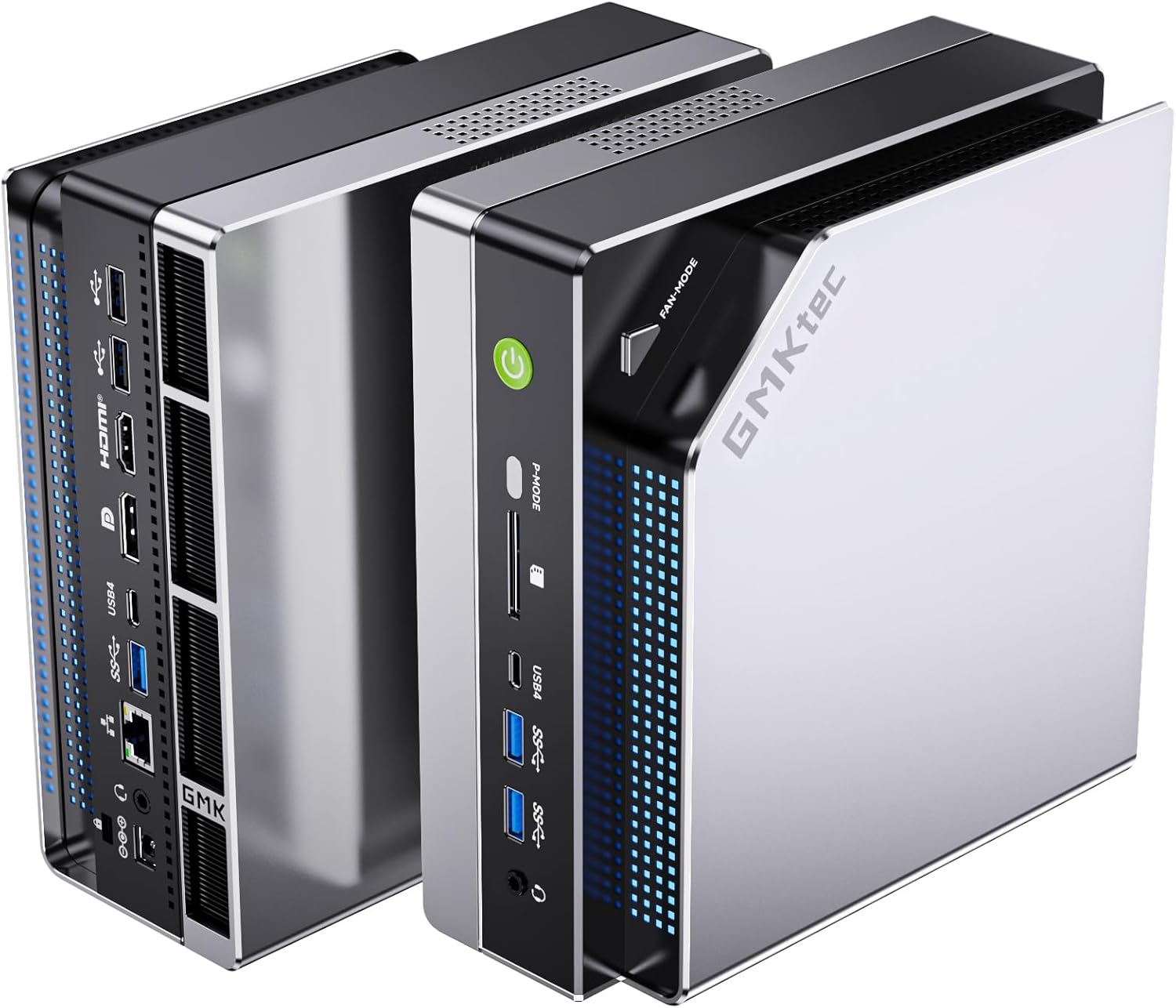
The GMKtec EVO-X2 AI is built on the AMD Ryzen AI Max+ 395 — the same silicon that powers AI workstations costing 5x more. With 128GB of LPDDR5X-8000 unified memory accessible by both CPU and GPU, it enables LLM inference at a scale that no other consumer mini PC can match.
Why unified memory matters for AI: Traditional GPUs have limited VRAM (RTX 4090: 24GB). The Ryzen AI Max+ 395’s unified architecture treats all 128GB of system RAM as GPU memory — enabling models up to ~70B parameters at 4-bit quantization.
Specs:
| Spec | Detail |
|---|---|
| CPU | AMD Ryzen AI Max+ 395 (16C/32T) |
| GPU | Radeon 8090S (40 RDNA 3.5 CUs) |
| NPU | XDNA2 (50+ AI TOPS) |
| RAM | 128GB LPDDR5X-8000 (unified) |
| Storage | 2TB PCIe 4.0 NVMe |
| Power Draw | ~30W idle / ~60–120W under AI load |
| Price | ~$1,800+ |
AI capabilities with Ollama:
- Llama 3 8B (INT4): ~25–35 tokens/sec
- Llama 3 70B (INT4): ~8–12 tokens/sec
- Stable Diffusion XL: ~3–5 seconds per image
- Whisper Large v3 (speech): Real-time
Pros:
- 128GB unified memory — runs 70B models that no other mini PC can
- XDNA2 NPU purpose-built for AI inference
- 16 cores for parallel AI + other workloads
- Best local LLM performance in the mini PC category
Cons:
- ~$1,800+ is a significant investment
- ~30W idle = ~$33/year electricity (higher than typical mini PCs)
- Overkill if you only need 7B–13B models
Who should buy this: Developers running large local LLMs (32B–70B), researchers evaluating models privately, or power users who want the best local AI setup available in 2026.
Who should skip this: Anyone who just wants to run 7B–8B models for coding assistance — the MINISFORUM AI X1 Pro does that for half the cost.
🥈 Best AI Value
MINISFORUM AI X1 Pro
→ Check Current Price on Amazon
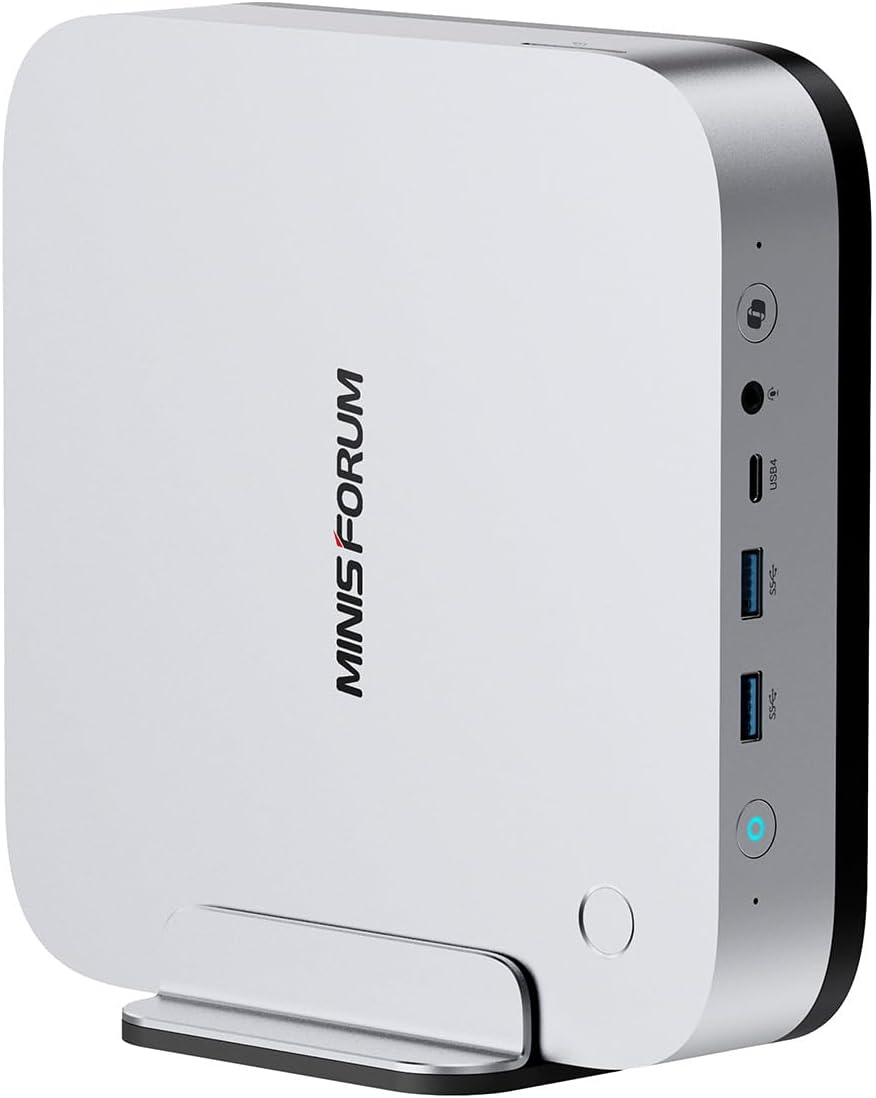
The MINISFORUM AI X1 Pro brings the Ryzen AI 9 HX370 platform to a more accessible price. With 32–64GB of DDR5 RAM and 50 AI TOPS from the XDNA2 NPU, it handles 7B–13B models well and manages 32B models with aggressive quantization.
Specs:
| Spec | Detail |
|---|---|
| CPU | AMD Ryzen AI 9 HX370 (12C/24T) |
| NPU | XDNA2 (50 AI TOPS) |
| RAM | 32–64GB DDR5 |
| Storage | 1TB NVMe |
| Networking | 1x 2.5GbE + WiFi 6E |
| Power Draw | ~12W idle / ~55W under AI load |
| Price | ~$800–1,200 |
AI capabilities:
- Llama 3 8B (INT4): ~15–20 tokens/sec
- Mistral 7B (INT4): ~18–25 tokens/sec
- DeepSeek Coder 6.7B: ~20 tokens/sec
- Stable Diffusion 1.5: ~8–12 seconds per image
Pros:
- 50 TOPS XDNA2 NPU for efficient AI inference
- Accessible entry point to dedicated AI hardware (~$800)
- Strong for developer tools (Continue.dev, LM Studio)
Cons:
- 64GB max RAM limits model size (no 70B models at reasonable speed)
- Less memory bandwidth than Ryzen AI Max+ 395
Who should buy this: Developers running local AI assistants (7B–13B models), small teams evaluating AI models privately, or anyone wanting a dedicated AI workstation under $1,200.
🔷 Mid-Range AI
Minisforum UM790 Pro
→ Check Current Price on Amazon
Without a dedicated NPU, the UM790 Pro uses its Radeon 780M iGPU for AI via ROCm/HIP. With 64GB DDR5 RAM, it handles 7B–13B models adequately using Ollama’s GPU acceleration. Not a purpose-built AI machine — this is a capable general homelab server that handles AI as a secondary function. If you’re looking for a versatile homelab box, check our best mini PC for home server picks.
Specs:
| Spec | Detail |
|---|---|
| CPU | AMD Ryzen 9 7940HS (8C/16T, up to 5.2GHz) |
| GPU | Radeon 780M iGPU (~15–20 AI TOPS) |
| RAM | 32–64GB DDR5 (user-upgradeable) |
| Storage | 1TB NVMe PCIe 4.0 |
| Networking | 1x 2.5GbE + WiFi 6E |
| Power Draw | ~15W idle / ~65W load |
| Price | ~$380–500 |
AI capabilities: Llama 3 8B (INT4): ~5–8 tokens/sec | Llama 3 13B: ~3–5 tokens/sec
Pros:
- 64GB DDR5 fits 7B–13B models entirely in memory for decent inference speed
- 8 cores / 16 threads handle AI inference alongside Docker, Plex, and other homelab services
- ~15W idle means ~$16/year electricity — affordable to run 24/7
Cons:
- No dedicated NPU — relies on iGPU compute, roughly 3x slower than XDNA2 for AI workloads
- Single 2.5GbE NIC limits network throughput if you’re also running NAS or firewall duties
Who should buy this: Anyone who wants a full homelab server (Proxmox, Docker, Plex) that also runs small LLMs as a bonus — and doesn’t want to spend $800+ on a dedicated AI box.
Who should skip this: If local AI is your primary workload and you need 15+ tokens/sec on 7B models, the MINISFORUM AI X1 Pro’s XDNA2 NPU is a significant step up.
💰 Budget AI
Beelink EQ14
→ Check Current Price on Amazon
The N150’s iGPU handles tiny models (under 2B parameters) at ~1 token/sec. Not a practical AI workstation, but adequate for lightweight inference tasks — running a local coding assistant with a small model (Phi-2, TinyLlama), edge AI classification, or feeding sensor data through a compact neural network. At 6W idle, it’s well suited as an always-on edge AI node.
Specs:
| Spec | Detail |
|---|---|
| CPU | Intel N150 (4C/4T, up to 3.6GHz) |
| GPU | Intel UHD Graphics (~10 AI TOPS INT8) |
| RAM | 16GB LPDDR5 (soldered) |
| Storage | 500GB NVMe |
| Networking | 2x 2.5GbE + WiFi 6 |
| Power Draw | ~6W idle / ~25W load |
| Price | ~$190–220 |
AI capabilities: Phi-2 (INT4): ~1–2 tokens/sec | TinyLlama 1.1B: ~2 tokens/sec | Edge AI classification: real-time on small models
Pros:
- 6W idle draws just ~$6/year electricity — the cheapest always-on AI edge node available
- Dual 2.5GbE NICs make it useful for network-attached AI inference or IoT gateway duties
- At ~$190, low financial risk to experiment with local AI before investing in faster hardware
Cons:
- 16GB soldered RAM caps model size at under 2B parameters for any usable speed
- ~1 token/sec on 7B+ models is too slow for interactive chat or coding assistance
Who should buy this: Tinkerers who want an ultra-low-power edge AI node for small model inference, IoT data processing, or a stepping stone into local AI before committing to more expensive hardware.
Who should skip this: Anyone expecting to run 7B+ models at conversational speed — the MINISFORUM AI X1 Pro is the realistic entry point for that.
Head-to-Head Comparison
| Feature | GMKtec EVO-X2 AI | MINISFORUM AI X1 Pro | Minisforum UM790 Pro | Beelink EQ14 |
|---|---|---|---|---|
| CPU | Ryzen AI Max+ 395 (16C/32T) | Ryzen AI 9 HX370 (12C/24T) | Ryzen 9 7940HS (8C/16T) | Intel N150 (4C/4T) |
| AI TOPS | 50+ (NPU + GPU) | 50 (NPU) | ~15–20 (iGPU) | ~10 (INT8) |
| RAM | 128GB LPDDR5X | 32–64GB DDR5 | 32–64GB DDR5 | 16GB LPDDR5 |
| Storage | 2TB NVMe | 1TB NVMe | 1TB NVMe | 500GB NVMe |
| Networking | 1x 2.5GbE + WiFi 6E | 1x 2.5GbE + WiFi 6E | 1x 2.5GbE + WiFi 6E | 2x 2.5GbE + WiFi 6 |
| Power (Idle) | ~30W | ~12W | ~15W | ~6W |
| Power (Load) | ~60–120W | ~55W | ~65W | ~25W |
| Best LLM | 70B (Q4) | 7B–32B | 7B–13B | <2B |
| Price | ~$1,800+ | ~$800–1,200 | ~$380–500 | ~$190–220 |
Power Consumption at a Glance
Running AI workloads 24/7 adds up. Here’s what each pick costs to operate at idle (the baseline when your AI server is waiting for queries). For active inference costs, multiply load wattage by your expected daily usage hours.
| Mini PC | Idle (W) | Load (W) | Annual Cost (24/7 idle) |
|---|---|---|---|
| GMKtec EVO-X2 AI | ~30W | ~60–120W | ~$32/year |
| MINISFORUM AI X1 Pro | ~12W | ~55W | ~$13/year |
| Minisforum UM790 Pro | ~15W | ~65W | ~$16/year |
| Beelink EQ14 | ~6W | ~25W | ~$6/year |
Calculated at $0.12/kWh, 24/7 idle operation. Use our Power Cost Calculator for your local electricity rate.
Setting Up Local AI with Ollama
Ollama is the easiest way to run local LLMs:
# Install Ollama
curl -fsSL https://ollama.com/install.sh | sh

# Pull a model
ollama pull llama3.2:8b     # 5GB download
ollama pull mistral:7b      # 4.1GB download
ollama pull deepseek-r1:8b  # 4.7GB download

# Run a model
ollama run llama3.2:8b
For AMD GPU acceleration on Linux:
# Ollama auto-detects AMD iGPU via ROCm/HIP on supported hardware
# Verify GPU is being used:
ollama run llama3.2:8b --verbose
# Look for "GPU layers" in the output — higher = more GPU acceleration
Quick Picks Recap
| Pick | Mini PC | AI TOPS | Unified RAM | Price | Link |
|---|---|---|---|---|---|
| 🥇 Best AI Overall | GMKtec EVO-X2 AI | 50+ TOPS (XDNA2) | 128GB LPDDR5X | ~$1,800+ | Check Price |
| 🥈 Best AI Value | MINISFORUM AI X1 Pro | 50 TOPS (XDNA2) | 32–64GB DDR5 | ~$800–1,200 | Check Price |
| 🥉 Mid AI | Minisforum UM790 Pro | 16 TOPS (iGPU) | 32–64GB DDR5 | ~$380–500 | Check Price |
| 💰 Budget AI | Beelink EQ14 | 10 TOPS (INT8) | 16GB | ~$190–220 | Check Price |
Frequently Asked Questions
What’s the minimum mini PC for running local LLMs?
The Beelink EQ14 (16GB RAM) can run Llama 3.2 8B in CPU-only mode at ~1 token/sec — technically possible but impractical for real use. For useful local LLM performance (8+ tokens/sec on 7B models), the MINISFORUM AI X1 Pro is the entry point.
Is a dedicated GPU better than a Ryzen AI Max mini PC?
For LLM inference on models up to 24GB, a $500 RTX 3090 is faster than most mini PCs. But the Ryzen AI Max+ 395’s 128GB unified memory enables 70B models that the RTX 3090 (24GB VRAM) can’t run at all. The tradeoff depends on model size requirements.
What models work best for local AI assistants?
For coding: DeepSeek Coder 6.7B or Qwen2.5-Coder:14B. For general chat: Llama 3.2:8B or Mistral 7B. For reasoning: DeepSeek-R1:8B. All run well on the MINISFORUM AI X1 Pro at 15–25 tokens/sec. For a deeper dive into LLM-specific hardware, see our best mini PC for local LLM guide.
Can a mini PC run Stable Diffusion locally?
Yes. The GMKtec EVO-X2 AI runs Stable Diffusion XL at ~3–5 seconds per image thanks to its Radeon 8090S iGPU and 128GB unified memory. The UM790 Pro handles SD 1.5 at ~15–20 seconds per image via ROCm. The EQ14 is too slow for practical image generation.
How much VRAM do I need for local AI?
For 7B parameter models at Q4 quantization, you need roughly 4–6GB of VRAM or unified memory. For 13B models, plan on 8–10GB. For 70B models, you need 40–50GB — which is why the Ryzen AI Max+ 395’s 128GB unified memory is so valuable. Traditional discrete GPUs top out at 24GB (RTX 4090).
NPU vs GPU — which is better for AI inference?
Dedicated NPUs like AMD’s XDNA2 are optimized for low-power, sustained inference and excel at INT8/INT4 operations. GPUs offer higher peak throughput but draw more power. In practice, Ollama and most inference frameworks use both — the NPU handles smaller models efficiently while the GPU takes over for larger workloads.
Is it worth building a mini PC AI server vs using cloud AI?
If you run more than ~50 queries per day or need privacy for sensitive data, a local AI server pays for itself within 6–12 months compared to API costs. The MINISFORUM AI X1 Pro at ~$800 replaces roughly $50–100/month in API fees for a developer running local coding assistants.
Our Testing Methodology
We measure LLM inference speed in tokens per second using Ollama with standardized prompts, noting both prefill speed and generation speed. Models tested at Q4_K_M quantization unless otherwise specified. Power measured at wall during sustained inference load.
Amazon Product Links
- 🤖 GMKtec EVO-X2 AI (Best AI): Check Price on Amazon
- 🏆 MINISFORUM AI X1 Pro (Best Value AI): Check Price on Amazon
- 🔷 Minisforum UM790 Pro (Mid-Range): Check Price on Amazon
- 💰 Beelink EQ14 (Budget/Light AI): Check Price on Amazon