
Best Mini PC for Jellyfin 2026 — Including 4K HDR
By Max · March 20, 2026 · Updated August 25, 2026
This article contains affiliate links. If you purchase through our links, we may earn a commission at no extra cost to you. We only recommend products we’ve thoroughly researched and verified.

Jellyfin is the free, open-source alternative to Plex — no subscription required, including hardware transcoding. For a mini PC home server, Jellyfin is excellent: it handles H.264, HEVC, VP9, AV1, and HDR content with hardware acceleration on both Intel and AMD iGPUs. If you’re weighing your options, check our Plex mini PC picks for the alternative approach.
The biggest advantage over Plex: no Plex Pass required for hardware transcoding. This makes the economics of a Jellyfin mini PC server significantly better over time.
Quick Picks: Best Mini PC for Jellyfin at a Glance
| Pick | Mini PC | Hardware Transcode | Price | Link |
|---|---|---|---|---|
| 🥇 Best Overall | GMKtec K11 | 4K HDR + 10+ streams | ~$639 | Check Price |
| 🥈 Best Value | Minisforum UM790 Pro | 4K HDR + 4–6 streams | ~$380–500 | Check Price |
| 🥉 Budget Pick | Beelink EQ14 | 1080p + 2–4 streams | ~$190–220 | See current alternatives |
| 🔷 Intel Option | GEEKOM IT12 | 4K Quick Sync + 4–6 streams | ~$382–549 | Check Price |
Why Jellyfin Over Plex for Mini PCs?
| Feature | Jellyfin | Plex |
|---|---|---|
| Cost | Free | Free + $5/month (Plex Pass) for hardware transcode |
| Hardware transcoding | Free | Plex Pass required ($120 lifetime) |
| Client app quality | Good, improving | Excellent, polished |
| Privacy | Self-hosted, no cloud account | Account required |
| Plugin ecosystem | Growing | Larger |
| Best for | Privacy-focused, budget | Best UX experience |
Over 5 years, Plex Pass costs $60 (at annual pricing) vs Jellyfin’s $0. On a $200 EQ14, that’s 30% of the hardware cost just for hardware transcoding capability.
Jellyfin Hardware Transcoding: Intel vs AMD
The short version is that Intel Quick Sync produces better H.264 quality than AMD’s video engine, which matters because compatibility transcodes almost always target H.264. Put your own hardware and library into the transcode calculator to see the codec support and an estimate of simultaneous streams.
| Feature | Intel Quick Sync (N150, 12th Gen) | AMD VCN (Radeon 780M) |
|---|---|---|
| H.264 encode/decode | ✅ Excellent | ✅ Excellent |
| HEVC 10-bit | ✅ Excellent | ✅ Excellent |
| AV1 decode | ✅ (12th gen+) | ✅ (RDNA 2+) |
| AV1 encode | ❌ (needs 12th gen i-series) | ✅ (RDNA 3, 780M) |
| HDR tone mapping | ⚠️ Limited | ✅ Excellent (OpenCL AMF) |
| Concurrent 4K streams | 2–4 | 4–8 |
| Linux driver maturity | Excellent (VA-API, QSV) | Excellent (VA-API, AMF) |
Verdict: AMD Radeon 780M (Ryzen 8000 series) is superior for 4K HDR transcoding. Intel Quick Sync is excellent for 1080p and more power-efficient at lower loads.
What to Look for in a Jellyfin Mini PC
1. iGPU for hardware transcoding Jellyfin’s hardware transcoding needs either Intel VA-API/Quick Sync or AMD AMF/VA-API. Both work well on Linux.
2. RAM for library management Jellyfin’s metadata scanning uses ~1–2GB for large libraries. 8GB minimum; 16GB+ comfortable.
3. Storage for media NVMe for media library storage or a fast 2.5GbE connection to a NAS. Avoid slow USB 2.0 drives for media.
4. AV1 decode support AV1 is increasingly common in YouTube downloads and some transcoded content. Intel 12th gen+ and AMD RDNA 2+ both support AV1 decode in hardware.
Which Mini PC for Your Jellyfin Setup
Jellyfin is free and its hardware transcoding works on both Intel Quick Sync/VA-API and AMD AMF/VA-API on Linux — so you have more hardware freedom than with Plex, and no Plex Pass to buy. As with any media server, size for transcoding load, especially 4K HDR, not library size.
| Your Jellyfin scenario | What it needs | Recommended pick |
|---|---|---|
| Direct Play to local TVs | No transcode | Beelink EQ14 |
| 1–3 1080p transcodes | Intel VA-API or AMD VA-API | Beelink EQ14 |
| 2–4 4K HDR tone-mapped transcodes | Strong Intel Quick Sync, AV1 decode | GEEKOM IT12 |
| Jellyfin + *arr stack + other services | Cores + RAM for the full stack | GMKtec K11 |
| Large household, many heavy streams | Headroom, dual NIC, 64GB ceiling | Minisforum UM790 Pro |
On 4K HDR specifically: tone-mapping a 4K HDR file to an SDR client is the heaviest transcode Jellyfin does. Intel Quick Sync on 12th-gen and newer handles it cleanly with proper HDR tone-mapping, which is why the Intel GEEKOM IT12 is the value pick for 4K. AMD’s Radeon 780M in the K11 and UM790 Pro also tone-maps well and wins when you run a full media stack. Enable hardware acceleration in Jellyfin’s dashboard and confirm VA-API is active. Compare any two picks side by side with our comparison tool.
Our Top Picks: Best Mini PC for Jellyfin 2026
🥇 Best Overall
GMKtec K11
→ Check Current Price on Amazon
The Ryzen 9 8945HS with Radeon 780M RDNA 3 iGPU is Jellyfin’s ideal hardware. HEVC 10-bit decode, AV1 encode, and excellent HDR tone mapping — all hardware-accelerated, all free with Jellyfin. Handles 4K remux transcoding for clients that can’t play them natively.
Specs:
| Spec | Detail |
|---|---|
| CPU | AMD Ryzen 9 8945HS (8C/16T, 5.2GHz) |
| GPU | Radeon 780M (12 RDNA 3 CUs) |
| RAM | 32GB DDR5 (upgradeable to 64GB) |
| Storage | 1TB PCIe 4.0 NVMe |
| Networking | 2x 2.5GbE |
| Power Draw | ~18W idle / ~80W load |
| Price | ~$639 |
Jellyfin performance:
- 4K HEVC → 1080p transcode: ✅ Hardware, <10% CPU
- 4K HDR tone mapping: ✅ Hardware (AMF)
- H.264 1080p: ✅ Hardware, 8–12 simultaneous streams
- AV1 decode: ✅ Hardware (RDNA 3)
- AV1 encode: ✅ Hardware (RDNA 3)
Pros:
- Best iGPU for 4K HDR Jellyfin transcoding
- AV1 encode support for next-gen codec handling
- 64GB DDR5 upgrade path for large libraries
- Dual 2.5GbE for fast NAS media access
Cons:
- ~18W idle = ~$20/year electricity
- $599 is significant for a Jellyfin-only server
Who should buy this: Users with large 4K HDR libraries, 4+ simultaneous users, or anyone combining Jellyfin with a full homelab stack.
Who should skip this: Single users with 1080p content — the EQ14 handles that for $400 less.
🥈 Best Value
Minisforum UM790 Pro
→ Check Current Price on Amazon
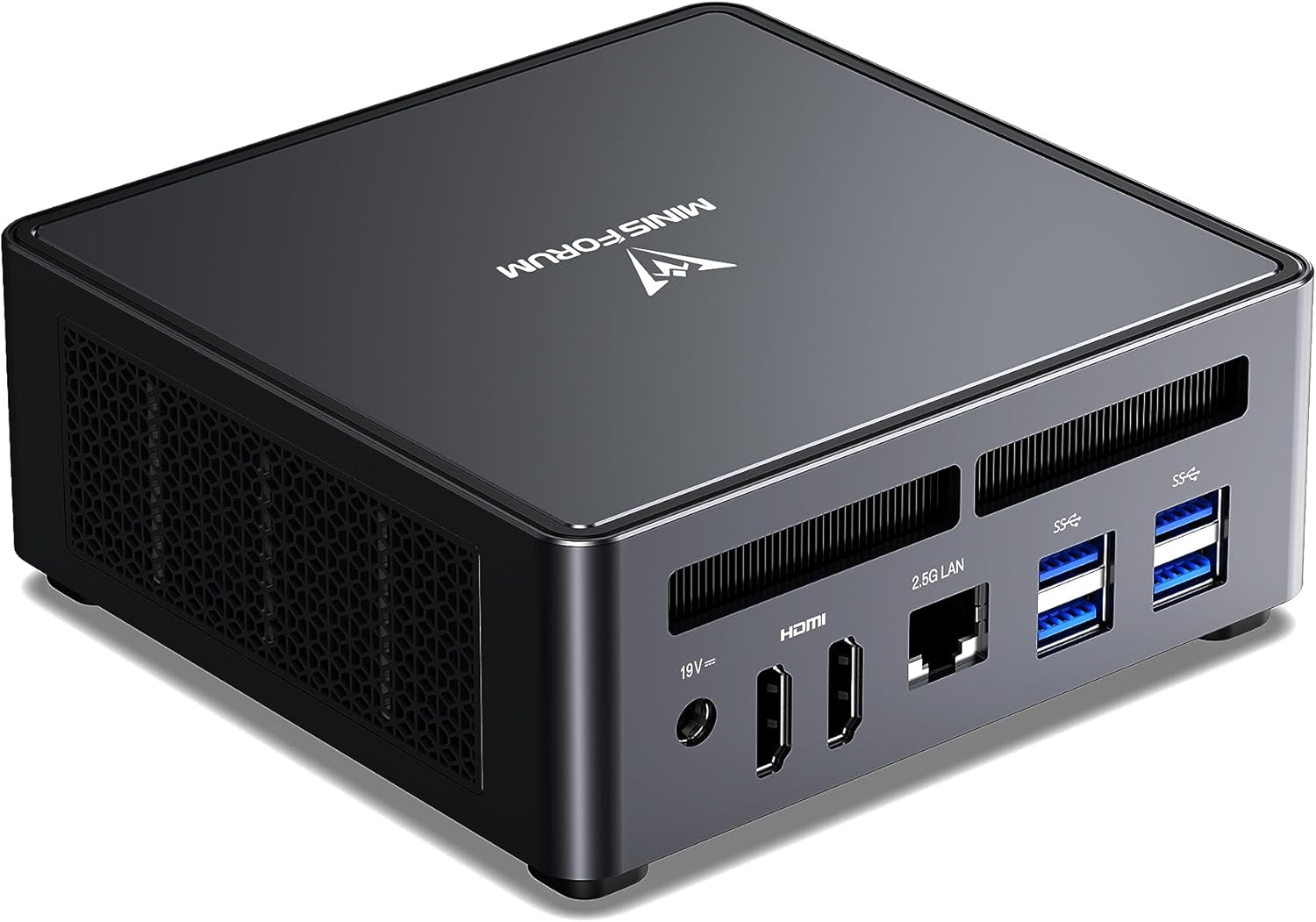
The Radeon 780M in the 7940HS is the same GPU architecture as the K11 — excellent 4K HDR transcoding capability at a lower price. For a household with 2–4 Jellyfin users, this delivers near-identical real-world performance to the K11 while costing $100+ less.
Specs: Ryzen 9 7940HS (8C/16T) | 32–64GB DDR5 | 1x 2.5GbE | 2x USB4 | ~15W idle | ~$380–500
Pros:
- Radeon 780M: identical 4K HDR transcoding capability to K11
- 2nd M.2 slot for media storage separation
- Dual USB4 for external NVMe media library
- $100+ cheaper than K11 for equivalent Jellyfin performance
Cons:
- Single 2.5GbE NIC — no dual-NIC option for network separation
- ~15W idle draws more than the EQ14’s 6W for always-on media server duty
Who should buy this: Households with 2–4 Jellyfin users and 4K HDR libraries.
Who should skip this: Users who only stream 1080p content — the EQ14 delivers that for $160+ less.
🥉 Budget Pick
Beelink EQ14
Intel Quick Sync on the N150 enables hardware transcoding for 1080p content in Jellyfin. At $190–220 with no Jellyfin subscription needed, the total cost is significantly lower than comparable Plex setups.
Specs:
| Spec | Detail |
|---|---|
| CPU | Intel N150 (4C/4T, 3.6GHz boost) |
| GPU | Intel UHD Graphics (N150) |
| RAM | 16GB LPDDR5 (soldered) |
| Storage | 500GB PCIe NVMe |
| Networking | 2x 2.5GbE + WiFi 6 |
| Power Draw | ~6W idle / ~25W load |
| Price | ~$190–220 |
Jellyfin performance on EQ14:
- 1080p HEVC → 720p: ✅ Hardware, 3–4 simultaneous streams
- 4K HEVC → 1080p: ⚠️ Limited (1 stream possible)
- 4K HDR tone mapping: ❌ Software-only, very slow
Pros:
- 6W idle means ~$6/year electricity — the cheapest Jellyfin server to run 24/7
- Dual 2.5GbE enables direct NAS media streaming without bottlenecks
- Free Jellyfin hardware transcoding at this price point undercuts any Plex setup by $120+
Cons:
- No 4K HDR tone mapping in hardware — limited to 1080p transcoding workloads
- 16GB LPDDR5 is soldered with no upgrade path
Who should buy this: Single users or small families with 1080p media libraries who want a free, subscription-free media server.
Who should skip this: Anyone with 4K HDR content who needs transcoding — step up to the UM790 Pro.
🔷 Intel Option
GEEKOM IT12
→ Check Current Price on Amazon
The i5-12450H’s Quick Sync provides better 4K handling than the N150 — AV1 decode is supported, and 4K transcoding works for 2–3 simultaneous streams. A solid option for Intel-platform users.
Specs:
| Spec | Detail |
|---|---|
| CPU | Intel i5-12450H (8C/12T, 4.4GHz boost) |
| GPU | Intel UHD Graphics Xe |
| RAM | 16–32GB DDR4 SO-DIMM (user-upgradeable) |
| Storage | 512GB PCIe NVMe |
| Networking | 1x 2.5GbE + WiFi 6 |
| Power Draw | ~10W idle / ~45W load |
| Price | ~$382–549 |
Pros:
- Intel Quick Sync handles 4K HEVC transcoding at 2–3 simultaneous streams
- AV1 hardware decode support for next-gen codec compatibility
- DDR4 SO-DIMM slots allow cost-effective RAM upgrades to 32GB
Cons:
- Single 2.5GbE NIC — no redundancy for NAS-heavy media workflows
- No AV1 hardware encode — the K11 with RDNA 3 is needed for that
Who should buy this: Intel-preferred users who want 4K transcoding capability at moderate cost.
Who should skip this: Users with large 4K HDR libraries needing HDR tone mapping — the UM790 Pro handles that better at a similar price.
Setting Up Jellyfin with Hardware Transcoding on Linux
# For Intel Quick Sync (VA-API):
sudo apt install intel-media-va-driver vainfo
vainfo  # Verify driver is working

# For AMD VA-API:
sudo apt install mesa-va-drivers vainfo
vainfo  # Should show AMD entries

# In Jellyfin web UI:
# Dashboard → Playback → Transcoding
# Hardware acceleration: Video Acceleration API (VAAPI)
# Enable: H264, HEVC, MPEG2, VC1, VP8, VP9, AV1 checkboxes
# Enable: Hardware encoding
Head-to-Head Comparison
| Feature | Beelink EQ14 | GEEKOM IT12 | UM790 Pro | GMKtec K11 |
|---|---|---|---|---|
| iGPU | Intel UHD (N150) | Intel UHD Xe | Radeon 780M | Radeon 780M RDNA 3 |
| 4K HDR transcode | ⚠️ Limited | ✅ Good | ✅ Excellent | ✅ Best |
| AV1 decode HW | ❌ | ✅ | ✅ | ✅ |
| AV1 encode HW | ❌ | ❌ | ❌ | ✅ |
| Jellyfin subscription | Free | Free | Free | Free |
| Power (idle) | ~6W | ~10W | ~15W | ~18W |
| Price | ~$190–220 | ~$382–549 | ~$380–500 | ~$639 |
Power Consumption at a Glance
Running a Jellyfin server 24/7 means electricity costs matter. The figures below are wall-power measurements from published reviews, covering idle and sustained transcode load.
| Mini PC | Idle (W) | Load (W) | Annual Cost (24/7 idle) |
|---|---|---|---|
| Beelink EQ14 | ~6W | ~25W | ~$6/year |
| GEEKOM IT12 | ~10W | ~45W | ~$11/year |
| Minisforum UM790 Pro | ~15W | ~65W | ~$16/year |
| GMKtec K11 | ~18W | ~80W | ~$19/year |
Annual cost calculated at $0.12/kWh, 24/7 idle operation.
Even the K11 at ~$19/year is negligible compared to a traditional server. For most Jellyfin setups that sit idle between streaming sessions, the EQ14’s 6W idle is hard to beat.
Quick Picks Recap
| Pick | Mini PC | Hardware Transcode | Price | Link |
|---|---|---|---|---|
| 🥇 Best Overall | GMKtec K11 | 4K HDR + 10+ streams | ~$639 | Check Price |
| 🥈 Best Value | Minisforum UM790 Pro | 4K HDR + 4–6 streams | ~$380–500 | Check Price |
| 🥉 Budget Pick | Beelink EQ14 | 1080p + 2–4 streams | ~$190–220 | See current alternatives |
| 🔷 Intel Option | GEEKOM IT12 | 4K Quick Sync + 4–6 streams | ~$382–549 | Check Price |
Frequently Asked Questions
Does Jellyfin need a subscription for hardware transcoding?
No. Hardware transcoding in Jellyfin is completely free. This is the main advantage over Plex, which requires a Plex Pass subscription (~$5/month) for hardware transcoding.
Can the Beelink EQ14 handle 4K Jellyfin content?
Direct play of 4K content: yes, with a capable client. Hardware transcoding of 4K: limited (1 stream at reduced quality). Software transcoding of 4K: no — the N150 is too slow. For 4K transcoding, the UM790 Pro or K11 is necessary.
How do I enable iGPU passthrough for Jellyfin in Docker?
Add /dev/dri:/dev/dri to your Docker container’s devices mapping. The docker-compose example in the draft includes this. The Docker user also needs to be in the video group on the host system.
Is Jellyfin stable enough for a household media server?
Yes. Jellyfin is actively developed and production-ready. The client apps (web, Android, iOS, Apple TV, Roku, Fire TV) cover most devices. Some client apps are less polished than Plex equivalents, but the core server is reliable.
Does Jellyfin support hardware transcoding on Intel?
Yes. Jellyfin supports Intel Quick Sync via VA-API on Linux. Install intel-media-va-driver, enable VAAPI in Jellyfin’s transcoding settings, and verify with vainfo. 12th-gen and newer Intel processors handle HEVC 10-bit and AV1 decode in hardware. The N150 works well for 1080p; 12th-gen i-series chips handle 4K.
Jellyfin vs Plex — which needs more hardware?
They need similar hardware for transcoding. The real difference is cost: Plex requires a Plex Pass ($5/month or $120 lifetime) for hardware transcoding, while Jellyfin includes it free. On equivalent hardware, both deliver comparable stream counts. For a detailed Plex hardware comparison, see our best mini PC for Plex picks.
How We Research These Picks
Each recommendation is tied to a specific product configuration and cross-checked against manufacturer documentation. Affiliate targets are checked for product identity during content refreshes. Prices are approximate, and this site does not publish live stock guarantees or claim first-party benchmarks without documented evidence.
Amazon Product Links
- 🥇 GMKtec K11 (Best Overall): Check Price on Amazon
- 🥈 Minisforum UM790 Pro (Best Value): Check Price on Amazon
- 🥉 Beelink EQ14 (Budget): See current alternatives
- 🔷 GEEKOM IT12 (Intel Option): Check Price on Amazon