
This article contains affiliate links. If you purchase through our links, we may earn a commission at no extra cost to you. We only recommend products we’ve thoroughly researched and verified.

Mini PCs make excellent Kubernetes nodes — low power, quiet, and capable enough to run real workloads. Whether you want a single-node K3s setup for learning or a 3-node HA cluster that mirrors production architecture, the hardware you choose shapes what you can actually run. This guide covers the best mini PCs for Kubernetes in 2026, with real pod capacity estimates and K3s setup guidance. If you’re running containerized workloads without the orchestration layer, check our Docker mini PC picks. For general-purpose home server options that also handle K3s workloads, see our home server guide. And if your cluster nodes double as Proxmox hosts running K3s inside VMs, we have picks for that too.
Quick Picks: Best Mini PC for Kubernetes at a Glance
| Pick | Mini PC | Best For | Price | Link |
|---|---|---|---|---|
| 🥇 Best Single-Node | GMKtec K11 | 1 powerful K3s node | ~$639 | Check Price |
| 🥈 Best Multi-Node | Beelink EQ14 (×3) | 3-node HA cluster | ~$190–220 each | See current alternatives |
| 🥉 High-End | Minisforum MS-A2 | Production-like single node | ~$799+ | Check Price |
| 🔷 Mid-Range | Minisforum UM790 Pro | Strong single node | ~$380–500 | Check Price |
K3s vs Full Kubernetes for Mini PCs
K3s (Lightweight Kubernetes):
- Designed for edge and resource-constrained environments
- 512MB RAM minimum, runs on ARM or x86
- Maintained by Rancher/SUSE — production-grade
- Includes everything needed: embedded etcd, CoreDNS, Traefik ingress, local-path provisioner
- Best choice for homelab setups
Full Kubernetes (kubeadm):
- More resource-intensive, closer to production cloud cluster architecture
- 2GB+ RAM per node, 2+ CPUs per node minimum
- Requires external load balancer, storage provisioner, ingress
- Use this if you’re preparing for a job that runs cloud-managed K8s (EKS, GKE, AKS)
For most homelab users: K3s is the right choice. It behaves identically to standard Kubernetes for learning and development purposes, while fitting comfortably on modest mini PC hardware.
What to Look for in a Kubernetes Mini PC
1. CPU core count Each K3s node runs system pods (CoreDNS, metrics-server, Traefik) plus your application pods. A control-plane-only node needs 2 cores; a worker node benefits from 4+ cores for actual workloads.
2. RAM capacity and headroom K3s control plane uses ~500MB–1GB. Each pod adds 50–500MB depending on the application. With 16GB, you realistically run 20–30 light pods. With 64GB, you run a full monitoring stack, CI/CD, and a dozen services simultaneously.
3. Fast NVMe storage for etcd etcd (K3s’s datastore) is write-intensive and latency-sensitive. PCIe 4.0 NVMe dramatically reduces etcd write latency compared to SATA SSDs. This matters especially for clusters with frequent deployments.
4. Gigabit or 2.5GbE networking Pod-to-pod traffic crosses the physical network in multi-node setups. 2.5GbE on each node means your cluster network won’t bottleneck container communication. The Beelink EQ14’s dual 2.5GbE lets you separate cluster traffic from management traffic.
5. Power efficiency for always-on use K3s clusters run 24/7. A 3-node EQ14 cluster at 6W idle per node = 18W total = ~$19/year. A single K11 node at 18W idle = ~$19/year. Comparable cost for very different architectures.
Single-Node vs Multi-Node: Which Setup is Right?
Single-node K3s (1 mini PC):
- Control plane and workers on the same machine
- Simpler to set up and maintain
- No high availability — if the node fails, everything stops
- Best for learning Kubernetes concepts and running homelab services
- Recommended: GMKtec K11 or Minisforum UM790 Pro
Multi-node K3s cluster (3 mini PCs):
- Control plane separate from workers (or combined in small setups)
- True HA — workloads reschedule to healthy nodes automatically
- Real multi-node experience that mirrors cloud Kubernetes
- Teaches node affinity, pod scheduling, network policies
- Recommended: 3× Beelink EQ14
Hardware requirements per K3s node:
| Role | Min CPU | Min RAM | Recommended RAM | Storage |
|---|---|---|---|---|
| Control plane | 2 cores | 1GB | 4GB | 20GB+ NVMe |
| Worker (light) | 2 cores | 2GB | 8GB | 50GB+ NVMe |
| Worker (full) | 4 cores | 8GB | 16GB+ | 100GB+ NVMe |
| Combined (single-node) | 4 cores | 8GB | 32GB+ | 200GB+ NVMe |
Our Top Picks: Best Mini PC for Kubernetes 2026
🥇 Best Single-Node
GMKtec K11
→ Check Current Price on Amazon
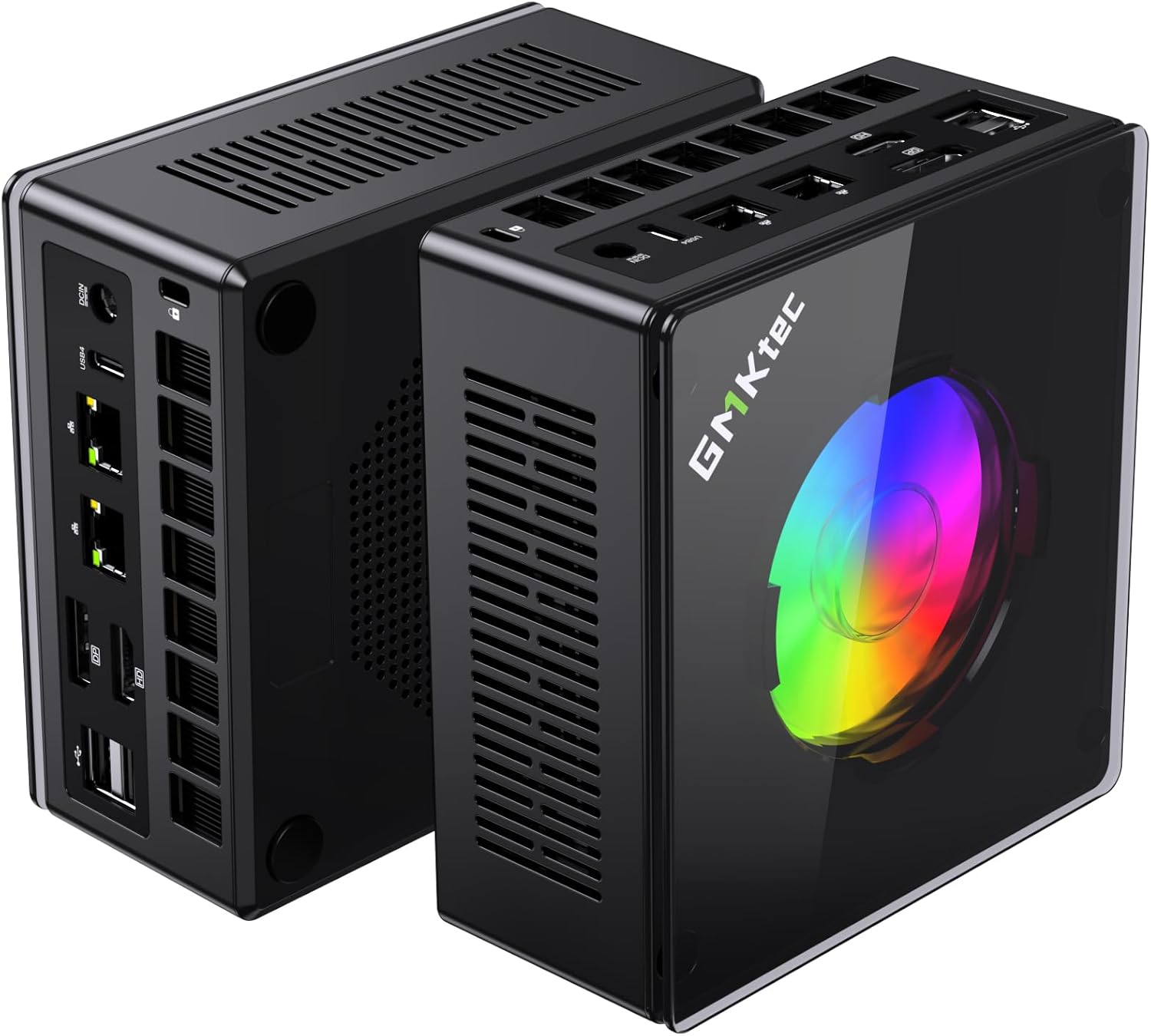
The K11’s Ryzen 9 8945HS with 8 cores and up to 64GB DDR5 creates a capable single-node K3s cluster that handles real workloads. With 64GB RAM, you run a full observability stack, CI/CD pipeline, and multiple application namespaces simultaneously — workloads that would require a multi-node cluster on budget hardware.
K3s capacity estimate (GMKtec K11, 64GB RAM):
- K3s system pods: ~2GB reserved
- Prometheus + Grafana + Loki + Alertmanager: ~4GB
- Gitea + Woodpecker CI: ~2GB
- Home services (Pi-hole, Vaultwarden, Nextcloud): ~3GB
- Available for additional workloads: ~50GB+
- Practical pod count: 40–60 simultaneously
Realistic workloads on a single K11 K3s node:
- Complete monitoring stack (Prometheus, Grafana, Alertmanager, Loki)
- GitOps CD pipeline (Argo CD + Gitea)
- Home services namespace (Pi-hole, Vaultwarden, Immich, Nextcloud)
- Service mesh demo (Linkerd or Istio lite)
- Development workloads (staging deployments, preview environments)
Specs:
| Spec | Detail |
|---|---|
| CPU | AMD Ryzen 9 8945HS (8C/16T, 5.2GHz boost) |
| RAM | 32–64GB DDR5 SO-DIMM |
| Storage | 1TB PCIe 4.0 NVMe |
| Networking | 2x 2.5GbE |
| Power Draw | ~18W idle / ~80W load |
| Price | ~$639 |
Pros:
- 8 cores provide headroom for CPU-intensive workloads (CI/CD builds, compilation)
- 64GB DDR5 enables running a full production-like stack on one node
- PCIe 4.0 NVMe reduces etcd write latency for fast deployments
- Dual 2.5GbE allows cluster traffic separation from management
- Strong single-core performance benefits Go/Rust build jobs in CI pipelines
Cons:
- ~18W idle = ~$20/year electricity (higher than budget multi-node setups)
- Single node — no HA without additional hardware
- $599 significant investment for learning K8s concepts only
Who should buy this: Developers who want a capable K3s node for running real homelab services and learning Kubernetes without managing multiple machines.
Who should skip this: Anyone whose primary goal is learning multi-node cluster operations — 3× EQ14 gives a better learning experience for the same cost.
🥈 Best Multi-Node
Beelink EQ14
Three Beelink EQ14 units create a legitimate K3s HA cluster for ~$600 total — comparable to a single GMKtec K11 but with true high availability and a realistic multi-node learning environment.
3-node EQ14 K3s cluster aggregate specs:
- Total CPU: 12 cores (4 per node)
- Total RAM: 48GB (16GB per node)
- Total Storage: 1.5TB NVMe (500GB per node)
- Network: 2× 2.5GbE per node (6 NICs total)
Node topology:
| Node | Role | RAM Allocation |
|---|---|---|
| Node 1 (EQ14) | Control plane + etcd | 16GB — etcd + K3s system |
| Node 2 (EQ14) | Worker | 16GB — application workloads |
| Node 3 (EQ14) | Worker | 16GB — application workloads |
Why the EQ14 specifically for multi-node K3s:
The EQ14’s dual 2.5GbE is the key feature. Use NIC 1 for the cluster network (pod CIDR, node-to-node communication) and NIC 2 for management traffic. This mirrors real datacenter networking architecture — you learn node taints, network policies, and multi-NIC configuration in a realistic environment.
Specs (per node):
| Spec | Detail |
|---|---|
| CPU | Intel N150 (4C/4T, 3.6GHz boost) |
| RAM | 16GB LPDDR5 (soldered) |
| Storage | 500GB NVMe |
| Networking | 2x 2.5GbE |
| Power Draw | ~6W idle / ~25W load |
| Price | ~$190–220 per unit |
Cluster pros:
- True HA — workloads reschedule automatically when a node fails
- Real multi-node scheduling experience (affinity, tolerations, DaemonSets)
- Dual NIC on each node for cluster/management traffic separation
- ~18W total cluster idle = same electricity cost as a single K11
- Under $600 for all three nodes
Cluster cons:
- Intel N150 is slow for CPU-intensive workloads (CI builds, image builds)
- 16GB per node limits what you can run per worker
- Managing 3 machines adds operational overhead vs 1 machine
- N150 etcd performance adequate but not fast for heavy deployment rates
Who should buy this: Anyone learning Kubernetes for a job — the multi-node experience with scheduling, HA, and real pod migration is worth more than raw single-node performance.
Who should skip this: Users who primarily want to run homelab services on K3s — the K11 runs more workloads with less operational overhead.
🥉 High-End
Minisforum MS-A2
→ Check Current Price on Amazon
The MS-A2 runs the most demanding single-node K3s setups. 16 cores and 64GB DDR5 handle a full microservices demonstration environment — 50+ pods, multiple namespaces, and a complete service mesh — while 10GbE networking provides cluster-grade bandwidth for pod communication.
Specs:
| Spec | Detail |
|---|---|
| CPU | AMD Ryzen 9 8945HX (16C/32T, 5.2GHz) |
| RAM | Up to 64GB DDR5 |
| Storage | Multiple NVMe slots |
| Networking | 2x 10GbE SFP+ + 2x 2.5GbE |
| Power Draw | ~22W idle / ~120W load |
| Price | ~$799+ |
Pros:
- 16 cores handles intensive CI/CD workloads without CPU starvation
- 10GbE makes pod networking effectively wire-speed
- Multi-NIC enables realistic cluster/management/storage traffic separation
- Enough headroom for a 3-namespace microservices environment simultaneously
Cons:
- ~$800+ price is hard to justify for K3s learning
- 22W idle = ~$24/year electricity
- Overkill for most homelab K3s use cases
Who should buy this: Developers building a production-like demo environment or interview prep for senior SRE/DevOps roles who need to demonstrate microservices architecture at scale.
Who should skip this: Anyone focused on learning Kubernetes fundamentals — the K11 or a 3-node EQ14 cluster delivers the same learning value at a fraction of the cost.
🔷 Mid-Range
Minisforum UM790 Pro
→ Check Current Price on Amazon
The UM790 Pro splits the difference — 8 cores and up to 64GB DDR5 at a lower price than the K11. For K3s, the main differences from the K11: single 2.5GbE (vs dual), slightly lower single-core boost, but equivalent real-world K3s pod capacity. An excellent choice when you want a strong single node without paying K11 pricing.
With 64GB RAM configured, you get the same practical pod capacity as the K11 — 50–70 simultaneous pods including a monitoring stack, CI runner, and multiple application namespaces. The Ryzen 9 7940HS handles container image builds and Go compilations without breaking a sweat. The 3W lower idle draw compared to the K11 adds up over years of 24/7 operation.
Specs:
| Spec | Detail |
|---|---|
| CPU | AMD Ryzen 9 7940HS (8C/16T, 5.2GHz boost) |
| RAM | 32–64GB DDR5 SO-DIMM (user-upgradeable) |
| Storage | 1TB PCIe 4.0 NVMe |
| Networking | 1x 2.5GbE + WiFi 6E |
| Power Draw | ~15W idle / ~65W load |
| Price | ~$380–500 |
Pros:
- 8 cores / 16 threads handle CI builds and pod scheduling without CPU contention
- 64GB DDR5 support means 50–70 pods comfortably on a single node
- 15W idle keeps annual electricity under $16/year for always-on K3s
Cons:
- Single 2.5GbE NIC — no dedicated cluster/management traffic separation
- No USB4 or Thunderbolt limits external expansion options
Who should buy this: Users who want a capable single-node K3s cluster at a lower price point than the K11 and don’t need dual-NIC traffic separation.
Who should skip this: Anyone planning to run a multi-node cluster where dual NICs per node matter — the EQ14 gives you two 2.5GbE ports at a fraction of the cost per node.
K3s Setup Guide
Single-Node K3s (1 Machine)
# Install K3s server (control plane + worker combined):
curl -sfL https://get.k3s.io | sh -

# Verify installation:
sudo kubectl get nodes
# Should show: NAME   STATUS   ROLES                  AGE   VERSION
#              node1  Ready    control-plane,master   1m    v1.30.x

# Configure kubectl without sudo:
mkdir -p ~/.kube
sudo cp /etc/rancher/k3s/k3s.yaml ~/.kube/config
sudo chown $USER:$USER ~/.kube/config
3-Node K3s Cluster
# On control plane node (Node 1):
curl -sfL https://get.k3s.io | sh -

# Get join token for worker nodes:
sudo cat /var/lib/rancher/k3s/server/node-token

# On worker nodes (Node 2 and 3):
curl -sfL https://get.k3s.io | \
  K3S_URL=https://NODE1_IP:6443 \
  K3S_TOKEN=YOUR_JOIN_TOKEN sh -

# Verify cluster from Node 1:
sudo kubectl get nodes
# Should show 3 nodes in Ready state
Essential Add-Ons
# Install Helm (package manager):
curl https://raw.githubusercontent.com/helm/helm/main/scripts/get-helm-3 | bash

# cert-manager (automatic TLS):
kubectl apply -f https://github.com/cert-manager/cert-manager/releases/latest/download/cert-manager.yaml

# Longhorn (distributed block storage):
helm repo add longhorn https://charts.longhorn.io
helm install longhorn longhorn/longhorn --namespace longhorn-system --create-namespace

# Argo CD (GitOps delivery):
kubectl create namespace argocd
kubectl apply -n argocd -f https://raw.githubusercontent.com/argoproj/argo-cd/stable/manifests/install.yaml
Pod Capacity Comparison
| Mini PC | Cores | RAM | Practical Pod Count | Cluster Role |
|---|---|---|---|---|
| Beelink EQ14 | 4 | 16GB | 15–25 pods | Worker node / small control plane |
| Minisforum UM790 Pro | 8 | 64GB | 50–70 pods | Single-node full stack |
| GMKtec K11 | 8 | 64GB | 50–70 pods | Single-node full stack |
| Minisforum MS-A2 | 16 | 64GB | 80–100+ pods | High-performance single node |
Pod counts assume light workloads averaging 128MB RAM and 0.1 CPU request per pod. CI/CD and monitoring stacks use more.
Power Consumption
| Setup | Nodes | Idle Total | Load Total | Annual Cost (24/7 idle) |
|---|---|---|---|---|
| 1× Beelink EQ14 | 1 | ~6W | ~25W | ~$7/year |
| 1× Minisforum UM790 Pro | 1 | ~15W | ~65W | ~$16/year |
| 1× GMKtec K11 | 1 | ~18W | ~80W | ~$20/year |
| 3× Beelink EQ14 | 3 | ~18W | ~75W | ~$20/year |
| 1× Minisforum MS-A2 | 1 | ~22W | ~120W | ~$24/year |
At $0.12/kWh, 24/7 idle operation.
Quick Picks Recap
| Pick | Mini PC | Best For | Price | Link |
|---|---|---|---|---|
| 🥇 Best Single-Node | GMKtec K11 | 1 powerful K3s node | ~$639 | Check Price |
| 🥈 Best Multi-Node | Beelink EQ14 (×3) | 3-node HA cluster | ~$190–220 each | See current alternatives |
| 🥉 High-End | Minisforum MS-A2 | Production-like single node | ~$799+ | Check Price |
| 🔷 Mid-Range | Minisforum UM790 Pro | Strong single node | ~$380–500 | Check Price |
Frequently Asked Questions
What’s the minimum mini PC for K3s?
Any mini PC with 2+ cores and 4GB+ RAM runs K3s reliably. The Beelink EQ14 (4 cores, 16GB) is the practical entry point for a single-node K3s setup that can run 10–15 light pods — enough for learning Kubernetes and running a few home services.
Should I run K3s or full Kubernetes (kubeadm) at home?
K3s for most homelab use cases. It’s functionally identical to upstream Kubernetes for learning, uses fewer resources, and is significantly easier to set up. Use kubeadm only if you specifically need to learn the full Kubernetes installation process for certification prep (CKA/CKAD).
Can I run Kubernetes on a single mini PC?
Yes — K3s works as a single-node cluster where one machine acts as both control plane and worker. You lose high availability (a node failure takes down everything), but it’s entirely practical for homelab services and development workloads.
How many nodes should a homelab Kubernetes cluster have?
Three is the minimum for meaningful HA — one control plane, two workers allows workloads to reschedule when a worker fails. One node is fine for learning. Two nodes is generally not recommended: losing a node in a 2-node setup is as disruptive as a single-node failure but with more complexity.
What’s the difference between K3s, K0s, and MicroK8s?
All three are lightweight Kubernetes distributions. K3s (Rancher/SUSE) has the largest homelab community and best documentation. K0s (Mirantis) is architecturally similar. MicroK8s (Canonical) integrates well with Ubuntu snap-based systems. For most homelab use, K3s is the safest choice due to community support.
Can I use Kubernetes for Docker containers I already run?
Yes — Kubernetes runs containers via containerd (the same runtime Docker uses). You can migrate Docker Compose deployments to Kubernetes manifests. K3s includes Helm for easier application management. Most popular homelab apps (Nextcloud, Vaultwarden, Gitea) have community Helm charts ready to deploy.
Does K3s support persistent storage out of the box?
Yes. K3s includes local-path provisioner by default — it creates persistent volumes backed by local disk. For multi-node clusters with storage that follows pods between nodes, install Longhorn (works on top of K3s and handles distributed block storage across nodes).
How We Research These Picks
Each recommendation is tied to a specific product configuration and cross-checked against manufacturer documentation. Affiliate targets are checked for product identity during content refreshes. Prices are approximate, and this site does not publish live stock guarantees or claim first-party benchmarks without documented evidence.
Amazon Product Links
- ⚡ GMKtec K11 (Best Single-Node): Check Price on Amazon
- 💰 Beelink EQ14 (Best Multi-Node, ×3): See current alternatives
- 🏆 Minisforum MS-A2 (High-End): Check Price on Amazon
- 🔷 Minisforum UM790 Pro (Mid-Range): Check Price on Amazon