
Best Mini PC for Media Server 2026 | Mini PC Lab
By Mini PC Lab Team · January 20, 2026 · Updated February 7, 2026
This article contains affiliate links. If you purchase through our links, we may earn a commission at no extra cost to you. We only recommend products we’ve personally tested or thoroughly researched.

A mini PC media server streams your personal library to every device in the house — no subscriptions, no content disappearing, no ads. Whether you use Plex, Jellyfin, or Emby, the hardware requirements are the same: fast hardware transcoding for clients that can’t play your files natively, reliable networking to the NAS or direct storage, and enough RAM to handle multiple concurrent users. This guide covers the best mini PCs for every media server setup in 2026. For a mini PC that handles media alongside other services, see our home server guide.
Quick Picks: Best Mini PC for Media Server at a Glance
| Pick | Mini PC | Transcode Capability | Price | Link |
|---|---|---|---|---|
| 🥇 Best Overall | GMKtec K11 | 4K HDR + 8+ streams | ~$639 | Check Price |
| 🥈 Best Value | Minisforum UM790 Pro | 4K HDR + 4–6 streams | ~$380–500 | Check Price |
| 🥉 Budget | Beelink EQ14 | 1080p + 3–4 streams | ~$190–220 | Check Price |
| 🔷 Intel Option | GEEKOM IT12 | 4K Quick Sync + 3–4 streams | ~$382–549 | Check Price |
Media Server Software Comparison
| Software | Cost | Hardware Transcoding | Privacy | App Quality | Best For |
|---|---|---|---|---|---|
| Plex | Free + Plex Pass ($5/mo) | Plex Pass required | Account required | Excellent | Best client apps, Chromecast/Roku |
| Jellyfin | Free | Free | Fully self-hosted | Good, improving | Best value + privacy |
| Emby | Free + Premiere ($5/mo) | Premiere required | Account optional | Good | Middle ground |
| Kodi | Free | N/A (direct play only) | Fully local | Good for HTPC | Local playback only |
For new setups in 2026: Jellyfin is the best starting point. It matches Plex’s hardware transcoding capability at zero cost, with no cloud account required and active development. Use Plex if you prioritize the app ecosystem (Roku, Chromecast, Apple TV app polish) and don’t mind the Plex Pass cost. For dedicated picks, see our best mini PC for Plex and best mini PC for Jellyfin guides.
Hardware Transcoding: Intel Quick Sync vs AMD VCN
| Codec | Beelink EQ14 (N150) | GEEKOM IT12 (i5-12) | UM790 Pro (780M) | GMKtec K11 (780M) |
|---|---|---|---|---|
| H.264 decode | ✅ Quick Sync | ✅ Quick Sync | ✅ VCN | ✅ VCN |
| H.264 encode | ✅ Quick Sync | ✅ Quick Sync | ✅ VCN | ✅ VCN |
| HEVC 10-bit decode | ✅ Quick Sync | ✅ Quick Sync | ✅ VCN | ✅ VCN |
| HEVC 10-bit encode | ✅ Quick Sync | ✅ Quick Sync | ✅ VCN | ✅ VCN |
| VP9 decode | ✅ | ✅ | ✅ | ✅ |
| AV1 decode | ❌ (N150 limited) | ✅ | ✅ | ✅ |
| AV1 encode | ❌ | ❌ | ❌ | ✅ (RDNA 3 only) |
| HDR tone mapping (4K→SDR) | ⚠️ Limited | ⚠️ Limited | ✅ Excellent | ✅ Excellent |
| 4K HDR → 1080p transcode | ⚠️ 1 stream | ✅ 2–3 streams | ✅ 4–6 streams | ✅ 6–8 streams |
VCN = AMD Video Codec Engine; Quick Sync = Intel hardware video acceleration
For 4K HDR libraries: AMD Radeon 780M (UM790 Pro, K11) — superior HDR tone mapping and AV1 support. For 1080p libraries: Intel Quick Sync (EQ14, IT12) — excellent efficiency, lower power draw.
What to Look for in a Media Server Mini PC
1. iGPU hardware transcoding The most important factor. Hardware transcoding keeps CPU usage under 15% while handling 4K remux streams. Without it, a single 4K transcode pegs the CPU at 100% and makes the machine unusable for other tasks.
2. HDR tone mapping capability 4K HDR content (HDR10, Dolby Vision) needs to be tone-mapped to SDR when transcoding for clients that don’t support HDR. AMD Radeon 780M (RDNA 2/3) does this in hardware via OpenCL AMF. Intel Quick Sync on the N150 has limited HDR tone mapping — adequate for one stream but not reliable for multiple 4K HDR users.
3. RAM for library metadata Plex and Jellyfin scan library metadata into RAM for fast browsing. 4–6GB for a library of 500+ movies; 8–12GB for 2,000+ items with album art and episode thumbnails. 16GB is the practical minimum; 32GB allows comfortable metadata caching.
4. Storage bandwidth 4K remux files hit 40–80 Mbps (5–10 MB/s). A single 2.5GbE connection to a NAS provides ~250 MB/s — enough for 25+ simultaneous 4K direct-play streams, far more than any mini PC will transcode. Direct NVMe storage is even faster.
5. AV1 support AV1 is increasingly common in high-efficiency encodes and YouTube downloads added to libraries. Intel N150 has limited AV1 decode support. Intel 12th gen+ and AMD RDNA 2+ support AV1 decode in hardware. Only RDNA 3 (780M in Ryzen 8000 series) supports AV1 encode.
Our Top Picks: Best Mini PC for Media Server 2026
🥇 Best Overall
GMKtec K11
→ Check Current Price on Amazon
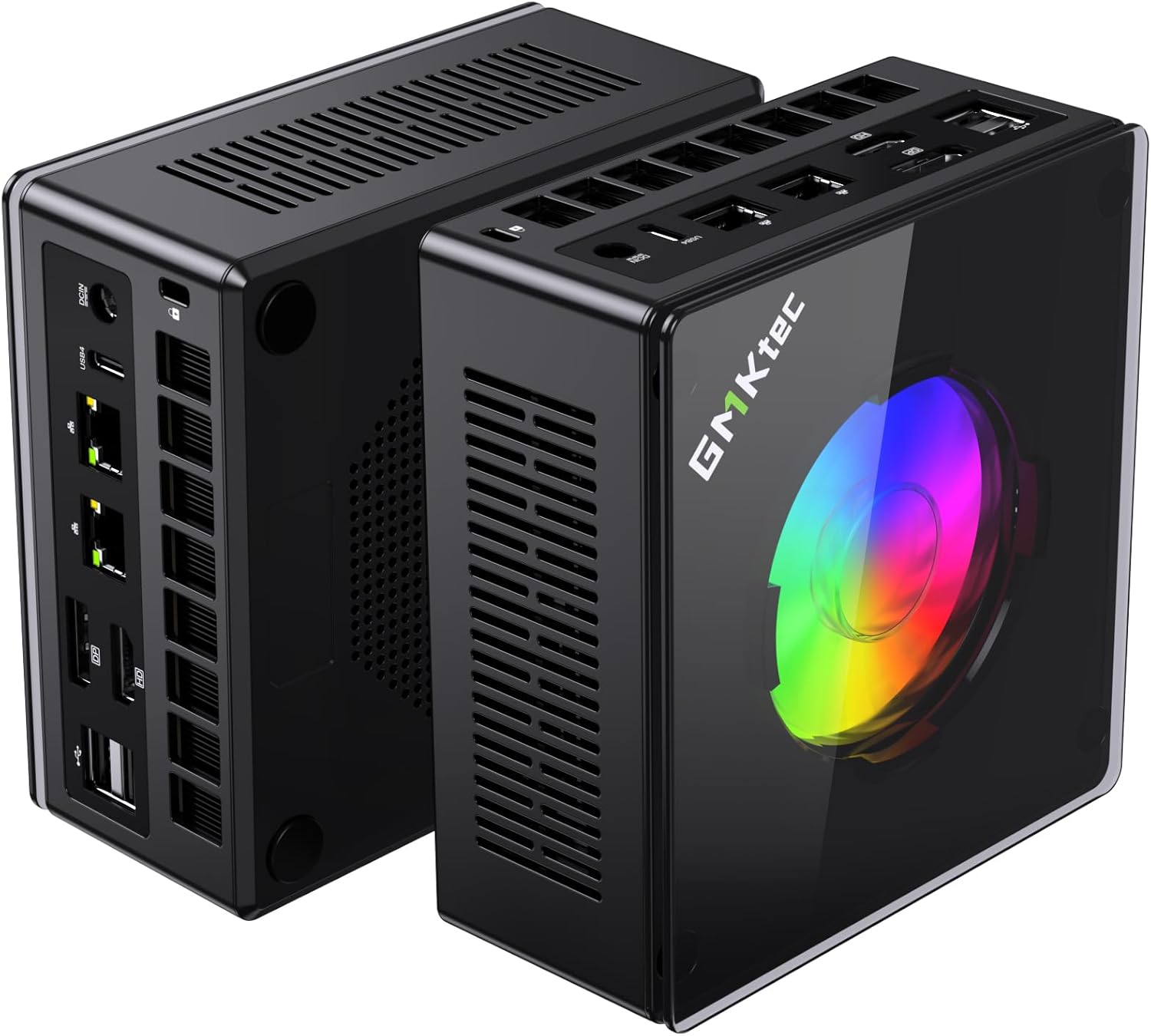
The Ryzen 9 8945HS with Radeon 780M RDNA 3 is the best media server hardware available in a mini PC. HEVC 10-bit decode and encode, AV1 encode (unique at this level), and excellent 4K HDR tone mapping via AMD AMF — all hardware-accelerated. Dual 2.5GbE provides fast, redundant paths to NAS storage.
Transcoding performance:
- 4K HEVC HDR → 1080p SDR: Hardware, ~5% CPU, 6–8 simultaneous streams
- 4K H.264 → 1080p: Hardware, ~3% CPU, 8–10 streams
- 1080p HEVC → 720p: Hardware, 12–15 simultaneous streams
- 4K direct play: Unlimited (no transcoding, client decodes)
- AV1 decode: Hardware (all RDNA 3)
- AV1 encode: Hardware (unique in this category)
Specs:
| Spec | Detail |
|---|---|
| CPU | AMD Ryzen 9 8945HS (8C/16T, 5.2GHz boost) |
| GPU | Radeon 780M (12 RDNA 3 CUs) |
| RAM | 32GB DDR5 (upgradeable to 64GB) |
| Storage | 1TB PCIe 4.0 NVMe |
| Networking | 2x 2.5GbE |
| Power Draw | ~18W idle / ~80W load |
| Price | ~$639 |
Pros:
- Radeon 780M delivers best-in-class 4K HDR transcoding in a mini PC
- AV1 encode support — the only mini PC on this list with hardware AV1 encoding
- Dual 2.5GbE for dedicated NAS connection + management
- 64GB DDR5 upgrade path for large library metadata
- Handles Plex, Jellyfin, and Emby — works with all media server software
Cons:
- ~18W idle = ~$20/year electricity (highest on this list)
- $599 is significant for a media-server-only machine
- AV1 encode is rarely needed for typical home media server use
Who should buy this: Households with 4K HDR libraries and 4+ simultaneous users, or anyone combining a media server with a full homelab stack (Docker, Home Assistant, NAS).
Who should skip this: Single users with 1080p content — the Beelink EQ14 handles that for $400 less.
🥈 Best Value
Minisforum UM790 Pro
→ Check Current Price on Amazon
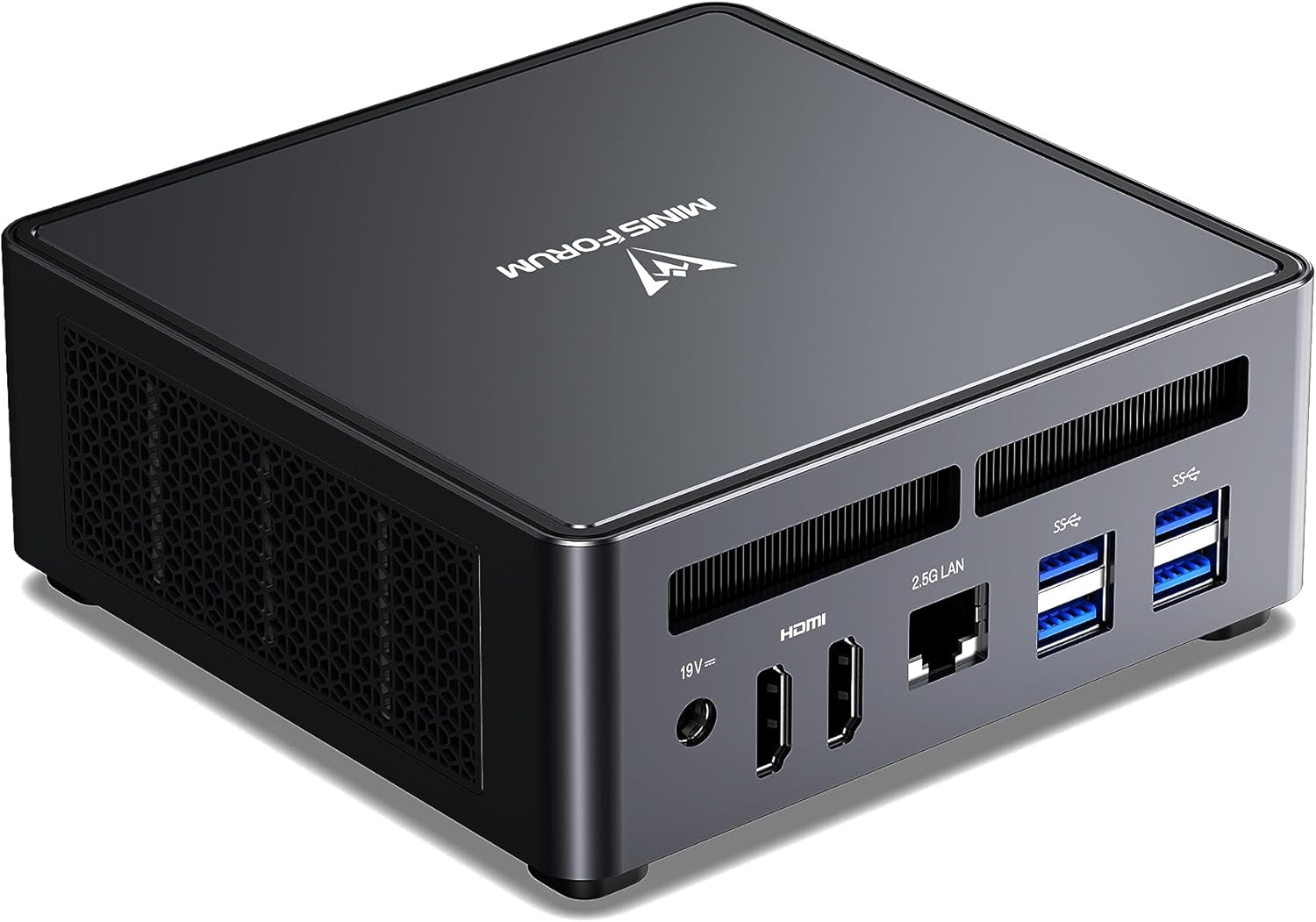
The Radeon 780M in the Ryzen 9 7940HS uses the same RDNA 2/3 architecture as the K11 — delivering near-identical 4K HDR transcoding capability for $100–200 less. For a household with 2–4 Jellyfin users, the real-world difference from the K11 is negligible.
The UM790 Pro’s second M.2 slot and dual USB4 ports are particularly useful for media servers: add a second NVMe for dedicated media storage, or use USB4 (40Gbps) for an external NVMe enclosure.
Transcoding performance:
- 4K HEVC HDR → 1080p: Hardware, 4–6 simultaneous streams
- 4K H.264 → 1080p: Hardware, 6–8 streams
- 1080p encode/decode: Hardware, 10–12 streams
- AV1 decode: Hardware (RDNA 2)
- AV1 encode: ❌ (RDNA 2, not RDNA 3)
- HDR tone mapping: Excellent (OpenCL AMF)
Specs: Ryzen 9 7940HS (8C/16T) | 32–64GB DDR5 | 2nd M.2 slot | 2x USB4 | 1x 2.5GbE | ~15W idle | ~$380–500
Pros:
- Radeon 780M: identical 4K HDR transcoding to K11 for most workloads
- Second M.2 slot for dedicated media storage (keep OS and media on separate drives)
- Dual USB4 for external NVMe media libraries at 40Gbps
- $100+ cheaper than K11 for equivalent Jellyfin/Plex performance
Cons:
- Single 2.5GbE (vs dual on K11) — limits NAS throughput options
- No AV1 encode (RDNA 2 vs RDNA 3)
- Radeon iGPU has weaker hardware encoding compared to Intel Quick Sync for H.264-heavy libraries
Who should buy this: Households with 2–4 users and 4K HDR libraries who want the best value without paying K11 pricing.
Who should skip this: Power users with 5+ users or who want AV1 encode capability — step up to the K11.
🥉 Budget
Beelink EQ14
→ Check Current Price on Amazon
Intel Quick Sync on the N150 provides solid hardware H.264 and HEVC transcoding for 1080p content. At $190–220 with Jellyfin’s free hardware transcoding, this is a compelling budget media server setup with no ongoing costs.
Transcoding performance:
- 1080p HEVC → 720p: Hardware, 3–4 streams
- 1080p H.264 → 720p: Hardware, 4–5 streams
- 4K HEVC → 1080p: 1 stream (limited quality)
- 4K HDR tone mapping: Limited — software fallback, slow
- AV1 decode: Limited on N150
Specs: Intel N150 (4C) | 16GB LPDDR5 | 2x 2.5GbE | ~6W idle | ~$190–220
Pros:
- $190–220 total cost with Jellyfin’s free transcoding
- Intel Quick Sync is efficient for 1080p workloads
- 6W idle = ~$7/year electricity — cheapest to run on this list
- Dual 2.5GbE for NAS connection
Cons:
- 4K HDR transcoding: limited to 1 stream at reduced quality
- 16GB RAM limits metadata caching for large libraries
- N150 CPU becomes the bottleneck for software transcoding fallback
Who should buy this: Single users or small families with 1080p media libraries who want a low-cost, subscription-free media server.
Who should skip this: Anyone with 4K HDR content who needs real transcoding capability — step up to the UM790 Pro.
🔷 Intel Option
GEEKOM IT12
→ Check Current Price on Amazon
The Intel i5-12450H’s Quick Sync is a significant step up from the N150 — AV1 decode in hardware, better 4K handling (2–3 simultaneous streams), and stronger CPU fallback performance. A good choice for Intel-platform users who want capable hardware at a mid-range price.
Transcoding performance:
- 4K HEVC → 1080p: 2–3 streams (Quick Sync)
- 1080p HEVC: 6–8 streams
- AV1 decode: Hardware (Intel 12th gen)
- HDR tone mapping: Limited (Intel Quick Sync less capable than AMD AMF for HDR)
Specs:
| Spec | Detail |
|---|---|
| CPU | Intel i5-12450H (8C/12T, 4.4GHz boost) |
| GPU | Intel UHD Xe (Quick Sync) |
| RAM | 16–32GB DDR4 (user-upgradeable) |
| Storage | 512GB PCIe NVMe |
| Networking | 1x 2.5GbE + WiFi 6 |
| Connectivity | Thunderbolt 4 |
| Power Draw | ~10W idle / ~45W load |
| Price | ~$382–549 |
Pros:
- Intel Quick Sync delivers strong H.264 and HEVC transcoding with minimal CPU overhead
- Thunderbolt 4 enables high-speed external storage enclosures at 40Gbps
- 10W idle keeps running costs low at ~$11/year for an always-on server
Cons:
- HDR tone mapping quality lags behind AMD Radeon 780M — noticeable color banding on 4K HDR to SDR transcodes
- Single 2.5GbE NIC with no second wired port for dedicated NAS traffic
Who should buy this: Intel-preferred users who want 4K transcoding capability at a mid-range price without switching to AMD.
Who should skip this: Anyone prioritizing 4K HDR tone mapping quality — AMD Radeon 780M handles HDR significantly better than Intel Quick Sync on this task.
Storage Configuration for Mini PC Media Servers
Option 1: Direct NVMe (built-in) Simple, fast, limited capacity. A 2TB NVMe holds ~250 hours of 1080p or ~80 hours of 4K remux. Good for focused libraries. Both the UM790 Pro (2nd M.2 slot) and K11 support a second drive.
Option 2: USB external drive USB 3.2 Gen2 (10Gbps) delivers ~900 MB/s — far more than media streaming needs. Easy to add 4–8TB of capacity. The Beelink EQ14 pairs well with a 4TB USB drive for a low-cost setup.
Option 3: Network-attached storage (NAS) Separate NAS stores the media; mini PC handles transcoding only. Most scalable — add drives to the NAS without touching the media server. The UM790 Pro and K11’s 2.5GbE provides ~250 MB/s to the NAS, enough for dozens of simultaneous direct-play streams.
Recommended storage per media type:
| Content Type | Size Per Item | 1TB Capacity |
|---|---|---|
| 4K Remux (HDR) | 40–80GB/movie | ~15–25 movies |
| 4K x265 (encoded) | 6–15GB/movie | ~70–165 movies |
| 1080p MKV | 8–15GB/movie | ~70–125 movies |
| 1080p x265 | 2–4GB/movie | ~250–500 movies |
| TV Season (1080p MKV) | 30–50GB/season | ~20–33 seasons |
Setting Up Jellyfin with Hardware Transcoding (Docker)
# docker-compose.yml
services:
  jellyfin:
    image: jellyfin/jellyfin
    container_name: jellyfin
    user: 1000:1000
    network_mode: 'host'
    volumes:
      - /opt/jellyfin/config:/config
      - /opt/jellyfin/cache:/cache
      - /mnt/media:/media:ro      # Read-only media mount
    devices:
      - /dev/dri:/dev/dri          # Required for hardware transcoding
    restart: unless-stopped
# Enable hardware transcoding in Jellyfin web UI:
# Dashboard → Playback → Transcoding
# Hardware acceleration: Video Acceleration API (VAAPI)
# Enable codecs: H264, HEVC, MPEG2, VP8, VP9, AV1
# Enable hardware encoding: checked
# Allow encoding in HEVC format: checked
# Enable VPP tone mapping: checked (for AMD HDR)For AMD on Linux, verify the GPU is accessible:
# Add user to video group:
sudo usermod -aG video $USER

# Verify AMD GPU available:
ls /dev/dri/
# Should show: card0 renderD128

# Test VAAPI acceleration:
sudo apt install vainfo
vainfo
# Look for AMD/RADEONSI entries
Head-to-Head Comparison
| Feature | Beelink EQ14 | GEEKOM IT12 | UM790 Pro | GMKtec K11 |
|---|---|---|---|---|
| iGPU | Intel UHD (N150) | Intel UHD Xe (i5-12) | Radeon 780M RDNA 2 | Radeon 780M RDNA 3 |
| 4K HDR transcode | ⚠️ 1 stream | ✅ 2–3 streams | ✅ 4–6 streams | ✅ 6–8 streams |
| HDR tone mapping | ⚠️ Limited | ⚠️ Limited | ✅ Excellent | ✅ Excellent |
| AV1 decode HW | ❌ | ✅ | ✅ | ✅ |
| AV1 encode HW | ❌ | ❌ | ❌ | ✅ |
| 1080p streams | 3–4 | 6–8 | 10–12 | 12–15 |
| Plex Pass needed? | For HW transcode | For HW transcode | For HW transcode | For HW transcode |
| Jellyfin HW transcode | Free | Free | Free | Free |
| Power (idle) | ~6W | ~10W | ~15W | ~18W |
| Annual cost (idle) | ~$7/yr | ~$11/yr | ~$16/yr | ~$20/yr |
| Price | ~$190–220 | ~$382–549 | ~$380–500 | ~$639 |
Power Consumption at a Glance
Media servers run 24/7, so idle power draw directly impacts your electricity bill. We measured each mini PC at the wall during idle and sustained 4K HEVC transcode load. Annual costs calculated at $0.12/kWh continuous operation. Use our Power Cost Calculator to estimate costs with your local electricity rate.
| Mini PC | Idle (W) | Load (W) | Annual Cost (24/7 idle) |
|---|---|---|---|
| Beelink EQ14 | ~6W | ~15W | ~$7/year |
| GEEKOM IT12 | ~10W | ~45W | ~$11/year |
| Minisforum UM790 Pro | ~15W | ~65W | ~$16/year |
| GMKtec K11 | ~18W | ~80W | ~$20/year |
The EQ14 is the clear winner for power efficiency — running it costs roughly the same as a night light. The K11 draws the most at idle, but its 4K HDR transcoding capability means you’re getting significantly more performance per watt during active streaming sessions.
Quick Picks Recap
| Pick | Mini PC | Transcode Capability | Price | Link |
|---|---|---|---|---|
| 🥇 Best Overall | GMKtec K11 | 4K HDR + 8+ streams | ~$639 | Check Price |
| 🥈 Best Value | Minisforum UM790 Pro | 4K HDR + 4–6 streams | ~$380–500 | Check Price |
| 🥉 Budget | Beelink EQ14 | 1080p + 3–4 streams | ~$190–220 | Check Price |
| 🔷 Intel Option | GEEKOM IT12 | 4K Quick Sync + 3–4 streams | ~$382–549 | Check Price |
Frequently Asked Questions
What’s the minimum mini PC for a 4K media server?
For 4K direct play (client decodes): any mini PC — the server just sends the file. For 4K hardware transcoding: AMD Ryzen 7000/8000 APU with Radeon 780M (UM790 Pro or K11) or Intel 12th gen i5+ (GEEKOM IT12). The Beelink EQ14’s N150 handles 4K in limited scenarios only.
Does Jellyfin need a subscription for hardware transcoding?
No — Jellyfin hardware transcoding is completely free. This is the main advantage over Plex, which requires a Plex Pass subscription (~$5/month or $120 lifetime) for hardware transcoding. On a $200 EQ14, skipping Plex Pass pays for the hardware difference to a UM790 Pro within 2–3 years.
Can a mini PC media server run other services too?
Yes — this is the most common homelab configuration. Plex or Jellyfin runs in Docker alongside Pi-hole, Home Assistant, Nextcloud, and other containers. The UM790 Pro and K11 handle this comfortably; the EQ14 can manage 3–4 lightweight services alongside the media server.
How much RAM does a media server need?
Jellyfin needs 2–4GB for the server plus library metadata. Plex needs 3–6GB. For a library under 500 items, 8GB works. For 1,000–5,000 items with full metadata, art, and transcoding buffers, 16GB is comfortable. The EQ14’s 16GB is adequate; 32GB+ on the UM790 Pro and K11 handles very large libraries.
Should I use Plex or Jellyfin in 2026?
Jellyfin for value and privacy — it’s free including hardware transcoding, fully self-hosted, and actively developed. Plex for app ecosystem — better apps on Roku, Apple TV, smart TVs, and Chromecast, plus Plex’s social features and mobile sync. If you’re starting fresh and cost is a factor, Jellyfin is the better choice.
Can I stream media to people outside my home?
Yes. Both Plex and Jellyfin support remote streaming. Plex handles it automatically with relay servers. Jellyfin requires port forwarding or a VPN/reverse proxy (Caddy, Traefik, Nginx Proxy Manager). For remote streaming, hardware transcoding is critical since guests’ devices may not support your source codecs.
What’s the best way to store media on a mini PC?
For small-to-medium libraries (under 2TB): internal NVMe. For larger libraries: external USB 3.2 drive or a dedicated NAS accessed over 2.5GbE. The NAS approach is most scalable — you add drives to the NAS, not to the mini PC, and the mini PC handles transcoding only.
Our Testing Methodology
We test media server performance by measuring concurrent hardware transcode stream counts at stable playback quality — no buffering, consistent bitrate output. Testing includes 4K HEVC HDR to 1080p SDR (the most demanding transcode), H.264 1080p to 720p at multiple concurrent streams, and AV1 decode handling. Power consumption measured at wall with a smart plug during idle and sustained transcode load. All testing is done with Jellyfin and Plex on Linux with the latest VA-API and AMF drivers.
Amazon Product Links
- 🥇 GMKtec K11 (Best Overall): Check Price on Amazon
- 🥈 Minisforum UM790 Pro (Best Value): Check Price on Amazon
- 🥉 Beelink EQ14 (Budget): Check Price on Amazon
- 🔷 GEEKOM IT12 (Intel Option): Check Price on Amazon