
This article contains affiliate links. If you purchase through our links, we may earn a commission at no extra cost to you. We only recommend products we’ve thoroughly researched and verified.

Using a mini PC as a NAS gives you far more flexibility and compute power than a dedicated NAS appliance — at a lower price, with better software compatibility, and the ability to run additional services alongside your storage. The challenge: most mini PCs have limited internal drive connectivity. Here’s what to look for and what to buy. For a general-purpose home server that covers storage alongside other workloads, see our home server guide.
Quick Picks: Best Mini PC for NAS at a Glance
| Pick | Mini PC | Drive Bays | Max Storage | Price | Link |
|---|---|---|---|---|---|
| 🥇 Best NAS Mini PC | Beelink Me Pro | Two HDD bays plus three M.2 | Drive-dependent | Check retailer | Check Price |
| 🥈 Advanced NAS | Minisforum N5 Air | Five HDD bays plus three M.2 | Drive-dependent | Check retailer | Check Price |
| 🥉 Flexible Base | Minisforum UM790 Pro | 1–2x M.2 + USB4 | Variable | ~$380–500 | Check Price |
Why Use a Mini PC as a NAS?
A dedicated NAS appliance (Synology, QNAP) costs $300–800 for the enclosure alone — before drives. A mini PC NAS gives you:
- Better compute: Run Plex, Jellyfin, Docker containers, and Home Assistant alongside your NAS software
- More flexibility: TrueNAS, Unraid, OpenMediaVault — your choice of software
- Lower cost per feature: Same storage capabilities at lower total cost
- x86 compatibility: Any Linux or BSD software runs natively
The tradeoff: most mini PCs lack internal SATA ports, so you need to choose specifically designed NAS-capable models or accept USB external storage.
The NAS Challenge with Mini PCs
Standard mini PCs are designed for compute, not storage. They typically have:
- 1–2 M.2 NVMe slots (fast but expensive per GB)
- No SATA ports (traditional HDD/SSD connectivity)
- No HDD bays
For a proper NAS, you have three approaches:
Approach 1: Dedicated NAS mini PC (Beelink Me Pro, Minisforum N5 Air) These are hybrid products designed for both compute and storage. They include SATA bays and multiple M.2 slots.
Approach 2: Standard mini PC + USB storage Connect external USB 3.2/USB4 enclosures to a standard mini PC. Convenient but limited to USB speeds (~10Gbps effective with USB 3.2 Gen2). Works for TrueNAS SCALE and Unraid.
Approach 3: Standard mini PC + PCIe-to-SATA adapter Some mini PCs allow an M.2 slot to be used with a PCIe-to-SATA adapter card, adding 4+ SATA ports. More complex but very effective.
What to Look for in a NAS Mini PC
RAM is the spec people get wrong in both directions here. Size it from your actual drive count and workload with the TrueNAS hardware calculator, which follows the published sizing rules instead of the old one-gigabyte-per-terabyte folklore.
SATA port count The most important factor. Internal SATA means faster, more reliable HDD connections than USB.
ECC RAM support Important for ZFS (TrueNAS). Unfortunately, consumer mini PCs don’t support ECC. If ECC is non-negotiable, look at used HPE MicroServer or Dell PowerEdge T series instead.
Networking 2.5GbE minimum for NAS use. 10GbE is ideal for fast local transfers (backups, video editing over network). The Beelink Me Pro’s 5GbE + 2.5GbE is excellent for this category.
CPU For NAS purposes (file serving + RAID management), even an N100/N150 is adequate. You only need more CPU if running additional services (Plex, Proxmox) on the same machine.
Cooling for 24/7 operation NAS boxes run continuously. Confirm the mini PC maintains stable thermals under sustained storage I/O load.
Mini PC as a NAS vs a Dedicated NAS
A mini PC makes a capable NAS, but it is a different trade-off than a Synology or a purpose-built box. Decide by how many drives you need and whether you want apps on the same machine.
| Your situation | Better choice | Why |
|---|---|---|
| 1–2 drives, want apps + Docker + media too | Mini PC NAS | One box does NAS plus a home server; far more compute than a Synology |
| Many drives / large parity array | Dedicated multi-bay NAS | Mini PCs have few internal bays; a multi-bay appliance like the Minisforum N5 Air or a real NAS is built for it |
| Want the simplest turnkey setup | Synology / appliance | Polished software, but weaker hardware and locked-in apps |
| ZFS data integrity on a budget | Mini PC + TrueNAS | A mini PC with ECC-capable memory running TrueNAS beats a budget appliance on integrity |
The honest limit of a mini PC NAS is drive bays — most have one or two M.2 slots and no SATA backplane. For a 1–4 drive setup it is excellent and doubles as a home server; for an 8-bay parity array, buy a chassis built for drives. See the TrueNAS vs Unraid section below for the software side.
Our Top Picks: Best Mini PC for NAS 2026
🥇 Best NAS Mini PC
Beelink Me Pro
→ Check Current Price on Amazon
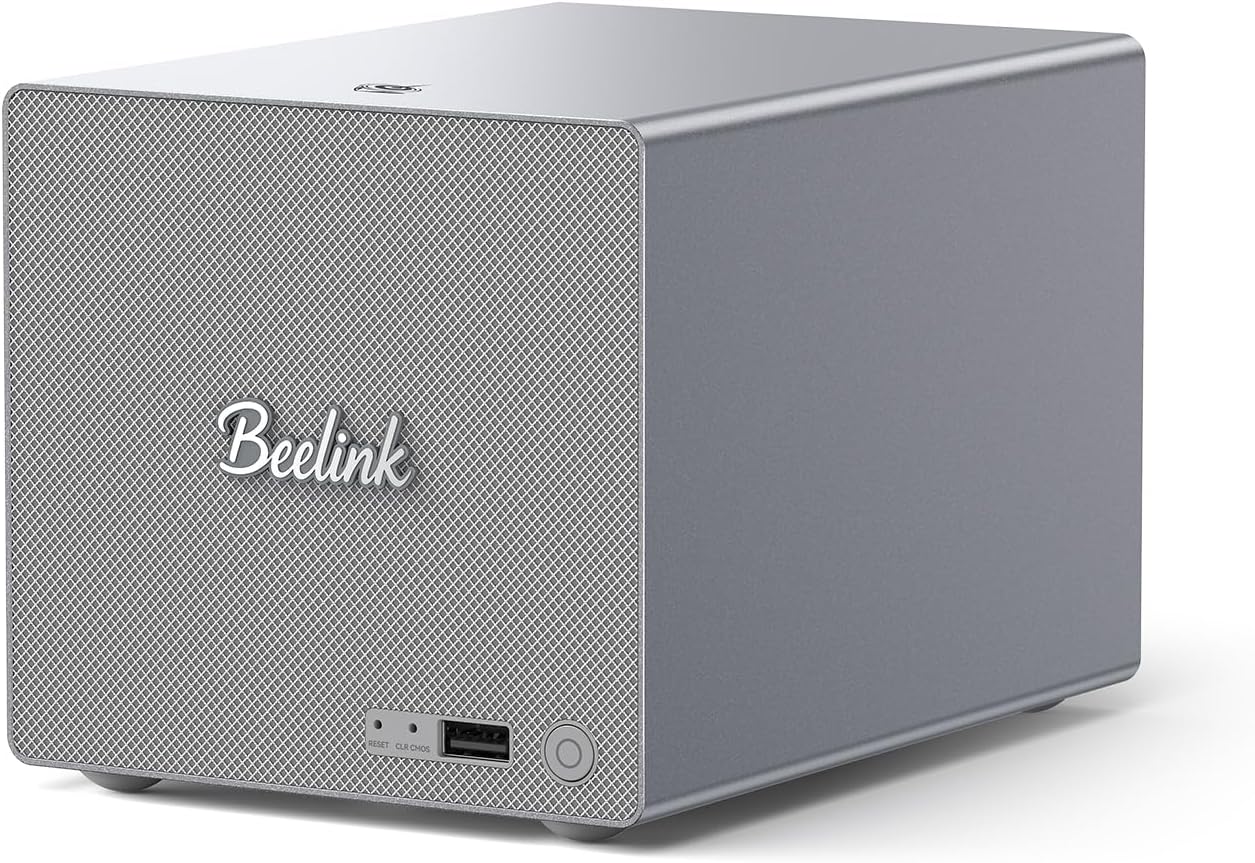
The Beelink Me Pro combines a compact form factor with two HDD bays, three M.2 positions, and dual network ports at 5GbE and 2.5GbE. Confirm supported drive dimensions, interfaces, and capacities against the exact configuration before building a pool.
This is the machine to buy when you want a single compact box running TrueNAS or Unraid as your primary storage platform. The Intel N150 provides adequate compute for file serving and basic Plex transcoding alongside NAS duties.
Specs:
| Spec | Detail |
|---|---|
| CPU | Intel N150 (4C/4T) |
| RAM | 16GB LPDDR5 (soldered) |
| Storage | Two HDD bays plus three M.2 positions; verify exact interfaces and supported drives |
| Networking | 1x 5GbE + 1x 2.5GbE |
| Power Draw | ~8W idle / ~30W load |
| Price | ~$400–450 |
NAS Software Compatibility:
- TrueNAS SCALE: ✅ Excellent
- Unraid: ✅ Works well
- OpenMediaVault: ✅ Works well
Pros:
- Two internal SATA bays — rare in mini PC form factor
- 5GbE + 2.5GbE dual network for fast transfers
- Five internal storage positions across the HDD bays and M.2 slots
- Low 8W idle power consumption
- Purpose-built for hybrid NAS/server role
Cons:
- SATA bays accept 2.5” drives only (max ~8TB per bay — no 3.5” HDDs)
- LPDDR5 is soldered — not upgradeable
- No ECC RAM support
- N150 compute limits additional VM/container workloads
Who should buy this: Anyone wanting a compact primary NAS that also handles file serving, basic Plex transcoding, and Docker containers — all in one small box.
Who should skip this: If you need 3.5” drives (the larger capacity options) or ECC RAM for critical data. The Minisforum N5 Air handles 3.5” drives.
🥈 Advanced NAS
Minisforum N5 Air
→ Check Current Price on Amazon
The Minisforum N5 Air steps into dedicated NAS appliance territory. With 5 HDD bays (accepting 3.5” drives up to ~20TB each), 3 M.2 slots, and dual high-speed networking (10GbE + 5GbE), it’s a purpose-built enterprise-lite NAS in a compact form factor.
If your primary requirement is a high-capacity storage server with maximum flexibility, the N5 Air is the most capable mini-PC-category product available in 2026. The AMD Ryzen 7 CPU provides plenty of headroom for transcoding, background tasks, and additional services alongside the NAS role.
Specs:
| Spec | Detail |
|---|---|
| CPU | AMD Ryzen 7 255 (8C/16T) |
| RAM | None included — 2× DDR5 SO-DIMM (upgradeable to 64GB) |
| Storage | Five HDD bays plus three M.2 positions; total capacity depends on supported drives |
| Networking | 1× 10GbE + 1× 5GbE |
| Power Draw | ~15–20W idle / ~80W load |
| Price | ~$519 |
Pros:
- 5x 3.5” HDD bays for maximum storage density — accepts full-size drives up to 20TB each
- 10GbE + 5GbE networking handles multi-user 4K video editing workflows over the network
- 8-core Ryzen 7 255 CPU leaves plenty of headroom for Plex transcoding alongside NAS duties
- 2× DDR5 SO-DIMM slots — upgrade RAM based on your workload (not included)
Cons:
- Starting at ~$500, costs 2.5x more than the Beelink Me Pro for users who only need basic file storage
- Larger form factor than typical mini PCs — closer to a small desktop than a palm-sized box
- Overkill for basic home NAS use cases under 20TB
Who should buy this: Homelab users who need a true large-capacity NAS (20TB+) with fast networking for video production workflows, multi-user file sharing, or backup server duties.
Who should skip this: Anyone with storage needs under 20TB — the Beelink Me Pro is more cost-effective.
🥉 Flexible Option
Minisforum UM790 Pro
→ Check Current Price on Amazon
If you want a capable compute platform that also handles NAS duties, the UM790 Pro with USB 3.2 or USB4 external storage enclosures is the most flexible approach. You get 8 cores for Proxmox + Docker while connecting external drives for storage.
The tradeoff: USB storage is slower than internal SATA for some workloads (though USB 3.2 Gen2 at 10Gbps is adequate for most NAS use cases). This approach works well for Unraid or simple SMB shares; it’s less ideal for ZFS with its write-intent logging. If you’re leaning toward a TrueNAS-first setup, consider a model with internal SATA instead.
Best configuration: USB4 (40Gbps) external NVMe enclosure for the ZFS cache pool, USB 3.2 Gen2 multi-bay enclosures for data drives.
Specs:
| Spec | Detail |
|---|---|
| CPU | AMD Ryzen 9 7940HS (8C/16T, up to 5.2GHz) |
| RAM | 32–64GB DDR5 SO-DIMM (upgradeable) |
| Storage | 1TB NVMe + 1 expansion M.2 slot |
| Networking | 1x 2.5GbE + WiFi 6E |
| Power Draw | ~7W idle / ~65W load |
| Price | ~$380–500 |
Pros:
- 8-core Ryzen 9 handles Proxmox, Docker, and Plex transcoding alongside NAS duties without breaking a sweat
- USB4 at 40Gbps connects high-speed external enclosures — fast enough for multi-drive NVMe arrays
- Upgradeable DDR5 up to 64GB for memory-hungry ZFS workloads
Cons:
- Zero internal SATA ports — you’re entirely dependent on USB enclosures for spinning drives
- Single 2.5GbE NIC bottlenecks large file transfers compared to the Me Pro’s 5GbE or the N5 Air’s 10GbE
Who should buy this: Homelab users who want a powerful all-in-one server running Proxmox or Docker and need NAS as a secondary function — not the primary workload.
Who should skip this: Anyone building a dedicated NAS with multiple internal drives. The Beelink Me Pro or N5 Air give you actual SATA bays without the USB enclosure hassle.
TrueNAS vs Unraid for Mini PCs
| Feature | TrueNAS SCALE | Unraid |
|---|---|---|
| Cost | Free | ~$49–129 license |
| ZFS support | Yes (native) | Plugin-based |
| Docker support | Excellent (TrueNAS 25+) | Excellent |
| VMs | Excellent | Good |
| ECC benefit | Yes (ZFS) | Less critical |
| RAID rebuilds | Faster (ZFS) | Parity-based (slower) |
| Mixed drive sizes | No (ZFS pools need matching) | Yes |
| Best for | ZFS reliability, large arrays | Flexibility, mixed drive sizes |
Head-to-Head Comparison
Compare any of these side by side, or against a model not listed here, with the mini PC comparison tool.
The N5 ladder: Air, Pro, and Max
| Model | Memory | Native storage | Network | Best fit |
|---|---|---|---|---|
| N5 Air | Upgradeable non-ECC DDR5 | Five HDD bays and three solid-state positions | 10GbE plus 5GbE | Storage-first value |
| N5 Pro | Upgradeable ECC-capable DDR5 up to 96GB | Five HDD bays and three M.2 or U.2 positions | 10GbE plus 5GbE | ZFS and heavier services |
| N5 Max 64GB | Fixed LPDDR5X unified memory | Five HDD bays and five M.2 positions | Dual 10GbE | NAS plus local AI |
The N5 Pro is the meaningful upgrade for a storage-first buyer who wants ECC-capable memory and more application headroom. The N5 Max is not automatically a better NAS: its Ryzen AI Max+ 395 and Radeon 8060S matter only if the same box will run local models or GPU-heavy applications. This guide covers the fixed-memory 64GB N5 Max retail configuration.
Budget the whole platform rather than the enclosure alone: memory for upgradeable models, OS storage, HDDs, NVMe cache or model storage, networking hardware, a UPS, and a separate backup target. None of these systems makes backup optional.
| Feature | Beelink Me Pro | Minisforum N5 Air | UM790 Pro + USB |
|---|---|---|---|
| Internal HDD bays | Two; verify exact interface and drive support | Five | None |
| M.2 slots | 3x | 3x | 2x |
| Max storage | Drive-dependent | Drive-dependent | Enclosure-dependent |
| CPU | N150 (4C) | Ryzen 7 (8C) | Ryzen 9 (8C) |
| Networking | 5GbE + 2.5GbE | 10GbE + 5GbE | 1x 2.5GbE |
| Power (idle) | ~8W | ~15–20W | ~7W |
| Price | ~$400–450 | ~$500–700 | ~$380–500 |
Power Consumption & Annual Running Cost
Run these figures against your own tariff in the power cost calculator.
| Mini PC | Idle (W) | Load (W) | Annual Cost (24/7 idle)* |
|---|---|---|---|
| Beelink Me Pro | ~8W | ~30W | ~$8.76/year |
| Minisforum UM790 Pro | ~7W | ~65W | ~$7/year |
| Minisforum N5 Air | ~15–20W | ~80W | ~$16–22/year |
*At $0.12/kWh. Does not include drive spin-up power.
Where these figures come from. Idle and load figures are drawn from published measurements rather than our own bench, and they match the sourced dataset behind our comparison tool: ServeTheHome wall measurements for the UM790 Pro, MS-A2 and the Strix Halo boxes, NotebookCheck for the Meteor Lake and Raptor Lake platforms, CNX Software for Alder Lake-N, and consistent owner reports where no reviewer figure exists. Where a figure is a platform-class estimate rather than a measurement of that exact chassis, it is an approximation and marked with a tilde. Annual cost assumes 24/7 operation at $0.12 per kWh; put your own rate into the power cost calculator.
Quick Picks Recap
| Pick | Mini PC | Drive Bays | Max Storage | Price | Link |
|---|---|---|---|---|---|
| 🥇 Best NAS Mini PC | Beelink Me Pro | Two HDD bays plus three M.2 | Drive-dependent | Check retailer | Check Price |
| 🥈 Advanced NAS | Minisforum N5 Air | Five HDD bays plus three M.2 | Drive-dependent | Check retailer | Check Price |
| 🥉 Flexible Base | Minisforum UM790 Pro | 1–2x M.2 + USB4 | Variable | ~$380–500 | Check Price |
Frequently Asked Questions
Can I run TrueNAS on a mini PC without SATA drives?
Yes. TrueNAS SCALE runs fine on NVMe-only hardware. Create a ZFS pool from NVMe drives for an all-flash NAS. It’s expensive per GB but extremely fast. For a home media library or backup target, 2TB NVMe drives are now under $150.
Does the Beelink Me Pro support ECC RAM?
No — consumer mini PCs don’t support ECC. For a home media library with regular backups, non-ECC is acceptable. For business-critical or truly irreplaceable data, use enterprise hardware with ECC.
How many drives can I connect via USB to a mini PC?
Practically: 2–4 drives via USB, depending on bus power and enclosure type. For a mini PC like the UM790 Pro with USB4, you can attach a multi-bay USB4 enclosure and access 4+ drives at 40Gbps aggregate bandwidth — adequate for most home NAS workloads.
Is TrueNAS or Unraid better for a mini PC?
For the Beelink Me Pro: either works. If you prioritize data integrity and ZFS reliability, TrueNAS SCALE. If you want flexibility (mixed drive sizes, simpler Docker management), Unraid. See our TrueNAS guide for a detailed comparison.
Can I use a mini PC NAS for Plex media streaming?
Yes — and it’s one of the best reasons to choose a mini PC over a dedicated NAS appliance. The Intel N150 in the Beelink Me Pro handles 1–2 simultaneous Plex transcodes. For 3+ concurrent streams or 4K HDR tone mapping, step up to the UM790 Pro’s Ryzen 9 7940HS. Install Plex as a Docker container alongside your NAS software.
How many drives can I connect to a mini PC NAS?
It depends on the model. The Beelink Me Pro has two HDD bays plus three M.2 positions. The Minisforum N5 Air fits five HDDs plus three M.2 positions. For systems without native bays, an external enclosure adds another controller, cable, and power path that must be planned and monitored.
How We Research These Picks
Each recommendation is tied to a specific product configuration and cross-checked against manufacturer documentation. Affiliate targets are checked for product identity during content refreshes. Prices are approximate, and this site does not publish live stock guarantees or claim first-party benchmarks without documented evidence.
Amazon Product Links
- 🗄️ Beelink Me Pro (Best NAS Mini PC): Check Price on Amazon
- 🏆 Minisforum N5 Air (Advanced NAS): Check Price on Amazon
- 🔷 Minisforum UM790 Pro (Flexible): Check Price on Amazon