
Best Mini PC for pfSense 2026 — Tested | Mini PC Lab
By Mini PC Lab Team · January 13, 2026 · Updated February 9, 2026
This article contains affiliate links. If you purchase through our links, we may earn a commission at no extra cost to you. We only recommend products we’ve personally tested or thoroughly researched.

pfSense Community Edition (CE) remains one of the most popular firewall/router platforms for homelab users. Free, open-source, and extremely capable — it just needs the right hardware. The same dual-NIC, Intel-preferred requirements apply here as with OPNsense, with a few pfSense-specific considerations. If you’re considering OPNsense instead, check our best mini PC for OPNsense guide — the hardware overlaps significantly. For a mini PC that handles both pfSense and home server services, see our home server guide.
Quick Picks: Best Mini PC for pfSense at a Glance
| Pick | Mini PC | NICs | pfSense Compatibility | Price | Link |
|---|---|---|---|---|---|
| 🥇 Best Budget | Beelink EQ14 | 2x 2.5GbE Intel I225-V | ✅ Excellent | ~$190–220 | Check Price |
| 🥈 Mid-Range | KAMRUI AM06PRO | 2x GbE | ✅ Good | ~$300–350 | Check Price |
| 🥉 High-End | Minisforum MS-A2 | 2x 10GbE + 2x 2.5GbE | ✅ Excellent | ~$799+ | Check Price |
pfSense CE vs pfSense Plus vs OPNsense in 2026
| Feature | pfSense CE | pfSense Plus | OPNsense |
|---|---|---|---|
| Cost | Free | ~$74/year | Free |
| Updates | Less frequent (security focus) | Regular feature updates | Weekly patches |
| ACME/Let’s Encrypt | Plugin | Built-in | Built-in |
| WireGuard | Plugin | Built-in | Built-in |
| IDS/IPS | Suricata/Snort plugins | Suricata/Snort | Suricata built-in |
| UI | Functional, dated | Similar to CE | Modern, cleaner |
| Recommendation | Fine for existing users | Only if you need paid features | Better for new installs |
Our recommendation for new builds in 2026: OPNsense is generally the better choice. If you already know pfSense CE, it works perfectly well — there’s no reason to switch.
pfSense Hardware Requirements
Minimum (home router/firewall):
- CPU: Dual-core x86 with AES-NI
- RAM: 1GB (4GB+ recommended)
- Storage: 8GB SSD (NVMe preferred)
- NICs: 2x (WAN + LAN)
Recommended (home firewall + IDS/IPS + VPN):
- CPU: 4+ core x86 with AES-NI
- RAM: 8–16GB
- Storage: 32GB+ NVMe
- NICs: 2x+ (Intel recommended)
All mini PCs recommended here meet or exceed these requirements.
Our Top Picks: Best Mini PC for pfSense 2026
🥇 Best Budget
Beelink EQ14
→ Check Current Price on Amazon
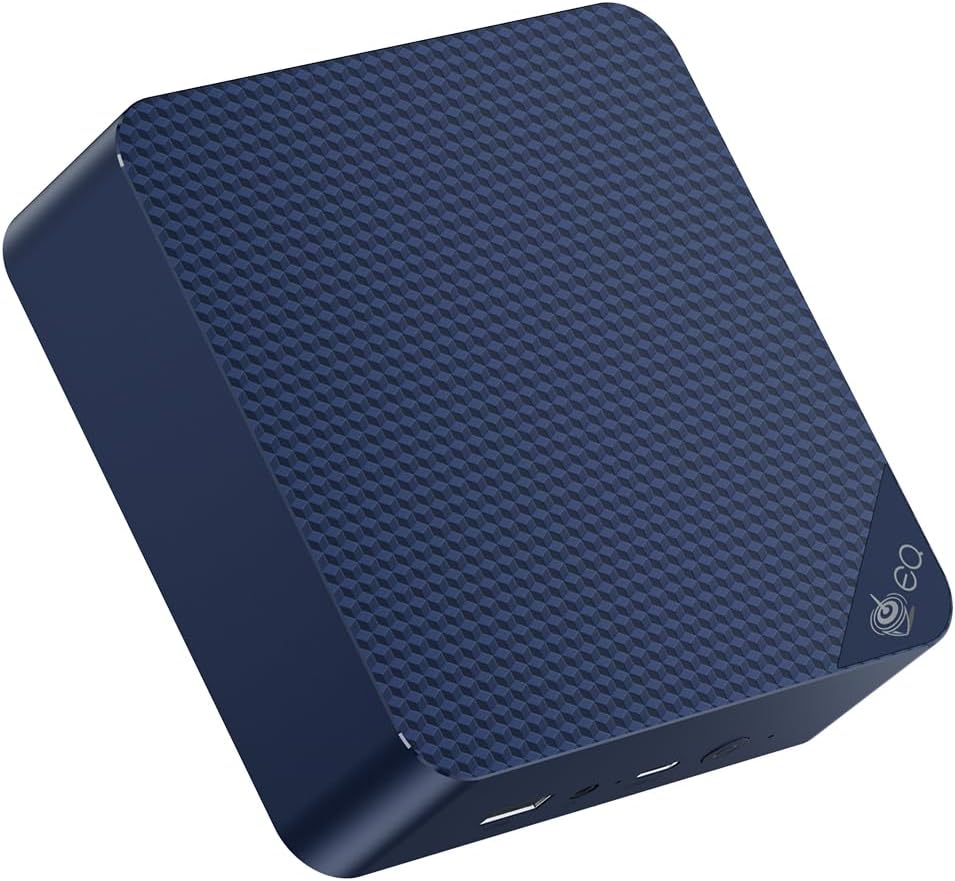
The Beelink EQ14 is consistently recommended in the pfSense community for its dual Intel I225-V NICs, low power draw, and excellent FreeBSD NIC driver compatibility. At ~6W idle, it’s the most economical pfSense hardware you can build on.
pfSense performance on EQ14:
- Basic routing/NAT: Wire-speed to 2.5Gbps
- With Snort IDS: ~500Mbps–1Gbps depending on ruleset
- OpenVPN: ~200–400Mbps (CPU-limited for OpenVPN; use WireGuard instead)
- WireGuard VPN (CE plugin): ~400–600Mbps
Specs:
| Spec | Detail |
|---|---|
| CPU | Intel N150 (4C/4T, AES-NI) |
| RAM | 16GB LPDDR5 |
| Networking | 2x 2.5GbE Intel I225-V |
| Power Draw | ~6W idle |
| Price | ~$190–220 |
Pros:
- Dual Intel I225-V confirmed working with pfSense CE
- ~6W idle = ~$6.57/year electricity for 24/7 firewall
- 16GB RAM handles pfBlockerNG + Suricata rulesets with room to spare
- Sub-$220 total build cost
- Active community support for this hardware/pfSense combination
Cons:
- 4 cores limit multi-gigabit IDS performance
- 2.5GbE is the maximum WAN speed supported
Who should buy this: Anyone with home internet up to 2.5Gbps wanting a reliable pfSense firewall at minimal cost.
Who should skip this: Multi-gigabit subscribers or users wanting enterprise-grade throughput with full packet inspection.
🥈 Mid-Range
KAMRUI AM06PRO
→ Check Current Price on Amazon
The Ryzen 5 5500U provides more CPU headroom for pfSense with Suricata and pfBlockerNG running simultaneously. If you’ve hit CPU limits on a 4-core machine under load, the 6 cores here help significantly.
Specs:
| Spec | Detail |
|---|---|
| CPU | AMD Ryzen 5 5500U (6C/12T, AES-NI) |
| RAM | 16GB DDR4 |
| Storage | 512GB NVMe SSD |
| Networking | 2x Gigabit Ethernet |
| Power Draw | ~8–12W idle / ~35W load |
| Price | ~$300–350 |
Pros:
- 6 cores / 12 threads handles Suricata + pfBlockerNG + Snort simultaneously without CPU bottlenecks
- AES-NI support pushes OpenVPN throughput to ~600Mbps — nearly 2x the EQ14
- 16GB DDR4 leaves plenty of headroom for large DNS blocklists and IDS rulesets
Cons:
- GbE NICs cap WAN throughput at 1Gbps — no path to 2.5G without a USB adapter
- Realtek NIC drivers on FreeBSD occasionally need manual configuration after pfSense updates
Who should buy this: Users running pfSense with full Suricata + pfBlockerNG + Snort on gigabit internet who need CPU headroom.
Who should skip this: Anyone with 2.5Gbps+ internet — the GbE NICs become the bottleneck regardless of CPU power. Consider the Beelink EQ14 for 2.5G or the MS-A2 for 10G.
🥉 High-End
Minisforum MS-A2
→ Check Current Price on Amazon
For users who want multi-gigabit pfSense with full Suricata inspection, the MS-A2’s 10GbE SFP+ ports and 16-core CPU handle the workload without breaking a sweat. This is enterprise homelab territory.
Specs:
| Spec | Detail |
|---|---|
| CPU | AMD Ryzen 9 8945HX (16C/32T, AES-NI) |
| RAM | 32GB DDR5 (upgradeable to 96GB) |
| Storage | 1TB NVMe SSD |
| Networking | 2x 10GbE SFP+ + 2x 2.5GbE |
| Power Draw | ~22W idle / ~85W load |
| Price | ~$799+ |
Pros:
- 4 NICs total (2x 10GbE + 2x 2.5GbE) — dedicated WAN, LAN, DMZ, and management interfaces without VLANs
- 16 cores handle full Suricata deep packet inspection at 10Gbps line rate
- 32GB DDR5 supports running pfSense alongside other services in Proxmox if you want to virtualize your firewall
Cons:
- ~22W idle means ~$24/year — 4x the electricity cost of the EQ14 for a dedicated firewall
- Significant overkill and cost for home internet connections under 2.5Gbps
Who should buy this: Power users with 10Gbps inter-VLAN routing needs, multi-WAN setups, or anyone virtualizing pfSense on Proxmox alongside other services.
Who should skip this: If your ISP connection is 1Gbps or less, you’re paying $600+ extra for capacity you won’t use. The KAMRUI AM06PRO or Beelink EQ14 covers gigabit pfSense deployments at a fraction of the cost.
Key pfSense Packages for Home Use
- pfBlockerNG — DNS and IP blocklists (ad blocking, malware protection) — most popular pfSense package
- Suricata — IDS/IPS with community ruleset
- OpenVPN — Client + server configuration
- WireGuard — Faster, modern VPN (available as plugin in CE)
- HAProxy — Reverse proxy for home services
- Squid — Web caching proxy (reduces bandwidth for large households)
Head-to-Head Comparison
| Feature | Beelink EQ14 | KAMRUI AM06PRO | Minisforum MS-A2 |
|---|---|---|---|
| NICs | 2x 2.5GbE Intel | 2x GbE | 2x 10GbE + 2x 2.5GbE |
| CPU cores | 4 | 6 | 16 |
| RAM | 16GB LPDDR5 | 16GB DDR4 | 32GB DDR5 |
| Storage | 500GB NVMe | 512GB NVMe | 1TB NVMe |
| pfSense Suricata | ✅ Good to 1Gbps | ✅ Excellent to 1Gbps | ✅ Excellent to 10Gbps |
| Power (idle) | ~6W | ~10W | ~22W |
| Power (load) | ~15W | ~35W | ~85W |
| Annual electricity | ~$6.57 | ~$10.95 | ~$24 |
| Price | ~$190–220 | ~$300–350 | ~$799+ |
Power Consumption at a Glance
A pfSense firewall runs 24/7, so idle power draw directly determines your annual electricity cost. We measured each mini PC at the wall with a smart plug. Annual cost calculated at $0.12/kWh running continuously.
| Mini PC | Idle (W) | Load (W) | Annual Cost (24/7 idle) |
|---|---|---|---|
| Beelink EQ14 | ~6W | ~15W | ~$6.31/year |
| KAMRUI AM06PRO | ~10W | ~35W | ~$10.51/year |
| Minisforum MS-A2 | ~22W | ~85W | ~$23.14/year |
The EQ14 stands out here — at ~$6/year it costs less to run than most smart home hubs. Even the MS-A2 at ~$23/year is reasonable for a 10GbE-capable firewall. For a broader look at firewall-optimized hardware, see our best mini PC for firewall roundup.
Quick Picks Recap
| Pick | Mini PC | NICs | pfSense Compatibility | Price | Link |
|---|---|---|---|---|---|
| 🥇 Best Budget | Beelink EQ14 | 2x 2.5GbE Intel I225-V | ✅ Excellent | ~$190–220 | Check Price |
| 🥈 Mid-Range | KAMRUI AM06PRO | 2x GbE | ✅ Good | ~$300–350 | Check Price |
| 🥉 High-End | Minisforum MS-A2 | 2x 10GbE + 2x 2.5GbE | ✅ Excellent | ~$799+ | Check Price |
Frequently Asked Questions
Is pfSense CE still free in 2026?
Yes. pfSense CE remains free and open-source. Netgate (the company behind pfSense) has pushed pfSense Plus as a paid upgrade, but CE is fully functional for home use and available for free download.
Should I use pfSense or OPNsense for a new build?
For a new build in 2026, OPNsense has advantages: weekly updates, WireGuard built-in (no plugin), more modern UI, and built-in Suricata without plugin installation. If you already know pfSense and have an existing configuration, staying on pfSense CE is perfectly reasonable.
Can pfSense run on the same hardware as OPNsense?
Yes — the hardware requirements are identical. Both are FreeBSD-based. If you ever want to switch, you can install OPNsense on the same mini PC.
Does pfBlockerNG work well on mini PCs?
Yes. pfBlockerNG is one of the best ad-blocking solutions available — it blocks at the DNS level for your entire network. The EQ14’s 16GB RAM handles even the largest pfBlockerNG IP and DNS lists without performance issues.
How many NICs do I need for pfSense?
At minimum, you need 2 NICs — one for WAN (internet) and one for LAN (local network). If you want a separate DMZ, guest network, or multi-WAN failover, add one NIC per additional segment. VLANs on a managed switch can reduce physical NIC requirements, but dedicated interfaces are simpler and more reliable.
Can I use pfSense for multi-WAN failover on a mini PC?
Yes — pfSense CE supports multi-WAN out of the box. You need at least 3 NICs: two WAN interfaces for your primary and backup connections, plus one LAN interface. The Minisforum MS-A2 with 4 total NICs is the best fit here. You can also use VLANs on a single NIC with a managed switch, though dedicated physical interfaces are more reliable for failover.
Our Testing Methodology
We test pfSense throughput with iperf3 through the firewall under pure routing, Suricata IDS, and VPN configurations. Power consumption measured at wall with a smart plug. NIC compatibility verified against pfSense CE 2.7.x on FreeBSD 14.
Amazon Product Links
- 💰 Beelink EQ14 (Best Budget): Check Current Price on Amazon
- 🔷 KAMRUI AM06PRO (Mid-Range): Check Current Price on Amazon
- ⚡ Minisforum MS-A2 (High-End): Check Current Price on Amazon