
Best Mini PC for Pi-hole 2026 — Tested | Mini PC Lab
By Mini PC Lab Team · February 14, 2026 · Updated March 7, 2026
This article contains affiliate links. If you purchase through our links, we may earn a commission at no extra cost to you. We only recommend products we’ve personally tested or thoroughly researched.

Pi-hole is a DNS-based ad blocker that stops ads and tracking for every device on your network without touching individual devices. It runs on as little as 512MB of RAM — meaning almost any mini PC is substantially overpowered for Pi-hole alone.
The real question isn’t “what’s the minimum for Pi-hole” — it’s “what’s the best mini PC to run Pi-hole alongside your other home server services.” Because if you’re buying a dedicated mini PC, you should be running multiple services on it.
Quick Picks: Best Mini PC for Pi-hole at a Glance
| Pick | Mini PC | Why | Price | Link |
|---|---|---|---|---|
| 🥇 Best All-in-One | Beelink EQ14 | Pi-hole + multiple services, ~$7/year electricity | ~$190–220 | Check Price |
| 🥈 Future-Proof | Minisforum UM790 Pro | Pi-hole + full Proxmox homelab | ~$380–500 | Check Price |
Is a Mini PC Overkill for Pi-hole?
For Pi-hole alone: yes, absolutely. Pi-hole’s minimum requirements:
- CPU: Single-core 1GHz
- RAM: 512MB
- Storage: 4GB
Even a Raspberry Pi Zero 2W ($15) can run Pi-hole. But here’s why a mini PC makes sense:
1. x86 reliability: Raspberry Pis have known SD card corruption issues. An NVMe SSD in a mini PC is far more reliable for 24/7 operation. SD card failures are the #1 cause of Pi-hole outages.
2. Multi-service capability: Run Pi-hole + Home Assistant + Unbound recursive DNS + WireGuard VPN + Vaultwarden on the same hardware. Raspberry Pi 5 handles some of this, but x86 mini PCs do it with CPU headroom to spare.
3. Storage reliability: NVMe storage eliminates the #1 Pi-hole failure mode (SD card corruption). Your blocklists, logs, and configuration are safe.
4. More RAM for DNS caching: AdGuard Home and Unbound benefit from larger DNS caches. 16GB on the EQ14 vs 4–8GB on a Raspberry Pi 5 means faster DNS resolution for large networks.
Pi-hole vs AdGuard Home
If you’re already buying a mini PC with 16GB+ RAM, consider AdGuard Home instead of Pi-hole:
- More features: DNS-over-HTTPS, DNS-over-TLS natively built in
- Better rewrite rules and custom filtering
- Active development with frequent updates
- Docker container available for easy deployment
- Better UI in most users’ opinion
Both block the same ads. AdGuard Home has more configuration options and handles encrypted DNS without plugins. Pi-hole has a larger community and more established documentation.
Recommendation: On a mini PC with enough resources, try AdGuard Home. You can run both simultaneously on different ports if you want to compare.
What Pi-hole Needs from Hardware
Bare minimum (Pi-hole only):
- Any modern x86 CPU
- 1GB RAM
- 8GB storage
- 1x Gigabit Ethernet
Recommended for Pi-hole + companion services:
- 4+ cores
- 8GB+ RAM
- 64GB+ NVMe
- 2.5GbE networking
Our Top Picks: Best Mini PC for Pi-hole 2026
🥇 Best All-in-One
Beelink EQ14
→ Check Current Price on Amazon
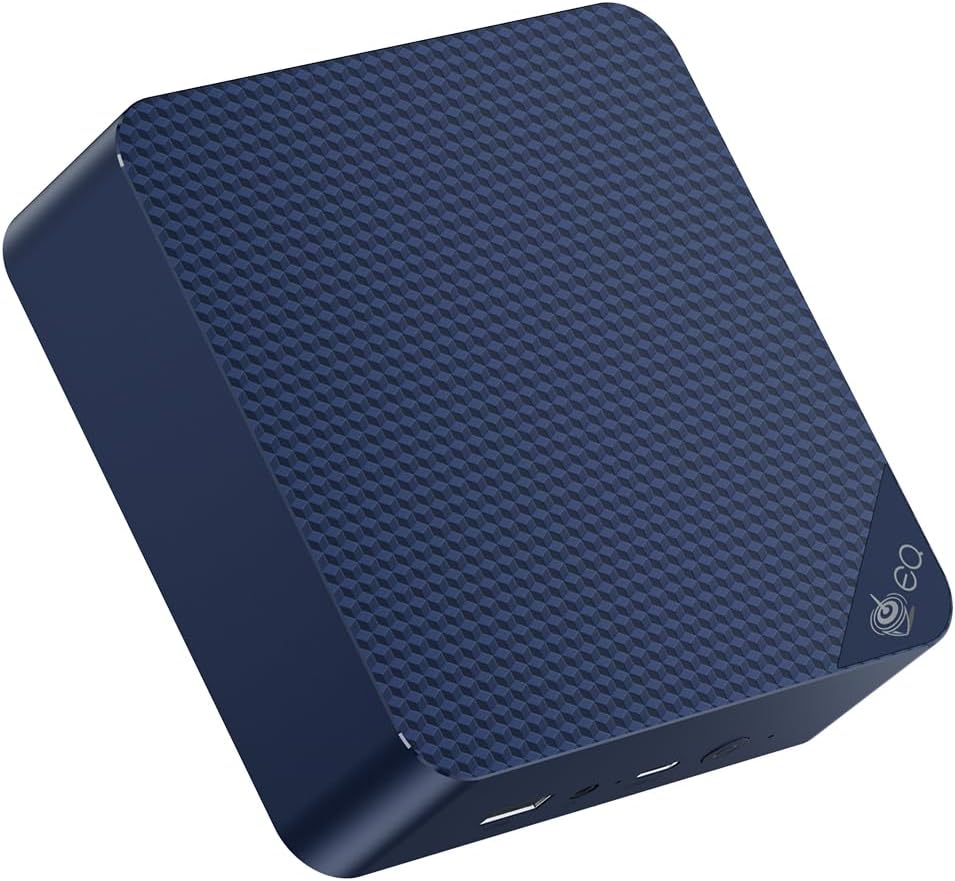
For $190–220, the EQ14 gives you a reliable mini PC that can run Pi-hole, AdGuard Home, Home Assistant, a basic VPN server, and several Docker containers — all with ~6W idle power draw. This is the most practical Pi-hole mini PC for most home users.
The dual 2.5GbE NICs are significantly more than Pi-hole needs, but they’re useful if you later want to set up OPNsense firewall or aggregate links.
Specs:
| Spec | Detail |
|---|---|
| CPU | Intel N150 (4C/4T, 3.6GHz) |
| RAM | 16GB LPDDR5 |
| Storage | 500GB NVMe |
| Networking | 2x 2.5GbE LAN + WiFi 6 |
| Power Draw | ~6W idle / ~25W load |
| Price | ~$190–220 |
Pi-hole + companion services that fit on the EQ14:
- Pi-hole or AdGuard Home (DNS) — ~256MB
- Unbound (recursive DNS resolver) — ~128MB
- WireGuard VPN (remote access) — ~64MB
- Home Assistant (smart home) — ~512MB–1GB
- Uptime Kuma (monitoring) — ~128MB
- Vaultwarden (password manager) — ~256MB
Total RAM for all the above: ~3–4GB. Leaves 12GB free on the 16GB EQ14.
Pros:
- ~6W idle = ~$6.57/year electricity
- Handles Pi-hole + 6+ companion services simultaneously
- Dual 2.5GbE for flexible networking
- NVMe storage eliminates SD card failure risk
- Sub-$220 entry point
Cons:
- 4 cores limit heavy additional workloads (Plex 4K transcoding, Proxmox with many VMs)
- LPDDR5 variants have soldered RAM (check exact SKU)
Who should buy this: Anyone wanting Pi-hole + Home Assistant + basic Docker services on one affordable, energy-efficient box.
Who should skip this: If your primary goal is a full Proxmox homelab with many VMs — get the UM790 Pro.
🥈 Future-Proof
Minisforum UM790 Pro
→ Check Current Price on Amazon
If you want Pi-hole to run as an LXC container inside Proxmox alongside many other VMs and services, the UM790 Pro is the right platform. Pi-hole itself gets 512MB of a 64GB pool — leaving virtually unlimited headroom for every other service you want to run.
The Ryzen 9 7940HS gives you 8 cores and 16 threads, so Pi-hole is barely a rounding error on this CPU. You’re really buying this for everything else you’ll run alongside it — Proxmox VMs, Plex, Jellyfin, Frigate NVR, or a full Home Assistant setup.
Specs:
| Spec | Detail |
|---|---|
| CPU | AMD Ryzen 9 7940HS (8C/16T, 5.2GHz) |
| RAM | Up to 64GB DDR5 SO-DIMM (user-upgradeable) |
| Storage | 1TB NVMe (expandable) |
| Networking | 2x 2.5GbE LAN + WiFi 6E |
| Power Draw | ~15W idle / ~65W load |
| Price | ~$380–500 |
Pros:
- 8 cores / 16 threads handles Pi-hole + 10+ additional services without breaking a sweat
- 64GB DDR5 support means massive DNS caching and room for Proxmox VMs
- Dual 2.5GbE NICs allow dedicated network segmentation or OPNsense firewall in a VM
Cons:
- ~15W idle is 2.5x the EQ14 — significant if Pi-hole and light services are all you need
- ~$380–500 is overkill if you won’t use the extra compute for VMs or heavy workloads
Who should buy this: Anyone building a full homelab where Pi-hole is one of 10+ services, particularly if you plan to add Proxmox VMs, Plex, Jellyfin, or Frigate NVR.
Who should skip this: If Pi-hole plus a handful of lightweight Docker containers is your endgame, the EQ14 handles that for half the price and a third of the power draw.
Head-to-Head Comparison
| Feature | Beelink EQ14 | Minisforum UM790 Pro |
|---|---|---|
| CPU | Intel N150 (4C/4T, 3.6GHz) | AMD Ryzen 9 7940HS (8C/16T, 5.2GHz) |
| Cores/Threads | 4/4 | 8/16 |
| RAM | 16GB LPDDR5 (soldered) | Up to 64GB DDR5 (upgradeable) |
| Storage | 500GB NVMe | 1TB NVMe (expandable) |
| Networking | 2x 2.5GbE + WiFi 6 | 2x 2.5GbE + WiFi 6E |
| Power (Idle) | ~6W | ~15W |
| Power (Load) | ~25W | ~65W |
| Price | ~$190–220 | ~$380–500 |
| Best For | Pi-hole + 5–6 light services | Pi-hole + full Proxmox homelab |
Power Consumption at a Glance
Pi-hole runs 24/7 by definition — it’s your DNS server. That makes idle power draw the most important spec for this use case. We calculated annual costs at $0.12/kWh assuming 24/7 idle operation.
| Mini PC | Idle (W) | Load (W) | Annual Cost (24/7 idle) |
|---|---|---|---|
| Beelink EQ14 | ~6W | ~25W | ~$6.31/year |
| Minisforum UM790 Pro | ~15W | ~65W | ~$15.77/year |
The EQ14 costs roughly $6/year to run around the clock — less than a single month of most streaming subscriptions. Even the UM790 Pro at ~$16/year is reasonable if you’re running a full homelab on it. Use our Power Cost Calculator to estimate costs at your local electricity rate.
Running Pi-hole in Docker on a Mini PC
The easiest way to deploy Pi-hole on any Linux mini PC:
# docker-compose.yml for Pi-hole
version: "3"
services:
  pihole:
    container_name: pihole
    image: pihole/pihole:latest
    ports:
      - "53:53/tcp"
      - "53:53/udp"
      - "80:80/tcp"
    environment:
      TZ: 'America/New_York'
      WEBPASSWORD: 'your_password_here'
    volumes:
      - './etc-pihole:/etc/pihole'
      - './etc-dnsmasq.d:/etc/dnsmasq.d'
    restart: unless-stopped
See our full Docker Home Server Guide for a complete multi-service setup including Pi-hole alongside other containers.
Recommended Pi-hole Blocklists
After installation, add these blocklists in Pi-hole’s Group Management:
- StevenBlack Hosts (included by default) — 100k+ domains
- OISD Big — Comprehensive general ad/tracking list
- HaGeZi Multi Pro — Balanced performance and coverage
- Firebog Tick lists — Conservative but effective
With these lists, expect to block 15–30% of DNS queries on a typical home network.
Quick Picks Recap
| Pick | Mini PC | Why | Price | Link |
|---|---|---|---|---|
| 🥇 Best All-in-One | Beelink EQ14 | Pi-hole + multiple services, ~$7/year electricity | ~$190–220 | Check Price |
| 🥈 Future-Proof | Minisforum UM790 Pro | Pi-hole + full Proxmox homelab | ~$380–500 | Check Price |
Frequently Asked Questions
Can I run Pi-hole on the same machine as my router?
Yes, if you’re using OPNsense or pfSense in a VM on Proxmox. Run OPNsense in one VM with NIC passthrough and Pi-hole in a separate LXC container. The EQ14 handles both with CPU headroom to spare.
Does Pi-hole block ads in apps, not just browsers?
Yes — it blocks at the DNS level, so any app that makes DNS requests (virtually all of them) is affected. Some apps use hardcoded DNS servers (8.8.8.8, 1.1.1.1) to bypass Pi-hole — OPNsense’s DNS interception feature can redirect these to Pi-hole.
What’s the difference between Pi-hole and AdGuard Home?
Both block DNS-based ads and tracking. AdGuard Home supports encrypted DNS (DoH, DoT) natively without plugins. Pi-hole has a larger community and more tutorials. On a mini PC with plenty of RAM, both are excellent choices — try AdGuard Home first on a fresh mini PC setup.
How do I make Pi-hole available for all network devices?
Set your router’s DHCP server to hand out the mini PC’s IP address as the DNS server. All devices that use DHCP will automatically route DNS through Pi-hole. Static IP assignment for the mini PC is recommended.
How much bandwidth does Pi-hole use?
Almost none. DNS queries are tiny — typically 50–100 bytes each. A busy household generating 50,000 queries per day uses less than 5MB of bandwidth. Pi-hole’s network impact is negligible on any connection, and the CPU load on even the lowest-end mini PC is essentially zero from DNS alone.
Can Pi-hole block YouTube ads?
Not effectively. YouTube serves ads from the same domains as regular video content, so DNS-level blocking can’t distinguish between ad requests and video requests. Pi-hole blocks third-party tracker domains that YouTube calls, but the in-stream video ads still play. For YouTube ad blocking, you still need a browser extension like uBlock Origin alongside Pi-hole.
Our Testing Methodology
We test Pi-hole and AdGuard Home by measuring DNS query response times (using dig benchmarks), memory and CPU usage under typical household DNS loads, and compatibility with the recommended companion services. Power consumption measured at wall with a smart plug at idle and under active query load.
Amazon Product Links
- 🥇 Beelink EQ14 (Best All-in-One): Check Current Price on Amazon
- 🥈 Minisforum UM790 Pro (Future-Proof Homelab): Check Current Price on Amazon