
This article contains affiliate links. If you purchase through our links, we may earn a commission at no extra cost to you. We only recommend products we’ve thoroughly researched and verified.

TrueNAS is the gold standard for home NAS software — enterprise-grade, ZFS-based, and free (TrueNAS SCALE). The challenge with mini PCs: most don’t have SATA ports for traditional HDDs, and ZFS has specific RAM requirements that you need to plan for.
Here’s how to make TrueNAS work well on a mini PC, and which hardware to buy. If you’re comparing NAS platforms, our best mini PC for NAS roundup covers hardware across all NAS software, and our Unraid mini PC guide is worth reading if you haven’t committed to ZFS yet. For a mini PC that handles storage alongside other services, our home server guide covers the best multi-workload options.
Quick Picks: Best Mini PC for TrueNAS at a Glance
| Pick | Mini PC | Drive Connectivity | Price | Link |
|---|---|---|---|---|
| 🥇 Best TrueNAS Mini PC | Beelink Me Pro | Two HDD bays plus three M.2 | Check retailer | Check Price |
| 🥈 Advanced | Minisforum N5 Air | 5x HDD + 3x M.2 | ~$519 | Check Price |
| 🥉 All-in-One | Minisforum UM790 Pro | M.2 + USB | ~$380–500 | Check Price |
TrueNAS Hardware Requirements
Rather than sizing from a generic table, run your intended pool through the TrueNAS hardware calculator. It applies the documented per-drive, deduplication, L2ARC, and directory-services allowances to your own build and shows the usable capacity left after parity.
TrueNAS SCALE (current, recommended):
- CPU: Any x86-64 with AES-NI
- RAM: size ARC and application memory from the working set rather than the obsolete 1GB-per-TB shortcut
- Boot device: Separate from data pool (use a dedicated M.2 or USB drive for OS)
- Storage: SATA or NVMe preferred over USB for data drives
ECC RAM note: TrueNAS documentation recommends ECC RAM to protect against RAM bit flips causing ZFS data corruption. Consumer mini PCs don’t support ECC. For a home media library with regular backups, non-ECC is acceptable. For business-critical or irreplaceable data, use enterprise hardware (HPE MicroServer, Dell T-series).
ZFS RAM allocation guide:
| Pool Size | Minimum RAM | Recommended RAM |
|---|---|---|
| 1–4TB | 8GB | 16GB |
| 4–10TB | 16GB | 32GB |
| 10–20TB | 32GB | 64GB |
| 20TB+ | 64GB | ECC server hardware |
What to Look for in a TrueNAS Mini PC
1. Drive connectivity — the critical factor TrueNAS works best with direct-attached SATA or NVMe. USB drives work but add complexity and limit ZFS performance features.
2. RAM capacity ZFS ARC (the read cache) uses available RAM aggressively. More RAM = faster reads from cache. With 16GB, ZFS takes 8–10GB for ARC; the rest runs TrueNAS + apps.
3. Boot drive separation Always boot TrueNAS from a separate drive, not from your data pool. A dedicated M.2 slot for the OS is ideal.
4. Networking for NAS throughput SMB file transfers: 125MB/s on gigabit, 312MB/s on 2.5GbE, 1.25GB/s on 10GbE. Match your networking to your use case.
Our Top Picks: Best Mini PC for TrueNAS 2026
🥇 Best TrueNAS Mini PC
Beelink Me Pro
→ Check Current Price on Amazon
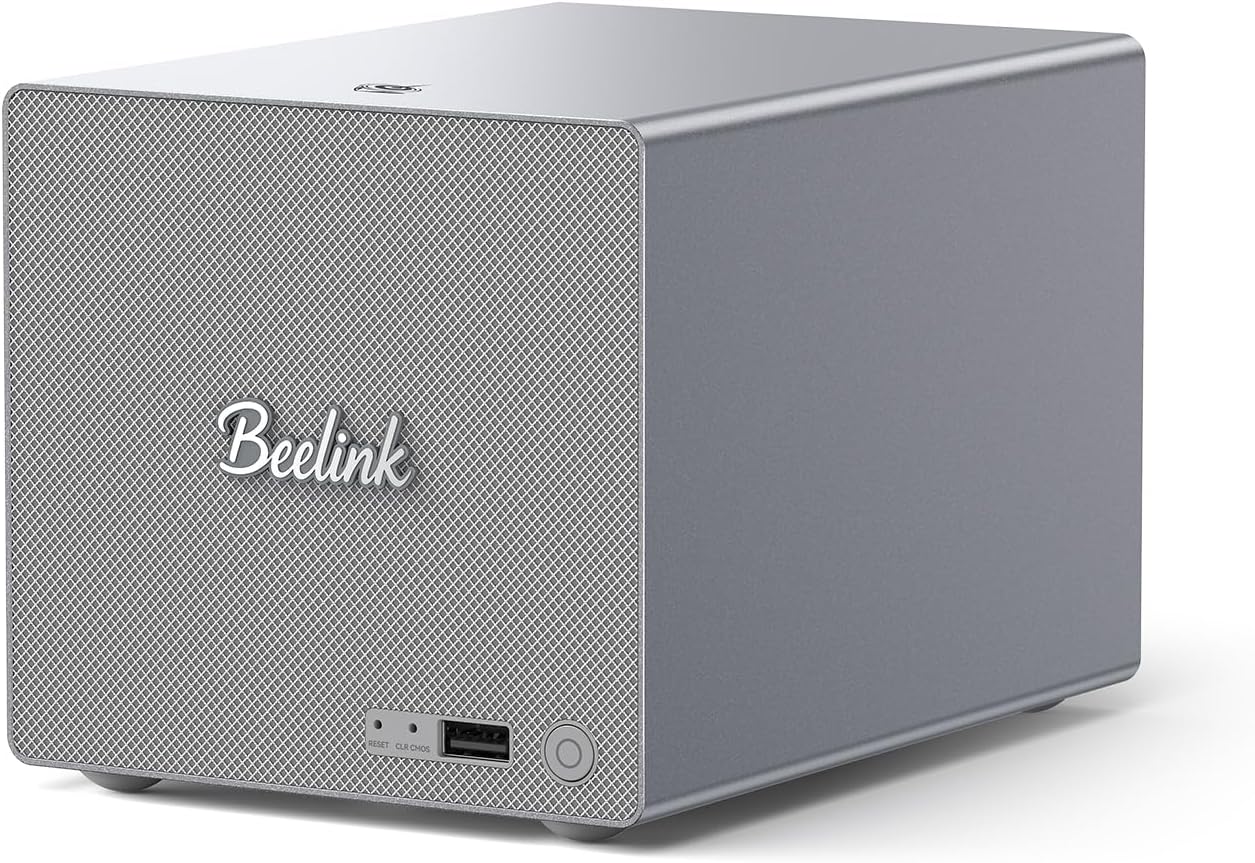
The Beelink Me Pro has two HDD bays plus three M.2 positions. Verify the exact drive interfaces and supported dimensions before assigning boot, data, or cache roles; do not infer a SATA topology from the number of bays.
Recommended TrueNAS configuration on Beelink Me Pro:
- Boot: use supported dedicated media when the exact platform layout permits it
- ZFS data pool: use the two verified HDD bays as a mirror only after confirming their interface and drive support
- Cache: add L2ARC only after measurement shows a read-cache problem and sufficient RAM is available
- Network: 5GbE for LAN data transfers, 2.5GbE for management or iSCSI
Specs:
| Spec | Detail |
|---|---|
| CPU | Intel N150 (4C/4T) |
| RAM | 16GB LPDDR5 (soldered) |
| Storage | Three M.2 positions plus two HDD bays; verify exact interfaces and drive support |
| Networking | 1x 5GbE + 1x 2.5GbE |
| Power Draw | ~8W idle / ~30W load |
| Price | ~$400–450 |
TrueNAS Compatibility:
- TrueNAS SCALE: ✅ Excellent
- SATA drives: ✅ Native
- iSCSI/NFS: ✅ Full support
- Apps (Docker containers): ✅ TrueNAS 25+
Pros:
- Internal SATA bays — native ZFS pool connectivity
- 5GbE + 2.5GbE dual network for fast transfers
- 3x M.2 slots for boot + cache + additional storage
- Low 8W idle power cost
Cons:
- SATA bays accept 2.5” drives only (max ~8TB each — no 3.5” HDDs)
- LPDDR5 soldered — cannot upgrade RAM
- 16GB limits ZFS ARC for pools larger than 8TB
Who should buy this: Anyone wanting a purpose-built compact TrueNAS appliance with SATA drives and fast networking in a small form factor.
Who should skip this: If you need 3.5” drives for maximum storage density — the Minisforum N5 Air is the right tool.
🥈 Advanced
Minisforum N5 Air
→ Check Current Price on Amazon
For a proper TrueNAS SCALE NAS with multiple 3.5” HDDs, the Minisforum N5 Air is the only mini-PC-category product that supports them. Five HDD bays (accepting 3.5” drives up to ~20TB each), 3 M.2 slots, and dual high-speed networking (10GbE + 5GbE).
Example TrueNAS RAIDZ2 configuration:
- 4x 8TB HDDs in RAIDZ2 = 16TB usable, 2-drive fault tolerance
- Add a power-loss-protected SLOG only for workloads bottlenecked by synchronous writes
- 1x M.2 NVMe as L2ARC read cache
- 10GbE port for fast local transfers (up to ~1.25GB/s over NFS/SMB)
Specs:
| Spec | Detail |
|---|---|
| CPU | AMD Ryzen 7 255 (8C/16T) |
| RAM | None included — 2× DDR5 SO-DIMM (upgradeable to 64GB) |
| Storage | Five HDD bays plus three M.2 positions; total capacity depends on supported drives |
| Networking | 1× 10GbE + 1× 5GbE |
| Power Draw | ~15–20W idle / ~65W load |
| Price | ~$519 |
Pros:
- 5x 3.5” HDD bays support RAIDZ2 with 2-drive fault tolerance out of the box
- 10GbE networking delivers ~1.25GB/s transfers over NFS — real NAS-grade throughput
- DDR5 SO-DIMM slots are user-upgradeable to 64GB for large ZFS ARC caches
- 3x M.2 slots let you separate boot, SLOG, and L2ARC on dedicated NVMe drives
Cons:
- Higher idle power draw (~15–20W) adds ~$18–21/year compared to the Beelink Me Pro
- Price premium puts the total build cost well above entry-level NAS appliances
- Fan noise under sustained disk I/O is noticeable in a quiet room
Who should buy this: Users wanting a high-capacity TrueNAS build (20TB+) with 3.5” drives, RAIDZ2 redundancy, and fast 10GbE networking.
Who should skip this: If your storage needs are under 8TB, this is overkill — the Beelink Me Pro with 2.5” SATA SSDs is quieter, cheaper, and uses less power.
🥉 All-in-One
Minisforum UM790 Pro
→ Check Current Price on Amazon
For a combined Proxmox + TrueNAS setup (TrueNAS running as a VM in Proxmox), the UM790 Pro with USB4 external storage enclosures works well. You get 8 cores for Proxmox + Docker + TrueNAS VM simultaneously. The USB4 connection provides 40Gbps bandwidth to external NVMe storage — adequate for most home NAS workloads.
Limitation: USB-attached storage is less ideal for ZFS than native SATA/NVMe. SLOG devices should be on native NVMe, not USB. Fine for basic NAS; less suitable for demanding ZFS configurations.
Specs:
| Spec | Detail |
|---|---|
| CPU | AMD Ryzen 9 7940HS (8C/16T, 5.2GHz boost) |
| RAM | Up to 64GB DDR5 SO-DIMM (user-upgradeable) |
| Storage | 2x M.2 NVMe + USB4 external |
| Networking | 1x 2.5GbE |
| Power Draw | ~7W idle / ~65W load |
| Price | ~$380–500 |
Pros:
- 8 cores / 16 threads run Proxmox + TrueNAS VM + Docker containers simultaneously
- USB4 at 40Gbps provides enough bandwidth for external NVMe enclosures
- 64GB DDR5 support gives ZFS plenty of ARC cache headroom
Cons:
- No internal SATA bays — you’re dependent on USB enclosures for data drives
- Single 2.5GbE NIC limits throughput compared to 5GbE or 10GbE options
- USB-attached storage doesn’t support ZFS SLOG or proper disk identity tracking
Who should buy this: Homelab users who want TrueNAS as one VM among many in a Proxmox or Docker setup, and don’t need more than a few TB of storage.
Who should skip this: If TrueNAS is your primary workload, the lack of native SATA makes this a compromise — get the Beelink Me Pro or N5 Air instead.
TrueNAS SCALE vs CORE in 2026
| Feature | TrueNAS SCALE | TrueNAS CORE |
|---|---|---|
| Base OS | Linux | FreeBSD |
| Docker/Apps | Built-in (native, TrueNAS 25+) | Limited (bhyve VMs only) |
| ZFS support | OpenZFS (excellent) | OpenZFS (excellent) |
| Status in 2026 | Active development | Legacy, no new features |
| Hardware compatibility | Better for newer hardware | Good, well-established |
| Recommendation | ✅ Use for new installs | ❌ Don’t start new builds |
Head-to-Head Comparison
To line up any two of these against a box not on this list, use the mini PC comparison tool.
N5 Pro vs N5 Max for ZFS
| ZFS decision | N5 Pro | N5 Max 64GB |
|---|---|---|
| ECC availability | ECC-capable upgradeable DDR5 | Fixed LPDDR5X, not an ECC upgrade path |
| Memory expansion | Up to 96GB official support | Fixed at 64GB on the covered retail configuration |
| Direct HDD bays | Five | Five |
| Solid-state positions | Three M.2 or U.2 | Five M.2 |
| Network topology | 10GbE plus 5GbE | Dual 10GbE |
| Best TrueNAS role | Storage-first ZFS and services | Mixed NAS and local-AI host |
The N5 Pro is the more coherent TrueNAS choice when upgradeable ECC-capable memory is part of the brief. The N5 Max has much faster graphics and more unified compute, but that does not improve ZFS integrity by itself and the covered 64GB configuration cannot be upgraded.
ECC reduces one class of memory-error risk. It does not replace scrubs, SMART monitoring, tested restores, a UPS, or a separate backup. MINISFORUM’s MinisCloud features also are not evidence of TrueNAS behavior, so this guide keeps vendor-OS promises separate from TrueNAS claims.
| Feature | Beelink Me Pro | Minisforum N5 Air | UM790 Pro + USB |
|---|---|---|---|
| HDD bays | Two; verify exact interface and drive support | Five | USB only |
| M.2 slots | 3x | 3x | 2x |
| Max storage | Drive-dependent | Drive-dependent | Enclosure-dependent |
| CPU | N150 (4C) | Ryzen 7 (8C) | Ryzen 9 (8C) |
| Networking | 5GbE + 2.5GbE | 10GbE + 5GbE | 1x 2.5GbE |
| Power (idle) | ~8W | ~15–20W | ~7W |
| Power (load) | ~30W | ~65W | ~65W |
| ECC RAM | ❌ | ❌ | ❌ |
| Price | ~$400–450 | ~$500–700 | ~$380–500 |
Power Consumption at a Glance
For the drives themselves, the NAS capacity calculator shows usable capacity after parity and the real cost per terabyte.
A NAS runs every hour of the year, so idle draw decides the bill. Check yours against your own electricity rate in the power cost calculator.
A NAS runs 24/7, so idle power draw directly affects your electricity bill. The figures below are wall-power readings reported by reviewers and owners using smart-plug meters.
| Mini PC | Idle (W) | Load (W) | Annual Cost (24/7 idle @ $0.12/kWh) |
|---|---|---|---|
| Beelink Me Pro | ~8W | ~30W | ~$8.40/year |
| Minisforum N5 Air | ~15–20W | ~65W | ~$18–21/year |
| Minisforum UM790 Pro | ~7W | ~65W | ~$7/year |
The Beelink Me Pro is the clear winner on efficiency. If you’re running a NAS that stays mostly idle (typical home file server), the difference between 8W and 20W adds up to roughly $10–12/year. Over a 5-year lifespan, that’s $50–60 saved on electricity alone.
Where these figures come from. Idle and load figures are drawn from published measurements rather than our own bench, and they match the sourced dataset behind our comparison tool: ServeTheHome wall measurements for the UM790 Pro, MS-A2 and the Strix Halo boxes, NotebookCheck for the Meteor Lake and Raptor Lake platforms, CNX Software for Alder Lake-N, and consistent owner reports where no reviewer figure exists. Where a figure is a platform-class estimate rather than a measurement of that exact chassis, it is an approximation and marked with a tilde. Annual cost assumes 24/7 operation at $0.12 per kWh; put your own rate into the power cost calculator.
Quick Picks Recap
| Pick | Mini PC | Drive Connectivity | Price | Link |
|---|---|---|---|---|
| 🥇 Best TrueNAS Mini PC | Beelink Me Pro | Two HDD bays plus three M.2 | Check retailer | Check Price |
| 🥈 Advanced | Minisforum N5 Air | 5x HDD + 3x M.2 | ~$519 | Check Price |
| 🥉 All-in-One | Minisforum UM790 Pro | M.2 + USB | ~$380–500 | Check Price |
Frequently Asked Questions
Does TrueNAS require ECC RAM?
TrueNAS (and the ZFS documentation) recommends ECC RAM to protect against RAM bit flips causing silent data corruption. Consumer mini PCs don’t support ECC. For a home media library with regular external backups, non-ECC is an acceptable tradeoff. For critical data that can’t be lost, use enterprise hardware with ECC support.
Can I run TrueNAS SCALE apps on the Beelink Me Pro?
Yes. TrueNAS SCALE 25+ includes a native container runtime for running apps (Docker-based). The N150 handles lightweight apps (Plex with hardware transcoding, Nextcloud) well. More demanding apps (Jellyfin with 4K transcode, Immich AI) may be CPU-limited.
Can I use NVMe drives instead of SATA for TrueNAS?
Yes — NVMe drives work perfectly with TrueNAS SCALE for ZFS pools. They’re faster than SATA but more expensive per GB. For an all-flash home NAS under 4TB, NVMe is excellent.
What’s the minimum for a useful TrueNAS home setup?
Start with a platform whose exact drive interfaces are verified, two data drives in a mirror, separate boot media where the layout permits it, enough memory for the workload, a UPS, and a tested backup. Price and application capacity depend on the selected drives and services.
TrueNAS CORE vs SCALE — which is better for a mini PC?
TrueNAS SCALE. It’s Linux-based, has better driver support for modern mini PC hardware (especially Intel N-series and AMD Ryzen chips), and includes native Docker container support as of TrueNAS 25+. CORE is FreeBSD-based and no longer receives new features — don’t start a new build on it in 2026.
Do I need ECC RAM for TrueNAS on a mini PC?
Not strictly. ECC RAM protects against single-bit memory errors that could theoretically corrupt ZFS data. For a home media library with regular backups, non-ECC is an acceptable tradeoff — millions of TrueNAS users run non-ECC without issues. For irreplaceable business data, use enterprise server hardware with ECC support instead of a mini PC.
How We Research These Picks
Each recommendation is tied to a specific product configuration and cross-checked against manufacturer documentation. Affiliate targets are checked for product identity during content refreshes. Prices are approximate, and this site does not publish live stock guarantees or claim first-party benchmarks without documented evidence.
Amazon Product Links
- 🗄️ Beelink Me Pro (Best TrueNAS Mini PC): Check Price on Amazon
- 🏆 Minisforum N5 Air (Advanced NAS): Check Price on Amazon
- 🔷 Minisforum UM790 Pro (All-in-One): Check Price on Amazon