
Best Mini PC for Unraid 2026 | Mini PC Lab
By Mini PC Lab Team · February 16, 2026 · Updated March 5, 2026
This article contains affiliate links. If you purchase through our links, we may earn a commission at no extra cost to you. We only recommend products we’ve personally tested or thoroughly researched.

Unraid is a popular NAS + hypervisor platform that’s particularly appealing for homelab users: it supports mixed drive sizes (no matched pairs required), runs Docker natively, and has a straightforward VM manager. For mini PCs, Unraid works well with the right hardware choices. For general-purpose home server picks that handle Unraid alongside other workloads, see our home server guide.
Quick Picks: Best Mini PC for Unraid at a Glance
| Pick | Mini PC | Drive Support | Price | Link |
|---|---|---|---|---|
| 🥇 Best Overall | Beelink Me Pro | 2x SATA + 3x M.2 | ~$400–450 | Check Price |
| 🥈 Compute-First | Minisforum UM790 Pro | M.2 + USB enclosures | ~$380–500 | Check Price |
| 🥉 Advanced Storage | Minisforum N5 Air | 5x HDD + 3x M.2 | ~$519 | Check Price |
Why Unraid for Mini PCs?
Unraid’s key advantages over alternatives for mini PC homelab use:
Mixed drive sizes: Unlike ZFS (which prefers matched drives), Unraid’s array uses a parity drive model that works with any combination of drive sizes. Add a 1TB here, a 4TB there — Unraid handles it gracefully.
Docker-first: Unraid’s Community Applications store has hundreds of Docker containers pre-configured for one-click install. Plex, Jellyfin, Home Assistant, Nextcloud — all available with minimal setup.
Gradual expansion: Start with 2 drives, add more as you can afford them. No need to buy everything at once.
User-friendly: Unraid’s web UI is one of the most approachable NAS interfaces available. No command line required for basic setup.
NOT ideal when:
- You need ZFS-level data integrity with checksumming and scrubbing — TrueNAS is the better fit
- You’re running 4+ VMs as your primary workload — Proxmox gives you more control
- Budget is extremely tight — Unraid’s license fee ($49–$129) adds cost vs free alternatives
- You need enterprise features like replication or clustering out of the box
Unraid Requirements for Mini PCs
Critical Unraid requirements:
-
USB boot drive (mandatory): Unraid boots from a USB flash drive — 2GB+ USB 3.0. The USB drive stores Unraid’s license key and config but isn’t written to during normal operation.
-
License: Unraid requires a one-time license purchase (~$49 for Basic, ~$69 for Plus, ~$129 for Pro). This is the main cost difference vs TrueNAS (free).
-
Storage drives: Array drives + optional cache SSD. Minimum 2 drives for a parity array (1 parity + 1 data).
-
RAM: 2GB minimum; 4GB+ for Docker apps; 16GB+ for VMs.
-
Networking: Gigabit minimum; 2.5GbE for fast backups.
Unraid storage architecture:
- Array: Parity drive(s) + data drives — mix any sizes
- Cache pool: SSD/NVMe for Docker containers and VMs (bypasses parity for speed)
- NVMe best practice: Use NVMe as cache pool, not in the parity array — NVMe speeds are wasted in an Unraid parity array
What to Look for in an Unraid Mini PC
1. SATA connectivity for array drives Unraid works with USB drives, but internal SATA is significantly more reliable for a parity array. The Beelink Me Pro’s SATA bays are ideal.
2. Fast NVMe for cache pool Unraid cache pools use NVMe/SSD for Docker containers and VMs. PCIe 4.0 NVMe in the cache pool makes Docker containers feel snappy.
3. CPU for iGPU transcoding If running Plex or Jellyfin in Unraid Docker, hardware transcoding via iGPU passthrough is a major quality-of-life feature. Intel Quick Sync (N150) or AMD VCN (Ryzen 7/9) work well.
4. RAM for VMs and containers Docker containers need RAM. VMs need RAM. Plan for 1GB per active container, plus 4–8GB per VM.
Our Top Picks: Best Mini PC for Unraid 2026
🥇 Best Overall
Beelink Me Pro
→ Check Current Price on Amazon
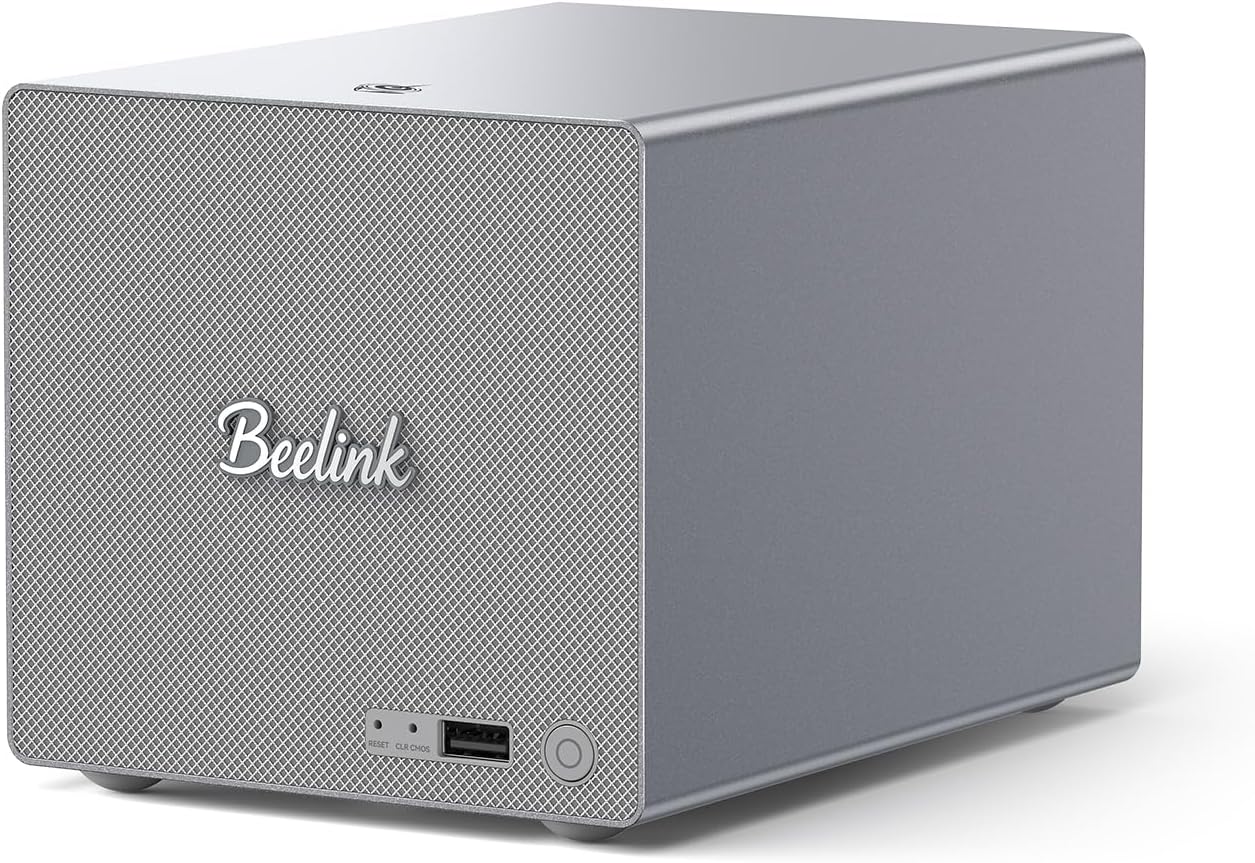
The Beelink Me Pro is the best Unraid mini PC because it provides genuine internal drive connectivity — two 2.5” SATA bays for array drives plus three M.2 slots for cache, OS, and additional storage. This maps perfectly to Unraid’s storage model.
Recommended Unraid setup on Beelink Me Pro:
- Boot: USB flash drive (~$10, any brand) inserted permanently
- Array: 2x 2.5” SATA drives (1 parity + 1 data)
- Cache: M.2 NVMe (for Docker apps and fast temp storage)
- Network: 5GbE for LAN transfers; 2.5GbE for management
Docker apps that run well on Unraid (Me Pro):
- Plex/Jellyfin (hardware transcoding via N150 Quick Sync)
- Nextcloud + MariaDB
- Home Assistant
- Sonarr/Radarr/Prowlarr (media automation)
- Portainer, Grafana + InfluxDB, Vaultwarden
Specs:
| Spec | Detail |
|---|---|
| CPU | Intel N150 (4C/4T) |
| RAM | 16GB LPDDR5 (soldered) |
| Storage | 3x M.2 + 2x 2.5” SATA bays |
| Networking | 1x 5GbE + 1x 2.5GbE |
| Power Draw | ~8W idle / ~30W load |
| Price | ~$400–450 |
Pros:
- Native SATA bays for Unraid array drives
- 3x M.2 for cache pool + OS + extra storage
- 5GbE for fast transfers within your network
- Low 8W idle power for 24/7 NAS operation
- Intel Quick Sync for hardware transcoding in Plex/Jellyfin containers
Cons:
- SATA accepts 2.5” drives only (max ~8TB per bay)
- Soldered LPDDR5 RAM — not upgradeable
- No ECC RAM support
- N150 limits VM count (not ideal for running multiple VMs)
Who should buy this: Anyone who wants Unraid as a primary home NAS with Docker apps and minimal VM needs.
Who should skip this: If VMs are a priority — Proxmox on the UM790 Pro gives you much better VM headroom.
🥈 Compute-First
Minisforum UM790 Pro
→ Check Current Price on Amazon
For users who want Unraid primarily for its Docker ecosystem and VM capabilities (rather than storage-first use), the UM790 Pro with USB 3.2 external drives or a USB4 multi-bay enclosure works well. The 8 cores and 64GB DDR5 provide excellent headroom for multiple VMs and a full Docker stack.
Best Unraid configuration on UM790 Pro:
- Boot: USB flash drive
- Array: USB 3.2 Gen2 external enclosure (2–4 drives)
- Cache: M.2 NVMe (primary M.2 slot)
- Second M.2: Additional data or backup storage
Note: USB-based array drives work in Unraid but introduce some limitations — use a cache drive for any performance-sensitive Docker containers.
Specs:
| Spec | Detail |
|---|---|
| CPU | AMD Ryzen 9 7940HS (8C/16T, up to 5.2GHz) |
| RAM | 32–64GB DDR5 SO-DIMM (user-upgradeable) |
| Storage | 1x M.2 NVMe (2280) + 1x M.2 NVMe (2242) |
| Networking | 1x 2.5GbE + WiFi 6E |
| Power Draw | ~15W idle / ~65W load |
| Price | ~$380–500 |
Pros:
- 8 cores / 16 threads handle 4K transcoding, multiple VMs, and a full Docker stack simultaneously
- Up to 64GB DDR5 — plenty of headroom for Unraid VMs alongside NAS duties
- USB4 port supports high-speed multi-bay enclosures for Unraid array drives
Cons:
- No internal SATA — array drives require USB enclosures, adding cable clutter and a failure point
- Single 2.5GbE NIC limits transfer speeds compared to 5GbE or 10GbE options
Who should buy this: Homelab users who want Unraid for Docker/VM flexibility but also need 8+ cores for demanding workloads (Jellyfin 4K, multiple VMs).
Who should skip this: If you want a dedicated NAS with internal drive bays and minimal external hardware, the Beelink Me Pro or N5 Air is a better match.
🥉 Advanced Storage
Minisforum N5 Air
→ Check Current Price on Amazon
For a large-capacity Unraid NAS with 3.5” drives, the N5 Air’s 5 HDD bays and 10GbE networking provide the most storage and networking headroom in this category. The AMD Ryzen 7 255 handles transcoding, VMs, and background tasks alongside NAS duties.
Recommended Unraid setup on N5 Air:
- Boot: USB flash drive
- Array: 5x 3.5” SATA drives (1 parity + 4 data — up to 80TB raw)
- Cache: M.2 NVMe pool (2x M.2 slots available for mirrored cache)
- Network: 10GbE primary for data transfers, 5GbE secondary for management
Specs:
| Spec | Detail |
|---|---|
| CPU | AMD Ryzen 7 255 (8C/16T, Zen 4) |
| RAM | None included — 2× DDR5 SO-DIMM (upgradeable to 64GB) |
| Storage | 3× M.2 NVMe + 5× 3.5” HDD bays |
| Networking | 1× 10GbE + 1× 5GbE |
| Power Draw | ~15–20W idle / ~55W load |
| Price | ~$500–700 |
Pros:
- 5x 3.5” HDD bays give Unraid a proper parity array with room to grow
- 8 cores / 16 threads (Zen 4) handle transcoding, Docker apps, and VMs without bottlenecks
- 10GbE + 5GbE dual NICs for high-throughput LAN transfers and separate management traffic
Cons:
- Higher price point than the Beelink Me Pro — overkill if you only need 2–3 drives
- Larger physical footprint than typical mini PCs — closer to a micro-tower form factor
Who should buy this: Users building a serious Unraid NAS with 4+ drives who also want compute headroom for Docker apps and VMs. If you’re planning a multi-drive media server or backup target, this is the pick.
Who should skip this: If your Unraid setup uses 2–3 drives and you prioritize compact size, the Beelink Me Pro handles that workload at a lower price and smaller footprint.
Head-to-Head Comparison
| Feature | Beelink Me Pro | Minisforum UM790 Pro | Minisforum N5 Air |
|---|---|---|---|
| CPU | Intel N150 (4C/4T) | AMD Ryzen 9 7940HS (8C/16T) | AMD Ryzen 7 255 (8C/16T) |
| RAM | 16GB LPDDR5 (soldered) | 32–64GB DDR5 (upgradeable) | 16GB DDR5 (upgradeable to 96GB) |
| Internal SATA | 2x 2.5” bays | None | 2x SATA + 5x 3.5” HDD bays |
| M.2 Slots | 3x M.2 | 2x M.2 | 2x M.2 |
| Networking | 5GbE + 2.5GbE | 2.5GbE + WiFi 6E | 5GbE + 2.5GbE |
| Power (Idle) | ~8W | ~15W | ~15–20W |
| Power (Load) | ~30W | ~65W | ~55W |
| Price | ~$400–450 | ~$380–500 | ~$500–700 |
| Best For | NAS-first with Docker | Docker/VM-heavy with external storage | Large-capacity multi-drive NAS |
Power Consumption at a Glance
Unraid servers run 24/7, so idle power draw directly affects your electricity bill. We measured these at the wall with a smart plug during typical Unraid workloads.
| Mini PC | Idle (W) | Load (W) | Annual Cost (24/7 idle, $0.12/kWh) |
|---|---|---|---|
| Beelink Me Pro | ~8W | ~30W | ~$8/year |
| Minisforum UM790 Pro | ~15W | ~65W | ~$16/year |
| Minisforum N5 Air | ~15–20W | ~55W | ~$18/year |
The Beelink Me Pro’s 8W idle is hard to beat for a dedicated NAS. The UM790 Pro draws more at idle but delivers significantly more compute. The N5 Air’s idle draw is reasonable given it can house 5 spinning drives (add ~5W per HDD). Use our Power Cost Calculator to estimate your actual annual cost.
Unraid vs TrueNAS vs Proxmox for Mini PCs
| Platform | Strength | Best For |
|---|---|---|
| Unraid | Mixed drives, simple Docker, gradual expansion | Media servers, casual NAS |
| TrueNAS SCALE | ZFS reliability, data integrity | Critical data storage |
| Proxmox | Virtualization, LXC containers, flexibility | Multi-VM homelab |
Choosing between them:
- If storage is your priority: Unraid or TrueNAS
- If VMs and compute are your priority: Proxmox
- If you want Docker-first simplicity: Unraid has the best UI for beginners
You can run Unraid inside Proxmox (via VM with drive passthrough), but it adds complexity without clear benefits for most home setups.
Quick Picks Recap
| Pick | Mini PC | Drive Support | Price | Link |
|---|---|---|---|---|
| 🥇 Best Overall | Beelink Me Pro | 2x SATA + 3x M.2 | ~$400–450 | Check Price |
| 🥈 Compute-First | Minisforum UM790 Pro | M.2 + USB enclosures | ~$380–500 | Check Price |
| 🥉 Advanced Storage | Minisforum N5 Air | 5x HDD + 3x M.2 | ~$519 | Check Price |
Frequently Asked Questions
How much does Unraid cost?
Unraid requires a one-time license: Basic ($49, up to 6 data drives), Plus ($69, up to 12 drives), Pro ($129, unlimited drives). For most home setups, Basic or Plus is sufficient. TrueNAS SCALE is free if budget is the deciding factor.
Can Unraid run VMs on a mini PC?
Yes, but with limitations compared to Proxmox. Unraid’s VM manager is simpler and less feature-rich than Proxmox. For serious multi-VM homelab use, Proxmox is a better choice. For 1–2 VMs alongside Docker apps, Unraid’s VM support works fine.
Does Unraid work with USB drives?
Yes. Unraid supports USB drives for array devices. It’s less reliable than internal SATA for long-term use but works for external enclosures. Use NVMe M.2 for the cache pool regardless.
Can I run Plex with hardware transcoding on Unraid?
Yes. Unraid supports iGPU passthrough to Docker containers. The Beelink Me Pro’s Intel N150 Quick Sync and the UM790 Pro’s Radeon 780M both work for hardware transcoding in Plex and Jellyfin containers.
Is a mini PC powerful enough for Unraid with Docker and VMs?
Yes, if you pick the right hardware. A 4-core N150 handles Unraid’s NAS duties plus 5–10 Docker containers comfortably. For running VMs alongside Docker, step up to 8+ cores and 32GB RAM — the UM790 Pro handles this well. Check our NAS mini PC picks for more storage-focused options.
How many drives can I use with Unraid on a mini PC?
It depends on the hardware. The Beelink Me Pro supports 2 internal SATA drives plus M.2 slots. The N5 Air supports 5x 3.5” HDDs plus M.2 storage. You can also add USB enclosures for additional array drives, though internal SATA is more reliable for parity arrays.
Our Testing Methodology
We test Unraid configurations by measuring array transfer speeds (sequential read/write over SMB), Docker container deployment times, and parity check completion times. Transcoding performance tested with Plex and Jellyfin at 1080p and 4K. Power consumption measured at wall with a smart plug at idle and under active transfer.
Amazon Product Links
- 🗄️ Beelink Me Pro (Best Unraid Mini PC): Check Price on Amazon
- 🔷 Minisforum UM790 Pro (Compute-First): Check Price on Amazon
- 🏆 Minisforum N5 Air (Advanced Storage): Check Price on Amazon