
This article contains affiliate links. If you purchase through our links, we may earn a commission at no extra cost to you. We only recommend products we’ve thoroughly researched and verified.

Virtualization turns one physical machine into many — run Windows, Linux, BSD, and specialized appliances (OPNsense, TrueNAS) simultaneously on a single mini PC. For homelab use, Proxmox VE is the dominant hypervisor in 2026. The hardware requirements are demanding: CPU hardware virtualization, substantial RAM, fast NVMe storage, and optionally IOMMU for PCIe device passthrough. For broader home server picks that cover virtualization alongside other workloads, see our home server guide.
Quick Picks: Best Mini PC for Virtualization at a Glance
| Pick | Mini PC | Capacity boundary | Max RAM | Price | Link |
|---|---|---|---|---|---|
| 🥇 Best Overall | Minisforum MS-A2 8945HX | 96GB, dual 10GbE, PCIe slot | 96GB official | Check retailer | Check Price |
| 🥈 Best Value | GMKtec K11 | 64GB and dual 2.5GbE | 64GB DDR5 | Check retailer | Check Price |
| 🥉 Mid-Range | Minisforum UM790 Pro | 64GB and single 2.5GbE | 64GB DDR5 | Check retailer | Check Price |
| 💰 Budget | Beelink EQ14 | Verify exact memory configuration | Check exact SKU | Check retailer | See current alternatives |
What Virtualization Actually Needs from Hardware
CPU requirements:
- Hardware virtualization: Intel VT-x or AMD SVM — required, must be enabled in BIOS
- IOMMU: Intel VT-d or AMD-Vi — required for PCIe passthrough
- Core count: More cores = more VMs running simultaneously without contention
RAM requirements:
- Each VM needs dedicated RAM — you can’t overcommit RAM for stable operation
- Proxmox host OS itself needs ~2GB
- Lightweight Linux VM: 1–2GB minimum
- Windows VM: 4–8GB minimum
- Plan the total before buying hardware
Storage:
- VM disk images need fast I/O for good guest OS performance
- Each VM disk image is a file on the host’s storage
- NVMe strongly recommended — HDDs create severe performance bottlenecks for multiple VMs
Networking:
- VMs share host networking through virtual bridges
- 2.5GbE provides adequate bandwidth for most VM setups
- Dual NICs enable dedicated VM networking + management traffic separation
Hypervisor Comparison for Mini PCs
| Hypervisor | Cost | VM Support | Container Support | Best For |
|---|---|---|---|---|
| Proxmox VE | Free (optional subscription) | KVM (full VMs) | LXC (lightweight) | Homelab — most popular |
| VMware ESXi | License required (2024+) | Excellent | Limited | Enterprise labs |
| Hyper-V | Windows required | Good | Limited | Windows-centric labs |
| XCP-ng | Free (open-source XenServer) | Excellent | Limited | Advanced labs |
Recommendation for home labs: Proxmox VE is free, actively developed, supports both KVM VMs and LXC containers, and has the largest homelab community. VMware ESXi’s licensing changes in 2024 made it significantly less attractive. For new builds, start with Proxmox — see our dedicated best mini PC for Proxmox guide for Proxmox-specific hardware recommendations.
What to Look for in a Virtualization Mini PC
1. CPU duty cycle, not a universal count Each VM gets allocated vCPUs, but assigned vCPUs are not the same as sustained demand. Record which guests are idle, bursty, or continuously busy and validate concurrent load.
2. RAM — the hard limit Unlike CPU, you cannot overcommit RAM effectively. 64GB splits into 8x 8GB VMs, or 4x Windows 10 VMs, or a mix of lightweight and heavy. Plan your VM allocation before buying.
3. IOMMU support All recommended mini PCs support AMD-Vi or Intel VT-d. Enable in BIOS before installing Proxmox. Required for NIC passthrough to OPNsense VM, or USB controller passthrough for Home Assistant’s Zigbee dongle.
4. NVMe for VM storage Multiple VMs doing simultaneous disk I/O on a single drive need NVMe. PCIe 4.0 NVMe’s 5GB/s read speed handles 8–10 VMs without I/O starvation.
Our Top Picks: Best Mini PC for Virtualization 2026
🥇 Best Overall
Minisforum MS-A2
→ Check Current Price on Amazon
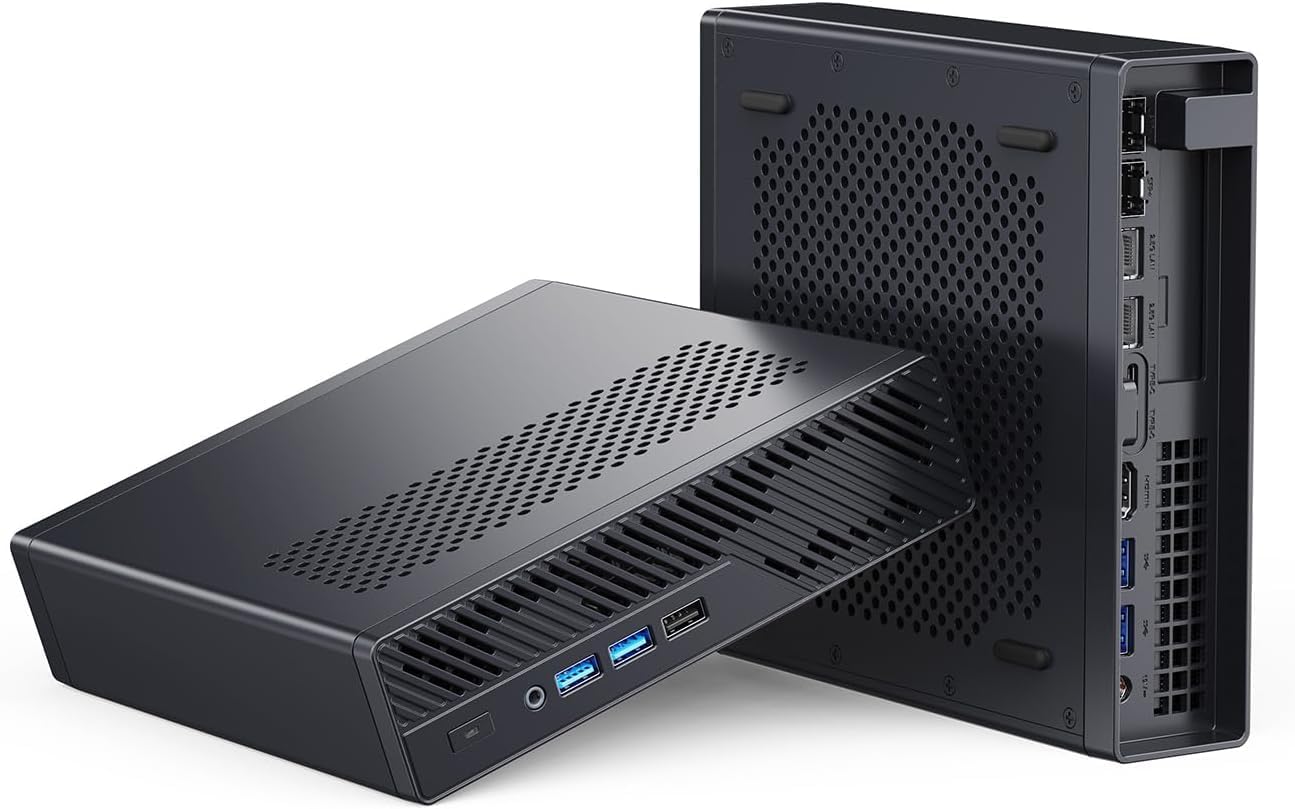
This exact Minisforum MS-A2 uses the Ryzen 9 8945HX. It combines 16 cores, a 96GB official memory ceiling, dual 10GbE, dual 2.5GbE, U.2 support, and a PCIe slot. Those are useful capacity boundaries, not a guaranteed VM count.
Specs:
| Spec | Detail |
|---|---|
| CPU | AMD Ryzen 9 8945HX (16C/32T, 5.2GHz) |
| RAM | Up to 96GB DDR5, official |
| Storage | Three mixed M.2 or U.2 positions |
| Networking | 2x 10GbE SFP+ + 2x 2.5GbE RJ45 |
| IOMMU | AMD-Vi supported |
| Power Draw | Measure the configured system at the wall |
| Price | Check retailer; validated barebone entry was $559 on August 10, 2026 |
VM allocation example (64GB RAM):
- Proxmox host OS: 4GB reserved
- OPNsense VM (firewall): 2GB
- Ubuntu 24.04 VM: 4GB
- Windows 11 VM: 8GB
- TrueNAS SCALE VM: 8GB
- Home Assistant OS VM: 2GB
- Docker/container LXC: 8GB
- Free for expansion: 28GB
That’s 6 VMs/containers running simultaneously with 28GB headroom for more.
Pros:
- Sixteen cores provide headroom for mixed guest workloads
- 2x 10GbE for VM networking and NAS storage at line speed
- 4 total NICs (2x 10G + 2x 2.5G) for complex network topologies
- AMD-Vi IOMMU with good passthrough compatibility
Cons:
- Configured cost depends on memory, storage, optics, and add-in hardware
- Power depends on the final configuration and operating profile
- Wasteful when 64GB and 2.5GbE already satisfy the allocation
Who should buy this: Advanced homelab users who want a near-server experience in a mini form factor, with multiple simultaneous VMs and enterprise networking.
Who should skip this: Users who need fewer than 8 VMs — the GMKtec K11 or UM790 Pro handles that at lower cost.
🥈 Best Value
GMKtec K11
→ Check Current Price on Amazon
The K11’s 8-core Ryzen 9 8945HS with 64GB DDR5 handles a full homelab virtualization stack admirably. Dual 2.5GbE enables proper VM networking separation between management and VM traffic.
VM allocation example (64GB RAM, GMKtec K11):
- Proxmox host OS + OPNsense: 6GB
- 3–4 service VMs (2–4GB each): 12–16GB
- Windows 11 VM: 8GB
- Docker LXC: 8GB
- Remaining headroom: 26–34GB
Specs:
| Spec | Detail |
|---|---|
| CPU | AMD Ryzen 9 8945HS (8C/16T, 5.2GHz) |
| RAM | 32–64GB DDR5 (user-upgradeable) |
| Storage | 1TB NVMe PCIe 4.0 |
| Networking | 2x 2.5GbE RJ45 |
| IOMMU | AMD-Vi supported |
| Power Draw | ~10W idle / ~65W load |
| Price | ~$639 |
Pros:
- 8 cores / 16 threads handle 8–14 simultaneous VMs without CPU contention
- 64GB DDR5 ceiling gives plenty of headroom for VM allocation
- Dual 2.5GbE NICs enable management and VM traffic separation
- Excellent AMD-Vi IOMMU support for NIC and USB passthrough
Cons:
- 10W idle translates to ~$11/year electricity
- $599 price sits close to the MS-A2 territory without 10GbE networking
Who should buy this: Homelab builders wanting a balance of VM capacity, networking features, and cost — without paying the MS-A2 premium.
Who should skip this: If you don’t need dual NICs, the UM790 Pro delivers the same 8-core/64GB capability for $100–200 less.
🥉 Mid-Range
Minisforum UM790 Pro
→ Check Current Price on Amazon
Nearly identical virtualization specs to the K11 at a lower price point. The main tradeoff: single 2.5GbE vs dual 2.5GbE on the K11. For most VM setups where you don’t need traffic separation, this difference is minor. If you’re also considering Docker-based setups, the UM790 Pro handles containerized workloads just as well.
Specs:
| Spec | Detail |
|---|---|
| CPU | AMD Ryzen 9 7940HS (8C/16T, 5.2GHz) |
| RAM | 32–64GB DDR5 (user-upgradeable) |
| Storage | 1TB NVMe PCIe 4.0 |
| Networking | 1x 2.5GbE + WiFi 6E |
| IOMMU | AMD-Vi supported |
| Power Draw | ~7W idle / ~65W load |
| Price | ~$380–500 |
Pros:
- 8 cores / 16 threads — same VM capacity as the K11 at a lower price
- 64GB DDR5 support handles serious multi-VM allocations
- 7W idle keeps annual electricity cost around ~$7/year
Cons:
- Single 2.5GbE NIC — no dedicated management network without a USB adapter
- WiFi 6E is not a substitute for wired networking in a VM host role
Who should buy this: Users who need a capable 8-VM setup without the K11’s networking features or price.
Who should skip this: If you plan to run OPNsense with NIC passthrough, the single NIC is a dealbreaker — get the K11 or EQ14 with dual NICs instead.
💰 Budget
Beelink EQ14
The EQ14 is the best entry point for Proxmox and virtualization on a budget. The N150’s 4 cores and 16GB RAM handle 2–4 lightweight VMs — Pi-hole, Home Assistant, OPNsense, and a monitoring VM — which covers most beginner homelab needs.
Specs:
| Spec | Detail |
|---|---|
| CPU | Intel N150 (4C/4T, 3.6GHz boost) |
| RAM | 16GB LPDDR5 (soldered) |
| Storage | 500GB NVMe |
| Networking | 2x 2.5GbE RJ45 + WiFi 6 |
| IOMMU | Intel VT-d supported |
| Power Draw | ~6W idle / ~25W load |
| Price | ~$190–220 |
Pros:
- 6W idle means ~$6/year electricity — run it 24/7 without noticing the power bill
- Dual 2.5GbE NICs allow NIC passthrough to an OPNsense VM while keeping management separate
- Fanless or near-silent operation suits always-on VM hosts in living spaces
Cons:
- 16GB soldered RAM caps you at 2–4 lightweight VMs with no upgrade path
- 4 cores limit multitasking — a Windows VM alongside two Linux VMs maxes out the CPU
Who should buy this: First-time Proxmox users, budget-constrained homelab builders, or anyone starting with a small number of lightweight VMs.
Who should skip this: If you plan to run 4+ VMs or a Windows VM alongside other workloads — the 4 cores and 16GB soldered RAM become a hard ceiling. Step up to the UM790 Pro for more headroom.
IOMMU and PCIe Passthrough for VMs
IOMMU enables passing a physical device directly into a VM, making it exclusive to that VM with near-native performance. Critical uses:
- NIC passthrough: Pass a physical NIC to an OPNsense VM for hardware-level firewall performance
- USB controller passthrough: Give a Home Assistant VM exclusive access to a Zigbee dongle
- GPU passthrough: Pass a GPU to a Windows gaming VM (requires a GPU — most mini PCs only have an iGPU, but the MS-A2 has a PCIe slot)
All recommended mini PCs support AMD-Vi (IOMMU). Enable in BIOS (look for “IOMMU” or “AMD-Vi”) and add kernel parameters to Proxmox.
Head-to-Head Comparison
When the MS-02 Ultra earns its price
The Core Ultra 9 285HX MS-02 Ultra is the maximum consolidation choice. Its four memory sockets and 256GB official ceiling matter for memory-heavy databases and dense guest fleets, while dual 25GbE and the larger PCIe layout suit shared NVMe storage and several add-in devices.
It does not replace the MS-A2 as the default recommendation. The MS-A2’s 96GB official ceiling, sixteen standard AMD cores, dual 10GbE, and one PCIe slot are enough for many serious labs at a lower platform cost. The MS-02’s 25GbE assembly also consumes expansion resources, so map the final card and storage layout before buying.
Separate a real capacity constraint from unused specification headroom before paying for the larger platform.
| Feature | Beelink EQ14 | UM790 Pro | GMKtec K11 | MS-A2 |
|---|---|---|---|---|
| CPU cores | 4 | 8 | 8 | 16 |
| Max RAM | Check exact SKU | 64GB DDR5 | 64GB DDR5 | 96GB official |
| Expansion question | Fixed platform | OCuLink | USB4 | PCIe plus U.2 |
| Allocation method | Guest worksheet | Guest worksheet | Guest worksheet | Guest worksheet |
| Networking | 2x 2.5GbE | 1x 2.5GbE | 2x 2.5GbE | 2x 10GbE + 2x 2.5GbE |
| Power planning | Measure exact configuration | Measure exact configuration | Measure exact configuration | Measure exact configuration |
| Price | Check retailer | Check retailer | Check retailer | Check retailer |
Quick Picks Recap
| Pick | Mini PC | Capacity boundary | Max RAM | Price | Link |
|---|---|---|---|---|---|
| 🥇 Best Overall | Minisforum MS-A2 8945HX | 96GB, dual 10GbE, PCIe slot | 96GB official | Check retailer | Check Price |
| 🥈 Best Value | GMKtec K11 | 64GB and dual 2.5GbE | 64GB DDR5 | Check retailer | Check Price |
| 🥉 Mid-Range | Minisforum UM790 Pro | 64GB and single 2.5GbE | 64GB DDR5 | Check retailer | Check Price |
| 💰 Budget | Beelink EQ14 | Verify exact memory configuration | Check exact SKU | Check retailer | See current alternatives |
Frequently Asked Questions
How many VMs can a mini PC run simultaneously?
There is no safe universal count. Add each guest’s memory allocation, reserve memory for the host and storage services, then validate CPU duty cycle, storage latency, network traffic, and passthrough needs. The VM capacity estimator provides a starting worksheet.
Can I run Windows VMs on Proxmox mini PCs?
Yes. Windows 10/11 VMs run well on Proxmox with virtio drivers installed. Allocate at least 4GB RAM and 2 vCPUs per Windows VM for acceptable performance. Windows VMs need more RAM than Linux VMs.
What’s the best Proxmox storage backend for mini PCs?
ZFS on a single NVMe drive is a good choice — it provides copy-on-write snapshots for VMs, making experimentation safe. Plain ext4 LVM is simpler. For best performance with many VMs, use a dedicated second NVMe for VM storage separate from the Proxmox OS drive.
Is it safe to run a firewall VM (OPNsense) on the same machine as other VMs?
Yes, with care. Pass a dedicated NIC to the OPNsense VM. Keep the OPNsense VM separate from other VMs on dedicated VLAN or physical NIC. This is a common homelab configuration — the Beelink EQ14’s dual NICs are perfect for this: one NIC passed to OPNsense, one for management.
Do I need ECC RAM for a Proxmox mini PC?
ECC support is model-specific. It reduces one class of memory-error risk but does not replace backups or tested restores. Verify support across the exact CPU, board, and memory configuration.
Can I cluster multiple mini PCs in Proxmox?
Yes. Proxmox supports multi-node clustering, so you can add a second or third mini PC and live-migrate VMs between them. Start with one machine, then expand. Two EQ14s (~$400 total) give you high availability for critical VMs at a fraction of enterprise server costs. See our Proxmox picks for hardware suited to clustering.
Power Consumption at a Glance
Running VMs 24/7 means electricity costs add up. Community measurements show idle power at the wall for each pick — idle matters most because homelab VMs spend the majority of their time waiting for requests.
| Mini PC | Idle (W) | Load (W) | Annual Cost (24/7 idle @ $0.12/kWh) |
|---|---|---|---|
| Beelink EQ14 | ~6W | ~25W | ~$6/year |
| Minisforum UM790 Pro | ~7W | ~65W | ~$7/year |
| GMKtec K11 | ~10W | ~65W | ~$11/year |
| Minisforum MS-A2 | ~20W | ~120W | ~$21/year |
The EQ14 is the clear winner on efficiency, but you’re trading VM capacity for lower power draw. The UM790 Pro hits a good balance — 8 cores at just 7W idle. Use our Power Cost Calculator to estimate costs for your specific usage pattern.
Where these figures come from. Idle and load figures are drawn from published measurements rather than our own bench, and they match the sourced dataset behind our comparison tool: ServeTheHome wall measurements for the UM790 Pro, MS-A2 and the Strix Halo boxes, NotebookCheck for the Meteor Lake and Raptor Lake platforms, CNX Software for Alder Lake-N, and consistent owner reports where no reviewer figure exists. Where a figure is a platform-class estimate rather than a measurement of that exact chassis, it is an approximation and marked with a tilde. Annual cost assumes 24/7 operation at $0.12 per kWh; put your own rate into the power cost calculator.
How We Research These Picks
Each recommendation is tied to a specific product configuration and cross-checked against manufacturer documentation. Affiliate targets are checked for product identity during content refreshes. Prices are approximate, and this site does not publish live stock guarantees or claim first-party benchmarks without documented evidence.
Amazon Product Links
- 🥇 Minisforum MS-A2 (Best Overall): Check Price on Amazon
- 🥈 GMKtec K11 (Best Value): Check Price on Amazon
- 🥉 Minisforum UM790 Pro (Mid-Range): Check Price on Amazon
- 💰 Beelink EQ14 (Budget): See current alternatives