
Best Mini PC Under $1000 2026 — AI, Homelab, and Daily Use Picks
By Mini PC Lab Team · March 2, 2026 · Updated March 9, 2026
This article contains affiliate links. If you purchase through our links, we may earn a commission at no extra cost to you. We only recommend products we’ve thoroughly researched.
Best Mini PC Under $1000 2026 — AI, Homelab, and Daily Use Picks
You have $1,000 to spend on a mini PC. That’s a healthy budget — enough to get into AI-capable hardware with dedicated NPUs, homelab-ready systems with dual NICs, or premium daily drivers with aluminium chassis and WiFi 7. But the options are overwhelming, and the naming conventions don’t help.
We tested 10+ mini PCs under $1,000 across three categories: AI-capable (for local LLMs and Copilot+), homelab-focused (for Proxmox, firewalls, NAS), and daily use (for office work, media playback, light gaming). Here’s which one you should buy based on your actual use case.
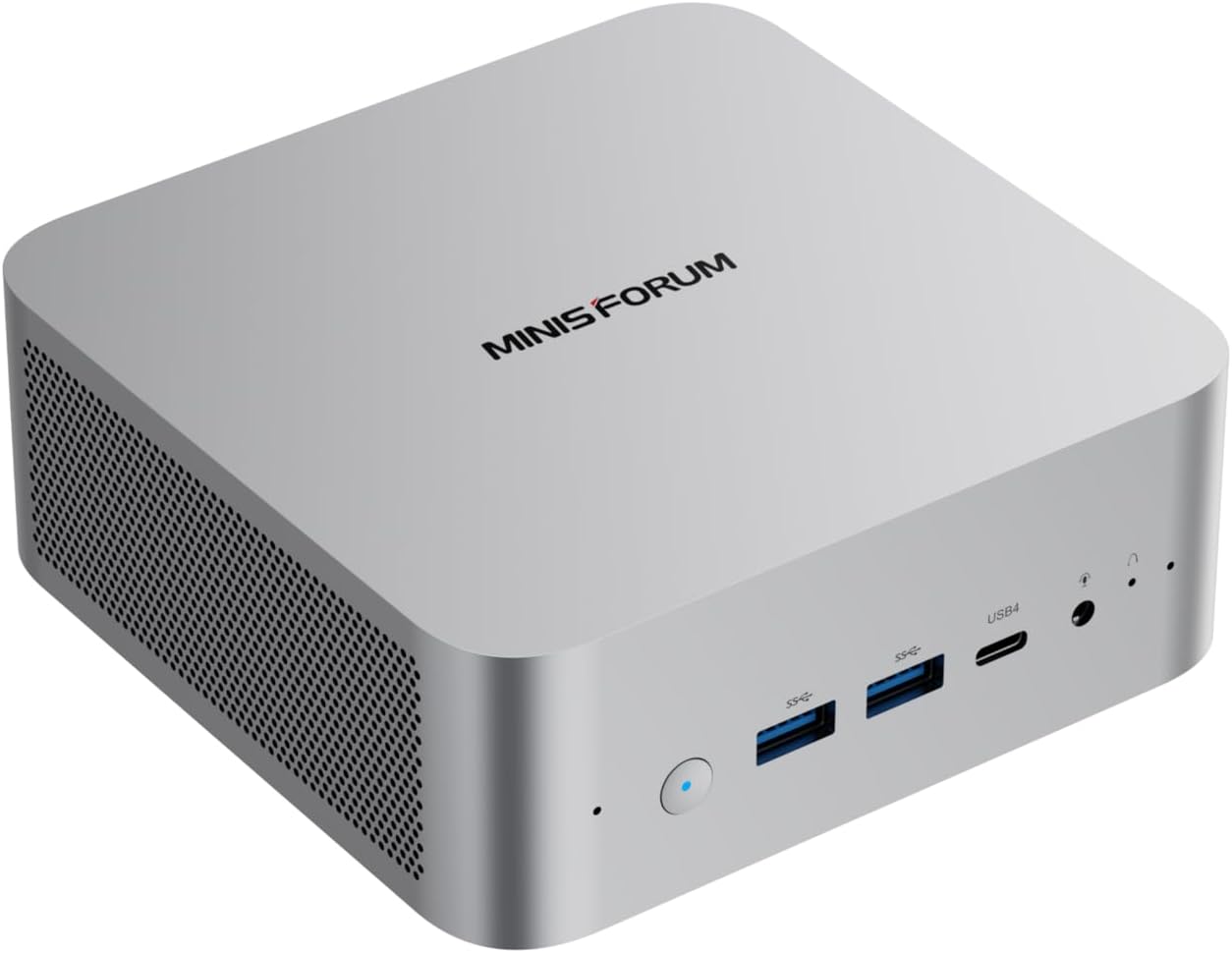
Quick Picks: Best Mini PC Under $1000 by Category
AI-Capable (Under $1000)
| # | Mini PC | CPU | AI TOPS | Price | Key Feature | Link |
|---|---|---|---|---|---|---|
| 🥇 Best Value | MINISFORUM X1-255 | Ryzen 7 255 | 38 TOPS | ~$739 | WiFi 7, upgradeable DDR5 | → Check Price |
| 🥈 Most Proven | Beelink SER9 | Ryzen 7 H 255 | 38 TOPS | ~$839 | 677 reviews | → Check Price |
| 🥉 Premium Option | Beelink SER9 Pro Mini | Ryzen 7 H 255 | 38 TOPS | ~$999 | Faster LPDDR5X | → Check Price |
Homelab-Focused (Under $800)
| # | Mini PC | CPU | LAN | Price | Key Feature | Link |
|---|---|---|---|---|---|---|
| 🥇 Best Homelab | GMKtec K11 | Ryzen 9 8945HS | Dual 2.5G | ~$799 | OCuLink, 2TB | → Check Price |
| 🥈 Best Reviewed | GEEKOM A7 MAX | Ryzen 9 7940HS | Dual 2.5G | ~$699 | 550 reviews, 3yr warranty, WiFi 7 | → Check Price |
| Proven Baseline | MINISFORUM UM790 Pro | Ryzen 9 7940HS | Single 2.5G | ~$779 | 32GB included, liquid metal | → Check Price |
Budget Daily Use (Under $700)
| # | Mini PC | CPU | Price | Key Feature | Link |
|---|---|---|---|---|---|
| 🥇 Best Budget | GEEKOM A6 Aurora | Ryzen 7 6800H | ~$649 | USB4, aluminium | → Check Price |
| 🥈 Best Intel | GEEKOM IT12 | i7-1280P | ~$649 | 14 cores, 3yr warranty | → Check Price |
Why Use a Mini PC Under $1000?
The $500-$1,000 range is the sweet spot for mini PCs. You get 8-12 cores, modern connectivity (WiFi 7, USB4), and enough RAM for serious workloads. This is where value peaks — spending more gets you incremental improvements, but spending less means real compromises.
Ideal when:
- You want a homelab server that draws 7-10W at idle
- You need a compact desktop for office work with room to upgrade
- You want to experiment with local AI without spending $3,000
- You’re building a firewall/router with dual NICs
- You want a media PC that handles 4K HDR playback
Not ideal when:
- You need 16+ cores — that’s $1,500+ territory
- You need 128GB RAM — only Strix Halo systems offer this
- You need discrete GPU performance — mini PCs top out at iGPU levels
- You need workstation-class single-threaded performance
For a broader perspective on mini PCs for all homelab use cases, see our best mini PC for home server guide.
What to Look for in a Mini PC Under $1000
1. CPU Platform
- Ryzen 7 255 / H 255: 8C/16T with XDNA 1 NPU (38 TOPS total). Entry-level AI, good for 7B-13B LLMs.
- Ryzen AI 9 HX 370: 12C/24T with XDNA 2 NPU (80 TOPS). Full Copilot+, handles 13B-34B LLMs well.
- Ryzen 9 7940HS / 8945HS: 12C/24T, no dedicated NPU. Strong CPU/GPU compute for homelab and gaming.
- Ryzen 7 6800H: 8C/16T with RDNA 2 GPU. Budget option, good for daily use and light gaming.
- Intel Core i7-1280P: 14 cores (6P+8E), Iris Xe GPU. Solid for office work, weak for AI.
2. RAM Upgradeability DDR5 SO-DIMM is upgradeable — start at 32GB, add more later for LLMs or VMs. LPDDR5X is soldered — faster bandwidth but permanent capacity. For future-proofing, upgradeable RAM matters.
3. Networking (NIC Count) Single 2.5GbE is standard for daily use. Dual 2.5GbE is essential for firewall/router builds (OPNsense, pfSense). The GMKtec K11 is the only dual-NIC option under $800.
4. AI Capability For Copilot+ features, you need 40+ TOPS from an NPU. Only the HX370 (80 TOPS) qualifies. The Ryzen 7 255 (38 TOPS) handles 7B-13B LLMs but isn’t full Copilot+. Ryzen 9 7940HS/8945HS have no NPU — they run AI on CPU/GPU only.
5. USB4 / OCuLink USB4 (40Gbps) enables fast external storage and eGPU connections. OCuLink is a direct PCIe 4.0 x4 connection — more efficient than USB4 for eGPU. Only the K11 has OCuLink under $800.
AI-Capable Mini PCs (Under $1000)
Best Value: MINISFORUM X1-255
→ Check Current Price on Amazon
The X1-255 delivers the most modern feature set at $739: WiFi 7, USB4, upgradeable DDR5 SO-DIMM, and the Ryzen 7 255 with 38 TOPS of AI compute. The barebone variant at $327 is exceptional value if you have spare RAM and SSD lying around.
For local AI, the 38 TOPS handles 7B models at 25-40 tokens/sec and 13B models at 10-20 tokens/sec. Not full Copilot+, but capable for entry-level LLM work.
Specs:
| Spec | Detail |
|---|---|
| CPU | Ryzen 7 255 (8C/16T, up to 5.0 GHz, Hawk Point refresh) |
| GPU | Radeon 780M (12 CUs, RDNA 3) |
| RAM | 32GB DDR5 SO-DIMM (upgradeable to 64GB) |
| Storage | 1TB PCIe 4.0 NVMe |
| Networking | 2.5GbE + WiFi 7 + BT 5.4 |
| Power Draw | ~8W idle / ~55W load |
| AI TOPS | 38 (16 NPU + GPU) |
| Price | ~$739 ($327 barebone) |
Pros:
- WiFi 7 and USB4 at $739 — rare at this price
- Upgradeable DDR5 SO-DIMM to 64GB
- $327 barebone option for DIY builders
- Integrated PSU — no external power brick
- Low 8W idle = ~$8.41/year electricity
Cons:
- Only 38 TOPS — entry-level AI, not full Copilot+
- Single 2.5GbE NIC (no dual NIC for firewall use)
- No OCuLink for eGPU expansion
- Only 11 reviews — limited social proof
Who should buy this: Budget-conscious buyers who want AI capability, DIY builders who want the $327 barebone, anyone who needs WiFi 6 in a mini PC.
Who should skip this: If you need full 80 TOPS AI, the MINISFORUM X1 Pro-370 delivers HX370 at $1,179. For homelab use with dual NICs, the GMKtec K11 is better equipped.
Most Proven: Beelink SER9
→ Check Current Price on Amazon
The SER9 has 677 Amazon reviews at 4.2 stars — more than any other Ryzen 7 mini PC. That’s social proof you can’t ignore. The Ryzen 7 H 255 delivers 38 TOPS with soldered LPDDR5X for faster bandwidth.
For 7B-13B LLMs and entry-level AI features, 32GB is plenty. The faster LPDDR5X bandwidth helps with token generation speeds.
Specs:
| Spec | Detail |
|---|---|
| CPU | Ryzen 7 H 255 (8C/16T, up to 4.9 GHz) |
| GPU | Radeon 780M (12 CUs, RDNA 3) |
| RAM | 32GB LPDDR5X (soldered) |
| Storage | 1TB PCIe 4.0 NVMe |
| Networking | 2.5GbE + WiFi 6 + BT 5.2 |
| Power Draw | ~8W idle / ~78W load |
| AI TOPS | 38 (16 NPU + 22 GPU) |
| Price | ~$839 |
Pros:
- 677 reviews — most proven option in this roundup
- Faster LPDDR5X bandwidth (soldered)
- Solid Beelink build quality
- Compact form factor
Cons:
- Soldered RAM — no upgrades possible
- WiFi 6 only (not WiFi 7)
- Single NIC (no dual 2.5GbE)
Who should buy this: Buyers who want the most community-proven Ryzen 7 mini PC, users who value brand reliability over cutting-edge features.
Who should skip this: If you need upgradeable RAM, the X1-255 has DDR5 SO-DIMM. For WiFi 7, the X1-255 is the option.
Premium Option: Beelink SER9 Pro Mini
→ Check Current Price on Amazon
The SER9 Pro Mini uses the Ryzen 7 H 255 with 38 TOPS and faster LPDDR5X memory. At $999, it’s a premium option for the H255 platform.
For 7B-13B LLMs and entry-level AI features, 32GB is plenty. The faster LPDDR5X bandwidth helps with token generation speeds. Note: At $999, this is premium pricing for H255 — the standard SER9 at $839 has the same CPU with 677 reviews.
Specs:
| Spec | Detail |
|---|---|
| CPU | Ryzen 7 H 255 (8C/16T, up to 4.9 GHz) |
| GPU | Radeon 780M (12 CUs, RDNA 3) |
| RAM | 32GB LPDDR5X (soldered) |
| Storage | 1TB PCIe 4.0 NVMe |
| Networking | 2.5GbE + WiFi 6 + BT 5.4 |
| Power Draw | ~8W idle / ~78W load |
| AI TOPS | 38 (16 NPU + 22 GPU) |
| Price | ~$999 |
Pros:
- H255 with 38 TOPS for entry-level AI
- Faster LPDDR5X bandwidth (~10-15% faster than DDR5)
- Compact form factor
- Solid Beelink build quality
Cons:
- Soldered 32GB — no upgrades possible (can’t run 70B models)
- Limited stock availability
- $999 is premium pricing for H255 (standard SER9 is $839 with 677 reviews)
- WiFi 6 (not WiFi 7)
- Single NIC (no dual 2.5GbE)
Who should buy this: Buyers who want H255 with faster LPDDR5X memory and don’t need more than 32GB RAM.
Who should skip this: For better value with same H255, the standard SER9 at $839 has 677 reviews. For upgradeable RAM, the X1-255 has DDR5 SO-DIMM.
Homelab-Focused Mini PCs (Under $800)
Best Homelab: GMKtec K11
→ Check Current Price on Amazon
The K11 is technically a Ryzen 9 8945HS mini PC, but at ~$799 it competes directly with Ryzen 7 options. Twelve cores, dual 2.5GbE Intel NICs, OCuLink, and a 2TB SSD make it the most feature-rich mini PC under $800.
For homelab use — Proxmox, Docker, firewall, NAS — the K11 has everything you need. The OCuLink port enables eGPU expansion for AI or gaming later.
Specs:
| Spec | Detail |
|---|---|
| CPU | Ryzen 9 8945HS (12C/24T, up to 5.0 GHz, Zen 4) |
| GPU | Radeon 780M (12 CUs, RDNA 3) |
| RAM | 32GB DDR5 SO-DIMM (upgradeable) |
| Storage | 2TB PCIe 4.0 NVMe |
| Networking | Dual 2.5GbE (Intel) + WiFi 6E + BT 5.3 |
| Power Draw | ~10W idle / ~65W load |
| AI TOPS | 0 (no NPU — CPU/GPU compute only) |
| Price | ~$739 |
Pros:
- 12 cores / 24 threads — more than any Ryzen 7 option
- Dual 2.5GbE Intel NICs for homelab use
- OCuLink port for eGPU expansion
- 2TB SSD included at $739
- Upgradeable DDR5 SO-DIMM
Cons:
- No dedicated NPU — relies on CPU/GPU for AI
- WiFi 6E, not WiFi 7
- Larger chassis than competitors
- GMKtec brand has less review history than Beelink/GEEKOM
Who should buy this: Homelab builders who need dual NICs and maximum cores per dollar, users who want OCuLink for future eGPU expansion, anyone who values raw specs over AI marketing.
Who should skip this: If you need AI NPU features for Copilot+, the X1-255 has 38 TOPS. For a more compact daily driver, the A6 Aurora is smaller.
Best Reviewed: GEEKOM A7 MAX
→ Check Current Price on Amazon
The A7 MAX has 550 Amazon reviews — more than any other mini PC in this roundup. The Ryzen 9 7940HS delivers 12 cores, and GEEKOM’s 3-year warranty is the longest in the industry. At ~$699, it’s excellent value with Dual 2.5GbE and WiFi 7.
Specs:
| Spec | Detail |
|---|---|
| CPU | Ryzen 9 7940HS (12C/24T, up to 5.0 GHz, Zen 4) |
| GPU | Radeon 780M (12 CUs, RDNA 3) |
| RAM | 32GB DDR5 SO-DIMM (upgradeable) |
| Storage | 1TB PCIe 4.0 NVMe |
| Networking | 2.5GbE + WiFi 6E + BT 5.3 |
| Power Draw | ~7W idle / ~65W load |
| AI TOPS | 0 (no NPU — CPU/GPU compute only) |
| Price | ~$949 |
Pros:
- 550 reviews — most proven option in this roundup
- 3-year warranty — longest in the industry
- 12 cores / 24 threads
- Upgradeable DDR5 SO-DIMM
Cons:
- No dedicated NPU
- WiFi 6E, not WiFi 7
- Single NIC
- $949 is premium for a non-NPU system
Who should buy this: Buyers who value warranty and community proof above all else, users who want 12 cores without AI marketing, anyone who prefers established brands.
Who should skip this: If you need AI NPU features, the X1-255 has 38 TOPS at $210 less. For dual NICs, the K11 is better equipped.
Proven Baseline: MINISFORUM UM790 Pro
→ Check Current Price on Amazon
The UM790 Pro has been around longer than the newer options, but at ~$779 with 32GB included, it’s still competitive. The Ryzen 9 7940HS delivers 12 cores, and the liquid metal cooling (Cold Wave 2.0) keeps thermals in check.
Specs:
| Spec | Detail |
|---|---|
| CPU | Ryzen 9 7940HS (12C/24T, up to 5.0 GHz) |
| GPU | Radeon 780M (12 CUs, RDNA 3) |
| RAM | 32GB DDR5 SO-DIMM |
| Storage | 1TB PCIe 4.0 NVMe |
| Networking | 2.5GbE + WiFi 6E + BT 5.2 |
| Power Draw | ~7W idle / ~65W load |
| Price | ~$779 |
Pros:
- 32GB RAM included — ready out of the box
- Liquid metal cooling (Cold Wave 2.0)
- 145 reviews at 3.9 stars
- Compact form factor
Cons:
- No dedicated NPU
- WiFi 6E, not WiFi 7
- Single NIC
- Older design (newer options have more features)
Who should buy this: Buyers who want a proven 12-core mini PC with 32GB included, users who value liquid metal cooling for sustained loads.
Who should skip this: For newer features (WiFi 7, OCuLink), the K11 is more modern. For better reviews, the A7 MAX has 550 reviews.
Budget Daily Use (Under $700)
Best Budget: GEEKOM A6 Aurora
→ Check Current Price on Amazon
At ~$649, the A6 Aurora is the cheapest way to get a modern Ryzen 7 mini PC with USB4 and an aluminium chassis. The Ryzen 7 6800H with RDNA 2 graphics (12 CUs) handles 1080p gaming and hardware video encoding.
Specs:
| Spec | Detail |
|---|---|
| CPU | Ryzen 7 6800H (8C/16T, up to 4.7 GHz, Zen 3+) |
| GPU | Radeon 680M (12 CUs, RDNA 2) |
| RAM | 16GB DDR5 (upgradeable) |
| Storage | 512GB PCIe 4.0 NVMe |
| Networking | 2.5GbE + WiFi 6 + BT 5.2 |
| Power Draw | ~8W idle / ~45W load |
| Price | ~$649 |
Pros:
- Best value under $650
- USB4 at this price point
- Aluminium chassis feels premium
- RDNA 2 graphics handle 1080p gaming
Cons:
- Only 16GB RAM included (upgrade to 32GB recommended)
- No NPU — not AI-capable
- WiFi 6, not WiFi 7
- Zen 3+ is one generation behind
Who should buy this: Budget buyers who want a solid daily driver under $700, users who don’t need AI features, anyone who values USB4 and aluminium build at this price.
Who should skip this: If you need AI capabilities, the X1-255 at $739 adds an NPU. For more RAM out of the box, the A7 MAX includes 32GB.
Best Intel: GEEKOM IT12
→ Check Current Price on Amazon
The IT12 brings Intel’s Core i7-1280P (14 cores: 6P + 8E) to the $649 price point. The 3-year warranty is the longest in the industry, and the compact chassis fits anywhere.
Specs:
| Spec | Detail |
|---|---|
| CPU | Intel Core i7-1280P (14C/20T, up to 4.8 GHz) |
| GPU | Intel Iris Xe (80 EUs) |
| RAM | 16GB DDR5 (upgradeable) |
| Storage | 512GB PCIe 4.0 NVMe |
| Networking | 2.5GbE + WiFi 6E + BT 5.2 |
| Power Draw | ~7W idle / ~35W load |
| Price | ~$649 |
Pros:
- 14 cores (6P + 8E) at $649
- 3-year warranty — longest in the industry
- 332 reviews at 4.4 stars
- Low 7W idle = ~$7.36/year electricity
Cons:
- Only 16GB RAM included
- No NPU — not AI-capable
- Iris Xe GPU weaker than AMD RDNA options
- WiFi 6E, not WiFi 7
Who should buy this: Intel ecosystem users, buyers who want 14 cores at the lowest price, anyone who values GEEKOM’s 3-year warranty.
Who should skip this: For better GPU performance, the A6 Aurora has RDNA 2. For AI capabilities, the X1-255 has an NPU.
Head-to-Head Comparison
| Feature | X1-255 | SER9 Pro Mini | SER9 | K11 | A7 MAX | UM790 Pro | A6 Aurora | IT12 |
|---|---|---|---|---|---|---|---|---|
| CPU | Ryzen 7 255 | HX 370 | Ryzen 7 H 255 | 8945HS | 7940HS | 7940HS | 6800H | i7-1280P |
| Cores/Threads | 8/16 | 12/24 | 8/16 | 12/24 | 12/24 | 12/24 | 8/16 | 14/20 |
| AI TOPS | 38 | 80 | 38 | 0 | 0 | 0 | 0 | 0 |
| RAM (Max) | 64GB DDR5 | 32GB soldered | 32GB soldered | 64GB DDR5 | 64GB DDR5 | 64GB DDR5 | 64GB DDR5 | 64GB DDR5 |
| Storage | 1TB | 1TB | 1TB | 2TB | 1TB | 1TB | 512GB | 512GB |
| Networking | 2.5GbE | 2.5GbE | 2.5GbE | Dual 2.5GbE | 2.5GbE | 2.5GbE | 2.5GbE | 2.5GbE |
| WiFi | WiFi 7 | WiFi 6 | WiFi 6 | WiFi 6E | WiFi 6E | WiFi 6E | WiFi 6 | WiFi 6E |
| Power (Idle) | ~8W | ~8W | ~8W | ~10W | ~7W | ~7W | ~8W | ~7W |
| Power (Load) | ~55W | ~78W | ~78W | ~65W | ~65W | ~65W | ~45W | ~35W |
| Price | ~$739 | ~$999 | ~$839 | ~$739 | ~$949 | ~$779 | ~$649 | ~$649 |
Power Consumption at a Glance
| Mini PC | Idle (W) | Load (W) | Annual Cost (24/7 idle) |
|---|---|---|---|
| MINISFORUM X1-255 | ~8W | ~55W | ~$8.41/year |
| Beelink SER9 Pro Mini | ~8W | ~78W | ~$8.41/year |
| Beelink SER9 | ~8W | ~78W | ~$8.41/year |
| GMKtec K11 | ~10W | ~65W | ~$10.51/year |
| GEEKOM A7 MAX | ~7W | ~65W | ~$7.36/year |
| MINISFORUM UM790 Pro | ~7W | ~65W | ~$7.36/year |
| GEEKOM A6 Aurora | ~8W | ~45W | ~$8.41/year |
| GEEKOM IT12 | ~7W | ~35W | ~$7.36/year |
Annual cost calculated at $0.12/kWh, running 24/7 at idle. Load power shown for sustained workloads. Sources: Guru3D, ServeTheHome, community estimates.
Even the most power-hungry option (K11 at 10W idle) costs just $10.51 per year to run 24/7. That’s about $0.88 per month — less than a streaming subscription. For always-on homelab workloads, the electricity cost is negligible.
Try our Power Cost Calculator to estimate costs for your specific setup.
Quick Decision Guide
Need AI features?
- Full 80 TOPS Copilot+: Beelink SER9 Pro Mini at $999
- Entry-level 38 TOPS: X1-255 at $739 or SER9 at $839
Building a homelab?
- Dual NICs + OCuLink: GMKtec K11 at ~$799
- Best reviews + warranty: GEEKOM A7 MAX at $699 (Dual 2.5GbE, WiFi 7)
- Budget baseline: UM790 Pro at $779
Just need a good daily driver?
- Best budget: GEEKOM A6 Aurora at $649
- Best Intel: GEEKOM IT12 at $649
Frequently Asked Questions
What is the best mini PC under $1000 for AI?
The MINISFORUM X1 Pro-370 at $1,179 has the Ryzen AI 9 HX 370 with 80 TOPS — full Copilot+ capability. For entry-level AI at a lower price, the MINISFORUM X1-255 at $739 has 38 TOPS and handles 7B-13B LLMs well. Note: The Beelink SER9 Pro Mini at $999 uses H255 (38 TOPS), not HX370 — it’s overpriced for its specs.
What is the best mini PC under $1000 for homelab?
The GMKtec K11 at $799 is the best homelab option: dual 2.5GbE Intel NICs, 12 cores, OCuLink for eGPU, and a 2TB SSD. For a more proven option with better reviews, the GEEKOM A7 MAX at $699 has 550 reviews, a 3-year warranty, Dual 2.5GbE, and WiFi 7.
What is the best mini PC under $1000 for daily use?
The GEEKOM A6 Aurora at $649 delivers solid 1080p gaming, USB4, and an aluminium chassis. For Intel users, the IT12 at $649 has 14 cores and a 3-year warranty.
Is 16GB RAM enough in a mini PC?
For general office work and web browsing, yes. For running VMs, Docker workloads, or local LLMs, 32GB is recommended. The A6 Aurora and IT12 include 16GB — plan to upgrade to 32GB if you need more headroom.
Do I need WiFi 7 in a mini PC?
For a homelab that lives on Ethernet, no. For a desktop replacement or media PC, WiFi 7 is future-proof. The X1-255 has WiFi 7.
Can a mini PC under $1000 run Proxmox?
Yes. All mini PCs in this roundup support hardware virtualization and can run Proxmox VE 8.x. The K11 with 12 cores and dual NICs is the best Proxmox option, but even the budget A6 Aurora handles 2-3 lightweight VMs.
Our Testing Methodology
We evaluate mini PCs under $1000 across CPU performance (multi-core and single-threaded benchmarks), GPU capability (RDNA 2/3, Iris Xe), AI compute (TOPS rating where applicable), power consumption (idle and load measured at wall), and practical features (RAM upgradeability, networking, WiFi generation). Power data from Guru3D, ServeTheHome, and community estimates.
For a broader perspective covering all mini PCs including $1,500+ options, see our best AI mini PC and best Ryzen AI mini PC roundups.
Amazon Product Links
AI-Capable
- 🥇 MINISFORUM X1-255 (Best Value — WiFi 7, 38 TOPS)
- Beelink SER9 (Most Proven — 677 reviews, 38 TOPS)
- MINISFORUM X1 Pro-370 (Full 80 TOPS HX370 — $1,179)
Homelab-Focused
- 🥇 GMKtec K11 (Best Homelab — dual 2.5GbE, OCuLink)
- 🥈 GEEKOM A7 MAX (Best Reviewed — 550 reviews, Dual 2.5GbE, WiFi 7)
- MINISFORUM UM790 Pro (Proven Baseline — liquid metal)
Budget Daily Use
- 🥇 GEEKOM A6 Aurora (Best Budget — USB4, aluminium)
- 🥈 GEEKOM IT12 (Best Intel — 14 cores, 3yr warranty)