
BOSGAME Mini PCs for Homelab 2026 — P4 and M4 Reviewed
By Max · March 24, 2026 · Updated August 5, 2026
This article contains affiliate links. If you purchase through our links, we may earn a commission at no extra cost to you. We only recommend products we’ve thoroughly researched and verified.

BOSGAME sits in a crowded part of the mini PC market: AMD Ryzen, dual 2.5GbE, budget pricing. Their P4 and M4 models target the same buyers as the Beelink SER series — homelab builders who want AMD compute and decent networking without spending $500+. Whether they succeed depends on which model you’re looking at.
The P4 runs older Zen 3 silicon (Ryzen 5000 series) at a price point that undercuts newer alternatives. The M4 uses the Ryzen 7 8745HS — a current Zen 4 chip with OculLink support, which puts it in direct competition with the Beelink SER9 PRO+. Neither is automatically the right choice; it depends on your priorities.
This guide covers both models honestly, including where BOSGAME earns its price and where you’re better served by a competitor.
Quick Summary: BOSGAME Homelab Models
| Model | CPU | RAM | Networking | OculLink | Price |
|---|---|---|---|---|---|
| P4 | Ryzen 7 5700U / 5825U (Zen 3, 8C) | 32GB DDR4 | 2× 2.5GbE | No | ~$250–350 |
| M4 | Ryzen 7 8745HS (Zen 4, 8C/16T) | 32GB DDR5 | 1× 2.5GbE | Yes | ~$380–450 |
About BOSGAME
BOSGAME is a Shenzhen-based brand that sells primarily through Amazon. They share hardware platforms with other white-label OEMs — the P4’s underlying hardware appears across several brand names in the same price tier. Community presence is limited: there’s no active brand forum, firmware updates are infrequent, and Linux compatibility information comes from user reports rather than official documentation.
That said, both the P4 and M4 run Linux without major driver issues. Proxmox VE 8.x installs cleanly on both platforms, and AMD SVM/AMD-Vi for IOMMU support is present in the BIOS.
BOSGAME P4 — Budget Dual-NIC Homelab Option
→ Check Current Price on Amazon
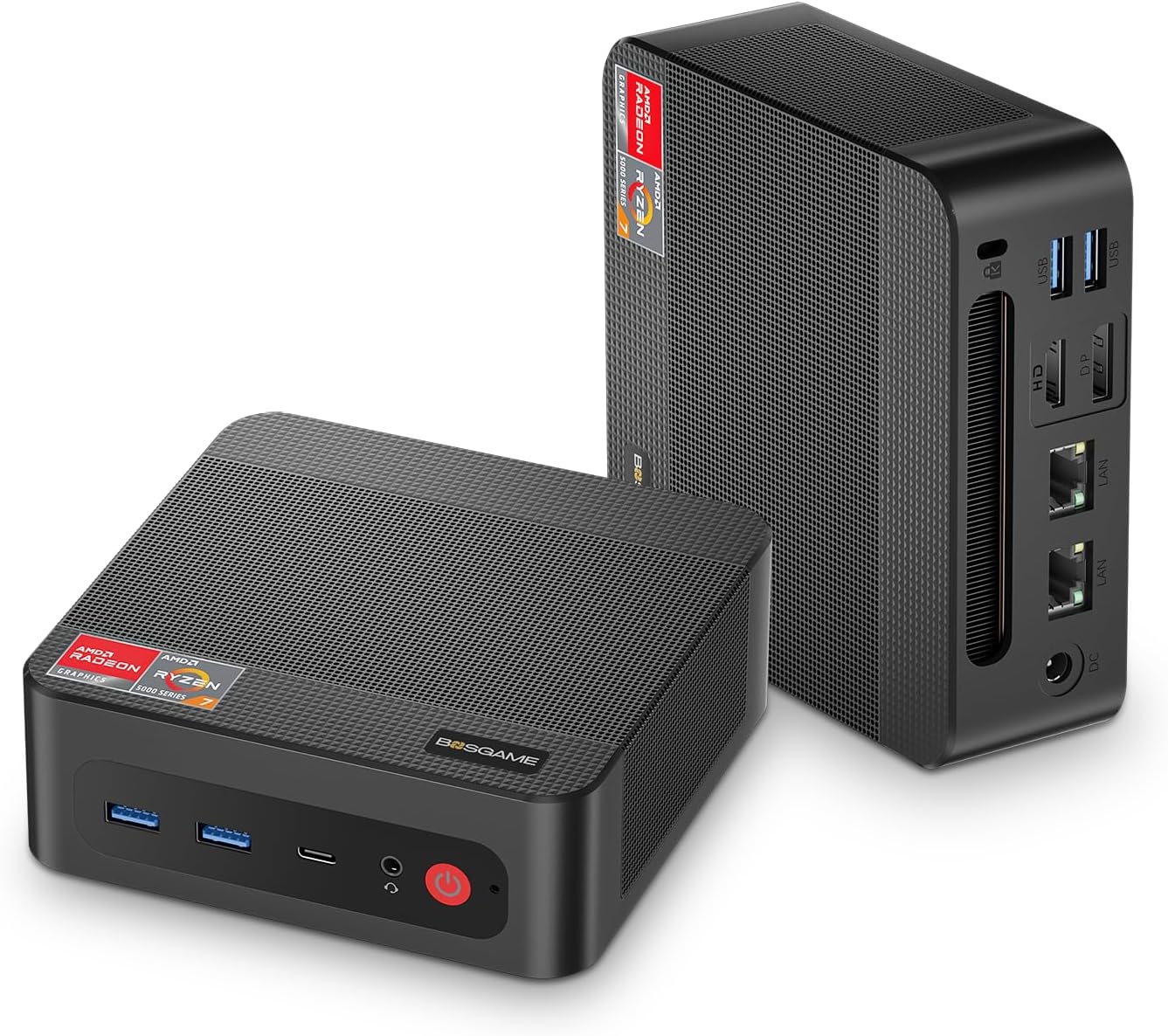
The P4’s defining feature for homelab use is dual 2.5GbE at a price under $350. At this price, most alternatives offer either one 2.5GbE NIC (Beelink SER9 PRO+) or 1GbE NICs (KAMRUI AM06PRO). If you specifically need two 2.5GbE ports and a budget under $350, the P4 fills that gap.
The CPU — Ryzen 7 5700U or 5825U depending on configuration — is Zen 3 architecture from 2021. It performs competently for Docker containers and 2–4 lightweight VMs, but it trails current Zen 4 alternatives on single-core performance and power efficiency. For a machine you’re running 24/7, the older platform also means less likelihood of firmware improvements.
At 32GB DDR4 pre-configured, the P4 is well-suited for a multi-container Docker host or light Proxmox setup. It won’t handle the same VM density as the Beelink SER9 PRO+ at equivalent prices, but the dual-NIC advantage is real for specific configurations.
Specs:
| Spec | Detail |
|---|---|
| CPU | AMD Ryzen 7 5700U or 5825U (8C/16T, up to 4.5GHz, Zen 3) |
| RAM | 32GB DDR4 SO-DIMM (upgradeable) |
| Storage | 1TB M.2 NVMe |
| Networking | 2× 2.5GbE |
| Display | Triple display (HDMI + DP + USB-C) |
| Power Draw | ~10W idle / ~45W load (community-estimated, Zen 3 platform) |
| Price | ~$250–350 |
Pros:
- Dual 2.5GbE at under $350 — uncommon at this price
- 32GB DDR4 pre-configured — ready for light Proxmox immediately
- AMD Ryzen 7 8C/16T handles Docker stacks and 2–4 VMs
- Lower price than most 2.5GbE dual-NIC alternatives
Cons:
- Zen 3 architecture (2021) — lower single-core performance than Zen 4 competitors
- Limited firmware support and no active brand community
- NIC controller type should be verified before OPNsense deployment (confirm via
lspci) - No OculLink or USB4 — no eGPU expansion path
Who should buy this: Homelab builders with a strict budget under $350 who specifically need dual 2.5GbE and don’t mind the older Zen 3 platform. Good for OPNsense builds where dual NICs matter but CPU performance doesn’t.
Who should skip this: Anyone who can stretch to the Beelink SER9 PRO+ (~$380) for Zen 4 performance and a longer-supported platform. For pure Proxmox/Docker use without the dual-NIC requirement, the SER9 PRO+ is a better investment.
BOSGAME M4 — Current-Gen Competitor
The M4 addresses the P4’s main weakness: it runs AMD Ryzen 7 8745HS, a Zen 4 chip with comparable performance to the Beelink SER9 PRO+‘s H 255 variant. It adds OculLink and USB4 support for eGPU expansion — features usually reserved for higher-priced competitors.
The networking step-down is notable: the M4 ships with a single 2.5GbE NIC, not dual like the P4. This removes the P4’s primary homelab advantage.
At ~$380–450, the M4 competes directly with the Beelink SER9 PRO+. In that comparison:
- Similar CPU (8745HS vs H 255 — both Zen 4, 8C/16T)
- Both have OculLink
- Both have single 2.5GbE
- Beelink has a larger established support community and more Proxmox forum documentation
- M4 may come in at slightly lower price on promotion
For most homelab builders, the Beelink SER9 PRO+ is the more documented and community-supported choice at the same price point. The M4 is an alternative worth checking if you catch it at a lower price.
BOSGAME vs. Direct Competitors
| Model | CPU | Dual NIC | OculLink | Price |
|---|---|---|---|---|
| BOSGAME P4 | Ryzen 7 5700U (Zen 3) | Yes (2.5GbE) | No | ~$250–350 |
| Beelink EQ14 | Intel N150 (Zen N) | Yes (Intel 2.5GbE) | No | ~$190–220 |
| BOSGAME M4 | Ryzen 7 8745HS (Zen 4) | No | Yes | ~$380–450 |
| Beelink SER9 PRO+ | Ryzen 7 H 255 (Zen 4) | No | No | ~$380–480 |
The P4’s dual-NIC advantage over the EQ14 comes at the cost of higher idle power (Zen 3 vs. N150) and a higher price. The M4 has no networking advantage over the SER9 PRO+ but may be slightly cheaper.
Power Consumption at a Glance
| BOSGAME Model | Idle (W) | Load (W) | Annual Cost (24/7 idle) |
|---|---|---|---|
| P4 (Zen 3) | ~10W | ~45W | ~$11/year |
| M4 (Zen 4) | ~8W | ~70W | ~$8/year |
P4 idle estimated from Zen 3 Ryzen 5000U platform community data. Annual cost at $0.12/kWh, 24/7 idle.
Quick Price Summary
- BOSGAME P4 — Best budget dual-NIC mini PC
- Beelink EQ14 — Best alternative (Intel dual 2.5GbE)
- Beelink SER9 PRO+ — Best Zen 4 mid-range upgrade
The Rest of the BOSGAME Lineup
BOSGAME’s current models, with verified specs:
| Model | Key specs | Check price |
|---|---|---|
| P3 | Ryzen 7 7840HS, 32GB DDR5, dual Gigabit, WiFi 6E | Amazon |
| P4 | Zen 3 platform, dual 2.5GbE | Amazon |
| P4 Ultra | Ryzen 7 7730U, 16GB DDR4, 1TB, dual 2.5GbE | Amazon |
| P6 | Ryzen 9 6900HX, 24GB LPDDR5X soldered, dual gigabit LAN, WiFi 6E — full review | Amazon |
Frequently Asked Questions
Does BOSGAME work with Proxmox?
Yes. Both P4 and M4 support AMD SVM and AMD-Vi for hardware virtualization and IOMMU in Proxmox VE 8.x. Install without issues reported. The Zen 3 platform on the P4 is well-supported under Proxmox’s Linux kernel.
Is BOSGAME reliable for 24/7 server use?
Community reports suggest normal reliability for both models under typical homelab loads. The brand doesn’t have the track record or firmware update history of Beelink or Minisforum, which is a risk factor for long-term 24/7 deployment. For critical infrastructure, a brand with better support history is a safer choice.
Which BOSGAME model for OPNsense?
The P4, if you can confirm the NIC controllers are Intel (check via lspci from a Linux live session). Realtek NICs work with OPNsense but are less stable under sustained traffic than Intel. The dual-NIC P4 is necessary for proper WAN/LAN separation; the M4’s single NIC requires a USB NIC adapter.
How We Research These Picks
Each recommendation is tied to a specific product configuration and cross-checked against manufacturer documentation. Affiliate targets are checked for product identity during content refreshes. Prices are approximate, and this site does not publish live stock guarantees or claim first-party benchmarks without documented evidence.
Amazon Product Links
- 🥇 BOSGAME P4 (Budget dual-NIC homelab): Check Price
- Beelink EQ14 (Best budget alternative — dual Intel 2.5GbE): See current alternatives
- Beelink SER9 PRO+ (Best Zen 4 mid-range): Check Price