
GEEKOM Mini PCs for Homelab 2026 — Full Lineup Guide
By Max · March 24, 2026 · Updated August 5, 2026
This article contains affiliate links. If you purchase through our links, we may earn a commission at no extra cost to you. We only recommend products we’ve thoroughly researched and verified.

GEEKOM takes a different approach to the mini PC market than Beelink or Minisforum. Their IT series runs 12th and 13th generation Intel processors — the same architecture used in the Intel NUC that GEEKOM explicitly positions itself as a replacement for. Build quality is noticeably solid, the form factor is compact, and the Intel platform provides excellent Linux compatibility and iGPU support.
The trade-off: GEEKOM models generally ship with a single 2.5GbE NIC. For pure Proxmox/Docker workloads that don’t need dual NICs, this isn’t a problem. For OPNsense firewall builds or bonded storage networks, it matters.
This guide covers the three GEEKOM models most relevant to homelab use and explains where each one fits.
Quick Picks: Best GEEKOM Mini PC by Use Case
| Use Case | Recommended Model | Price | Why |
|---|---|---|---|
| Versatile Intel-platform Proxmox host | IT12 | ~$382–549 | i5-12450H, proven Intel Xe iGPU, solid build |
| High-end Intel server / heavy multi-VM | IT13 | ~$450–699 | i9-13900HK, 14C/20T, up to 96GB RAM |
| AMD-platform Docker host / Proxmox | A6 | ~$350–450 | Ryzen 7 6800H, DDR5, good GPU for transcoding |
About GEEKOM
GEEKOM is a Taiwan-based company (unusual in a field dominated by Shenzhen OEMs) that entered the mini PC market by building near-direct successors to the discontinued Intel NUC. Their IT series form factor is similar to the NUC and targets the same enterprise-adjacent market that Intel NUC occupied — IT departments, compact workstations, home offices, and homelabs.
Build quality is consistently praised in reviews: aluminum chassis, solid thermals, and Intel components that “just work” on Linux. Support is responsive and the brand provides firmware updates for current products. Their 3-year warranty on current models is longer than most competitors.
GEEKOM Homelab Lineup Overview
| Model | CPU | Max RAM | Storage | Networking | Power (Idle) | Price |
|---|---|---|---|---|---|---|
| IT12 | i5-12450H (8C/12T, 4.4GHz) or i7-1280P (14C, 4.8GHz) | 64GB DDR4 | 1× M.2 PCIe4 + 1× M.2 SATA | 1× 2.5GbE | ~10W | ~$382–549 |
| IT13 | i9-13900HK (14C/20T, 5.4GHz) | 96GB DDR4 | 1× M.2 PCIe4 + 1× M.2 SATA | 1× 2.5GbE | ~12W | ~$450–699 |
| A6 | Ryzen 7 6800H (8C/16T, 4.7GHz) | 64GB DDR5 | 1× M.2 PCIe4 | 1× 2.5GbE | ~10W | ~$350–450 |
On RAM: The IT12 and IT13 use DDR4 SO-DIMM (not soldered) — you can upgrade to 64GB and 96GB respectively. The A6 uses DDR5. All RAM is user-upgradeable, which is a meaningful advantage over competitors with soldered configurations.
GEEKOM IT12 — Best Intel-Platform Homelab Mini PC
→ Check Current Price on Amazon
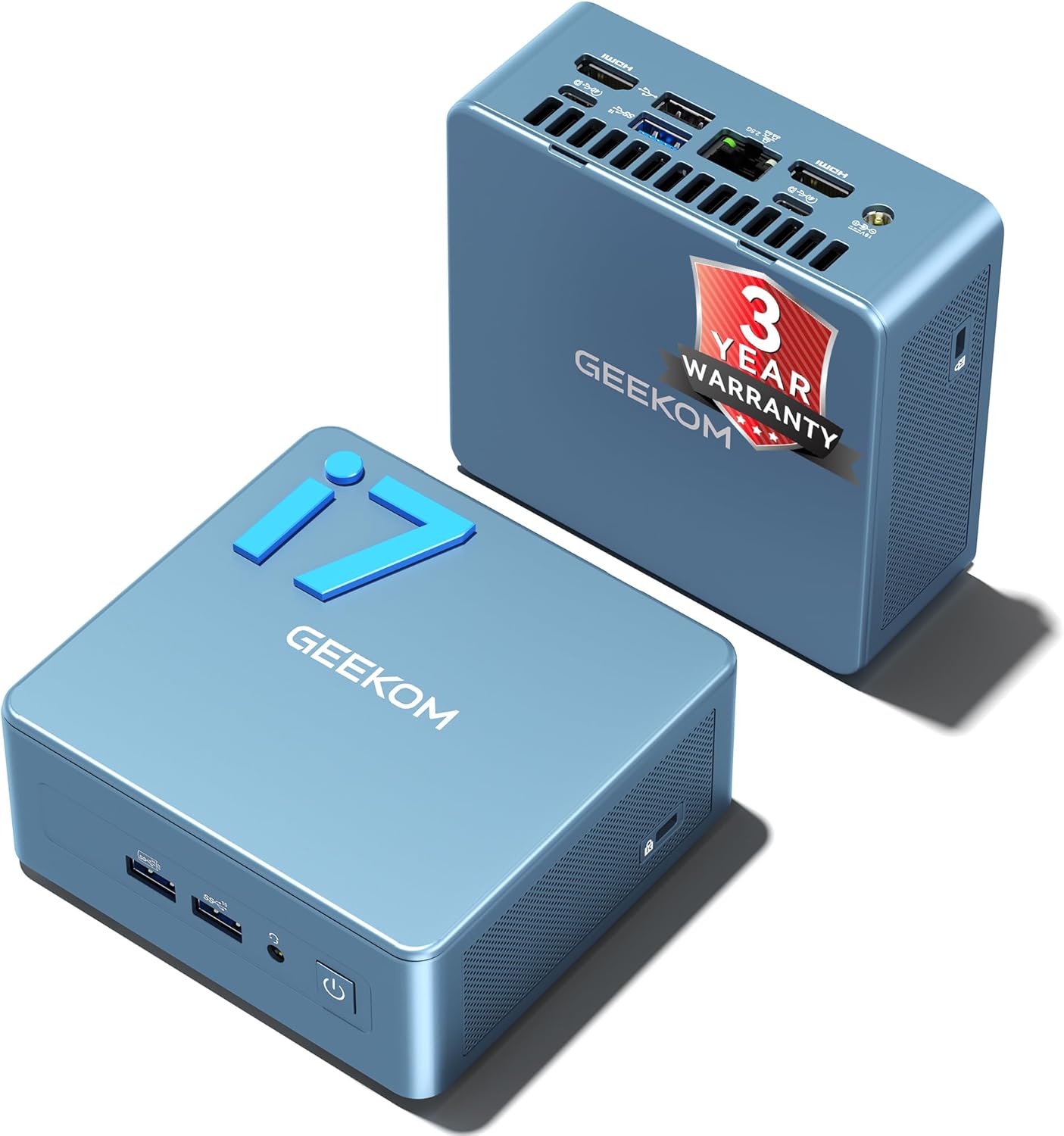
The IT12 is GEEKOM’s answer to the Intel NUC 12. It runs either an Intel Core i5-12450H (8 cores, 12 threads) or i7-1280P (14 cores, 20 threads) depending on configuration — both are Alder Lake hybrid architecture chips with Intel Xe iGPU.
For Proxmox, the Intel platform has specific advantages. Intel Quick Sync Video (QSV) is supported in hardware and provides excellent Plex and Jellyfin transcoding performance — more reliable driver support on Linux than AMD’s VA-API in our experience. The Intel VT-x + VT-d implementation is well-tested in Proxmox, and IOMMU group configurations on Intel platforms tend to be more predictable for PCIe passthrough.
The IT12 ships with dual M.2 slots (one PCIe 4.0 NVMe, one M.2 SATA), a USB4 port, and a 2.5GbE NIC. The i5-12450H configuration at ~$382 provides a strong entry point — 8 cores at 4.4GHz handles 4–8 Proxmox VMs comfortably, and the platform has no known Linux driver issues.
Power consumption: ~10W at idle on Proxmox (cited from TweakTown’s IT12 review and confirmed by community measurements). Load varies by i5 vs. i7 variant: ~45W for i5-12450H under sustained CPU stress.
Specs (i5-12450H variant):
| Spec | Detail |
|---|---|
| CPU | Intel Core i5-12450H (8C/12T, up to 4.4GHz, hybrid arch) |
| RAM | 32GB DDR4 (upgradeable to 64GB via 2× SO-DIMM) |
| Storage | 1TB M.2 NVMe PCIe 4.0 (+ 1× M.2 2242 SATA slot) |
| Networking | 1× 2.5GbE |
| Display | 2× USB4 (up to 8K) + 2× HDMI 2.0 (4K@120Hz) — quad display |
| Power Draw | ~10W idle / ~45W load (i5 variant, cited from TweakTown review) |
| Price | ~$382–549 (i5 to i7 configurations) |
Pros:
- Intel Quick Sync Video — reliable hardware video acceleration on Linux/Proxmox
- Dual M.2 slots allow OS + data separation without external drives
- Well-tested Intel VT-d implementation for IOMMU/PCIe passthrough
- Upgradeable DDR4 SO-DIMM (not soldered) up to 64GB
- 3-year warranty — longer than most competitors
Cons:
- Single 2.5GbE NIC — not a dual-NIC firewall without a USB adapter
- i7-1280P variant adds efficiency-cores (not performance-cores) — pure throughput doesn’t double vs. i5
- Intel Xe iGPU is weaker than AMD Radeon 780M for GPU-intensive tasks like AI inference
Who should buy this: Homelab builders who prefer Intel’s proven Linux compatibility, need Quick Sync hardware transcoding, or are migrating from an Intel NUC. The i5 variant at ~$382 is strong value for 4–8 VM Proxmox setups.
Who should skip this: Anyone who needs dual NICs or wants AMD Radeon GPU acceleration for AI inference or heavy video workloads. The A6 or Beelink SER9 PRO+ handles those cases better.
GEEKOM IT13 — High-End Intel Proxmox Server
→ Check Current Price on Amazon
The IT13 runs Intel Core i9-13900HK — a 14-core, 20-thread Raptor Lake chip that hits 5.4GHz boost. This is Intel’s most powerful mobile CPU in the 13th gen lineup, and GEEKOM is one of the few mini PC brands to offer it at reasonable prices.
The headline spec is RAM: 96GB DDR4 maximum. No other mini PC in this price range supports 96GB. If your Proxmox workload requires unusually high memory allocation — large Windows VMs, databases, memory-heavy development environments — the IT13 is the only compact hardware that accommodates it.
That said, the RAM ceiling is the IT13’s primary differentiator over the IT12. For workloads that fit within 64GB, the IT12 at $150–200 less handles similar tasks. The i9-13900HK’s performance advantage over the IT12’s i7-1280P is meaningful (more P-cores, higher clocks), but the value proposition depends on whether 96GB RAM or the extra CPU headroom is actually needed.
Specs:
| Spec | Detail |
|---|---|
| CPU | Intel Core i9-13900HK (14C/20T, up to 5.4GHz) |
| RAM | 16GB DDR4 (upgradeable to 96GB via 2× SO-DIMM) |
| Storage | 1TB M.2 NVMe PCIe 4.0 Gen4 (+ 1× M.2 2242 SATA slot) |
| Networking | 1× 2.5GbE + Wi-Fi 6E |
| Display | 2× USB4 (8K) + 2× HDMI 2.0 (4K@120Hz) |
| Power Draw | ~12W idle / ~65W load (manufacturer rated) |
| Price | ~$450–699 (varies by configuration) |
Pros:
- 96GB RAM ceiling — unique at this form factor and price
- i9-13900HK’s P-core count beats i7-1280P for multi-threaded VM workloads
- Intel Quick Sync for hardware video acceleration
- 3-year warranty
- Dual M.2 storage slots
Cons:
- Significant price premium over IT12 unless you need 96GB RAM specifically
- Single 2.5GbE NIC same as IT12
- Intel 13th gen runs warmer than 12th gen at equivalent loads — fan is audible under sustained stress
Who should buy this: Homelab builders who specifically need 96GB RAM for high-memory workloads, or who need the i9-13900HK’s peak performance for CPU-intensive VMs. For everyone else, the IT12 at lower cost is the smarter buy.
Who should skip this: Anyone running typical Proxmox loads that fit within 32–64GB. The IT12 delivers comparable day-to-day performance for less money.
GEEKOM A6 — AMD Platform with DDR5
→ Check Current Price on Amazon
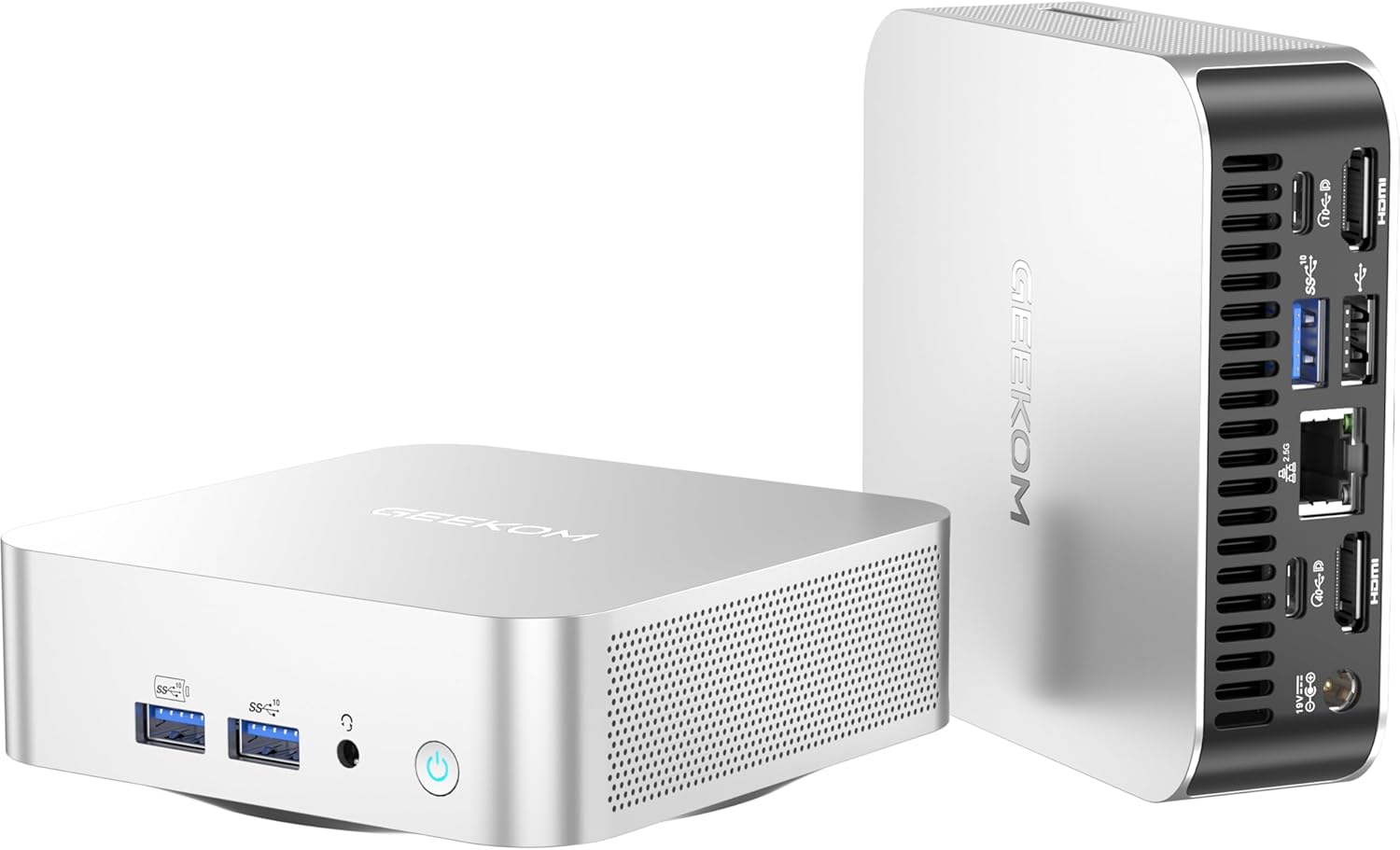
The A6 runs AMD Ryzen 7 6800H — the same chip that powered Minisforum’s UM690S. Eight cores, 16 threads, Radeon 680M iGPU, and DDR5 SO-DIMM RAM (user-upgradeable to 64GB). The Radeon 680M provides better GPU compute than Intel Iris Xe, which matters for Jellyfin hardware transcoding and GPU-accelerated AI inference.
Where the A6 differentiates from GEEKOM’s Intel models: the Radeon 680M’s VA-API hardware acceleration is more capable than Intel Iris Xe for video transcoding workloads. For a Plex or Jellyfin server that handles multiple simultaneous streams, the A6 has the edge over the IT12 in GPU-accelerated throughput.
The trade-off: the 6800H is an older Zen 3 architecture (while competing Beelink SER9 PRO+ uses Zen 4 H 255). It’s capable hardware, but it’s not the latest AMD platform. At similar prices, the Beelink SER9 PRO+ with its H 255 offers newer architecture and higher clock speeds — though the GEEKOM A6 includes GEEKOM’s build quality and 3-year warranty.
Specs:
| Spec | Detail |
|---|---|
| CPU | AMD Ryzen 7 6800H (8C/16T, up to 4.7GHz, Zen 3+) |
| RAM | 16GB DDR5 SO-DIMM (upgradeable to 64GB via 2× slots) |
| Storage | 1TB M.2 NVMe PCIe 4.0 |
| Networking | 1× 2.5GbE |
| Display | 2× USB4 + 2× HDMI — quad 4K |
| Power Draw | ~10W idle / ~55W load (community-measured, Linux) |
| Price | ~$350–450 |
Pros:
- DDR5 SO-DIMM upgradeable to 64GB
- Radeon 680M provides stronger GPU acceleration than Intel Iris Xe
- GEEKOM build quality and 3-year warranty
- Compact, VESA-mountable
Cons:
- Ryzen 7 6800H is Zen 3+ (older than Zen 4 competitors like the Beelink SER9 PRO+)
- Single 2.5GbE NIC
- At current prices, competes directly with the Beelink SER9 PRO+ which offers a newer platform
Who should buy this: Homelab builders who want AMD GPU acceleration for media transcoding but prefer GEEKOM’s build quality and warranty over Beelink’s. Also a good pick for compact Docker hosts where the 3-year warranty provides peace of mind for 24/7 operation.
Who should skip this: Anyone prioritizing the latest CPU generation at this price point. The Beelink SER9 PRO+ (H 255, Zen 4) offers newer silicon at a similar price. See our Beelink mini PC guide for comparison.
The Rest of the GEEKOM Lineup
Other current GEEKOM models, with verified specs:
| Model | Key specs | Check price |
|---|---|---|
| A5 | Ryzen 5 7430U, 16GB DDR4, 512GB, upgradeable to 64GB | Amazon |
| A6 Aurora | Ryzen 7 6800H, DDR5 SO-DIMM | Amazon |
| A9 Max | Ryzen AI 9 HX 370, 32GB DDR5, WiFi 7, dual 2.5GbE | Amazon |
| IT13 | Intel Core i5-13600H, 16GB, 1TB, dual USB4 | Amazon |
| GT1 Mega AI | Intel Core Ultra 9 185H, 32GB DDR5, Arc, dual 2.5GbE | Amazon |
Which GEEKOM Should You Buy?
| If you need… | Buy this |
|---|---|
| Proven Intel platform, Quick Sync, 4–8 VMs | IT12 (i5 variant) |
| Maximum RAM capacity (96GB) for high-memory VMs | IT13 |
| AMD GPU acceleration for transcoding + DDR5 | A6 |
| Intel NUC direct replacement | IT12 or IT13 |
Head-to-Head Comparison
| Feature | IT12 (i5) | IT13 (i9) | A6 |
|---|---|---|---|
| CPU | i5-12450H (8C/12T) | i9-13900HK (14C/20T) | Ryzen 7 6800H (8C/16T) |
| Architecture | Alder Lake (12th gen) | Raptor Lake (13th gen) | Zen 3+ |
| Max RAM | 64GB DDR4 | 96GB DDR4 | 64GB DDR5 |
| Storage | M.2 PCIe4 + SATA | M.2 PCIe4 + SATA | M.2 PCIe4 |
| Networking | 1× 2.5GbE | 1× 2.5GbE | 1× 2.5GbE |
| iGPU | Intel Iris Xe | Intel Iris Xe | Radeon 680M |
| Power (Idle) | ~10W | ~12W | ~10W |
| Power (Load) | ~45W | ~65W | ~55W |
| Annual Cost | ~$11/year | ~$13/year | ~$11/year |
| Warranty | 3 years | 3 years | 3 years |
| Price | ~$382–549 | ~$450–699 | ~$350–450 |
Power Consumption at a Glance
| GEEKOM Model | Idle (W) | Load (W) | Annual Cost (24/7 idle) |
|---|---|---|---|
| IT12 (i5-12450H) | ~10W | ~45W | ~$11/year |
| IT13 (i9-13900HK) | ~12W | ~65W | ~$13/year |
| A6 (Ryzen 7 6800H) | ~10W | ~55W | ~$11/year |
IT12 idle power cited from TweakTown review. Annual cost at $0.12/kWh, 24/7 idle. Use our Power Cost Calculator for your local rate.
GEEKOM vs. Competitors: When to Look Elsewhere
- For dual 2.5GbE NICs: Beelink EQ14 or GMKtec K11 — GEEKOM models are single-NIC
- For AMD Zen 4 (newer platform): Beelink SER9 PRO+ or Minisforum UM790 Pro
- For maximum VM density: Minisforum MS-A2 (16 cores)
- For enterprise networking (10GbE): Minisforum MS-01 or MS-A2
See our best mini PC for home server guide for the full cross-brand comparison.
Quick Price Summary
- GEEKOM IT12 — Best value Intel homelab
- GEEKOM IT13 — Best for high-RAM workloads
- GEEKOM A6 — Best AMD option from GEEKOM
Frequently Asked Questions
Does GEEKOM support Proxmox?
Yes. The IT12 and IT13 run Proxmox VE 8.x without issues. Intel VT-x and VT-d are available in BIOS and work correctly with Proxmox’s KVM/LXC stack. The A6’s AMD SVM + AMD-Vi also works with Proxmox. GEEKOM’s Intel Iris Xe iGPU supports Quick Sync hardware transcoding via Proxmox LXC passthrough.
Is GEEKOM a replacement for the Intel NUC?
Functionally, yes. GEEKOM’s IT series uses similar form factors, Intel processors, and connectivity configurations to Intel NUC. For environments running Intel NUC hardware in homelab or enterprise settings, the IT12 or IT13 are direct successors.
What’s the warranty on GEEKOM mini PCs?
Current GEEKOM models ship with a 3-year limited warranty — longer than Beelink (1 year), Minisforum (1 year), and GMKtec (1 year). For 24/7 server applications, the extended warranty is a meaningful differentiator.
Can the GEEKOM IT12 handle Plex 4K transcoding?
Yes, using Intel Quick Sync hardware acceleration. A single 4K stream with hardware transcoding enabled in Plex stays under 20% GPU utilization. For 2–3 simultaneous 4K transcodes, the IT12 handles it without software transcoding. 4K HDR tone mapping requires enabling it explicitly in Plex settings alongside QSV.
Does GEEKOM work with OPNsense?
The 2.5GbE NIC needs to be confirmed for Intel controller before deploying OPNsense. GEEKOM’s IT12 typically uses Intel Ethernet controllers — check with lspci from a Linux live session. With a confirmed Intel NIC, OPNsense installs and runs without driver issues. The single NIC means you’ll need a USB NIC for the WAN interface.
How We Research These Picks
Each recommendation is tied to a specific product configuration and cross-checked against manufacturer documentation. Affiliate targets are checked for product identity during content refreshes. Prices are approximate, and this site does not publish live stock guarantees or claim first-party benchmarks without documented evidence.
Amazon Product Links
- 🥇 GEEKOM IT12 (Best value Intel homelab): Check Price
- 🥈 GEEKOM IT13 (Best for high-RAM workloads): Check Price
- 🥉 GEEKOM A6 (Best AMD option from GEEKOM): Check Price