
GMKtec EVO-X2 vs Minisforum MS-S1 Max: Best Strix Halo Mini PC Showdown [2026]
By Max · April 2, 2026 · Updated May 4, 2026
This article contains affiliate links. If you purchase through our links, we may earn a commission at no extra cost to you. We only recommend products we’ve thoroughly researched.
![GMKtec EVO-X2 vs Minisforum MS-S1 Max: Best Strix Halo Mini PC Showdown [2026]](/images/heroes/variants/gmktec-evo-x2-vs-minisforum-ms-s1-max/1920.webp)
The Short Answer
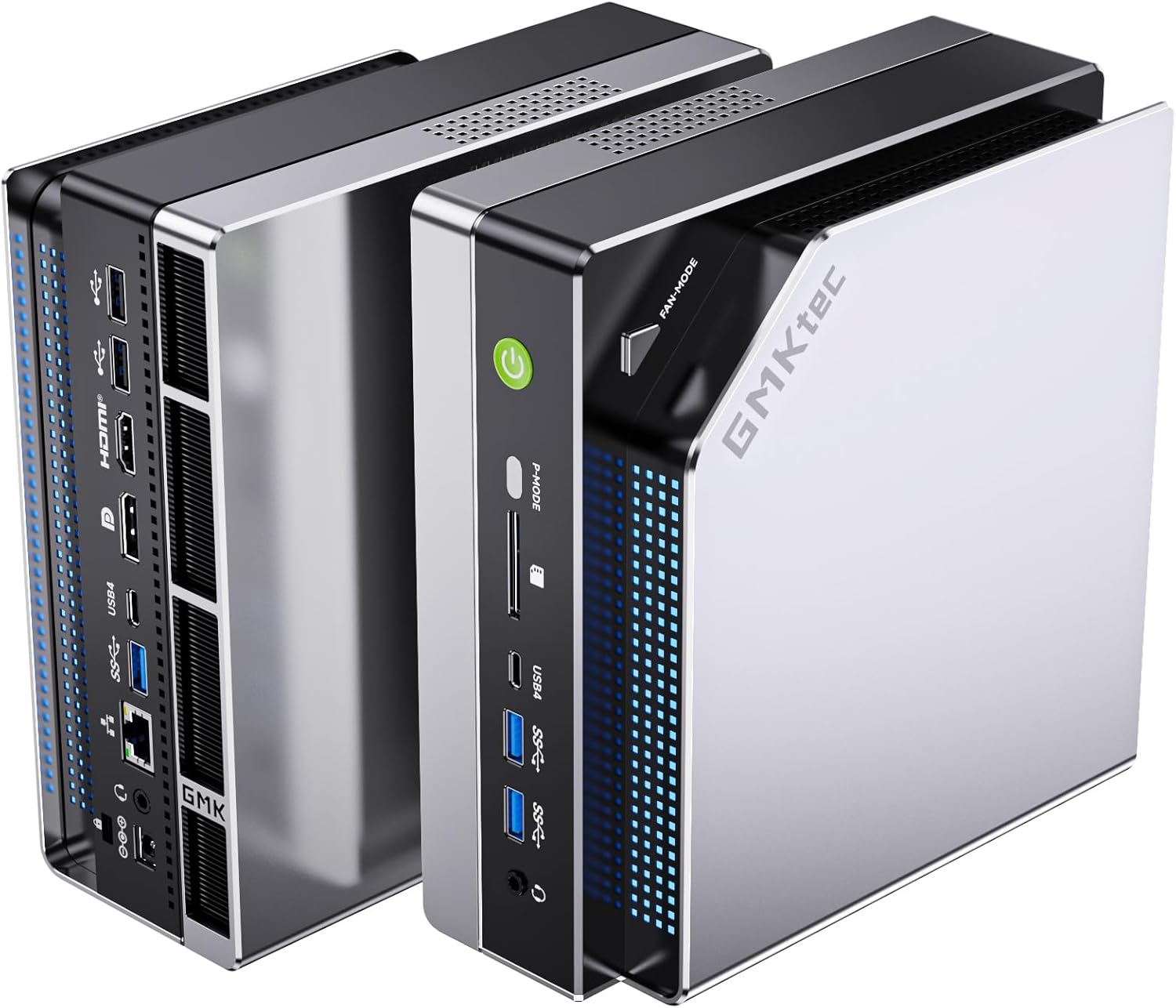
Both mini PCs use the same Ryzen AI Max+ 395 (Strix Halo) processor with 126 TOPS of AI compute and 128GB of LPDDR5X RAM. The GMKtec EVO-X2 AI at $2,999 is more readily available on Amazon with 74 reviews and triple-fan cooling with RGB. The Minisforum MS-S1 Max at ~$2,399 is cheaper and adds 10GbE SFP+ networking — a massive advantage for homelab builds.
Pick EVO-X2 if: You want Amazon availability, triple-fan cooling, SD card reader, and proven customer reviews.
Pick MS-S1 Max if: You need 10GbE for homelab, want to save ~$600, and prioritize networking over cooling aesthetics.
Quick Product Links
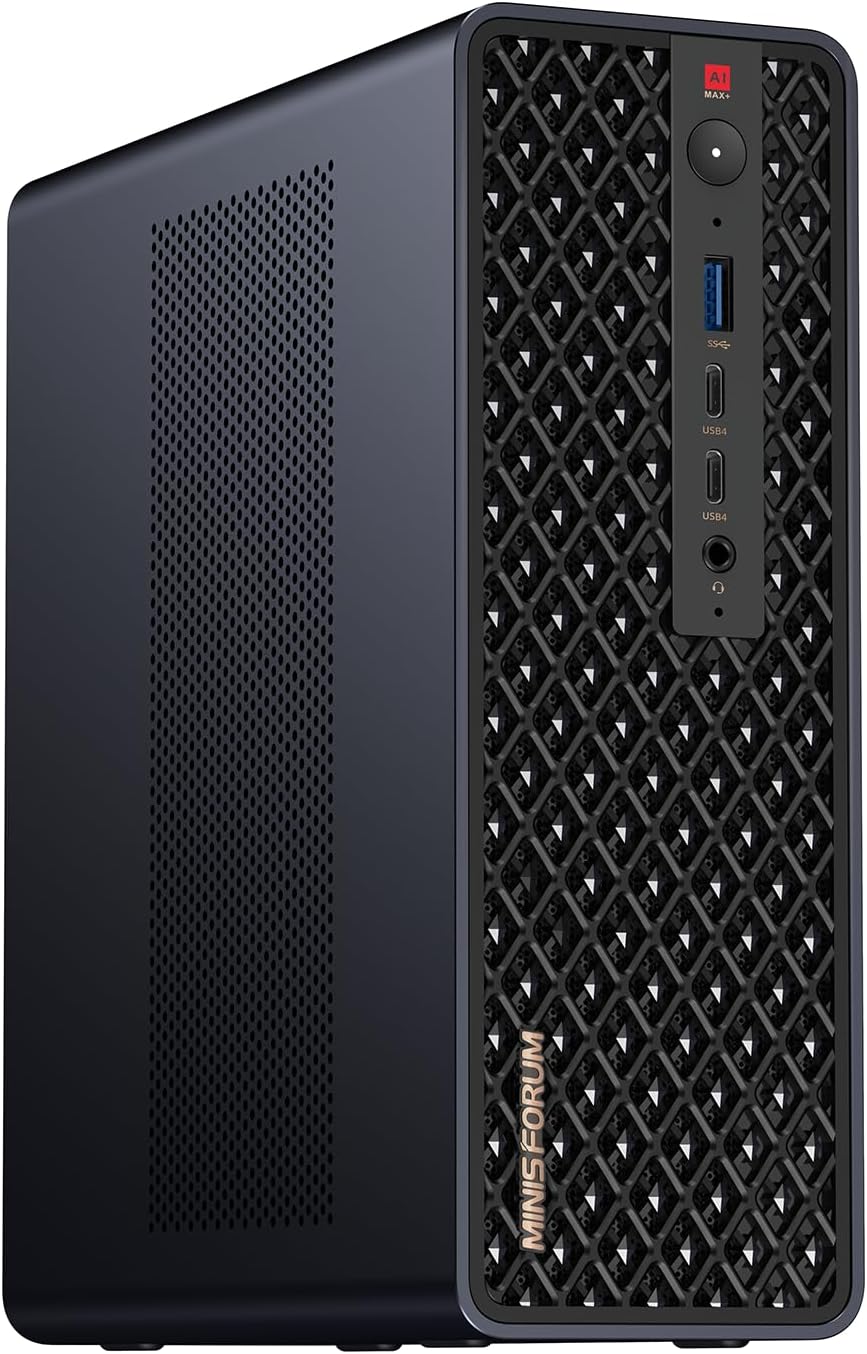
Minisforum MS-S1 MAX
Price: ~$1,440
→ Check Current Price on Amazon
Side-by-Side Specs
| Spec | GMKtec EVO-X2 AI | Minisforum MS-S1 Max | Winner |
|---|---|---|---|
| CPU | Ryzen AI Max+ 395 (16C/32T, 5.1GHz) | Ryzen AI Max+ 395 (16C/32T, 5.1GHz) | Tie |
| GPU | Radeon 8060S (40 CUs) | Radeon 8060S (40 CUs) | Tie |
| RAM | 128GB LPDDR5X 8000MT/s | 128GB LPDDR5X | Tie |
| Storage | 2TB PCIe 4.0 SSD | Config-dependent | EVO-X2 |
| Networking | 2.5GbE + WiFi 7 | 10GbE SFP+ + WiFi 7 | MS-S1 Max |
| Cooling | Triple fans, 3 heatpipes, RGB | Dual-fan design | EVO-X2 |
| USB4 | 2x USB4 (40Gbps) | 2x USB4 (40Gbps) | Tie |
| SD Card Reader | Yes (SD 4.0) | No | EVO-X2 |
| Reviews | 74 (4.1★) | Limited | EVO-X2 |
| Price | ~$2,999 | ~$2,399 | MS-S1 Max |
CPU and GPU Performance
Both systems use the identical Ryzen AI Max+ 395 processor — AMD’s most powerful x86 APU. Sixteen Zen 5 cores, 32 threads, up to 5.1 GHz boost, and the massive Radeon 8060S GPU with 40 RDNA 3.5 compute units (2,560 shaders).
AI compute: Both deliver 126 TOPS total (50+ from XDNA 2 NPU + GPU compute). For Ollama LLM inference:
- 7B models: ~50-70 tokens/sec on both
- 13B models: ~35-50 tokens/sec on both
- 34B models: ~20-30 tokens/sec on both
- 70B models (Q4): ~5-10 tokens/sec on both (requires 128GB RAM)
GPU performance: The 8060S sits between an RTX 4060 and RTX 4070 laptop GPU in raw compute. Stable Diffusion XL images generate in 3-8 seconds. 1080p AAA gaming runs at medium-high settings.
Real user benchmark: EVO-X2 owner Edward Lee confirmed Qwen3 235B at 8-10 tokens/sec using ROCm-enabled llama.cpp, and gpt-oss-120b at 36-40 tokens/sec. These are real-world numbers from actual usage.
Memory and Storage
Both systems ship with 128GB LPDDR5X — the maximum this platform supports. This is soldered RAM, not upgradeable. The advantage is 8-channel memory bandwidth at 8000MT/s (~256 GB/s), roughly 4x faster than standard DDR5 SO-DIMM.
Why 128GB matters for AI:
- 7B model (Q4): ~4GB — trivial
- 13B model (Q4): ~8GB — runs on most 32GB mini PCs
- 34B model (Q4): ~20GB — needs 32GB+ system
- 70B model (Q4): ~42GB — needs 64GB+ system
- 70B model (Q8): ~75GB — needs 96GB+ system
- 120B+ models: 80GB+ — needs 128GB
Storage: The EVO-X2 includes a 2TB PCIe 4.0 SSD out of the box. The MS-S1 Max storage configuration varies by vendor — verify on the product listing before purchasing. Both support dual M.2 slots for expansion.
Networking: The Key Differentiator
This is where the MS-S1 Max justifies its existence:
EVO-X2: Single 2.5GbE (Realtek controller). Adequate for general use, but requires manual driver installation on some Linux distributions. WiFi 7 and Bluetooth 5.4 are current-gen.
MS-S1 Max: Dual 10GbE SFP+ ports. This is enterprise-grade networking — 4x the bandwidth of 2.5GbE. For homelab builds with 10G switches, NAS systems, or high-throughput VM traffic, this is a significant advantage. The MS-S1 Max is the only Strix Halo mini PC with 10GbE.
For homelab use: The MS-S1 Max is the obvious choice. Run 10G VM traffic, connect to a 10G NAS, or use one port for WAN and one for LAN at multi-gigabit speeds. The EVO-X2’s 2.5GbE is limiting for serious homelab workloads.
Cooling and Acoustics
EVO-X2: Triple-fan design with three heatpipes and RGB lighting (13 modes). The dedicated power mode button on the front panel switches between Quiet (54W), Balanced (85W), and Performance (140W) without rebooting. Under sustained load, fan noise is noticeable but the triple-fan design keeps thermals manageable.
MS-S1 Max: Dual-fan design (per ServeTheHome review). Runs cooler and quieter than the EVO-X2 in equivalent workloads, but lacks the RGB aesthetics and dedicated power mode button. The chassis is more utilitarian — designed for rack mounting, not desk display.
Noise levels: Expect 35dB+ under full AI inference load on the EVO-X2 in Performance mode. The MS-S1 Max runs quieter but specific dB measurements vary by workload.
Power Consumption
| Metric | EVO-X2 AI | MS-S1 Max |
|---|---|---|
| Idle (W) | ~12W | ~12W |
| Load (W) | ~120W | ~120W |
| Annual Cost (24/7 idle) | ~$12.61/year | ~$12.61/year |
Annual cost calculated at $0.12/kWh. Source: ServeTheHome (Ryzen AI Max+ 395 platform).
Both systems share the Strix Halo platform — power consumption is identical. The three power modes on the EVO-X2 help manage this: Quiet mode (54W) for always-on tasks, Balanced (85W) for mixed workloads, Performance (140W) for maximum AI throughput.
Design and Build Quality
EVO-X2: Enthusiast-oriented design with RGB lighting strip (13 configurable modes). The chassis is substantial — the triple-fan cooling needs the internal volume. Build quality is solid for the price point. The SD 4.0 card reader is a welcome addition that many competitors omit.
MS-S1 Max: Utilitarian design focused on function over form. The chassis is designed for rack mounting or closet deployment. No RGB, no flashy aesthetics — just solid engineering. The dual 10GbE SFP+ ports are front-facing for easy cable management.
Port selection:
- EVO-X2: 2x USB4 (40Gbps), 4x USB-A 3.2, HDMI 2.1, DP 1.4, 2.5GbE, SD 4.0, 3.5mm audio
- MS-S1 Max: 2x USB4 (40Gbps), 4x USB-A, HDMI 2.1, 2x 10GbE SFP+, 3.5mm audio
Price and Value
At $2,999, the EVO-X2 is priced as a premium enthusiast system. You’re paying for:
- 128GB LPDDR5X (valued at ~$800-1,000 alone)
- Triple-fan cooling with RGB
- SD card reader
- Amazon availability with 74 reviews
- 2TB SSD included
At ~$2,399, the MS-S1 Max undercuts the EVO-X2 by ~$600. You’re getting:
- Same 128GB LPDDR5X
- Same Ryzen AI Max+ 395
- 10GbE SFP+ (a ~$200-300 value for homelab users)
- More utilitarian design
For homelab buyers: The MS-S1 Max is exceptional value. 10GbE alone justifies the purchase, and saving $600 is a bonus.
For enthusiast buyers: The EVO-X2’s triple-fan cooling, RGB, and SD reader may justify the premium.
Real-World Use Cases
For 70B+ LLM Inference
Tie. Both handle 70B Q4 at 5-10 tokens/sec and 120B+ models via CPU offloading. The 128GB RAM and 8-channel bandwidth are identical.
For Homelab (Proxmox, 10G NAS)
MS-S1 Max wins decisively. The dual 10GbE SFP+ ports enable multi-gigabit VM traffic, 10G NAS connectivity, and proper network segmentation. The EVO-X2’s 2.5GbE is limiting for serious homelab workloads.
For Content Creation
EVO-X2 wins. The SD 4.0 card reader is genuinely useful for photographers and videographers. The triple-fan cooling keeps thermals manageable during sustained rendering workloads.
For AI Development
Tie. Both deliver 126 TOPS and 128GB RAM. Choose based on networking needs (10GbE for distributed training) or cooling preferences (triple-fan for sustained inference).
Final Verdict: Which Should You Buy?
Buy the if
GMKtec EVO-X2 AI
→ Check Current Price on Amazon
- You want Amazon availability with 74 reviews proving reliability
- You need triple-fan cooling for sustained AI workloads
- You want the SD 4.0 card reader for content creation
- You value RGB aesthetics and dedicated power mode button
- You don’t need 10GbE networking
Buy the Minisforum MS-S1 Max if:
- You need 10GbE SFP+ for homelab or NAS connectivity
- You want to save ~$600 vs the EVO-X2
- You prioritize function over form (utilitarian design)
- You’re building a 10G homelab network
- You prefer ServeTheHome-reviewed hardware
Amazon Product Links
- GMKtec EVO-X2 AI — $2,999 (128GB/2TB, triple-fan cooling, SD reader)
- Minisforum MS-S1 Max — ~$2,399 (128GB, dual 10GbE SFP+)
Note: MS-S1 Max availability varies — check Amazon for current pricing and stock.
Frequently Asked Questions
Can both systems run 120B+ parameter LLMs?
Yes. With 128GB LPDDR5X and up to 96GB VRAM allocation, both handle 120B+ models via CPU offloading. Real user benchmarks on the EVO-X2 confirm gpt-oss-120b at 36-40 tokens/sec.
Is the RAM upgradeable on either system?
No. The LPDDR5X memory is soldered to the motherboard and cannot be upgraded. This is the trade-off for 8-channel bandwidth — you get roughly 256 GB/s of memory bandwidth, but the capacity you buy is permanent.
Does the MS-S1 Max 10GbE work with Proxmox?
Yes. The 10GbE SFP+ ports are supported in Proxmox VE 8.x. You may need to install specific drivers depending on the NIC controller, but community reports confirm successful deployment.
How does the 8060S compare to a discrete GPU?
The 40-CU Radeon 8060S performs between an RTX 4060 and RTX 4070 laptop GPU in raw compute. It lacks dedicated VRAM but compensates with access to up to 96GB of system RAM. For Stable Diffusion, it generates SDXL images in 3-8 seconds.
Which has better cooling?
The EVO-X2’s triple-fan design with three heatpipes handles thermals well but is audible under load (35dB+). The MS-S1 Max’s dual-fan design runs quieter but specific thermal performance varies by workload. For sustained AI inference, the EVO-X2’s dedicated power modes help manage heat.
Is the EVO-X2 worth the $600 premium?
For homelab users who need 10GbE, no — the MS-S1 Max is the clear choice. For enthusiast users who value triple-fan cooling, RGB, SD card reader, and Amazon availability with reviews, the EVO-X2 justifies the premium.