
GMKtec K11 Review: Ryzen 9 8945HS Mini PC with OCuLink and Dual 2.5G [2026]
By Max · March 24, 2026 · Updated May 4, 2026
This article contains affiliate links. If you purchase through our links, we may earn a commission at no extra cost to you. We only recommend products we’ve thoroughly researched.
![GMKtec K11 Review: Ryzen 9 8945HS Mini PC with OCuLink and Dual 2.5G [2026]](/images/heroes/variants/gmktec-k11-review/1920.webp)
→ Check Current Price on Amazon
The GMKtec K11 is one of the best-value mini PCs for homelab use. Dual Intel 2.5GbE NICs suit pfSense and router builds, OCuLink opens an external GPU path, and a full 32GB and 2TB configuration under $740 makes this the spec-per-dollar leader.
The Ryzen 9 8945HS is Zen 4 Hawk Point — marginally improved efficiency over the 7940HS, but real-world performance is identical. For homelabbers who need dual NICs and users who want OCuLink for future eGPU expansion, the K11 is the pick.
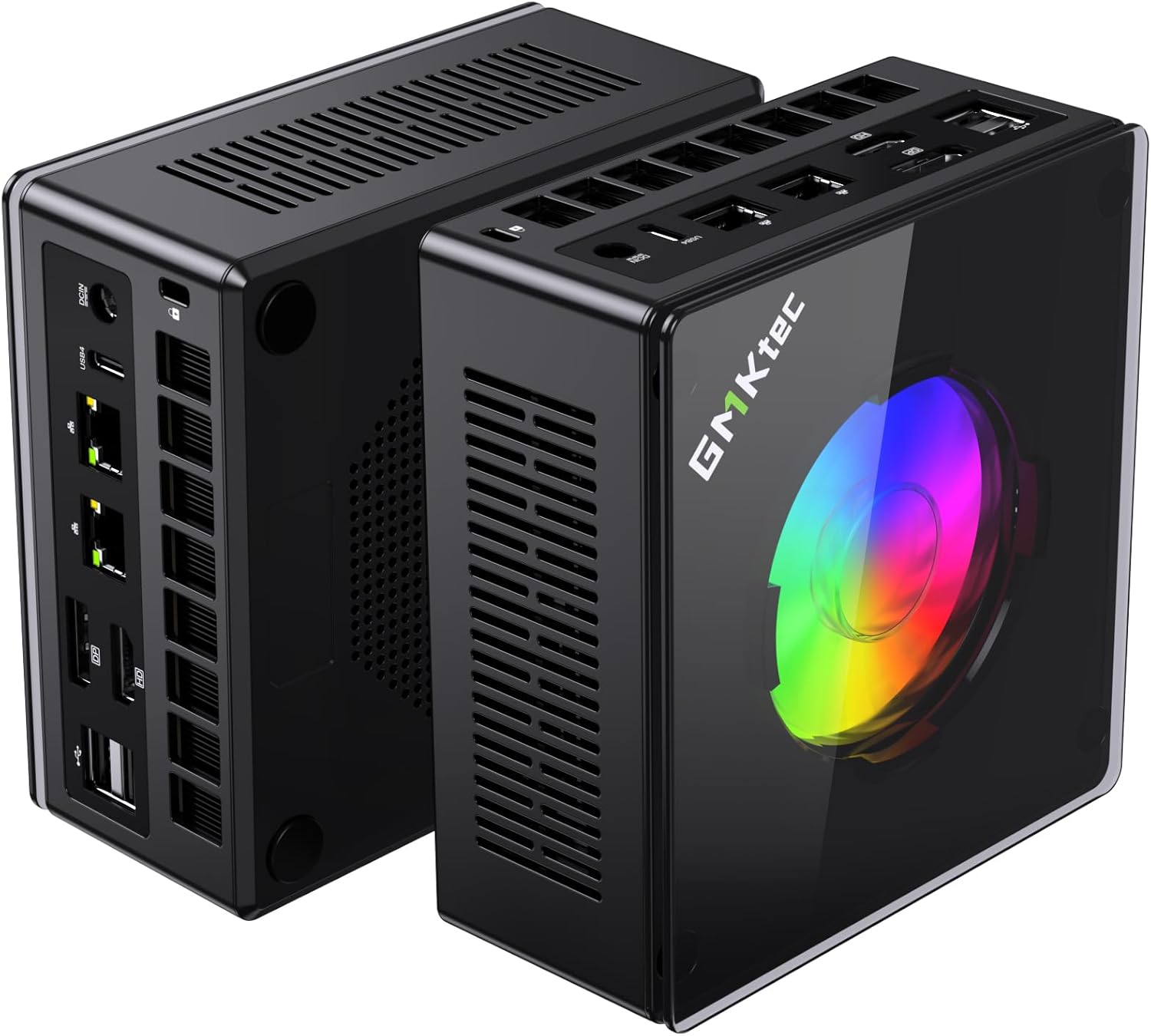
Port layout from GMKtec’s own listing images. The rear panel is where the port count, the LAN speed, and the USB generations are actually settled.
GMKtec K11 — Specs at a Glance
| Spec | Detail |
|---|---|
| CPU | AMD Ryzen 9 8945HS (8C/16T, up to 5.1 GHz, Zen 4 Hawk Point) |
| GPU | AMD Radeon 780M (RDNA 3, 12 CUs, 768 shaders) |
| RAM | 32GB DDR5 SO-DIMM (upgradeable to 64GB) |
| Storage | 2TB PCIe 4.0 NVMe SSD |
| Networking | Dual 2.5GbE (Intel i226-V) + WiFi 6 + Bluetooth 5.2 |
| Display | Dual display via HDMI, DP, USB-C 4.0 |
| AI TOPS | 0 (no dedicated NPU — CPU/GPU compute only) |
| USB | USB-C 4.0 (40Gbps), multiple USB-A 3.2 |
| Special Features | OCuLink port for eGPU, dual fan cooling |
| Warranty | 1-year limited |
| Price | ~$739 |
| Rating | New listing (reference similar GMKtec products) |
Design and Build Quality
The K11 follows GMKtec’s established design language — compact aluminium chassis with dual fan cooling. The larger chassis (compared to single-NIC competitors) accommodates the dual Intel NICs and OCuLink port.
Port selection is excellent for homelab use: dual 2.5GbE Intel NICs, USB-C 4.0 (40Gbps), multiple USB-A 3.2, HDMI, DisplayPort, and the OCuLink port. The OCuLink port is a direct PCIe 4.0 x4 connection for external GPUs — far more efficient than USB4 for eGPU setups.
Build quality notes: The chassis is solid with no flex. The dual fan cooling system keeps thermals manageable under sustained workloads. Fan noise is noticeable under load but acceptable for homelab closets.
CPU and Performance
The Ryzen 9 8945HS is AMD’s Hawk Point refresh — 8 cores and 16 threads at up to 5.1 GHz boost. For multi-threaded workloads — running multiple VMs, Docker containers, batch processing — the 8-core configuration delivers solid performance.
For homelab workloads:
- Proxmox VE: Handles 6-8 lightweight VMs comfortably
- Docker: Runs dozens of containers without breaking a sweat
- Firewall/router: Dual Intel NICs enable proper OPNsense/pfSense builds
For AI workloads: The 8945HS lacks a dedicated NPU. It relies on CPU/GPU compute for AI workloads. For Ollama LLM inference:
- 7B models (Q4): ~25-40 tokens/sec
- 13B models (Q4): ~10-20 tokens/sec
- 34B models (Q4): Runs well with 32GB RAM at 10-15 tokens/sec
- 70B models (Q4): Limited by 32GB RAM — needs 64GB+
The Radeon 780M handles GPU-accelerated inference adequately, but without NPU acceleration, AI workloads are slower than on HX370/HX470 systems.
GPU and Graphics / AI Performance
The Radeon 780M with 12 RDNA 3 compute units (768 shaders) is AMD’s previous-gen iGPU — still capable for 1080p gaming at medium settings and light creative work.
For gaming:
- 1080p medium: Handles Cyberpunk 2077, Elden Ring at 35-45 fps
- Esports titles: Valorant, CS2, League of Legends run at 60+ fps
For AI workloads:
- LLM inference: See tokens/sec above — the 780M handles GPU-accelerated inference adequately
- Stable Diffusion: Generates 512x512 images in 12-18 seconds
- ROCm support: Solid on Linux for RDNA 3 — reviewers have run Ollama on Ubuntu 24.04 without issues
OCuLink advantage: The OCuLink port is a direct PCIe 4.0 x4 connection for external GPUs. Connect an RTX 4070 or similar for desktop-class AI compute or 4K gaming. Performance loss vs direct PCIe is only 5-10% — far better than USB4’s 20-30% loss.
Memory and Storage
The K11 includes 32GB DDR5 SO-DIMM — upgradeable to 64GB. This is adequate for most homelab workloads and 7B-34B LLMs. For 70B models, plan to upgrade to 64GB (~$80-100 for extra 32GB).
Why 32GB matters:
- General use: 32GB is comfortable
- 7B-13B LLMs: 32GB is ideal
- 34B LLMs: 32GB is adequate
- 70B LLMs: 64GB+ recommended (upgrade required)
Storage: The included 2TB PCIe 4.0 NVMe SSD is generous at this price point. For AI workloads with multiple large models, this provides ample space for model weights and datasets. A single 70B Q4 model takes ~42GB — the 2TB SSD holds dozens of models.
Networking and Connectivity
| Port | Quantity |
|---|---|
| USB-C 4.0 (40Gbps) | 1 |
| USB-A 3.2 Gen 2 | Multiple |
| HDMI 2.1 | 1 |
| DisplayPort | 1 |
| 2.5GbE (Intel i226-V) | 2 |
| OCuLink | 1 |
| 3.5mm audio | 1 |
Dual Intel 2.5GbE is the gold standard for homelab use. These NICs have excellent Linux driver support out of the box. Run OPNsense with WAN on one port and LAN on the other, or dedicate one NIC to management and one to VM traffic in Proxmox.
OCuLink is the K11’s killer feature. This is a direct PCIe 4.0 x4 connection for external GPUs — far more efficient than USB4 for eGPU setups. Connect an RTX 4070 for desktop-class AI compute or 4K gaming.
WiFi 6 and Bluetooth 5.2 are adequate (one generation behind WiFi 6E/7). For a homelab that lives on Ethernet, this matters less.
Power Consumption and Running Costs
| Metric | Value | Source |
|---|---|---|
| Idle (W) | ~10W | Community estimate (Ryzen 9 8945HS platform) |
| Load (W) | ~65W | Community estimate (Ryzen 9 8945HS platform) |
| Annual Cost (24/7 idle) | ~$10.51/year | At $0.12/kWh |
Running 24/7 at idle, the K11 costs about $10.51 per year in electricity — about $0.88 per month. Under sustained load, power reaches ~65W, which is efficient for an 8-core system. The dual NICs add marginal power draw but are worth it for homelab flexibility.
GMKtec K11 vs. the Competition
The GEEKOM A7 MAX at around $699 uses the Ryzen 9 7940HS and carries 670 Amazon ratings at 4.2 stars as of August 25, 2026. The K11 counters with more memory, a larger SSD, dual 2.5GbE, and OCuLink. For homelab use, the K11 is better value.
The Reatan Alloy 9 (~$899) uses the same 7940HS with 32GB RAM and 2.5GbE. For $160 more, you get a slightly more premium chassis. The K11 counters with dual 2.5GbE, OCuLink, and 2TB SSD. For homelab use, the K11 is the clear winner.
The MINISFORUM X1-255 (~$739) uses the Ryzen 7 255 with 38 TOPS AI compute and WiFi 7. For the same price, you get AI capabilities but lose dual NICs, OCuLink, and the 8945HS’s extra cores. For AI workloads, the X1-255 is better. For homelab, the K11 wins.
Who Should Buy the GMKtec K11?
Buy it if you:
- Need dual 2.5GbE Intel NICs for homelab/firewall use
- Want OCuLink for eGPU expansion (RTX 4070, etc.)
- Need 32GB RAM and 2TB SSD out of the box
- Want the best specs per dollar at $739
- Run Proxmox, OPNsense, or Docker workloads
- Don’t need AI NPU features
Skip it if you:
- Need AI features — the X1-255 has 38 TOPS
- Want WiFi 7 — the X1-255 has WiFi 7
- Want proven reliability — the A7 MAX has 550 reviews
- Need a 3-year warranty — the A7 MAX has 3 years
- Want more cores — the X1 Pro-370 has 12 cores
Frequently Asked Questions
Does the K11 have AI capabilities?
No dedicated NPU. The 8945HS relies on CPU/GPU compute for AI workloads. It handles 7B models at 25-40 tokens/sec and 13B models at 10-20 tokens/sec, but lacks NPU acceleration for Copilot+ features.
Is OCuLink better than USB4 for eGPU?
Yes. OCuLink is a direct PCIe 4.0 x4 connection with only 5-10% performance loss vs direct PCIe. USB4 has 20-30% loss due to protocol overhead. For eGPU setups, OCuLink is significantly better.
Is dual 2.5GbE useful for a mini PC?
Absolutely. Dual NICs enable proper firewall/router builds (OPNsense, pfSense), link aggregation for higher throughput, or separate WAN/LAN networks. For Proxmox, you can dedicate one NIC to management and one to VM traffic.
Is 32GB RAM enough?
For general use and 7B-34B LLMs, yes. For 70B models, plan to upgrade to 64GB (~$80-100 for extra 32GB). The included 32GB is a genuine advantage over competitors with 16GB.
How does the 780M compare to newer iGPUs?
The 12-CU Radeon 780M is RDNA 3 (current-gen for non-AI chips). The 890M (16 CUs, RDNA 3.5) in HX370 systems is ~30% faster. For 1080p gaming and light creative work, the 780M is capable.
Can I use this for OPNsense/pfSense?
Yes. The dual Intel i226-V NICs have excellent out-of-the-box Linux support. Run WAN on one port and LAN on the other for a proper firewall build. This is the best mini PC under $800 for firewall use.
Final Verdict
The GMKtec K11 is the best-value mini PC for homelab use today. The dual Intel 2.5GbE NICs, OCuLink for eGPU, 32GB RAM, and 2TB SSD at $739 make it the spec-per-dollar king.
For homelabbers who need dual NICs and users who want OCuLink for future expansion, the K11 is the clear winner. For AI workloads, step up to HX370 systems. For general use, the K11 delivers solid performance at an unbeatable price.