
GMKtec Mini PCs for Homelab 2026 — Full Lineup Guide
By Max · March 24, 2026 · Updated August 6, 2026
This article contains affiliate links. If you purchase through our links, we may earn a commission at no extra cost to you. We only recommend products we’ve thoroughly researched and verified.

GMKtec built their reputation on one product: the K11. A mini PC with a Ryzen 9 8945HS, dual 2.5GbE Intel NICs, an OculLink port for eGPU expansion, and USB4 — all for around $599. That combination got the attention of homelab builders who wanted Proxmox performance without a server rack.
Beyond the K11, GMKtec’s lineup includes budget N-series options for light server use and newer AI-focused hardware. This guide covers the models that matter for homelab use: what each does well, where the trade-offs are, and which one fits your setup.
Quick Picks: Best GMKtec Mini PC by Use Case
| Use Case | Recommended Model | Price | Why |
|---|---|---|---|
| Light server / Pi-hole / firewall | NucBox G3 Plus | ~$180–230 | N150, dual LAN, minimum electricity cost |
| Primary Proxmox host — serious VM count | K11 | ~$639 | Dual Intel 2.5GbE, Ryzen 9 8945HS, OculLink |
| AI inference / local LLM workloads | EVO-X2 AI | ~$1,800+ | NPU + GPU acceleration optimized for inference |
About GMKtec
GMKtec is a Shenzhen-based OEM that entered the homelab-relevant market with the NucBox K series — high-spec mini PCs with networking configurations more typically found in rack-mounted hardware. Their customer-facing presence is primarily through Amazon and their own GMKtec.com store.
The brand’s community credibility comes largely from the K8 and K11, which are discussed extensively on Proxmox forums for their dual-NIC configurations and OculLink ports. Firmware updates have been inconsistent but not absent. Linux compatibility is good — no major driver blockers on current hardware, though BIOS settings require some digging to fully enable IOMMU.
GMKtec Homelab Lineup Overview
| Model | CPU | Max RAM | Networking | OculLink | Power (Idle) | Price |
|---|---|---|---|---|---|---|
| NucBox G3 Plus | Intel N150 (4C/4T, 3.6GHz) | 32GB DDR4 | 2× 2.5GbE | No | ~6W | ~$180–230 |
| K11 | Ryzen 9 8945HS (8C/16T, 5.4GHz) | 64GB DDR5 | 2× 2.5GbE (Intel) | Yes | ~15W | ~$639 |
| EVO-X2 AI | AMD Ryzen AI Max+ 395 | 128GB LPDDR5X | 1× 2.5GbE | No | ~15W | ~$1,800+ |
On NIC controllers: The K11’s dual 2.5GbE ports use Intel i226-V controllers — important for OPNsense/pfSense and Proxmox SDN configurations. Budget models in the NucBox line should have NICs verified before deploying as firewalls — confirm controller with lspci after boot.
GMKtec NucBox G3 Plus — Budget Homelab Entry
The NucBox G3 Plus fills the same role as the Beelink EQ14: an N150-based mini PC with dual LAN that does well for light always-on services. It draws ~6W at idle, runs Proxmox LXC containers without issues, and can serve as an OPNsense/pfSense firewall if NIC controllers are confirmed.
For anyone choosing between the GMKtec G3 Plus and Beelink EQ14, the decision comes down to availability and exact NIC specs — both are strong budget options. The EQ14 has a slight edge on documented Intel NIC confirmation; the G3 Plus competes on price.
Where it falls short: Same as the EQ14 — N150 CPU is a bottleneck for multi-VM workloads. If you need real Proxmox VM density, go straight to the K11.
GMKtec K11 — Best Overall Homelab Mini PC
→ Check Current Price on Amazon
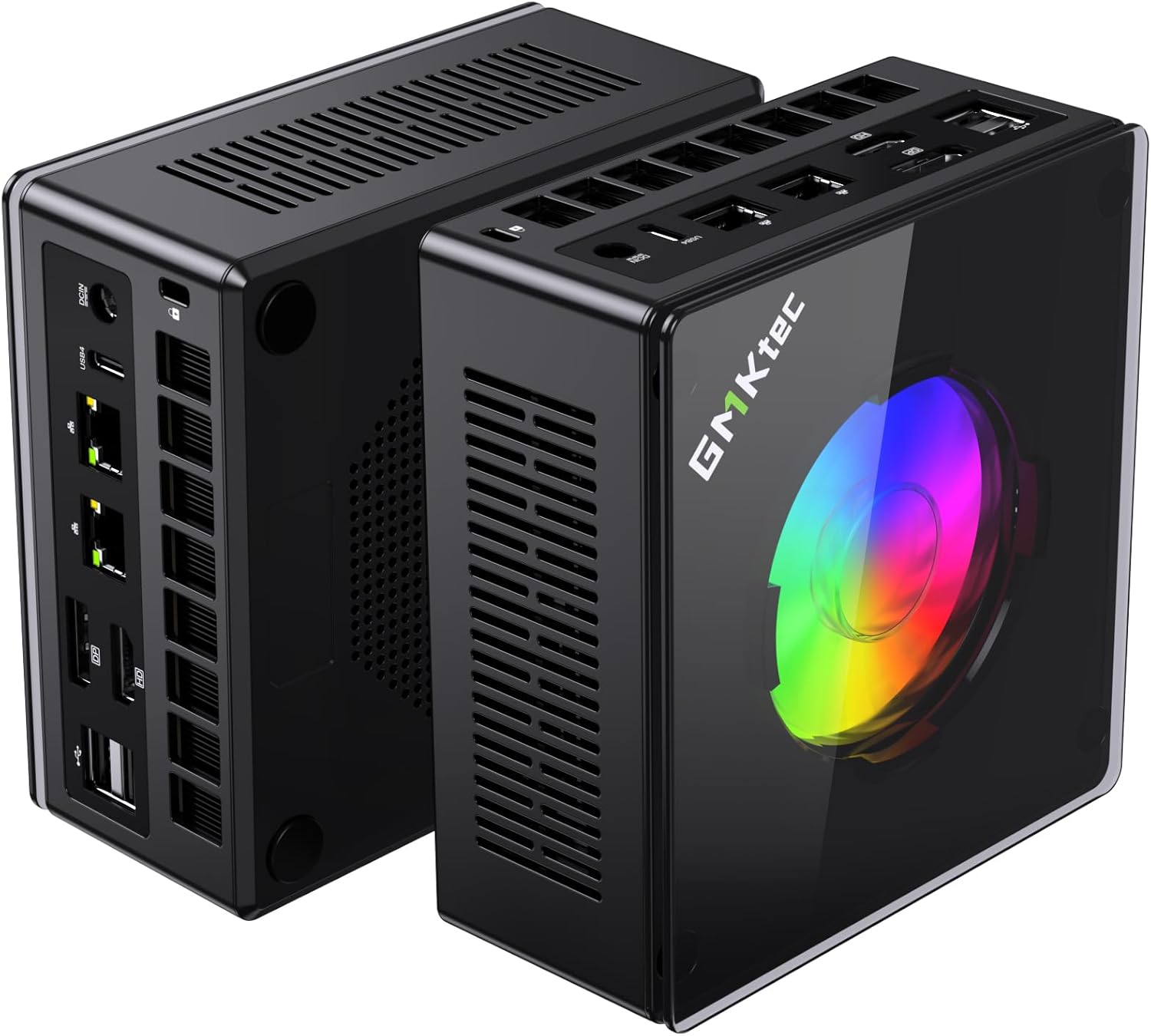
The K11 is the most capable mini PC for homelab use at its price point. The Ryzen 9 8945HS provides 8 cores and 16 threads with boost up to 5.4GHz — performance that sits comfortably above the Ryzen 7 H 255 found in the Beelink SER9 PRO+. More importantly for homelab use: it ships with dual Intel i226-V 2.5GbE NICs.
Dual Intel NICs at this price is rare. It means you can run OPNsense or pfSense with full native support, bond the NICs for 5Gbps aggregate throughput to a storage server, or segment management and data traffic without a USB NIC adapter. This networking configuration alone separates the K11 from most competitors in this price range.
The OculLink port takes the K11 further. OculLink provides up to 64Gbps PCIe 4.0 bandwidth to an external GPU — vastly more than Thunderbolt 4’s 40Gbps. For AI inference (Ollama with a dedicated GPU), machine learning workloads, or GPU passthrough experiments in Proxmox, the OculLink expands what a mini PC can do. External GPU enclosures compatible with OculLink are available in the $100–200 range.
Power consumption in homelab mode (Proxmox idle, no active VMs): ~15W at wall, cited from Lon.TV’s review of the K11 which measured 13.5–18W idle across configurations. Under CPU stress: ~80–96W depending on TDP mode selected.
The K11 ships with three TDP modes: Quiet (35W), Balance (54W), and Performance (65W). For a 24/7 homelab server, Balance mode gives the right trade-off — active VMs get the CPU headroom they need without running full power consumption continuously.
Specs:
| Spec | Detail |
|---|---|
| CPU | AMD Ryzen 9 8945HS (8C/16T, up to 5.4GHz, 35–65W configurable) |
| RAM | 32GB DDR5-5600 (upgradeable to 64GB via 2× SO-DIMM) |
| Storage | 2TB M.2 NVMe PCIe 4.0 (2× M.2 slots, up to 8TB total) |
| Networking | 2× 2.5GbE (Intel i226-V) |
| Display | 2× HDMI 2.1 + 1× DP 2.1 + 1× USB4 (4× display output) |
| Expansion | OculLink (PCIe 4.0 x4, 64Gbps) + USB4 (40Gbps eGPU) |
| Power Draw | ~15W idle / ~80–96W load (cited from Lon.TV, Proxmox mode) |
| Price | ~$639 |
Pros:
- Dual Intel i226-V 2.5GbE NICs — first-class OPNsense/pfSense/Proxmox networking
- OculLink expands GPU capacity beyond what Thunderbolt can deliver
- 64GB DDR5 capacity supports serious VM density
- Dual M.2 slots for OS + large data volume separation
- Radeon 780M iGPU for hardware video transcoding
Cons:
- ~$639 is a premium price — $150–200 more than comparable single-NIC models
- ~15W idle is higher than N-series alternatives (costs ~$16/year to run 24/7 idle)
- No SATA bays for spinning drives — NVMe only
- TDP mode selection adds a setup step that some users find opaque
Who should buy this: Homelab builders who want a single machine that can serve as Proxmox host, OPNsense firewall, and GPU inference server simultaneously — or who plan to expand with OculLink.
Who should skip this: Anyone who just needs Pi-hole + Home Assistant and doesn’t need dual NICs or high VM density. The EQ14 or G3 Plus does the job at a third of the price.
GMKtec EVO-X2 AI — For AI Inference Workloads
→ Check Current Price on Amazon
The EVO-X2 AI targets a different use case: local AI inference. It runs AMD Ryzen AI Max+ 395 with a 40-core integrated Radeon GPU and NPU rated at 50+ TOPS. For running Ollama, LM Studio, or Whisper locally without a discrete GPU, the combination of NPU and high-core-count iGPU matters — capabilities the Ryzen 9 8945HS doesn’t have.
For pure Proxmox VM hosting, the EVO-X2 AI doesn’t outperform the K11 meaningfully. Its strength is specifically in AI workloads where the NPU provides acceleration not available in the K11. Single 2.5GbE NIC means it’s not a dual-NIC firewall build.
Specs:
| Spec | Detail |
|---|---|
| CPU | AMD Ryzen AI Max+ 395 (16C/32T, up to 5.1GHz) |
| NPU | AMD NPU (50+ TOPS for AI inference) |
| RAM | Up to 128GB LPDDR5X (soldered — not upgradeable) |
| Storage | M.2 NVMe PCIe 4.0 |
| Networking | 1× 2.5GbE |
| Power Draw | ~12W idle / ~65W load (manufacturer rated) |
| Price | ~$1,800+ |
Pros:
- NPU acceleration makes it the best mini PC for local AI inference in this price range
- Radeon 890M is stronger than 780M for GPU-accelerated inference
- Compact, low-power for the compute delivered
Cons:
- LPDDR5 RAM is soldered — you can’t upgrade beyond configured capacity
- Single 2.5GbE NIC — not a dual-NIC firewall option
- NPU advantage over K11 only matters for AI workloads specifically
Who should buy this: Anyone running Ollama, Whisper, or other local inference workloads who wants NPU acceleration without a discrete GPU. See our dedicated best mini PC for local LLM guide.
Who should skip this: General Proxmox homelab builders who want networking flexibility. The K11 is better for that use case.
The Rest of the GMKtec Lineup
Other current GMKtec models, with verified specs — pick the K11 or EVO-X2 AI above unless one of these fits a specific need:
| Model | Key specs | Check price |
|---|---|---|
| M5 Ultra | Ryzen 7 7730U, 32GB DDR4, dual 2.5GbE, WiFi 6E | Amazon |
| M6 Ultra | Ryzen 5 7640HS, 32GB DDR5, dual 2.5GbE, USB4 | Amazon |
| K8 Plus | Ryzen 7 8845HS, 32GB DDR5, dual 2.5GbE, USB4 | Amazon |
| K15 | Intel Core Ultra 5 125U, 32GB DDR5, 3× M.2, dual 2.5GbE | Amazon |
| EVO-X1 | Ryzen AI 9 HX 370, 32GB LPDDR5X onboard, OCuLink | Amazon |
| EVO-T1 | Intel Core Ultra 9 285H, 64GB DDR5, 3× M.2, OCuLink | Amazon |
| G10 | Ryzen 5 3500U, 16GB, single 2.5GbE — budget | Amazon |
Which GMKtec Should You Buy?
| If you need… | Buy this |
|---|---|
| Budget always-on server, firewall, Pi-hole | NucBox G3 Plus |
| Main Proxmox host with real VM capacity + dual NICs | K11 |
| Local AI inference / Ollama / NPU acceleration | EVO-X2 AI |
| OPNsense firewall with Intel NICs at budget price | NucBox G3 Plus (verify NIC controllers) |
Head-to-Head Comparison
| Feature | G3 Plus | K11 | EVO-X2 AI |
|---|---|---|---|
| CPU | N150 (4C/4T) | Ryzen 9 8945HS (8C/16T) | Ryzen AI Max+ 395 (16C/32T) |
| Max RAM | 32GB DDR4 | 64GB DDR5 | 128GB LPDDR5X (soldered) |
| Networking | 2× 2.5GbE | 2× 2.5GbE (Intel) | 1× 2.5GbE |
| OculLink | No | Yes | No |
| NPU | No | No | Yes (50+ TOPS) |
| Power (Idle) | ~6W | ~15W | ~12W |
| Power (Load) | ~25W | ~80–96W | ~65W |
| Annual Cost (24/7 idle) | ~$6 | ~$16 | ~$13 |
| Price | ~$180–230 | ~$639+ | ~$1,800+ |
Power Consumption at a Glance
| GMKtec Model | Idle (W) | Load (W) | Annual Cost (24/7 idle) |
|---|---|---|---|
| NucBox G3 Plus | ~6W | ~25W | ~$6/year |
| K11 | ~15W | ~80–96W | ~$16/year |
| EVO-X2 AI | ~12W | ~65W | ~$13/year |
K11 idle figures cited from Lon.TV review (13.5–18W range, Proxmox configuration). Annual cost at $0.12/kWh, 24/7 idle. Use our Power Cost Calculator for your local rate.
GMKtec vs. Competitors: When to Look Elsewhere
- For pure NAS storage: The Beelink Me Pro has SATA drive bays the K11 lacks
- For enterprise networking (10GbE): Minisforum MS-01 or MS-A2 are the options
- For a cheaper dual-NIC option: Beelink EQ14 also has dual Intel NICs at ~$200
- For high-capacity NAS with 10GbE: Minisforum N5 Air NAS (5-bay, AMD Ryzen 7 255, ~$519)
See our Beelink vs. GMKtec comparison and our full best mini PC for Proxmox guide for broader comparisons.
Quick Price Summary
- GMKtec K11 — Best dual-NIC Proxmox host
- GMKtec EVO-X2 AI — Best for AI / NPU workloads
- GMKtec G3 Plus — Budget N150 option
- Beelink EQ14 — Budget dual-NIC alternative
Frequently Asked Questions
Does the GMKtec K11 work with Proxmox?
Yes. The K11 runs Proxmox VE 8.x without issues. AMD SVM (hardware virtualization) and AMD-Vi (IOMMU) are available in the BIOS and work with Proxmox’s KVM/LXC stack. Users on the Proxmox forums report successful GPU passthrough of the Radeon 780M iGPU with standard IOMMU configuration.
Does the K11 have Intel NICs for OPNsense?
Yes. The K11’s dual 2.5GbE ports use Intel i226-V controllers, which are directly supported by OPNsense 24.x, pfSense 2.7.x, and Proxmox without additional driver installation. This is one of its primary differentiators over single-NIC alternatives.
What is OculLink and do I need it?
OculLink is a PCIe 4.0 x4 connector that provides 64Gbps bandwidth to an external GPU — significantly more than Thunderbolt 4’s 40Gbps. You need OculLink if you want to connect an eGPU for AI inference, GPU passthrough, or gaming. If your workload is CPU-only (containers, VMs without GPU), OculLink is unused.
How many Proxmox VMs can the K11 handle?
In practice: 8–14 simultaneous VMs with 2 vCPU / 2GB RAM each, or 20–30 LXC containers. With 64GB DDR5 installed, RAM is rarely the limiting factor. At Balance TDP mode (54W), the 8945HS doesn’t throttle under typical homelab VM density.
Is the K11 worth $599?
For a homelab that needs dual Intel NICs, 8-core performance, and OculLink expansion, yes. If your workload is lighter — a few containers and Pi-hole — the NucBox G3 Plus at $180–230 handles it for a third of the cost. The K11’s premium is justified by its networking and expansion capabilities specifically.
How We Research These Picks
Each recommendation is tied to a specific product configuration and cross-checked against manufacturer documentation. Affiliate targets are checked for product identity during content refreshes. Prices are approximate, and this site does not publish live stock guarantees or claim first-party benchmarks without documented evidence.
Amazon Product Links
- 🥇 GMKtec K11 (Best for Proxmox / dual NICs): Check Price
- 🥈 GMKtec EVO-X2 AI (Best for AI inference / NPU): Check Price
- GMKtec NucBox G3 Plus (Budget N150 dual-NIC): Check Price
- Beelink EQ14 (Best budget alternative): See current alternatives