
This article contains affiliate links. If you purchase through our links, we may earn a commission at no extra cost to you. We only recommend products we have thoroughly researched.

→ Check Current Price on Amazon
The MINISFORUM AI X1 Pro-470 is one of the most compelling Ryzen AI mini PCs on sale right now because it pairs the top Strix Point chip with the upgrade path most rivals skip. You get Ryzen AI 9 HX 470, Radeon 890M, OCuLink, dual 2.5GbE, DDR5 SO-DIMM slots, and a chassis that still feels desk-friendly.
The reason this refresh matters is simple: the current live listings do not all describe the same machine in the same way. As of June 4, 2026, Amazon is showing barebone and fully configured X1 Pro-470 variants under several separate listings, and the storage and memory claims are not perfectly aligned across them. That matters more than a marketing headline because it changes what you are actually buying.
If you are comparing the broader field first, also read Best Mini PC for Local LLM, Best Mini PC for AI Server, and our X1 Pro-370 versus X1 Pro-470 comparison.
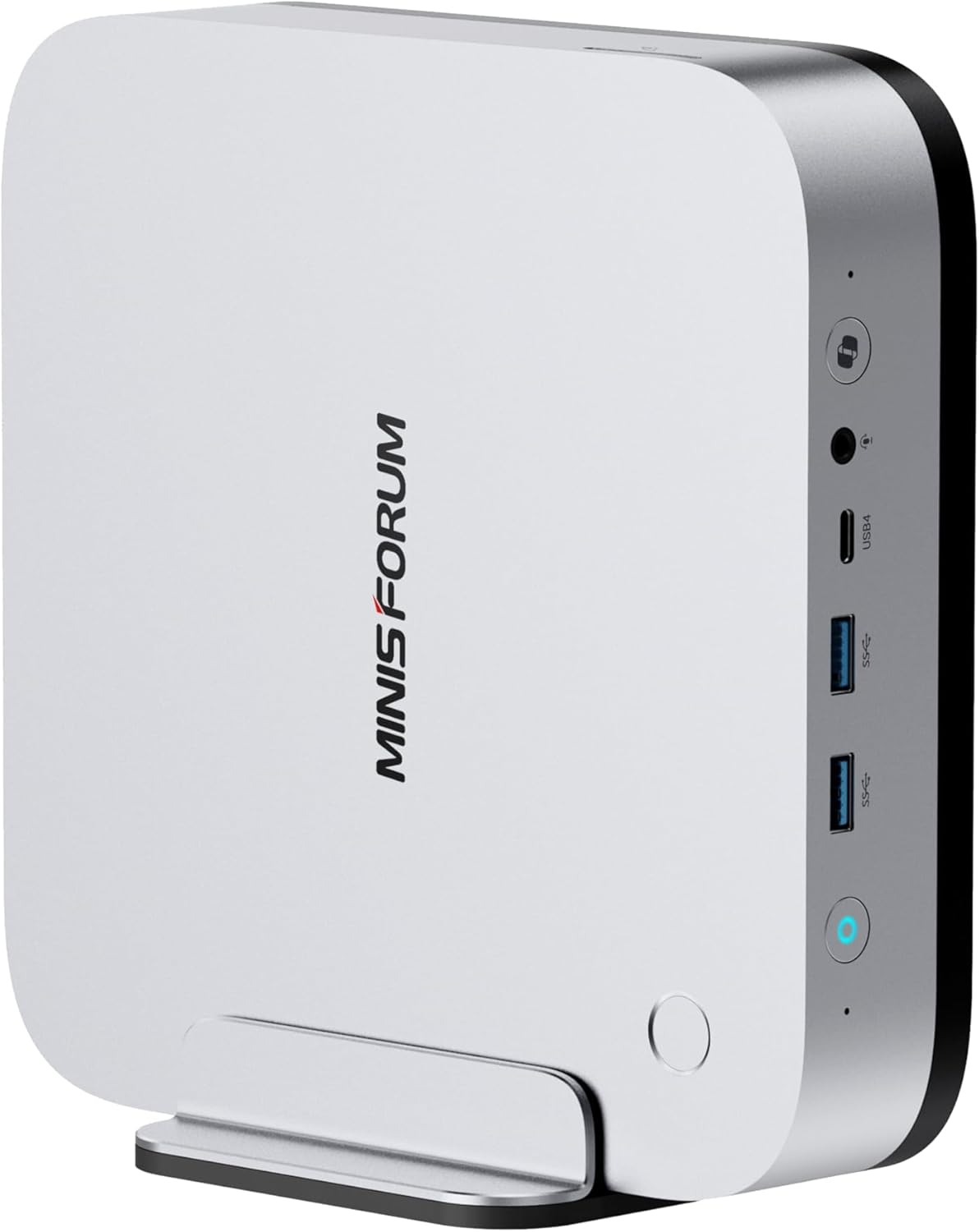
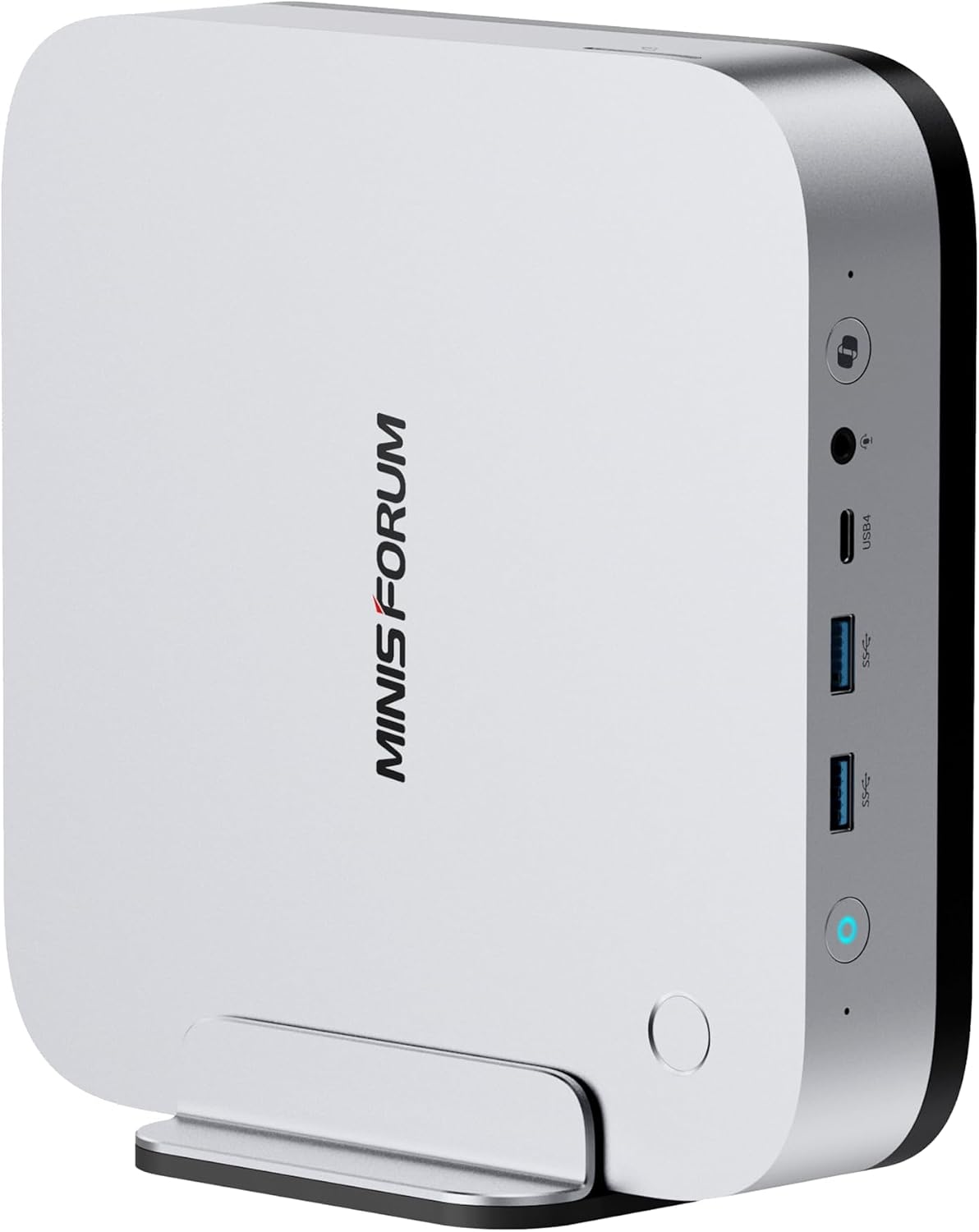
Front I/O from Minisforum’s own listing photo. The live gallery for this configuration does not include a labelled rear-panel diagram.
Minisforum AI X1 Pro-470
Specs At A Glance
| Spec | What We Could Verify |
|---|---|
| CPU | Ryzen AI 9 HX 470 with 12 cores, 24 threads, and boost up to 5.2 GHz |
| GPU | Radeon 890M integrated graphics |
| AI | 86 TOPS total and 55 TOPS from the NPU |
| Memory | Two DDR5 SO-DIMM slots with 128GB on the official page and one Amazon block still saying 96GB |
| Storage | The official page, the configured listing, and TechRadar show 3 M.2 slots and up to 12TB, while the alternate prebuilt listing says 2 M.2 slots and up to 8TB |
| Networking | Dual 2.5GbE, Wi-Fi 7, Bluetooth 5.4 |
| Expansion | OCuLink, 2 USB4 ports, HDMI 2.1, DP 2.0 |
| USB-A | 4 rear USB-A ports on the official layout |
| Display support | Up to four displays from HDMI, DisplayPort, and USB4 outputs |
| Power design | Integrated power supply and 135W adapter listed by current source material |
| Extras | Fingerprint reader, built-in speakers, dual microphones, Copilot button |
| Current live pricing | About $759 for barebone listings and $1,295 to $1,327.99 for configured listings |
Quick Verdict
The X1 Pro-470 is a strong buy for people who want the most capable upgradeable Strix Point mini PC, not just another sealed AI box. The built-in advantages are real: 86 TOPS, Radeon 890M, OCuLink for eGPU expansion, dual 2.5GbE, and memory you can replace later instead of living with a soldered ceiling forever.
The downside is that you have to shop this product carefully. The barebone listings are attractive at about $759. The canonical 32GB and 1TB library listing now sits at $1,327.99, while a second prebuilt listing is at $1,295. One listing still says 96GB max RAM while the official product page and current review coverage say 128GB. One listing describes triple M.2 storage while another describes a dual-drive layout. If you buy this box, buy the exact configuration you want, not the brand name alone.
Design And Build
The X1 Pro-470 follows the same practical X1 family formula that made the X1 Pro-370 interesting in the first place. You get a compact desk-friendly chassis, integrated power, front-facing convenience features, and a port layout that feels designed for people who actually plan to use the machine for more than light office work.
The official product materials and current review coverage line up on the quality-of-life features. This platform includes a fingerprint reader, built-in speakers, dual microphones, and a Copilot button in addition to the usual mini PC basics. That combination matters because the X1 Pro-470 sits between categories. It is not only a small desktop. It is also trying to be a local AI workstation, a creator box, and a compact lab machine.
The integrated power design is still worth calling out because it removes one of the more annoying mini PC compromises. You do not have to find room for a bulky external brick, and the whole setup feels cleaner on a desk or shelf. We would still describe the design as utilitarian rather than luxurious. The real selling point is not styling. It is the fact that Minisforum kept the chassis flexible while adding the ports and upgrade path that many Ryzen AI rivals drop.
What The Live Listings Show Right Now
We cross-checked every current Amazon listing against the official Minisforum product page on June 4, 2026.
| Listing | Current Price | What It Appears To Be | Buyer Signal |
|---|---|---|---|
| Configured listing, the one our links point to | $1,327.99 | 32GB DDR5 plus 1TB SSD, ready to run | 5 out of 5 from 2 ratings |
| Barebone listing | $759.90 | HX 470 barebone with no RAM, no SSD, no OS | Only 1 left in stock and 1 review |
| Second barebone listing | $759.00 | HX 470 barebone with alternate listing copy | 4 out of 5 from 2 ratings |
| Alternate prebuilt listing | $1,295.00 | 32GB DDR5 plus 1TB SSD | Only 8 left in stock and no visible rating yet |
That range matters. If you already own DDR5 and fast NVMe drives, the barebone pricing is the real attraction here. If you need a ready-to-run system, the configured listings push the X1 Pro-470 into a much more competitive bracket where alternatives like the MINISFORUM MS-S1 Max and GEEKOM A9 Max deserve a look.
The key detail is that our buy button points at the fully configured listing rather than one of the barebone side listings, so what you land on matches the machine described here. Check the configuration on the page before you order, because the barebone versions ship with no memory, no drive, and no operating system.
CPU, GPU, And AI Hardware
The core platform is consistent even when the listings are messy.
| Spec | What We Could Verify |
|---|---|
| CPU | Ryzen AI 9 HX 470 with 12 cores, 24 threads, and boost up to 5.2 GHz |
| GPU | Radeon 890M integrated graphics |
| AI | 86 TOPS total with 55 TOPS from the NPU |
| Memory | Two DDR5 SO-DIMM slots with 128GB on the official page and one Amazon block still saying 96GB |
| Storage | The official page, the configured listing, and TechRadar show 3 M.2 slots and up to 12TB, while the alternate prebuilt listing says 2 M.2 slots and up to 8TB |
| Networking | Dual 2.5GbE, Wi-Fi 7, Bluetooth 5.4 |
| Expansion | OCuLink, 2 USB4 ports, HDMI 2.1, DP 2.0 |
| Power | Built-in power supply with 135W adapter listed by TechRadar |
| Extras | Fingerprint reader, built-in speakers, dual microphones, Copilot button |
The key takeaway is not that the X1 Pro-470 lacks capability. It is that the product family is more capable than the cleanest Amazon bullets suggest, while the exact listing you click may still lag behind the official spec sheet.
The HX 470 matters because it is the top Strix Point part in this chassis family. If you already know the X1 Pro-370, the appeal here is straightforward: same broader platform idea, more CPU and AI headroom, and no surrender on upgradeability. The difference is not dramatic for basic office work, but the higher bin still matters for buyers who specifically want the strongest version of this chassis for local AI, creator work, or longer-term ownership.
The Radeon 890M also keeps this from feeling like a machine that only exists for AI checkboxes. It is a strong integrated graphics part for a mini PC and good enough to make the box viable for creator workflows and lighter gaming without turning immediately to an external GPU.
The NPU story also lands better here than it does on cheaper AI-branded systems. An 86 TOPS platform with 55 TOPS from the NPU gives the X1 Pro-470 a more credible reason to exist than machines that wear the AI label but still feel constrained by memory or weaker graphics. That does not make it a substitute for a real discrete GPU workstation. It does make it one of the more sensible all-in-one local AI mini PCs in this size class.
Memory, Storage, And Upgrade Path
This is still one of the biggest reasons to care about the X1 Pro-470. Minisforum did not lock the platform into soldered memory. You can start with a barebone or modest prebuilt configuration and scale the system later as your local AI, virtualization, or creator workloads get heavier.
For practical use, that flexibility matters more than minor SKU deltas on paper. A sealed 32GB machine can look fine in a product listing and feel cramped once you start stacking local assistants, Docker workloads, browser tabs, image work, and a few background services. The X1 Pro-470 gives you a cleaner upgrade path because the DDR5 memory is user-replaceable.
Storage expandability is where the listing drift becomes most annoying. The official page and current review coverage describe the platform as a triple-drive design with up to 12TB total. One current prebuilt Amazon listing still describes a dual-drive layout and an 8TB ceiling. That does not change our view of the platform itself, but it does mean advanced buyers should confirm which variant the page is actually selling before assuming they get the fullest storage layout.
Ports, Networking, And Expansion
For homelab and power-user buyers, the X1 Pro-470 earns its place on connectivity alone.
| Connection | What Matters |
|---|---|
| Dual 2.5GbE | Strong fit for Proxmox, local storage traffic, fast LAN transfers, or split network roles |
| 2 USB4 | High-speed external storage, modern docks, and flexible display support |
| 4 USB-A | Enough legacy and everyday connectivity without immediately adding a hub |
| OCuLink | Better long-term expansion story than most mini PCs in this class |
| HDMI 2.1 plus DP 2.0 | Easy multi-display desktop setup without adapters for the basics |
| Wi-Fi 7 and Bluetooth 5.4 | Current wireless stack instead of a last-generation compromise |
Dual 2.5GbE is especially important here. It moves the X1 Pro-470 out of the category of expensive desk toy and into the category of machine that can credibly serve as a compact Proxmox node, a fast creator desktop, or a mixed-use home lab box. OCuLink is the other standout. Even if you do not plan to use an external GPU on day one, it keeps the machine from becoming a dead-end purchase if your needs shift later.
Display flexibility is also better than the average small desktop in this price range. Between HDMI, DisplayPort, and the USB4 outputs, the X1 Pro-470 fits multi-monitor desks more naturally than stripped-down compact systems that only cover the bare minimum.
Performance For Local AI, Creative Work, and Homelab Use
This machine is compelling because it balances CPU performance, AI hardware, graphics, and upgrade headroom better than most small AI desktops. TechRadar tested the 32GB configuration and reported these results:
| Benchmark | Score |
|---|---|
| Geekbench single core | 2,724 |
| Geekbench multi core | 14,715 |
| CrystalDiskMark read | 5,121 MB/s |
| CrystalDiskMark write | 4,195 MB/s |
Those numbers are enough to back up the bigger story. The X1 Pro-470 is not just a Copilot label machine. It is a genuinely usable local AI and creator desktop. TechRadar also found it handled Lightroom, Photoshop, Premiere Pro, DaVinci Resolve, and 1080p gaming well, with the Radeon 890M doing better than many buyers expect from an integrated GPU.
For local AI, the X1 Pro-470 makes more sense than soldered-memory Strix Point systems because you can start with a smaller build and scale the RAM later. That matters more than small SKU-to-SKU CPU deltas once you move beyond light chat models and into larger local assistants, image generation workflows, or mixed creative projects. We are deliberately not publishing a tokens-per-second table for this exact article because we do not have our own in-house inference runs on this configuration yet. What we can say with confidence is that the platform mix is better suited to serious local AI use than sealed 32GB designs that leave you nowhere to go.
That same logic applies to larger local models. We are not going to promise a specific 70B experience without our own runs, but the upgradeable memory design gives the X1 Pro-470 a better path toward heavier local AI work than fixed-memory rivals that top out at the factory configuration forever.
For graphics and media work, the X1 Pro-470 looks stronger than the average mini PC buyer may expect. The Radeon 890M is still integrated graphics, so expectations should stay grounded, but it is enough to make 1080p gaming, photo work, and moderate editing feel realistic on a tiny box. The optional eGPU path through OCuLink is what turns that from a nice extra into a meaningful long-term advantage.
For homelab use, dual 2.5GbE and OCuLink are the differentiators. This is not the cheapest Proxmox box, but it is a far more flexible one. If your plan is a compact lab node that can also double as a serious daily desktop, the X1 Pro-470 is in the right class. If you only need low idle power and a few containers, start with our Best Budget Mini PC for Home Server guide instead.
X1 Pro-470 Versus X1 Pro-370
This is the comparison most buyers should settle before they spend real money.
The X1 Pro-470 is the right pick if you know you want the top chip in this chassis family and you actually plan to lean into local AI, heavier creative work, or longer-term headroom. The better CPU tier, the stronger AI positioning, and the same upgrade-friendly design make it the enthusiast choice in the lineup.
The X1 Pro-370 is the better value choice for buyers who mostly want the chassis, the DDR5 SO-DIMM upgrade path, the OCuLink port, and the dual 2.5GbE layout without paying for the top processor bin. If your workload is mostly general productivity, light creator work, homelab experiments, and smaller local models, the 370 is often the easier recommendation. Our full X1 Pro-370 versus X1 Pro-470 comparison goes deeper on that tradeoff.
The short version is simple. Buy the 470 when you want the best version of the platform. Buy the 370 when you want most of the same chassis strengths without paying extra for the highest-tier chip.
Why The Upgrade Path Matters More Than The Launch Hype
The official Minisforum page positions the X1 Pro-470 around four advantages that still matter after the CES launch buzz fades:
- Upgradeable DDR5 instead of soldered LPDDR memory
- Triple NVMe capacity on the full platform design
- OCuLink for an actual eGPU path
- Dual 2.5GbE in a system that still fits on a desk
That is why this machine still has a place even as newer AI mini PCs appear. If you are shopping for a local AI box that can grow with your storage and memory needs, the X1 Pro-470 is easier to justify than a sealed design that looks fine on day one and cramped a year later.
It also helps that the barebone pricing is reasonable. At about $759, the X1 Pro-470 is much easier to defend if you already have good DDR5 and a spare NVMe drive than if you are paying full Amazon prebuilt pricing.
What We Do Not Like
The first issue is listing drift. The official product page, the configured listing, and current review coverage say one thing about memory and storage expansion, while one Amazon feature set still says another. That does not make the platform bad, but it does make the shopping experience worse than it should be.
The second issue is that Amazon review volume is still thin. One barebone listing had a single review when we checked. Another showed two ratings and a 4 out of 5 average. That is not enough feedback to treat reliability as fully proven.
The third issue is a specific early complaint worth watching. On one of the barebone listings, a verified buyer review dated April 27, 2026 described the front audio jack not being detected properly in both Windows and Fedora, even though the built-in speakers were present. That may be a one-off defect or a BIOS-level bug, but buyers who rely on wired audio should test it quickly during the return window.
The fourth issue is price positioning on the prebuilt variants. Once this box moves past the barebone value story and into the $1,300-plus range, buyers should pause and compare it against stronger alternatives, better-reviewed alternatives, or simply the X1 Pro-370. The platform is good. The pricing is what gets harder to defend.
Cooling, Noise, and Day Two Ownership
We are not publishing wall-power numbers for the X1 Pro-470 yet because we do not have our own meter data for this exact platform. What we can say from current source material is still useful.
Minisforum claims full-load CPU temperature stays below 80C and noise stays below 45dB. Manufacturer claims are not the same thing as lab measurements, so treat those as directional. TechRadar’s hands-on review is more reassuring: it described fan noise as low under gaming and creative load, and quieter than most mini PCs the reviewer had used.
That is good enough to say the X1 Pro-470 does not look like a thermal disaster, but not good enough for a hard annual power-cost estimate. If low running cost is a deciding factor for you, compare it against our Mini PC Home Server Power Cost Calculator and Mini PC Power Consumption Guide before you commit.
Who Should Buy The X1 Pro-470
- Buy it if you want the top Strix Point mini PC with upgradeable DDR5
- Buy it if OCuLink, dual 2.5GbE, and desk-friendly size matter to your workflow
- Buy it if you want a mini PC that can start as a barebone and grow into a heavier local AI or creator system
- Buy it if you plan to use the machine for both serious desktop work and a small homelab role
Who Should Skip The X1 Pro-470
- Skip it if you want the simplest value buy, because the X1 Pro-370 keeps most of the same chassis appeal for less money
- Skip it if you only need a light always-on server, because cheaper N150 or Ryzen 7 boxes do that job for far less
- Skip it if you need proven long-term reliability data today, because the Amazon review sample is still early
- Skip it if you want the cleanest shopping experience, because this product family currently asks you to verify more listing detail than it should
Frequently Asked Questions
Is the MINISFORUM AI X1 Pro-470 worth buying in 2026?
Yes if you want the strongest upgradeable Strix Point mini PC rather than the cheapest AI badge. The platform mix of HX 470, Radeon 890M, OCuLink, dual 2.5GbE, and DDR5 SO-DIMM is still one of the better combinations in this class.
How much RAM does the X1 Pro-470 support?
The official product page and current review coverage say 128GB across two DDR5 SO-DIMM slots. One Amazon feature list still says 96GB. If you are buying specifically for a high-memory local AI build, verify the exact listing before checkout.
Does the X1 Pro-470 really have three M.2 slots?
The official page and TechRadar both describe three M.2 slots with up to 12TB total. The current 32GB and 1TB Amazon listing describes dual M.2 storage up to 8TB. That mismatch is exactly why this machine should be bought by the configuration printed on the page you are on, not by product name alone.
Does OCuLink matter on this machine?
Yes for the right buyer. OCuLink is one of the features that helps justify the X1 Pro-470 over simpler Ryzen AI mini PCs because it gives you a stronger expansion path if you later decide the Radeon 890M is not enough for your graphics or AI workload.
Is the barebone the best version to buy?
For many advanced buyers, yes. The barebone price near $759 is far easier to justify if you already have DDR5 and NVMe storage on hand. The prebuilt Amazon listing at about $1,295 has to compete with more powerful or more proven alternatives.
Should you buy the X1 Pro-470 or the X1 Pro-370?
Buy the 470 if you want the top Strix Point SKU and do not mind paying for it. Buy the 370 if you want nearly the same box with a lower entry price. Our full X1 Pro-370 versus X1 Pro-470 comparison breaks that tradeoff down.
Does OCuLink make the X1 Pro-470 a better long-term buy?
Yes for buyers who may want more graphics or AI acceleration later. OCuLink gives the X1 Pro-470 a more credible upgrade path than sealed mini PCs that rely only on their integrated graphics and fixed memory.
Is the X1 Pro-470 good for local AI and homelab use?
Yes. It is one of the better Strix Point mini PCs for that mix because you get 86 TOPS, dual 2.5GbE, OCuLink, and upgradeable DDR5 instead of soldered memory. It is a stronger fit for local assistants, image work, compact Proxmox labs, and future eGPU upgrades than for buyers who only need a basic office mini PC.
How We Researched This Update
This refresh is based on live source checks completed on June 4, 2026. We read each live Amazon listing for current price, seller, stock, feature blocks, images, and how the variants relate to each other, and we refreshed the product photo from the configured listing our buy button points at. We then cross-checked the official Minisforum product page and current third-party review coverage to spot spec drift between the official platform page and the active Amazon listings.
That matters here because the X1 Pro-470 is exactly the kind of product where stale assumptions produce a worse article. The product is still good. The listings are simply messier than the platform deserves.
Final Verdict
The MINISFORUM AI X1 Pro-470 is still one of the better Ryzen AI mini PCs you can buy if you care about upgradeability and expansion more than marketing neatness. HX 470, Radeon 890M, OCuLink, dual 2.5GbE, and user-replaceable DDR5 make it far more interesting than a sealed Copilot desktop.
The buying advice is straightforward. The barebone option is the smart way in for experienced builders. The prebuilt Amazon option makes sense only if you want convenience and accept the higher price. In either case, verify the exact listing details before you buy, because the live storage and memory claims still do not line up perfectly across every version of this machine.