
Minisforum Mini PCs for Homelab 2026 — Full Lineup Guide
By Max · March 24, 2026 · Updated June 29, 2026
This article contains affiliate links. If you purchase through our links, we may earn a commission at no extra cost to you. We only recommend products we’ve thoroughly researched and verified.

Minisforum occupies a unique space in the mini PC market. They’re one of the few brands that build both performance-focused mini PCs and enterprise-networking hardware — 10GbE SFP ports, dual 2.5GbE, PCIe expansion — in the same product catalog. For homelab builders, this means you can source everything from a capable Proxmox host to a 10GbE cluster node or a 5-bay NAS appliance from one brand.
The trade-off is complexity: the lineup is wide, the naming conventions are inconsistent, and picking the wrong model is easy. This guide maps the relevant compact PCs, MS workstations, and N5 NAS appliances to the constraints they actually solve.
Quick Picks: Best Minisforum Model by Use Case
| Use Case | Recommended Model | Price | Why |
|---|---|---|---|
| Primary Proxmox host — multi-VM mid-range | UM790 Pro | ~$380–500 | Ryzen 9 7940HS, 64GB DDR5, proven platform |
| Compact established cluster node | MS-01 | Check retailer | Dual 10GbE, USB4, and a PCIe slot in the smaller chassis |
| AMD virtualization host | MS-A2 8945HX | Check retailer | Sixteen standard cores, 96GB official memory, dual 10GbE, U.2 |
| Maximum expansion | MS-02 Ultra 285HX | Check retailer | 256GB, dual 25GbE, four M.2 positions, multi-slot chassis |
| Storage-first value | N5 Air | Check retailer | Five HDD bays, 10GbE plus 5GbE, upgradeable non-ECC memory |
| ECC-capable NAS | N5 Pro | Check retailer | Five HDD bays, upgradeable ECC-capable memory, 10GbE plus 5GbE |
| NAS plus local AI | N5 Max 64GB | Check retailer | Five HDD bays, five M.2 positions, fixed unified memory, dual 10GbE |
About Minisforum
Minisforum (MINISFORUM) is headquartered in Shenzhen with a US warehouse and sells through their own store and Amazon. They update their lineup frequently and have a reputation for technically aggressive hardware — they were among the first mini PC brands to offer OculLink and are consistently early with new AMD APU releases.
Support quality is mixed: firmware updates ship for most popular models, but community-reported bugs occasionally take weeks to address. The official Minisforum forums have active engineers participating in threads, which is uncommon for the category. Linux compatibility is generally good, with the notable exception that some Wi-Fi controllers (MediaTek MT7922) require kernel 6.1+ for full functionality.
Minisforum Homelab Lineup Overview
| Model | CPU | Max RAM | Networking | Form Factor | Power (Idle) | Price |
|---|---|---|---|---|---|---|
| UM790 Pro | Ryzen 9 7940HS (8C/16T, 5.2GHz) | 64GB DDR5 | 1× 2.5GbE | Active cooling | ~12W | ~$380–500 |
| MS-01 | Intel i9-13900H, 14C and 20T | 64GB official | Dual 10GbE SFP+ and dual 2.5GbE | Compact cluster node | Measure the final configuration | Check retailer |
| MS-A2 8945HX | Ryzen 9 8945HX, 16C and 32T | 96GB official | Dual 10GbE SFP+ and dual 2.5GbE | AMD virtualization host | Measure the final configuration | Check retailer |
| MS-02 Ultra 285HX | Core Ultra 9 285HX, 24C and 24T | 256GB official | Dual 25GbE, 10GbE, and 2.5GbE | Maximum expansion | Measure the final configuration | Check retailer |
| N5 Air NAS | Ryzen 7 255 | Upgradeable non-ECC | 10GbE plus 5GbE | Storage-first NAS | Depends on installed drives | Check retailer |
| N5 Pro NAS | Ryzen AI 9 HX PRO 370 | 96GB ECC-capable | 10GbE plus 5GbE | ZFS and heavier services | Depends on installed drives | Check retailer |
| N5 Max 64GB NAS | Ryzen AI Max+ 395 | Fixed 64GB LPDDR5X | Dual 10GbE | Storage plus local AI | Depends on installed drives | Check retailer |
MS-02 Ultra 285HX — Maximum Expansion
The MS-02 Ultra belongs above the MS-01 and MS-A2 only when a build can use its larger platform. The exact Core Ultra 9 285HX configuration supports four SO-DIMM sockets and 256GB, dual 25GbE plus 10GbE and 2.5GbE, four M.2 positions, and several PCIe positions. Lower MS-02 Ultra configurations do not share that complete layout.
This is a 4.8-liter workstation with a 350W internal power supply, not a drop-in MS-01 replacement. Its 25GbE card occupies expansion resources and carries two M.2 positions. Buyers should map every HBA, GPU, NIC, and SSD before ordering. The premium solves a real constraint only when 96GB, dual 10GbE, or one add-in device is no longer enough.
N5 Air, N5 Pro, and N5 Max — NAS Appliances
| Model | Storage-first to AI-first | Memory model | Best reason to buy |
|---|---|---|---|
| N5 Air | Storage-first | Upgradeable non-ECC DDR5 | Lower-cost five-bay NAS |
| N5 Pro | Storage and services | Upgradeable ECC-capable DDR5 up to 96GB | ZFS-focused build with heavier apps |
| N5 Max 64GB | Storage plus local AI | Fixed 64GB LPDDR5X unified memory | One expensive box for NAS and local models |
All three are NAS appliances rather than normal desk mini PCs. The N5 Pro uses the Ryzen AI 9 HX PRO 370, five HDD bays, three M.2 or U.2 positions, and 10GbE plus 5GbE. The linked N5 Pro is the upgradeable-memory retail variant, which is a different machine from the fixed-memory N5 Max.
This guide covers the 64GB Ryzen AI Max+ 395 N5 Max configuration. It combines five HDD bays, five M.2 positions, and dual 10GbE, but its memory is fixed. Do not buy it merely because its APU is fastest. A storage-first buyer who will not run large local models is paying for compute that does not improve data safety or replace backups.
Minisforum N5 Air — 5-Bay NAS Appliance
→ Check Current Price on Amazon
The N5 Air is not a mini PC — it’s a dedicated NAS appliance in a desktop form factor. If you’re looking for a silent mini PC, this isn’t it. But for homelab builders who need a high-capacity storage server with serious networking, it’s Minisforum’s most capable storage product.
The N5 Air provides 5 HDD bays (accepting 3.5” drives up to ~20TB each), 3 M.2 slots, and dual high-speed networking (10GbE + 5GbE). The AMD Ryzen 7 255 gives it enough processing headroom to handle transcoding, VMs, and background services alongside NAS duties. Two DDR5 SO-DIMM slots come empty — no RAM is included. Use it with TrueNAS SCALE, Unraid, or OMV for a capable 5-drive NAS.
For detailed NAS configuration, see our best mini PC for NAS guide and best mini PC for TrueNAS guide.
Specs:
| Spec | Detail |
|---|---|
| CPU | AMD Ryzen 7 255 (8C/16T, Zen 4) |
| RAM | None included — 2× DDR5 SO-DIMM slots (upgradeable) |
| Storage | 5× 3.5” HDD bays + 3× M.2 NVMe slots |
| Networking | 1× 10GbE + 1× 5GbE |
| Power Draw | ~15–20W idle (drives not loaded) |
| Price | ~$519 |
Who should buy this: Homelab builders who need a 5-bay NAS with enterprise-class networking. The 10GbE port makes it the best option for high-throughput NAS workloads (Plex libraries, VM storage, backup targets).
Who should skip this: Anyone looking for a silent mini PC or compact Proxmox host. For that use case, the UM790 Pro or the Beelink EQ14 are the correct choices.
Minisforum UM790 Pro — Best Mid-Range Proxmox Host
→ Check Current Price on Amazon
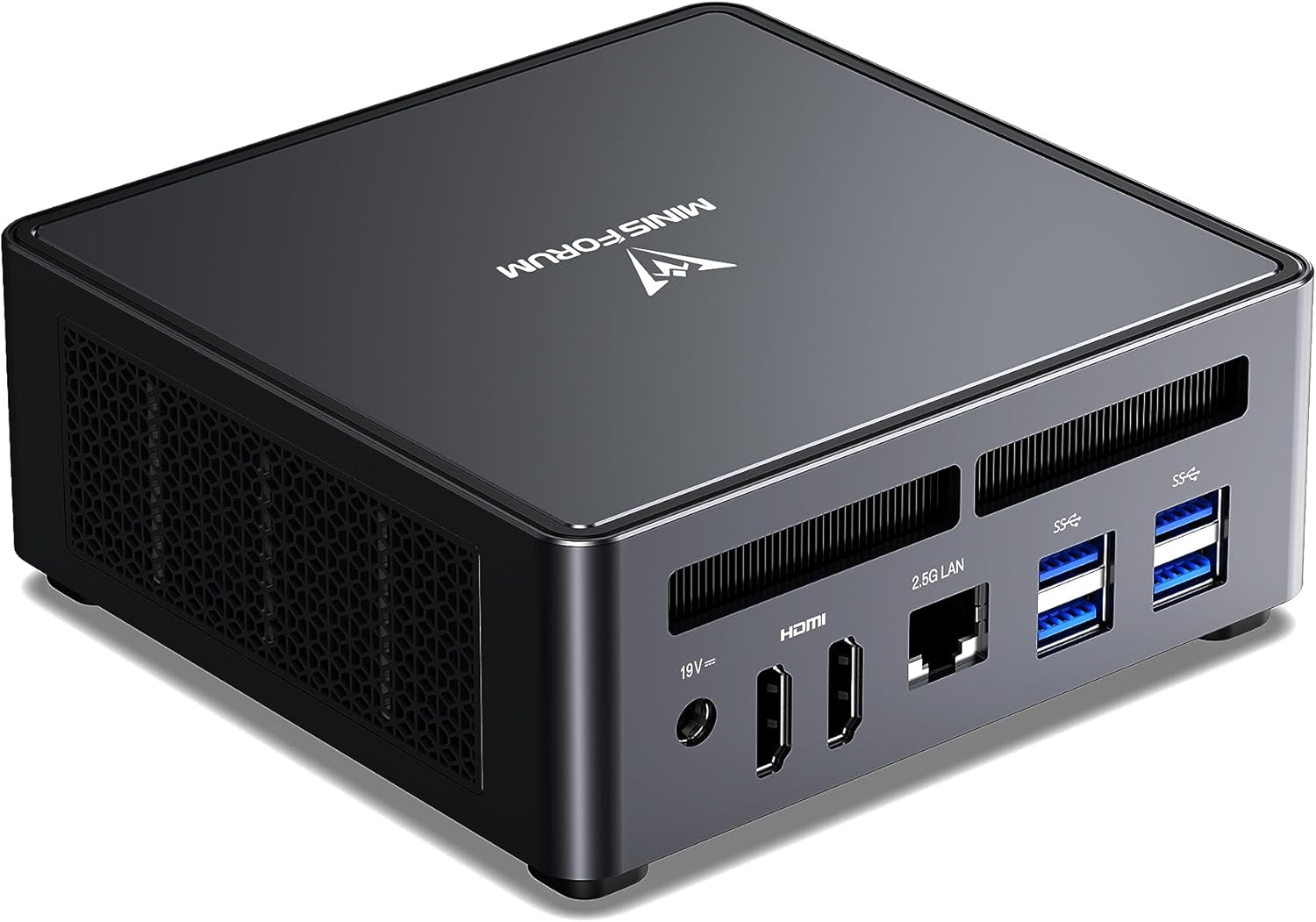
The UM790 Pro with its Ryzen 9 7940HS has been the benchmark mid-range Proxmox host for 2024–2026. Eight cores, 16 threads, up to 64GB DDR5, two USB4 ports with 8K display output, and PCIe 4.0 NVMe storage. It runs Proxmox VE 8.x reliably, handles 8–14 simultaneous VMs with appropriate RAM installed, and the Radeon 780M iGPU provides hardware video acceleration for Plex and Jellyfin transcoding.
Minisforum’s thermal engineering on the UM790 Pro is genuinely good. They use liquid metal between die and heatspreader, with active cooling for the memory and SSD — unusual for this form factor. Under sustained Proxmox VM load, the 7940HS maintains boost clocks without significant throttling.
The limitation is a single 2.5GbE NIC. For OPNsense firewall builds, you need a second NIC via USB or a different model. For pure Proxmox + Docker + media server workloads, the single NIC is fine.
Power consumption: ~12W idle on Proxmox with two VMs running, measured by the Proxmox community (Level1Techs forum thread on UM790 Pro power optimization). Under CPU stress: ~65–90W depending on TDP configuration.
Specs:
| Spec | Detail |
|---|---|
| CPU | AMD Ryzen 9 7940HS (8C/16T, up to 5.2GHz, 45–65W configurable) |
| RAM | 32GB DDR5-5600 SO-DIMM (upgradeable to 64GB) |
| Storage | 1TB M.2 NVMe PCIe 4.0 (4800MB/s read) |
| Networking | 1× 2.5GbE |
| Display | 2× HDMI 2.1 + 2× USB4 (4× display, up to 8K@60Hz) |
| Power Draw | ~12W idle / ~65–90W load (community-measured, Proxmox) |
| Price | ~$380–500 |
Pros:
- 8C/16T Zen 4 handles 8–14 Proxmox VMs without CPU bottleneck
- 64GB DDR5 support — enough for dense VM/container stacks
- Radeon 780M hardware video acceleration (1× 4K Plex transcode confirmed)
- Excellent thermal engineering — sustained load without throttling
- Two USB4 ports for flexible connectivity
Cons:
- Single 2.5GbE NIC — OPNsense requires a second USB NIC
- 7940HS is Zen 4 (previous gen) — the MS-A2’s 8945HX is newer and has 16 cores
- Wi-Fi 6E uses MediaTek controller requiring kernel 6.1+ for full Linux support
Who should buy this: Mid-range homelab builders who want the most Proxmox VM capacity per dollar in 2026. The UM790 Pro’s combination of Ryzen 9 performance, 64GB RAM ceiling, and proven Proxmox compatibility makes it the recommended choice for most homelab setups.
Who should skip this: Anyone building an OPNsense firewall (needs dual NICs) or needing more than 64GB RAM or 10GbE networking. The MS-01 or MS-A2 address those cases.
Minisforum MS-01 — Best for 10GbE Homelab Networking
The MS-01 occupies a unique position: it’s the only mini PC in this price range with dual 10GbE SFP+ ports alongside two 2.5GbE RJ45 ports — four NICs total. For homelab builders who have a 10GbE network switch and want full 10GbE throughput to their Proxmox storage backend — iSCSI NAS, Ceph cluster, or direct NVMe-oF — the MS-01 delivers what no other consumer mini PC does.
The CPU is Intel 13th Gen i9-13900H (14C/20T), which handles serious VM density. Combined with up to 96GB DDR5 and the quad-NIC configuration, the MS-01 serves well as a Proxmox cluster node where network throughput to shared storage is the bottleneck.
The price (~$700+) puts it in “deliberate choice” territory. You’re paying for the networking specifically. If your home network runs 1GbE or 2.5GbE and you don’t need SFP+, the UM790 Pro or MS-A2 offer better CPU-per-dollar.
Specs (summary):
| Spec | Detail |
|---|---|
| CPU | Intel i9-13900H (14C/20T, up to 5.4GHz) |
| RAM | Up to 96GB DDR5 SO-DIMM |
| Storage | 2× M.2 NVMe PCIe 4.0 + 1× M.2 SATA |
| Networking | 2× 10GbE SFP+ + 2× 2.5GbE RJ45 |
| Power Draw | ~18W idle / ~95W load (manufacturer rated) |
| Price | ~$700+ |
Who should buy this: Homelab builders with 10GbE infrastructure who need high-throughput networking for Proxmox storage (Ceph, iSCSI) or advanced network segmentation.
Who should skip this: Anyone without a 10GbE switch. The 10GbE SFP+ ports are the only reason to pay the MS-01 premium over the UM790 Pro.
Minisforum MS-A2 8945HX — AMD Virtualization Host
→ Check Current Price on Amazon
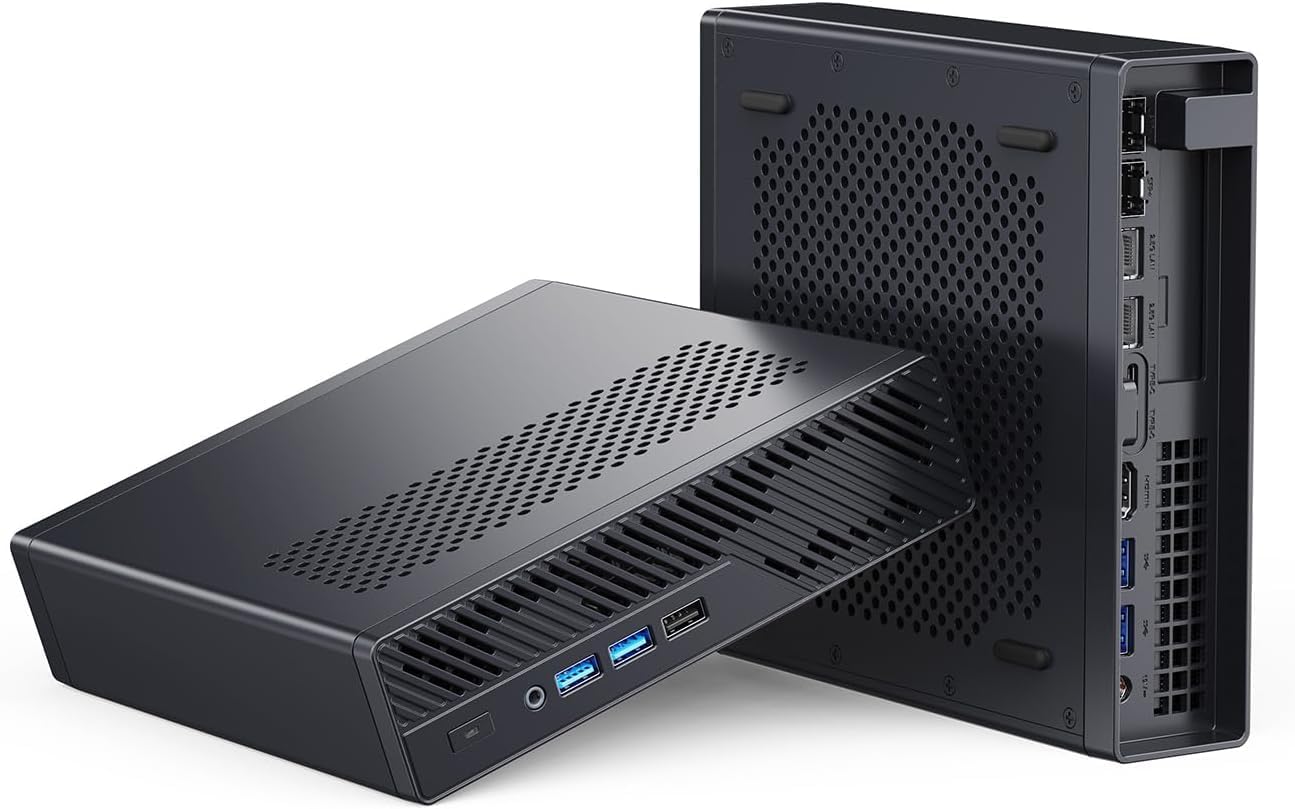
The selected MS-A2 runs AMD’s Ryzen 9 8945HX with 16 standard Zen 4 cores and 32 threads. Its value is not a universal VM count. It is the combination of CPU headroom, a 96GB official memory ceiling, fast networking, and expansion in a compact workstation.
Networking includes dual Intel X710 10GbE SFP+ and dual 2.5GbE. Storage combines M.2 and U.2 support across three mixed-form-factor positions, while the PCIe slot can serve an HBA, accelerator, or other add-in device.
The exact 8945HX barebone was validated at $559 on August 10, 2026, but prices and configured memory or storage change. Use the current retailer price and budget RAM, storage, optics, and any add-in card separately.
Specs:
| Spec | Detail |
|---|---|
| CPU | AMD Ryzen 9 8945HX (16C/32T, up to 5.2GHz, 55–75W configurable) |
| RAM | Up to 96GB DDR5 SO-DIMM, official |
| Storage | Three mixed M.2 or U.2 positions |
| Networking | 2× 10GbE SFP+ plus 2× 2.5GbE |
| Power Draw | Measure the configured system at the wall |
| Price | Check retailer; validated barebone entry was $559 on August 10, 2026 |
Pros:
- Sixteen cores provide CPU headroom for mixed guest workloads
- Dual 10GbE and dual 2.5GbE support storage and management separation
- Standard Zen 4 cores rather than a compact-core design
- U.2 support and a PCIe slot broaden storage and passthrough options
Cons:
- Memory, storage, optics, and an add-in card can lift configured cost well above barebone price
- The PCIe slot and storage positions share a finite lane and chassis budget
- It remains a compact workstation rather than a five-bay NAS
Who should buy this: Buyers who can define their guest memory budget and need 96GB, dual 10GbE, U.2, or a PCIe device. Use our VM capacity estimator before choosing a memory configuration.
Who should skip this: Buyers whose allocation fits 64GB and 2.5GbE; the premium only pays when the extra interfaces or expansion remove a real constraint.
The Rest of the Minisforum Lineup
Other current Minisforum models, with verified specs:
| Model | Key specs | Check price |
|---|---|---|
| UM790 Pro | Ryzen 9 7940HS, 32GB DDR5, dual USB4, 2.5GbE | Amazon |
| UM880 Plus | Ryzen 7 8845HS, 32GB DDR5, 1TB PCIe 4.0, OCuLink | Amazon |
| AI X1-255 | Ryzen AI 9 365, DDR5 SO-DIMM upgradeable | Amazon |
| G1 Pro | Ryzen 9 8945HX, GeForce RTX 5060 8GB, 32GB DDR5, 5GbE | Amazon |
| N5 Air | NAS appliance — 5-bay, Ryzen 7 255, 10GbE plus 5GbE, a NAS appliance not a standard mini PC | Amazon |
Which Minisforum Should You Buy?
| If you need… | Buy this |
|---|---|
| Best mid-range Proxmox host for most homelab setups | UM790 Pro |
| 10GbE networking for Ceph / iSCSI / 10GbE storage | MS-01 |
| AMD host with 96GB, dual 10GbE, and PCIe expansion | MS-A2 8945HX |
| More than 96GB or several add-in devices | MS-02 Ultra 285HX |
| 5-bay NAS with 10GbE networking | N5 Air |
Head-to-Head Comparison
| Feature | UM790 Pro | MS-01 | MS-A2 | N5 Air |
|---|---|---|---|---|
| CPU | Ryzen 9 7940HS (8C) | i9-13900H (14C) | Ryzen 9 8945HX (16C) | Ryzen 7 255 (8C) |
| Max RAM | 64GB DDR5 | 64GB official | 96GB official | Upgradeable non-ECC |
| Networking | 1× 2.5GbE | 2× 10GbE SFP+ plus 2× 2.5GbE | 2× 10GbE SFP+ plus 2× 2.5GbE | 10GbE plus 5GbE |
| Drive Bays | 0 | 0 | 0 | 5× HDD + 3× M.2 |
| Fanless | No | No | No | No |
| Power planning | Verify by exact configuration | Verify by exact configuration | Verify by exact configuration | Include installed drives |
| Price | Check retailer | Check retailer | Check retailer | Check retailer |
Power Planning
Do not compare PSU ratings or measurements from unlike memory, storage, firmware, and power-profile configurations as if they were one benchmark. Measure the final system at the wall in idle and sustained workloads, then use the power cost calculator with your electricity rate.
Where these figures come from. Idle and load figures are drawn from published measurements rather than our own bench, and they match the sourced dataset behind our comparison tool: ServeTheHome wall measurements for the UM790 Pro, MS-A2 and the Strix Halo boxes, NotebookCheck for the Meteor Lake and Raptor Lake platforms, CNX Software for Alder Lake-N, and consistent owner reports where no reviewer figure exists. Where a figure is a platform-class estimate rather than a measurement of that exact chassis, it is an approximation and marked with a tilde. Annual cost assumes 24/7 operation at $0.12 per kWh; put your own rate into the power cost calculator.
Quick Price Summary
- Minisforum UM790 Pro — Best overall mid-range
- Minisforum MS-A2 — Best for maximum VM density
- Minisforum MS-01 — Best for 10GbE networking
Frequently Asked Questions
Does the Minisforum UM790 Pro support IOMMU for PCIe passthrough on Proxmox?
Yes. The UM790 Pro supports AMD-Vi (IOMMU) via BIOS settings. Enable it under the CBS/NBIO menu. GPU passthrough of the Radeon 780M iGPU to a VM is possible with standard Proxmox IOMMU configuration, though some users report limitations in getting a stable display output post-passthrough — check the Proxmox forums for current workarounds.
What’s the difference between the UM790 Pro and the MS-A2?
The UM790 Pro has an 8-core Ryzen 9 7940HS and a single 2.5GbE NIC. The selected MS-A2 has a 16-core Ryzen 9 8945HX, 96GB official memory support, dual 10GbE SFP+, dual 2.5GbE, U.2 support, and a PCIe slot. Choose from an allocation and expansion plan rather than a fixed VM count.
Is the Minisforum N5 Air a good fanless mini PC?
No — the N5 Air is a 5-bay NAS appliance, not a mini PC. It runs AMD Ryzen 7 255, has 5× HDD bays and 3× M.2 slots, and provides 10GbE + 5GbE networking. It’s designed for storage workloads (TrueNAS, Unraid), not general Proxmox or container use. If you need a silent mini PC, no current Minisforum mini PC is fanless — the Beelink EQ14 is the closest equivalent at lower cost.
Can the UM790 Pro handle 4K Plex transcoding?
The Radeon 780M supports hardware video encode and decode. Actual stream capacity depends on codec, bitrate, tone mapping, application support, and client behavior, so this guide does not claim a universal stream count.
Does Minisforum provide firmware updates?
Yes, though update frequency varies by model. The UM790 Pro has received multiple BIOS updates addressing power management and memory compatibility. Updates are posted to Minisforum’s official forum at bbs.minisforum.com. Enable BIOS update notifications in your account settings.
What Linux kernel do I need for Minisforum Wi-Fi?
Models using MediaTek MT7922 Wi-Fi (including the UM790 Pro) require Linux kernel 6.1+ for full functionality. Proxmox VE 8.x ships with kernel 6.1+ by default. For Ubuntu Server installations, ensure you’re on 22.04 LTS or later.
How We Research These Picks
Each recommendation is tied to a specific product configuration and cross-checked against manufacturer documentation. Affiliate targets are checked for product identity during content refreshes. Prices are approximate, and this site does not publish live stock guarantees or claim first-party benchmarks without documented evidence.
Amazon Product Links
- 🥇 Minisforum UM790 Pro (Best overall): Check Price
- 🥈 Minisforum MS-A2 (Best for maximum VM density): Check Price
- Minisforum MS-01 (Best for 10GbE networking): Check Price
- 🗄️ Minisforum N5 Air (5-bay NAS appliance): Check Price