
This article contains affiliate links. If you purchase through our links, we may earn a commission at no extra cost to you. We only recommend products we’ve thoroughly researched and verified.

The Minisforum MS-01 became the default homelab mini PC for one reason: nothing else this small gives you dual 10GbE SFP+, a real PCIe slot, and Thunderbolt networking in a package the size of a 1-liter office desktop. Years after launch it still holds that position, because the boxes that followed either dropped a feature or moved to a different chassis. This review covers what the MS-01 does, where it frustrates owners, and the one purchase decision that matters most.
We verified the current listing and price through the Amazon product data on July 12, 2026, and we drew the real-world behavior from ServeTheHome’s review and consistent owner reports rather than a bench session of our own.
Minisforum MS-01 — Specs at a Glance
| Spec | Detail |
|---|---|
| CPU | Intel Core i9-13900H, 14-core hybrid, also sold as i5-12600H and i9-12900H |
| Memory | DDR5 SO-DIMM, up to 96GB, upgradeable |
| Storage | 3x M.2 NVMe plus U.2 support |
| Networking | 2x 10GbE SFP+ plus 2x 2.5GbE |
| Expansion | Half-height PCIe 4.0 x16 slot |
| External I/O | 2x Thunderbolt 4, 2x USB4, HDMI |
| Idle power | ~13 to 14W owner-reported, higher in some configs |
| Volume | Roughly 1.9 liters |
| Price | ~$1,139 for the i9-13900H config |
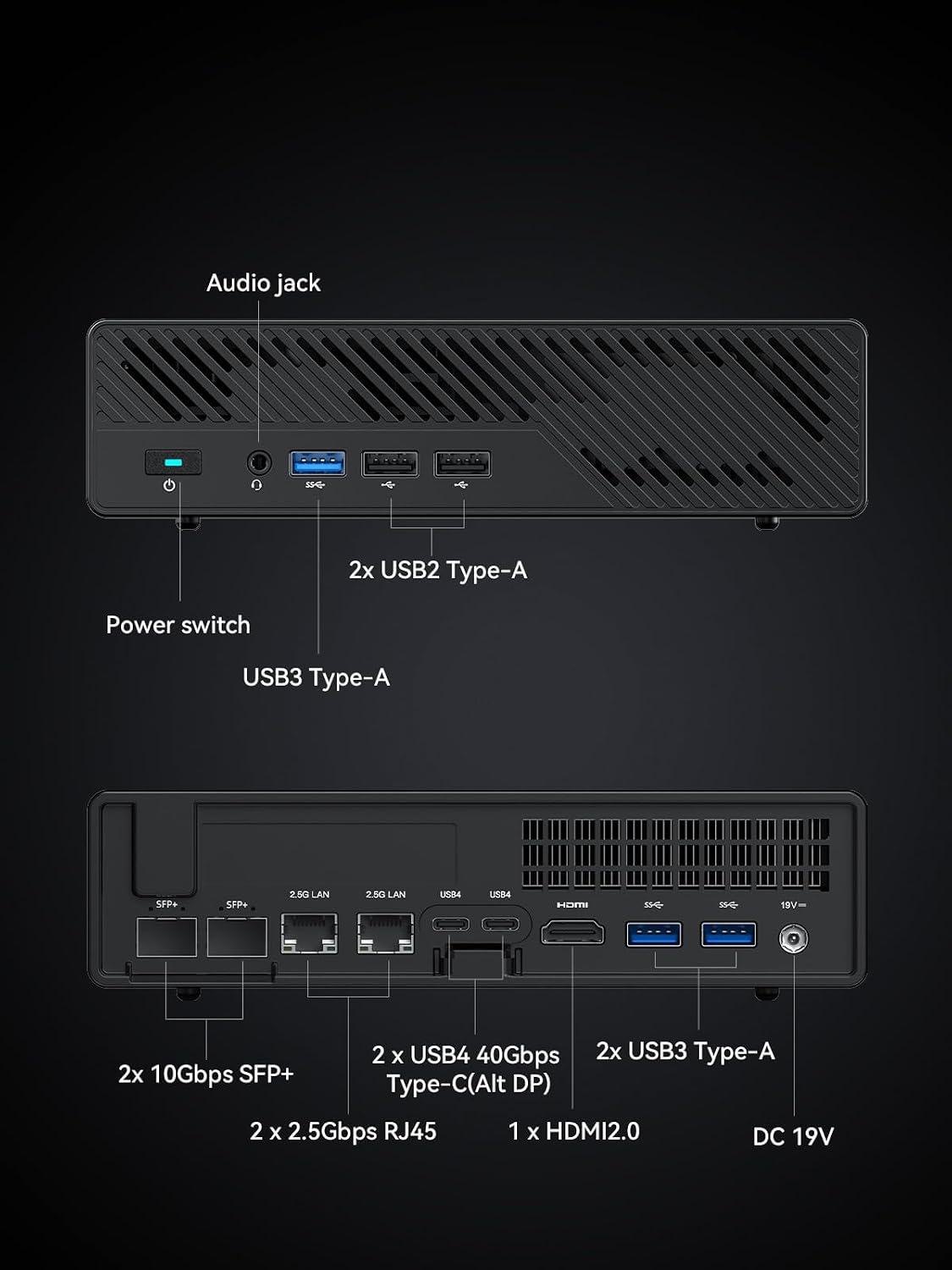
Port layout from Minisforum’s own listing diagram. The rear panel is the one with the two SFP+ cages and the two 2.5GbE jacks.
Why the MS-01 Still Has No Real Replacement
Most mini PCs make you choose between networking and expansion. The MS-01 refuses to. It gives you two 10GbE SFP+ ports for fast storage and replication, a half-height PCIe 4.0 x16 slot that owners fill with a 25GbE card or a storage controller, and two Thunderbolt 4 ports that enable roughly 40 gigabit Thunderbolt networking between three nodes in a ring. That last trick is why the MS-01 shows up in so many three-node Proxmox and Ceph clusters, and it is exactly the feature the newer AMD MS-A2 dropped.
Add three M.2 slots plus U.2, upgradeable SO-DIMM memory to 96GB, and a genuine 14-core processor, and you have a machine that behaves like a small server rather than a desktop with a fast NIC bolted on. For a homelab that outgrew a single Beelink, this is the step up that does not force a full rack. Our best mini PC for home server pillar puts it in context against the rest of the field.
CPU and Virtualization Performance
The common MS-01 configuration runs the Intel Core i9-13900H, a 14-core hybrid chip with 6 performance cores and 8 efficiency cores. For virtualization that core count is the draw. Owners run stacks of VMs and containers on it, and as a VyOS 10GbE router with a ConnectX card one owner reported pushing 36 gigabit of mixed traffic and 90 gigabit with large packets while idling near 34 watts. That is server-class throughput from a box you can hide behind a monitor.
The honest caveat is the hybrid design. A few owners note uneven behavior as the CPU approaches full load under the Linux scheduler, where performance and efficiency cores are not always assigned the way you want. For most homelab duty this never surfaces, but for a single host pinned near 100 percent it is real, and it is the main reason some buyers now prefer the all-standard-core AMD MS-A2. You can estimate how many VMs your workload needs with our VM capacity estimator.
Networking, Storage, and Expansion
Networking is the MS-01’s identity. The dual 10GbE SFP+ ports handle NAS-to-NAS replication, a fast Proxmox migration network, or a 10 gigabit link to your main workstation. The dual 2.5GbE ports give you separate management or a WAN link for firewall duty, which is why the MS-01 is a favorite pfSense and OPNsense box as well. Our best mini PC for firewall picks explain what to look for there.
Storage is generous for the size. Three M.2 NVMe slots plus U.2 let you build a fast all-flash pool, and the PCIe x16 slot takes an HBA if you want to attach a disk shelf. One point owners raise repeatedly: high-power add-in NICs like a Mellanox ConnectX need extra airflow or they overheat, so plan a small fan over the card if you run one. That is a NIC limitation, not an MS-01 flaw, but it catches people.
Power and Running Costs
At idle the MS-01 is efficient for what it packs. Owners report around 13 to 14 watts with the i5 or i9 and a pair of SFP modules, while some review setups measured 25 to 29 watts depending on configuration. Adding a power-hungry network card pushes that up. Under heavy virtualization the i9-13900H draws toward its higher power envelope, so a busy host lands well above idle.
For a machine that runs around the clock, model your own cost with our power cost calculator. At a typical 12 cents per kilowatt-hour, a 14-watt idle works out near 15 dollars a year, which is easy to justify for the networking you get in return.
The One Real Problem: Warranty Service
The MS-01 hardware earns its reputation. The company behind it does not, and this is the part a review has to say plainly. Multiple detailed owner reports, on ServeTheHome and across Reddit, describe Minisforum direct warranty service as slow and frustrating: weeks of delayed replies, a depreciation fee charged on in-warranty units, return shipping at the owner’s cost, and long waits for a promised replacement.
The practical takeaway is simple. Buy the MS-01 through Amazon, not direct. Amazon’s return window gives you a fallback that a direct purchase does not, and on a machine you plan to run continuously that protection is worth more than a small price difference. Owners who bought direct and hit a failure are the ones with the horror stories.
MS-01 vs the Newer Minisforum Boxes
The MS-01 now sits alongside two newer siblings. The MS-A2 swaps the Intel hybrid chip for an AMD Ryzen 9, which removes the performance-and-efficiency-core scheduling question and adds more raw cores, but it drops the Thunderbolt ports, so you lose Thunderbolt cluster networking. Our Minisforum MS-A2 review covers that trade in full. The MS-02 is the further-refreshed option for buyers who want to avoid the hybrid-core behavior entirely.
Choose the MS-01 if Thunderbolt clustering or the specific i9-13900H mix matters to you, or if you find it discounted below the AMD boxes. Choose the MS-A2 if you want more standard cores and do not need Thunderbolt networking.
Who Should Buy the Minisforum MS-01?
Buy it if you:
- Want dual 10GbE SFP+ and a PCIe slot in a 1-liter-class machine
- Plan a three-node cluster that uses Thunderbolt networking
- Run Proxmox, a firewall, or a fast all-flash NAS front end
- Need upgradeable memory to 96GB and three M.2 slots
Skip it if you:
- Want to avoid Intel hybrid-core scheduling questions, where the MS-A2 fits better
- Do not need 10GbE or the PCIe slot, where a cheaper box saves money
- Cannot buy through a channel with returns, given the direct-warranty reports
- Need internal SATA bays for a large disk array rather than M.2 storage
Frequently Asked Questions
Is the Minisforum MS-01 still worth buying in 2026?
Yes, for a specific buyer. The MS-01 remains the rare 1-liter-class mini PC with dual 10GbE SFP+, a half-height PCIe x16 slot, and dual Thunderbolt 4 for cluster networking. If you want that networking and expansion for Proxmox or a firewall, it still has no obvious replacement. If you want the newer AMD chip without the Intel hybrid-core quirks, look at the MS-A2 instead.
What CPU does the Minisforum MS-01 use?
The most common MS-01 configuration uses the Intel Core i9-13900H, a 14-core hybrid processor with performance and efficiency cores. Minisforum also sells i5-12600H and i9-12900H variants. The hybrid design is strong for mixed workloads but can produce uneven behavior near full load under some Linux schedulers, which is worth knowing for heavy virtualization.
Does the Minisforum MS-01 have 10GbE?
Yes. The MS-01 includes two 10GbE SFP+ ports, which is its headline homelab feature and rare at this size. It pairs those with dual Thunderbolt 4 ports that owners use for around 40 gigabit Thunderbolt networking in a three-node ring, and a half-height PCIe x16 slot for a faster network card or an HBA.
How much power does the Minisforum MS-01 use at idle?
Owner reports put the MS-01 near 13 to 14 watts at idle with the i5 or i9 and a pair of SFP modules, while some review configurations measured 25 to 29 watts. Adding a high-power network card like a ConnectX raises idle draw and needs extra airflow. Real figures depend on your NIC, drives, and BIOS settings.
Is the Minisforum MS-01 good for Proxmox?
It is a popular Proxmox box because of the 10GbE, the PCIe slot, and Thunderbolt clustering. The one caveat owners raise is uneven performance as the hybrid CPU approaches full load under the Linux scheduler. For a cluster that leans on Thunderbolt networking the MS-01 is still a top pick; for a single heavy host the AMD MS-A2 avoids the hybrid-core question.
Should I buy the Minisforum MS-01 direct or from Amazon?
Buy it through Amazon. The hardware is well regarded, but multiple owners report that Minisforum direct warranty service is slow and sometimes charges depreciation fees on in-warranty units. Purchasing through Amazon gives you a return path that direct sales do not, which matters on a machine you plan to run around the clock.
How We Research These Picks
We verified the MS-01 configuration, price, and availability against the Amazon product data on July 12, 2026, and we based the real-world behavior on ServeTheHome’s review and consistent, detailed owner reports for power draw, networking throughput, the hybrid-core scheduling note, and the warranty experience. We recommend buying through Amazon specifically because of those warranty reports. Every figure here is attributed to its source, and we make no hands-on testing claim we did not perform.
Amazon Product Links
- Minisforum MS-01 — the 10GbE homelab box: Check Current Price