
MINISFORUM MS-A2 Review: 16-Core Workstation with Dual 10GbE for $599 [2026]
By Max · April 2, 2026 · Updated May 4, 2026
This article contains affiliate links. If you purchase through our links, we may earn a commission at no extra cost to you. We only recommend products we’ve thoroughly researched.
![MINISFORUM MS-A2 Review: 16-Core Workstation with Dual 10GbE for $599 [2026]](/images/heroes/variants/minisforum-ms-a2-review/1920.webp)
→ Check Current Price on Amazon
The MINISFORUM MS-A2 is the most networking-focused mini PC ever made. Dual 10G SFP+ ports (not just 10GbE RJ45 — SFP+ for fiber) at $599 is unheard of. The Ryzen 9 8945HX delivers 16 cores and 32 threads — the most cores in a mini PC at this price point.
But there are tradeoffs: barebone (you need to buy RAM and SSD), the Radeon 610M iGPU is terrible for gaming/video, and power consumption is higher than typical mini PCs. For homelabbers building a 10GbE NAS or TrueNAS server, this is the ultimate compact workstation. For everyone else, look elsewhere.
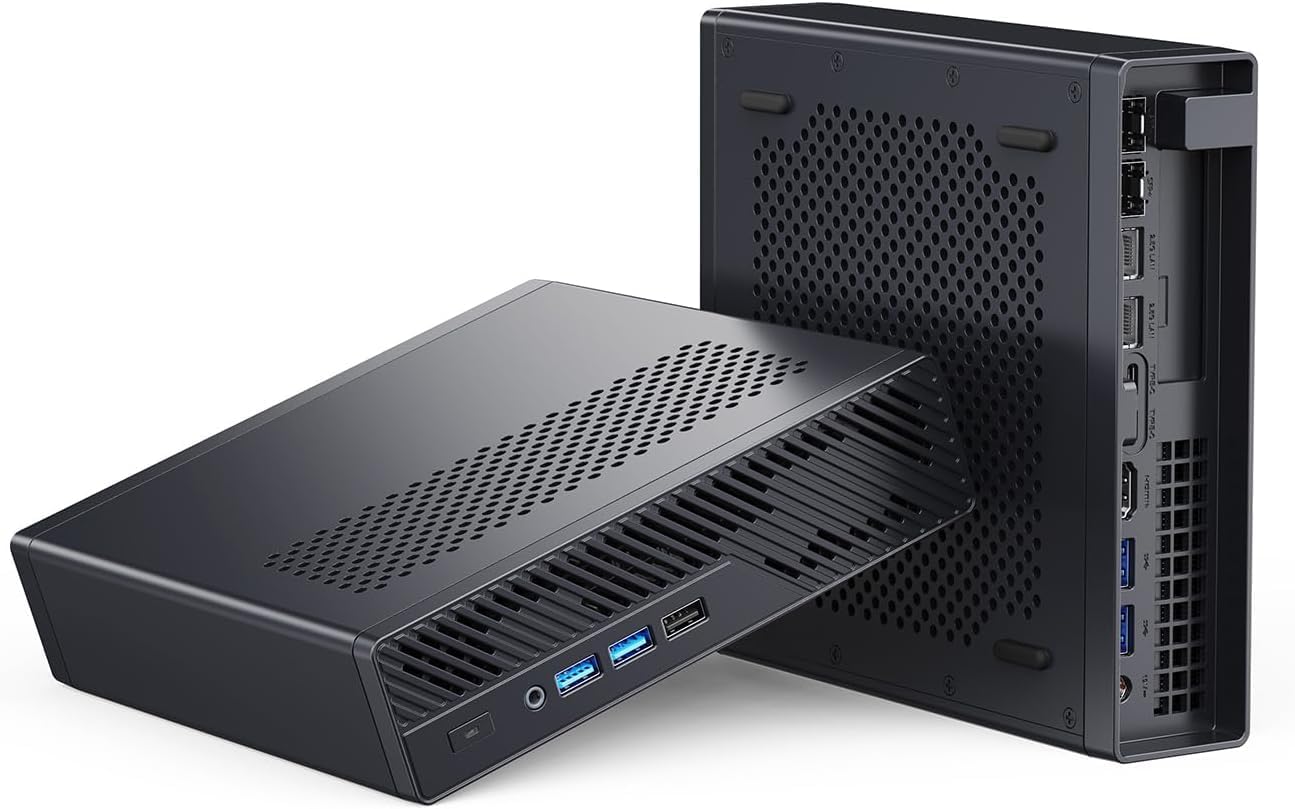
Port layout from Minisforum’s own listing images. The rear panel is where the port count, the LAN speed, and the USB generations are actually settled.
MINISFORUM MS-A2 — Specs at a Glance
| Spec | Detail |
|---|---|
| CPU | AMD Ryzen 9 8945HX (16C/32T, up to 5.4 GHz, Hawk Point HX) |
| GPU | AMD Radeon 610M (RDNA 2, 2 CUs — very basic) |
| RAM | BAREBONE — Dual DDR5-5200 SO-DIMM (up to 96GB) |
| Storage | BAREBONE — M.2 2280 PCIe 4.0 + M.2 2280/22110 + U.2 SSD support |
| Networking | 2x 2.5GbE RJ45 + 2x 10GbE SFP+ |
| Display | 1x HDMI 8K@60Hz + 2x USB-C 8K@60Hz |
| USB | 4x USB-A 3.2, 2x USB-C (with display output) |
| Cooling | Dual-fan, 4 heatpipes |
| Price | ~$599 (barebone) |
| Availability | Usually ships within 1-2 months |
Design and Build Quality
The MS-A2 is a substantial mini PC — larger than typical consumer mini PCs to accommodate the enterprise-grade networking and cooling. The chassis is designed for rack mounting or closet deployment, not desk display.
Front panel: Power button, status LEDs, USB-A ports. utilitarian design focused on function over form.
Rear panel: The networking is the star — 2x 2.5GbE RJ45 + 2x 10GbE SFP+. This is 25Gbps aggregate networking — more than most desktop workstations. Plus HDMI 8K, dual USB-C with display output, and additional USB-A ports.
Build quality notes: The chassis is solid aluminium, designed for 24/7 operation. The dual-fan cooling with 4 heatpipes handles the 8945HX’s thermal load. Fan noise is noticeable under load — this is a homelab/closet device, not a quiet office PC.
CPU and Performance
The Ryzen 9 8945HX is AMD’s Hawk Point HX — 16 Zen 4 cores and 32 threads at up to 5.4 GHz boost. This is the most cores in a mini PC at this price point. For multi-threaded workloads — running 10+ VMs, batch encoding, compilation — the 8945HX delivers workstation-class performance.
For homelab workloads:
- Proxmox VE: Handles 10-15 lightweight VMs comfortably
- TrueNAS SCALE: Excellent for ZFS with U.2 SSD support
- Docker: Runs dozens of containers without breaking a sweat
- 10GbE networking: 20Gbps aggregate for high-throughput NAS builds
For AI workloads: The 8945HX lacks a dedicated NPU. The Radeon 610M (2 CUs) is not useful for GPU-accelerated AI. This is a CPU-only system for networking and storage — not an AI workstation.
GPU and Graphics
The Radeon 610M with 2 RDNA 2 compute units is a basic display adapter — not a capable iGPU. This is the MS-A2’s biggest limitation for general use.
What the 610M can do:
- Drive 3x 8K displays (via HDMI + 2x USB-C)
- Handle desktop compositing and video playback
- Basic 2D acceleration
What the 610M cannot do:
- 1080p gaming (not capable)
- Stable Diffusion (not enough compute)
- LLM GPU acceleration (not enough VRAM or compute)
- Video encoding (no AV1, limited HW acceleration)
For homelab use: This is fine — headless operation is common. For daily desktop use, this is a dealbreaker.
Memory and Storage
BAREBONE: The MS-A2 ships without RAM or storage. You need to buy:
- DDR5-5200 SO-DIMM (up to 96GB, 2x 48GB)
- M.2 2280 PCIe 4.0 NVMe SSD and/or U.2 enterprise SSD
Cost estimate:
- 32GB DDR5-5200: ~$80-100
- 64GB DDR5-5200: ~$150-180
- 1TB M.2 NVMe: ~$60-80
- 2TB M.2 NVMe: ~$120-150
- U.2 7.68TB enterprise SSD: ~$400-600 (used)
Total build cost: ~$740-880 for 32GB/1TB config, ~$1,200+ for 64GB/2TB + U.2 SSD.
U.2 SSD support: This is the MS-A2’s killer feature for NAS builds. U.2 enterprise SSDs (7.68TB, 15.36TB+) provide massive, reliable storage for TrueNAS/ZFS. The triple M.2 slots (2280 + 2280/22110 + RAID support) enable flexible storage configurations.
Networking: The Star Feature
| Port | Quantity | Use Case |
|---|---|---|
| 2.5GbE RJ45 | 2 | Standard LAN, management |
| 10GbE SFP+ | 2 | High-speed NAS, fiber uplink |
Dual 10GbE SFP+ is the MS-A2’s raison d’être. This is 20Gbps aggregate networking — more than most desktop workstations. Use cases:
For TrueNAS/ZFS:
- Link aggregation for 20Gbps NAS throughput
- Dedicated storage network separate from management
- Fiber uplink to 10GbE switch
For Proxmox/homelab:
- Dedicated VM network separate from management
- High-speed migration network for live VM migration
- 10GbE uplink for container networking
For pfSense/OPNsense:
- WAN on one 10GbE, LAN on the other
- 2.5GbE ports for DMZ or management
- 10Gbps firewall throughput
SFP+ vs RJ45: SFP+ uses fiber or DAC cables — lower latency, longer distances, less interference. For homelab racks, DAC cables ($20-40 for 3m) are cost-effective. For longer runs, fiber modules ($30-80 each) work over multimode fiber.
Power Consumption
| Metric | Value | Source |
|---|---|---|
| Idle (W) | ~20W | ServeTheHome (measured) |
| Load (W) | ~80W | ServeTheHome (measured) |
| Annual Cost (24/7 idle) | ~$21.02/year | At $0.12/kWh |
The MS-A2 is power-hungry for a mini PC — ~20W idle vs ~7-10W for typical mini PCs. The 16-core 8945HX and dual 10GbE NICs draw significant power. For always-on homelab use, this costs ~$21/year in electricity — about 2-3x typical mini PCs.
For context:
- GMKtec K11 (8-core, dual 2.5GbE): ~10W idle, ~$10.51/year
- MINISFORUM X1-255 (8-core, single 2.5GbE): ~8W idle, ~$8.41/year
- MS-A2 (16-core, dual 10GbE): ~20W idle, ~$21.02/year
The power premium is the tradeoff for 16 cores and 20Gbps networking.
MINISFORUM MS-A2 vs. the Competition
GMKtec K11 (~$739): 8-core Ryzen 9 8945HS, dual 2.5GbE, OCuLink, 32GB/2TB included. For general homelab use, the K11 is better value — includes RAM/SSD, lower power, OCuLink for eGPU. The MS-A2 only wins on networking (10GbE vs 2.5GbE) and core count (16C vs 8C).
MINISFORUM UM790 Pro (~$779): 8-core Ryzen 9 7940HS, single 2.5GbE, 32GB/1TB included, liquid metal cooling. For daily use and light homelab, the UM790 Pro is better — includes RAM/SSD, capable 780M iGPU, lower power. The MS-A2 only wins on networking and core count.
GMKtec EVO-X2 AI (~$2,999): Strix Halo with 128GB RAM, 40-CU GPU, 126 TOPS AI. For AI workloads, the EVO-X2 AI is in a different league. The MS-A2 has no AI capability — it’s a networking/storage workstation.
Who Should Buy the MINISFORUM MS-A2?
Buy it if you:
- Need dual 10GbE SFP+ for TrueNAS/ZFS or high-speed networking
- Want 16 cores for VM/container density (10-15 VMs)
- Need U.2 enterprise SSD support for massive, reliable storage
- Are building a compact 10GbE firewall/router (pfSense/OPNsense)
- Understand barebone pricing (RAM/SSD not included)
- Plan to run headless (Radeon 610M is not for desktop use)
Skip it if you:
- Need a capable iGPU for gaming or creative work
- Want a ready-to-run system (barebone only)
- Need AI/LLM capability (no NPU, weak iGPU)
- Are power-conscious (~20W idle vs ~7-10W typical)
- Want quiet operation (dual-fan cooling is noticeable)
- Need WiFi (no wireless — wired only)
Frequently Asked Questions
Can the MS-A2 run TrueNAS SCALE?
Yes. The 16-core 8945HX, dual 10GbE SFP+, and U.2 SSD support make it an excellent TrueNAS platform. The 10GbE ports enable 20Gbps aggregate NAS throughput. U.2 enterprise SSDs (7.68TB+) provide massive, reliable ZFS storage.
Is the Radeon 610M good for anything?
No. The 610M with 2 CUs is a basic display adapter — sufficient for desktop compositing and video playback, but not for gaming, video encoding, or AI workloads. This is a headless homelab system, not a desktop PC.
How much does a full build cost?
For a 32GB/1TB config: ~$599 (barebone) + ~$90 (32GB DDR5) + ~$70 (1TB NVMe) = ~$759. For a 64GB/2TB + U.2 SSD config: ~$599 + ~$160 (64GB) + ~$130 (2TB) + ~$500 (7.68TB U.2) = ~$1,389.
Does the MS-A2 support WiFi?
No. The MS-A2 is wired-only — no WiFi or Bluetooth. For a homelab NAS or firewall, this is typical. For desktop use, you’ll need a USB WiFi adapter.
Can I use this for AI/LLM inference?
No. The 8945HX lacks an NPU, and the Radeon 610M (2 CUs) is not capable of GPU-accelerated AI. For AI workloads, consider the GMKtec EVO-X2 AI (126 TOPS) or MINISFORUM X1 Pro-370 (80 TOPS).
Is 10GbE SFP+ better than 10GbE RJ45?
For homelab racks, SFP+ with DAC cables is cost-effective (~$20-40 for 3m DAC) and provides lower latency. For longer runs, fiber modules work over multimode fiber. RJ45 10GbE requires Cat6a/Cat7 cables and consumes more power.
Final Verdict
The MINISFORUM MS-A2 is the ultimate homelab networking workstation. The dual 10GbE SFP+, 16-core 8945HX, and U.2 SSD support make it unmatched for TrueNAS, pfSense, and high-density VM builds. At $599 barebone, it’s exceptional value for networking-focused users.
The tradeoffs are real: no capable iGPU, barebone (RAM/SSD not included), higher power consumption (~20W idle), and noticeable fan noise. For daily desktop use or AI workloads, look elsewhere. For homelab networking and storage, this is the pick.
→ Check Current Price on Amazon
Note: Usually ships within 1-2 months — check Amazon for current availability.