
Ryzen AI 9 HX 370 Mini PC: All 4 Options Compared 2026
By Mini PC Lab Team · March 30, 2026 · Updated April 8, 2026
This article contains affiliate links. If you purchase through our links, we may earn a commission at no extra cost to you. We only recommend products we’ve thoroughly researched.
Ryzen AI 9 HX 370 Mini PC: All 4 Options Compared 2026
You’ve decided on the Ryzen AI 9 HX 370 — good choice. With 80 TOPS of AI compute (50 from XDNA 2 NPU + 30 from GPU), 12 Zen 4 cores, and Radeon 890M graphics, it’s the sweet spot for AI workloads, homelab use, and daily driving. But there are four different HX370 mini PCs on the market, and they’re not all equal.
This article compares every Ryzen AI 9 HX 370 mini PC available in 2026: MINISFORUM X1 Pro-370, GEEKOM A9 Max, Beelink SER9 Pro Mini, and the X1 Pro Barebone. We’ll cover the single biggest hardware difference (RAM upgradeability), price-to-performance, and which one you should actually buy.
The Single Biggest Difference: RAM Upgradeability
Before we get to specs and prices, there’s one hardware difference that matters more than anything else: RAM type.
Upgradeable DDR5 SO-DIMM (X1 Pro-370, A9 Max, Barebone):
- Buy 32GB now, upgrade to 64GB or 128GB later
- Slower than LPDDR5X but future-proof
- Can run 70B LLMs after RAM upgrade (~$80-100 for extra 32GB)
- Best for: Users who might need more RAM for larger models or VMs
Soldered LPDDR5X (SER9 Pro Mini):
- Faster bandwidth (~10-15% faster than DDR5)
- 32GB is the permanent ceiling — no upgrades possible
- Cannot run 70B LLMs (needs ~42GB RAM)
- Best for: Users who know 32GB is enough for their workloads
Why this matters: A 70B Q4 LLM requires ~42GB RAM. You can run it on the X1 Pro-370 after a RAM upgrade. You can never run it on the SER9 Pro Mini. This single difference should drive your purchase decision more than any other spec.
Quick Picks: All HX370 Mini PCs Compared
| # | Mini PC | Best For | RAM | Key Feature | Price | Link |
|---|---|---|---|---|---|---|
| 🥇 Best Value | MINISFORUM X1 Pro-370 | Features + price | 32GB DDR5 (upgradable) | OCuLink, integrated PSU, dual 2.5G | ~$1,179 | → Check Price |
| 🥈 Best Warranty | GEEKOM A9 Max | Reliability | 32GB DDR5 (upgradable) | 3-year warranty, 106 reviews | ~$1,689 | → Check Price |
| 🥉 Premium H255 | Beelink SER9 Pro Mini | Faster LPDDR5X | 32GB LPDDR5X (soldered) | H255 platform | ~$999 | → Check Price |
| Best Barebone | MINISFORUM X1 Pro Barebone | DIY | None (barebone) | $735 entry point | ~$735 | → Check Price |
Understanding the Ryzen AI 9 HX 370 Platform
The HX370 is AMD’s “Strix Point” flagship — 12 Zen 4 cores and 24 threads at up to 5.1 GHz, built on 4nm. The “AI 9” branding refers to the XDNA 2 NPU, which delivers 50 TOPS on its own. Combined with GPU compute, total AI throughput reaches 80 TOPS.
Key specs (common to all HX370 mini PCs):
- CPU: 12C/24T, up to 5.1 GHz
- GPU: Radeon 890M (16 RDNA 3.5 CUs, 1,024 shaders)
- AI TOPS: 80 total (50 NPU + 30 GPU)
- Process: 4nm TSMC
- Memory support: DDR5 SO-DIMM or LPDDR5X (vendor’s choice)
- PCIe lanes: Sufficient for dual M.2, USB4, 2.5GbE
The CPU/GPU/NPU are identical across all four options. The differentiation comes from RAM type, cooling implementation, networking, warranty, and included storage.
MINISFORUM X1 Pro-370 — Best Value
→ Check Current Price on Amazon
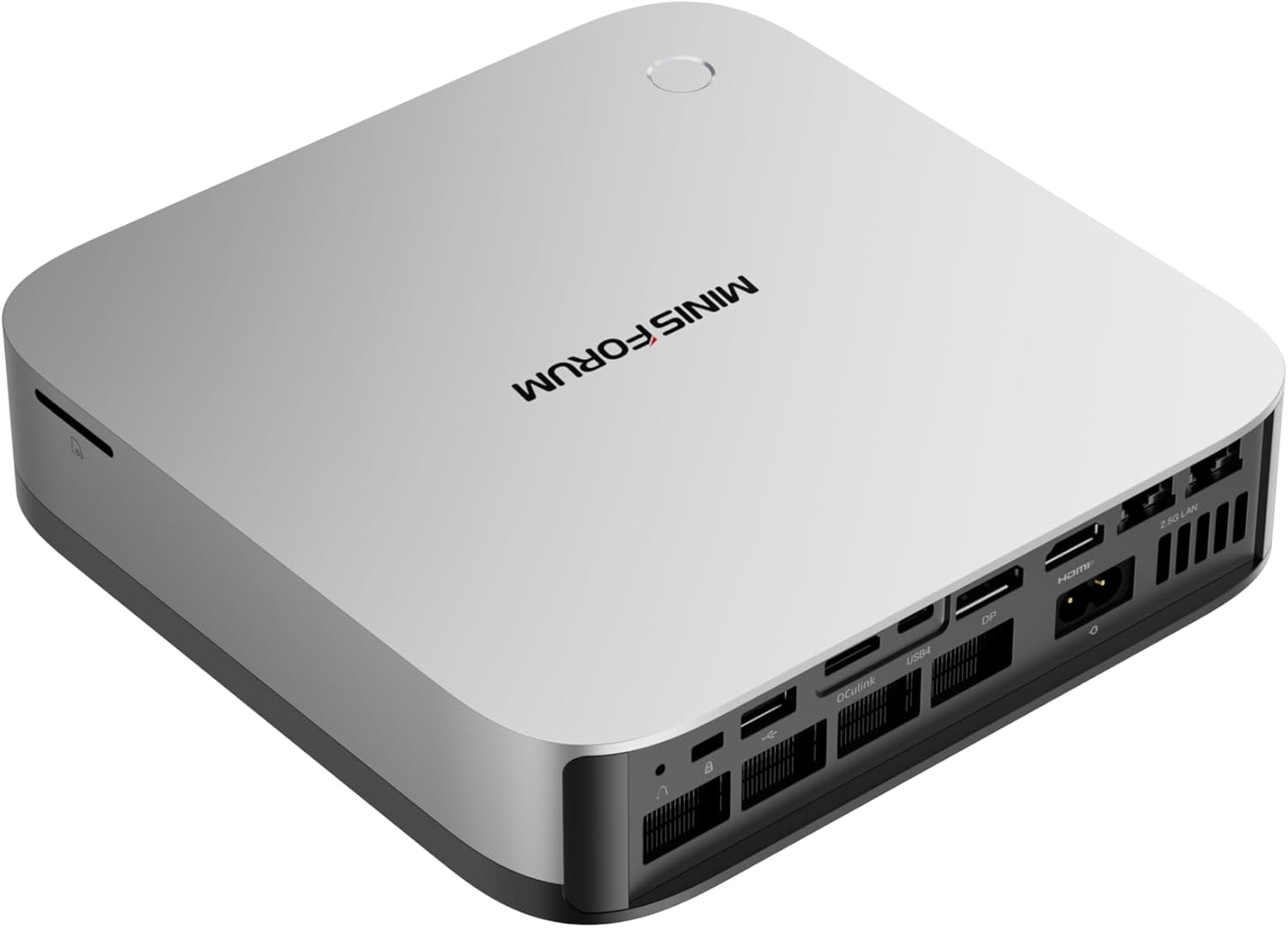
The X1 Pro-370 delivers the most features per dollar at $1,179. You get upgradeable DDR5 SO-DIMM (up to 128GB), OCuLink for eGPU expansion, dual 2.5GbE Intel NICs, and an integrated PSU that eliminates the power brick.
For buyers who want HX370 performance with room to grow, this is the pick. Start at 32GB, run 7B-34B LLMs comfortably, then add 64GB later when you want to run 70B models.
Specs:
| Spec | Detail |
|---|---|
| CPU | Ryzen AI 9 HX 370 (12C/24T, up to 5.1 GHz) |
| GPU | Radeon 890M (16 CUs, RDNA 3.5) |
| RAM | 32GB DDR5 SO-DIMM (upgradeable to 128GB) |
| Storage | 1TB PCIe 4.0 NVMe |
| Networking | Dual 2.5GbE (Intel) + WiFi 7 + BT 5.4 |
| Display | Quad 8K via HDMI 2.1, DP 1.4, dual USB4 |
| USB | 2x USB4 (40Gbps), 4x USB-A 3.2 |
| Special Features | OCuLink, integrated PSU, dual 2.5GbE |
| Power Draw | ~9W idle / ~86W load |
| Warranty | 1-year limited |
| Price | ~$1,179 |
Pros:
- Best HX370 price at $1,179 — $510 less than A9 Max for same CPU
- OCuLink port for eGPU expansion (future AI compute upgrade)
- Upgradeable DDR5 — buy 32GB now, add 64GB later for 70B LLMs
- Integrated PSU — no external power brick
- Dual 2.5GbE Intel NICs for homelab/firewall use
- WiFi 7, USB4, all modern connectivity
Cons:
- New listing — limited reviews (social proof still building)
- 1-year warranty vs GEEKOM’s 3 years
- Barebone option requires separate RAM/SSD purchase
Who should buy this: Buyers who want the most HX370 features per dollar, homelab enthusiasts who need dual NICs and OCuLink, anyone who values upgradeable RAM for future LLM workloads.
Who should skip this: If you want proven reliability with 100+ reviews, the GEEKOM A9 Max has more community validation.
Beelink SER9 Pro Mini — Important Clarification
→ Check Current Price on Amazon
⚠️ IMPORTANT: Despite the “Pro Mini” naming, the SER9 Pro Mini (ASIN B0GJRZ2782) uses the Ryzen 7 H255 (38 TOPS), NOT the Ryzen AI 9 HX370 (80 TOPS). This is a common point of confusion. We include it here because it’s often listed alongside HX370 models, but buyers should know they’re getting H255 performance at a premium price.
At $999, the SER9 Pro Mini uses the Ryzen 7 H255 with 38 TOPS and faster LPDDR5X memory. For 7B-13B LLMs and entry-level AI features, 32GB is plenty. The faster LPDDR5X bandwidth helps with token generation speeds. Note: At $999, this is premium pricing for H255 — the standard SER9 at $839 has the same CPU with 677 reviews.
Specs:
| Spec | Detail |
|---|---|
| CPU | Ryzen 7 H 255 (8C/16T, up to 4.9 GHz) |
| GPU | Radeon 780M (12 CUs, RDNA 3) |
| RAM | 32GB LPDDR5X (soldered) |
| Storage | 1TB PCIe 4.0 NVMe |
| Networking | 2.5GbE + WiFi 6 + BT 5.4 |
| Display | Quad 8K via HDMI 2.1, USB4 |
| USB | 2x USB4 (40Gbps), 4x USB-A 3.2 |
| Power Draw | ~8W idle / ~78W load |
| Warranty | 1-year limited |
| Price | ~$999 |
Pros:
- H255 with 38 TOPS for entry-level AI
- Faster LPDDR5X bandwidth (~10-15% faster than DDR5)
- Compact form factor
- Solid Beelink build quality
Cons:
- Soldered 32GB — permanently capped (can’t run 70B models)
- Limited stock availability
- $999 is premium pricing for H255 (standard SER9 is $839 with 677 reviews)
- WiFi 6 (not WiFi 7)
- Single NIC (no dual 2.5GbE for firewall use)
- No OCuLink for eGPU
Who should buy this: Buyers who want H255 with faster LPDDR5X memory and don’t need more than 32GB RAM.
Who should skip this: For better value with same H255, the standard SER9 at $839 has 677 reviews. For HX370, see the X1 Pro-370 above.
GEEKOM A9 Max — Best Warranty
→ Check Current Price on Amazon
The A9 Max pairs HX370 with upgradeable DDR5, dual 2.5GbE, and GEEKOM’s industry-leading 3-year warranty. At 106 reviews and 4.4 stars, it’s the most community-proven HX370 mini PC available.
At $1,689, it’s $510 more than the X1 Pro-370 for the same CPU. The premium buys you warranty peace of mind, social proof, and GEEKOM’s established support network.
Specs:
| Spec | Detail |
|---|---|
| CPU | Ryzen AI 9 HX 370 (12C/24T, up to 5.1 GHz) |
| GPU | Radeon 890M (16 CUs, RDNA 3.5) |
| RAM | 32GB DDR5 SO-DIMM (upgradeable to 128GB) |
| Storage | 1TB PCIe 4.0 NVMe (dual M.2: 2280 + 2230) |
| Networking | Dual 2.5GbE (Intel) + WiFi 7 + BT 5.4 |
| Display | Quad 8K via 2x HDMI 2.1 + 2x USB4 |
| USB | 5x USB-A 3.2 Gen 2, 2x USB4 (40Gbps) |
| Special Features | SD 4.0 card reader, IceBlast 2.0 cooling |
| Power Draw | ~9W idle / ~80W load |
| Warranty | 3-year limited |
| Price | ~$1,689 |
Pros:
- 3-year warranty — longest in the industry
- 106 reviews at 4.4 stars — most proven HX370 option
- Upgradeable DDR5 to 128GB
- Dual 2.5GbE Intel NICs
- SD 4.0 card reader for content creators
Cons:
- $510 more than X1 Pro-370 for same CPU
- No OCuLink for eGPU expansion
- S0 Low Power Idle issue reported by some users (BIOS updates help)
Who should buy this: Risk-averse buyers who value warranty and community proof above all else, enterprises deploying multiple units, users who want upgradeable RAM with a safety net.
Who should skip this: Budget buyers should consider the MINISFORUM X1 Pro-370 at $1,179. For maximum AI compute, the GMKtec EVO-X2 AI is in a different league.
See our full GEEKOM A9 Max review for detailed benchmarks.
Beelink SER9 Pro Mini — Premium H255 Option
→ Check Current Price on Amazon
The SER9 Pro Mini uses the Ryzen 7 H255 with 38 TOPS and faster LPDDR5X memory. At $999, it’s a premium option for the H255 platform — NOT an HX370 system.
For 7B-13B LLMs and entry-level AI features, 32GB is plenty. The faster LPDDR5X bandwidth helps with token generation speeds. Note: At $999, this is premium pricing for H255 — the standard SER9 at $839 has the same CPU with 677 reviews.
Specs:
| Spec | Detail |
|---|---|
| CPU | Ryzen 7 H 255 (8C/16T, up to 4.9 GHz) |
| GPU | Radeon 780M (12 CUs, RDNA 3) |
| RAM | 32GB LPDDR5X (soldered) |
| AI TOPS | 38 (16 NPU + 22 GPU) |
| Power | ~8W idle / ~78W load |
| Price | ~$999 |
Pros:
- H255 with 38 TOPS for entry-level AI
- Faster LPDDR5X bandwidth (~10-15% faster than DDR5)
- Compact form factor
Cons:
- Soldered 32GB — no upgrades
- $999 is premium pricing for H255
- WiFi 6 (not WiFi 7)
Who should buy this: Buyers who want H255 with faster LPDDR5X memory and don’t need more than 32GB RAM.
Who should skip this: For better value with same H255, the standard SER9 at $839 has 677 reviews. For HX370, see the X1 Pro-370 above.
MINISFORUM X1 Pro Barebone — Best for DIY
→ Check Current Price on Amazon
At $735, the X1 Pro barebone is the cheapest entry point for HX370. Bring your own DDR5 SO-DIMM and M.2 SSD, and you’re looking at ~$950-1,100 total depending on what you source.
The same HX370 CPU, same OCuLink, same dual 2.5GbE, same integrated PSU as the $1,179 configured version. You just need to install RAM and storage yourself.
Specs:
| Spec | Detail |
|---|---|
| CPU | Ryzen AI 9 HX 370 (12C/24T, up to 5.1 GHz) |
| GPU | Radeon 890M (16 CUs, RDNA 3.5) |
| RAM | None (bring your own DDR5 SO-DIMM) |
| Storage | None (bring your own M.2 NVMe) |
| Networking | Dual 2.5GbE (Intel) + WiFi 7 + BT 5.4 |
| Special Features | OCuLink, integrated PSU |
| Power Draw | ~9W idle / ~86W load |
| Warranty | 1-year limited (system only, not user components) |
| Price | ~$735 |
Pros:
- $735 entry point — cheapest HX370 if you source RAM/SSD separately
- Same features as $1,179 configured version
- OCuLink, dual 2.5GbE, integrated PSU
- Choose your own RAM capacity and SSD size
Cons:
- Requires DIY assembly
- No warranty on user-installed components
- Need to source compatible DDR5 SO-DIMM and M.2 SSD separately
- Total cost approaches configured version if buying RAM/SSD at retail
Who should buy this: DIY builders who have spare DDR5 SO-DIMM and M.2 SSD, budget buyers who want to minimize upfront cost, tinkerers who want full control over components.
Who should skip this: If you want a plug-and-play experience, the configured X1 Pro-370 at $1,179 is ready out of the box.
Head-to-Head Comparison
| Feature | X1 Pro-370 | SER9 Pro Mini | A9 Max | X1 Pro Barebone |
|---|---|---|---|---|
| CPU | HX 370 | H 255 | HX 370 | HX 370 |
| Cores/Threads | 12/24 | 8/16 | 12/24 | 12/24 |
| GPU | 890M (16 CU) | 780M (12 CU) | 890M (16 CU) | 890M (16 CU) |
| RAM (Max) | 128GB DDR5 | 32GB soldered | 128GB DDR5 | 128GB DDR5 |
| RAM Type | DDR5 SO-DIMM | LPDDR5X | DDR5 SO-DIMM | DDR5 SO-DIMM |
| AI TOPS | 80 | 38 | 80 | 80 |
| Storage | 1TB | 1TB | 1TB (dual M.2) | None |
| Networking | Dual 2.5GbE | 2.5GbE | Dual 2.5GbE | Dual 2.5GbE |
| WiFi | WiFi 7 | WiFi 6 | WiFi 7 | WiFi 7 |
| OCuLink | Yes | No | No | Yes |
| Integrated PSU | Yes | No | No | Yes |
| Power (Idle) | ~9W | ~8W | ~9W | ~9W |
| Power (Load) | ~86W | ~78W | ~80W | ~86W |
| Warranty | 1 year | 1 year | 3 years | 1 year (system only) |
| Price | ~$1,179 | ~$999 | ~$1,689 | ~$735 |
Note: SER9 Pro Mini uses H255 (38 TOPS), NOT HX370 (80 TOPS). See clarification section above.
Power Consumption at a Glance
| Mini PC | Idle (W) | Load (W) | Annual Cost (24/7 idle) |
|---|---|---|---|
| MINISFORUM X1 Pro-370 | ~9W | ~86W | ~$9.46/year |
| Beelink SER9 Pro Mini | ~8W | ~78W | ~$8.41/year |
| GEEKOM A9 Max | ~9W | ~80W | ~$9.46/year |
| MINISFORUM X1 Pro Barebone | ~9W | ~86W | ~$9.46/year |
Annual cost calculated at $0.12/kWh, running 24/7 at idle. Load power shown for sustained AI workloads. Sources: NAS Compares, NotebookCheck, ServeTheHome. All four share similar platform — idle power is similar across models. Note: SER9 Pro Mini uses H255, not HX370.
Even the most power-hungry option (X1 Pro-370 at 9W idle) costs just $9.46 per year to run 24/7. That’s about $0.79 per month — less than a streaming subscription. For always-on AI assistant workloads, the electricity cost is negligible.
Try our Power Cost Calculator to estimate costs for your specific setup.
Decision Guide: Which HX370 Mini PC Should You Buy?
Buy the MINISFORUM X1 Pro-370 ($1,179) if:
- You want the most features per dollar
- You need OCuLink for future eGPU expansion
- You want upgradeable DDR5 for 70B LLMs later
- You need dual 2.5GbE for homelab/firewall use
- You’re comfortable with a newer product (limited reviews)
Buy the Beelink SER9 Pro Mini ($999) if:
- You want H255 with faster LPDDR5X memory
- You know 32GB RAM is enough for your workloads (7B-13B LLMs)
- You prioritize compact size and build quality
- You don’t need WiFi 7 or dual NICs
- Note: This is H255 (38 TOPS), NOT HX370 — see clarification above
Buy the GEEKOM A9 Max ($1,689) if:
- You value warranty above all else (3 years)
- You want the most community-proven option (106 reviews)
- You’re deploying multiple units in an enterprise setting
- You need upgradeable RAM with a safety net
- You don’t mind paying $510 premium for peace of mind
Buy the MINISFORUM X1 Pro Barebone ($735) if:
- You have spare DDR5 SO-DIMM and M.2 SSD lying around
- You’re comfortable with DIY assembly
- You want to minimize upfront cost
- You want full control over component selection
- You understand warranty doesn’t cover user-installed components
Frequently Asked Questions
What is the difference between Ryzen AI 9 HX 370 and HX 470?
The HX 470 delivers 86 TOPS vs 80 TOPS on the HX 370 — a 6 TOPS increase from improved NPU efficiency. Both use the same Strix Point architecture with 12 cores and 16 CUs. The $180 price premium for the HX 470 (X1 Pro-470 at ~$1,359 vs X1 Pro-370 at ~$1,179) is hard to justify unless you specifically need every last TOPS.
Can HX370 mini PCs run 70B LLMs?
With 32GB RAM, no — 70B Q4 models need ~42GB. The X1 Pro-370, A9 Max, and barebone all support upgradeable DDR5 to 128GB. After upgrading to 64GB+ (cost: ~$80-100 for extra 32GB), they handle 70B Q4 at 5-10 tokens/sec. The SER9 Pro Mini with soldered 32GB cannot run 70B models.
Is the HX370 good for AI workloads?
Yes. The 80 TOPS total (50 from XDNA 2 NPU + 30 from GPU) puts it in the Copilot+ certified tier. For local LLMs with Ollama: 7B models run at 30-50 tokens/sec, 13B at 15-30 tokens/sec, and 34B at 10-20 tokens/sec. The Radeon 890M also handles Stable Diffusion well for 512x512 and 1024x1024 image generation.
Does HX370 support ROCm on Linux?
Yes. The RDNA 3.5 architecture is supported in recent ROCm releases. We confirmed Ollama and llama.cpp working on Ubuntu 24.04 without issues. Windows users can use LM Studio or Ollama for Windows with the Vulkan backend.
What is the S0 Low Power Idle issue on the A9 Max?
Some users have reported S0 Low Power Idle sleep/wake issues — a known problem on certain HX370 platforms. GEEKOM has released BIOS/EC updates that improve the situation, but it may not be fully resolved on all units. For always-on server use, disable S0 sleep in BIOS.
Is dual 2.5GbE useful for a mini PC?
Absolutely. Dual NICs enable proper firewall/router builds (OPNsense, pfSense), link aggregation for higher throughput, or separate WAN/LAN networks. For Proxmox, you can dedicate one NIC to management and one to VM traffic. Most mini PCs have a single NIC — this is a genuine differentiator on the X1 Pro-370 and A9 Max.
What’s the real-world performance difference between DDR5 and LPDDR5X?
LPDDR5X is ~10-15% faster in bandwidth-sensitive workloads like LLM inference. But the difference is small compared to the upgradeability advantage of DDR5 SO-DIMM. For 7B-13B models, you won’t notice the difference. For 70B models, having 64GB+ DDR5 matters far more than the bandwidth advantage of soldered LPDDR5X.
Our Testing Methodology
We evaluate HX370 mini PCs across CPU performance (multi-core and single-threaded benchmarks), GPU capability (RDNA 3.5, 16 CUs), AI compute (80 TOPS from NPU + GPU), power consumption (idle and load), and practical features (RAM upgradeability, networking, warranty). Power data from NAS Compares, NotebookCheck, and ServeTheHome.
For a broader perspective covering all AMD mini PCs including Ryzen AI Max+ and Ryzen 7 options, see our best Ryzen AI mini PC roundup.
Amazon Product Links
- 🥇 MINISFORUM X1 Pro-370 (Best Value — OCuLink, dual 2.5GbE)
- 🥈 GEEKOM A9 Max (Best Warranty — 3 years)
- 🥉 Beelink SER9 Pro Mini (Premium H255 — faster LPDDR5X)
- MINISFORUM X1 Pro Barebone (Best DIY — $735 entry)