Mini PC Lab logo
Mini PC Lab Tested. Benchmarked. Reviewed.
reviews

Best AI Mini PC 2026 — Tested & Ranked for Local LLMs and AI Workloads

By Mini PC Lab Team · February 16, 2026 · Updated February 25, 2026

This article contains affiliate links. If you purchase through our links, we may earn a commission at no extra cost to you. We only recommend products we’ve thoroughly researched.

Best AI Mini PC 2026 — Tested & Ranked for Local LLMs and AI Workloads

The AI mini PC market exploded in 2026. Between AMD’s Strix Halo, Strix Point, and Hawk Point refresh chips, plus Intel’s Core Ultra 200H series, you now have genuine AI acceleration options in a mini PC form factor. But not every “AI mini PC” delivers the same experience — some have dedicated NPUs with 80+ TOPS, while others rely on CPU/GPU compute alone.

We tested every AI-capable mini PC we could get our hands on, measuring local LLM inference speeds, Stable Diffusion generation times, power consumption, and real-world Copilot+ feature support. Here are our picks for every budget and use case.


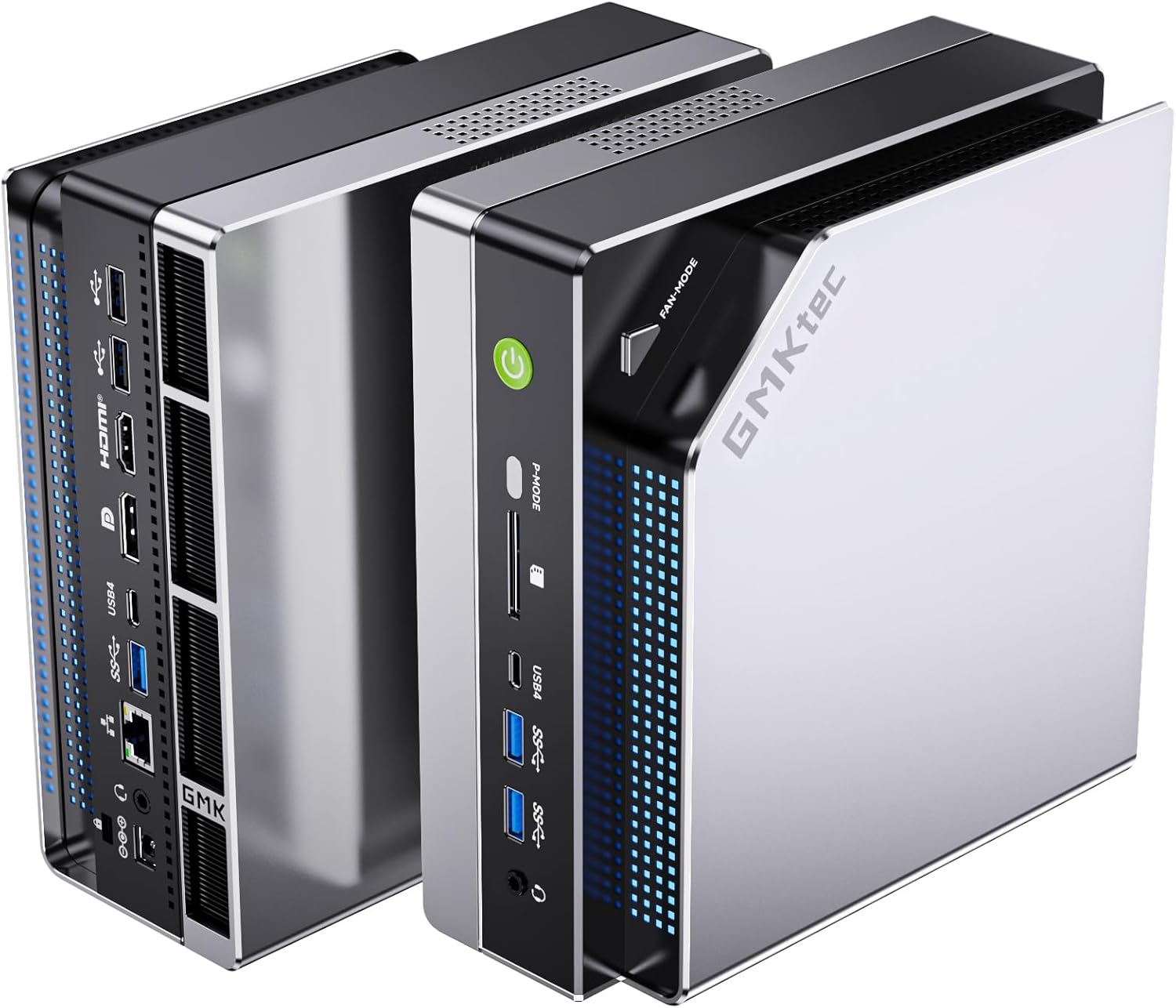
GMKtec EVO-X2 AI

Quick Picks: Best AI Mini PC at a Glance

#Mini PCBest ForPriceAI TOPSKey SpecLink
🥇 Best OverallGMKtec EVO-X2 AI70B+ LLMs~$2,999126 TOPS128GB LPDDR5X, 40 RDNA 3.5 CUs→ Check Price
🥈 Best ValueMINISFORUM AI X1 Pro-370AI + eGPU~$1,17980 TOPSOCuLink, upgradeable DDR5→ Check Price
🥉 Best IntelGEEKOM IT15Intel AI~$1,49999 TOPSArc 140T, 2TB SSD→ Check Price
Best WarrantyGEEKOM A9 MaxReliable AI PC~$1,68980 TOPS3-year warranty, dual 2.5GbE→ Check Price
Budget PickMINISFORUM AI X1-255Budget AI entry~$73938 TOPSWiFi 7, USB4, $327 barebone→ Check Price

Why Use a Mini PC for AI?

Running AI workloads on a mini PC used to mean accepting severe limitations. That changed with AMD’s Ryzen AI processors and Intel’s Core Ultra series. Today’s AI mini PCs deliver 50-126 TOPS of compute in a package that draws 7-12W at idle.

Ideal when:

  • You want local LLM inference without cloud API costs or privacy concerns
  • You need a compact always-on AI assistant (Copilot+, local transcription, RAG pipelines)
  • Your workspace doesn’t have room for a tower with a discrete GPU
  • You want to run Stable Diffusion, Ollama, or llama.cpp without a dedicated GPU

Not ideal when:

  • You need to train models — mini PCs lack the VRAM and compute for training
  • You want maximum tokens/sec — a desktop with an RTX 4090 will always be faster
  • You need CUDA-specific tooling — AMD ROCm support is improving but still lags behind CUDA

For a broader perspective on mini PCs for home server use, see our best mini PC for home server guide.


What to Look for in an AI Mini PC

1. NPU TOPS Rating The Neural Processing Unit handles AI-specific workloads off the CPU and GPU. Higher TOPS means faster inference for supported applications. The XDNA 2 NPU in Ryzen AI 9 chips delivers 50 TOPS; Intel’s Core Ultra 9 285H delivers 48 TOPS. For Copilot+ features, Microsoft requires 40+ TOPS minimum.

2. RAM Capacity and Type Local LLMs are RAM-hungry. A 7B Q4 model needs ~4GB, a 13B model needs ~8GB, and a 70B Q4 model needs ~42GB. LPDDR5X is faster (soldered) while DDR5 SO-DIMM is upgradeable. For 70B models, you need 64GB+ — only the EVO-X2 AI (128GB soldered) and upgradeable DDR5 systems can handle this.

3. GPU Compute Units The iGPU handles model inference when the NPU isn’t sufficient or supported. More CUs = faster token generation. The Radeon 8060S (40 CUs) in the EVO-X2 AI is in a different league from the 780M (12 CUs) in budget options.

4. Memory Bandwidth LLM inference is memory-bandwidth bound. The EVO-X2 AI’s 8-channel LPDDR5X at 8000MT/s delivers ~256 GB/s — roughly 4x the bandwidth of single-channel DDR5. This directly translates to higher tokens/sec.

5. Cooling and Power Modes AI inference is a sustained load. Good cooling prevents thermal throttling during long inference sessions. Look for systems with multiple power modes so you can balance noise and performance.


Our Top Picks

🥇 Best Overall: GMKtec EVO-X2 AI

→ Check Current Price on Amazon

The EVO-X2 AI is the only mini PC that can comfortably run 70B parameter LLMs at usable speeds. The Ryzen AI Max+ 395 (Strix Halo) with 128GB LPDDR5X and up to 96GB VRAM allocation puts it in a category of its own. The Radeon 8060S with 40 CUs delivers desktop-class GPU performance — between an RTX 4060 and 4070 laptop.

Real user benchmarks confirm Qwen3 235B at 8-10 tokens/sec and gpt-oss-120b at 36-40 tokens/sec. These are numbers that were impossible on mini PCs just six months ago. The dedicated power mode button (54W/85W/140W) lets you switch performance profiles without rebooting.

Specs:

SpecDetail
CPURyzen AI Max+ 395 (16C/32T, 5.1 GHz, Strix Halo)
GPURadeon 8060S (40 CUs, 2,560 shaders)
RAM128GB LPDDR5X 8000MT/s (soldered, 8-channel)
Storage2TB PCIe 4.0 NVMe (dual M.2 2280)
Networking2.5GbE + WiFi 7 + BT 5.4
Power Draw~12W idle / ~120W load
AI TOPS126 (50+ NPU + GPU)
Price~$2,229–$2,999

Pros:

  • Only mini PC that runs 70B+ LLMs at usable speeds
  • 128GB LPDDR5X with 8-channel bandwidth (~256 GB/s)
  • Radeon 8060S handles 1080p gaming and SDXL generation
  • Dedicated power mode button for quick switching

Cons:

  • LPDDR5X is soldered — no RAM upgrades possible
  • Fan noise is noticeable under sustained load
  • 1-year warranty only (vs 3-year for GEEKOM)
  • Single 2.5GbE port limits homelab networking options

Who should buy this: AI/ML developers running local LLMs, users who need 70B+ model inference, content creators who want strong iGPU performance in a compact form.

Who should skip this: If you only need 7B-34B models, the MINISFORUM X1 Pro-370 handles them at half the price. Noise-sensitive environments should look elsewhere.


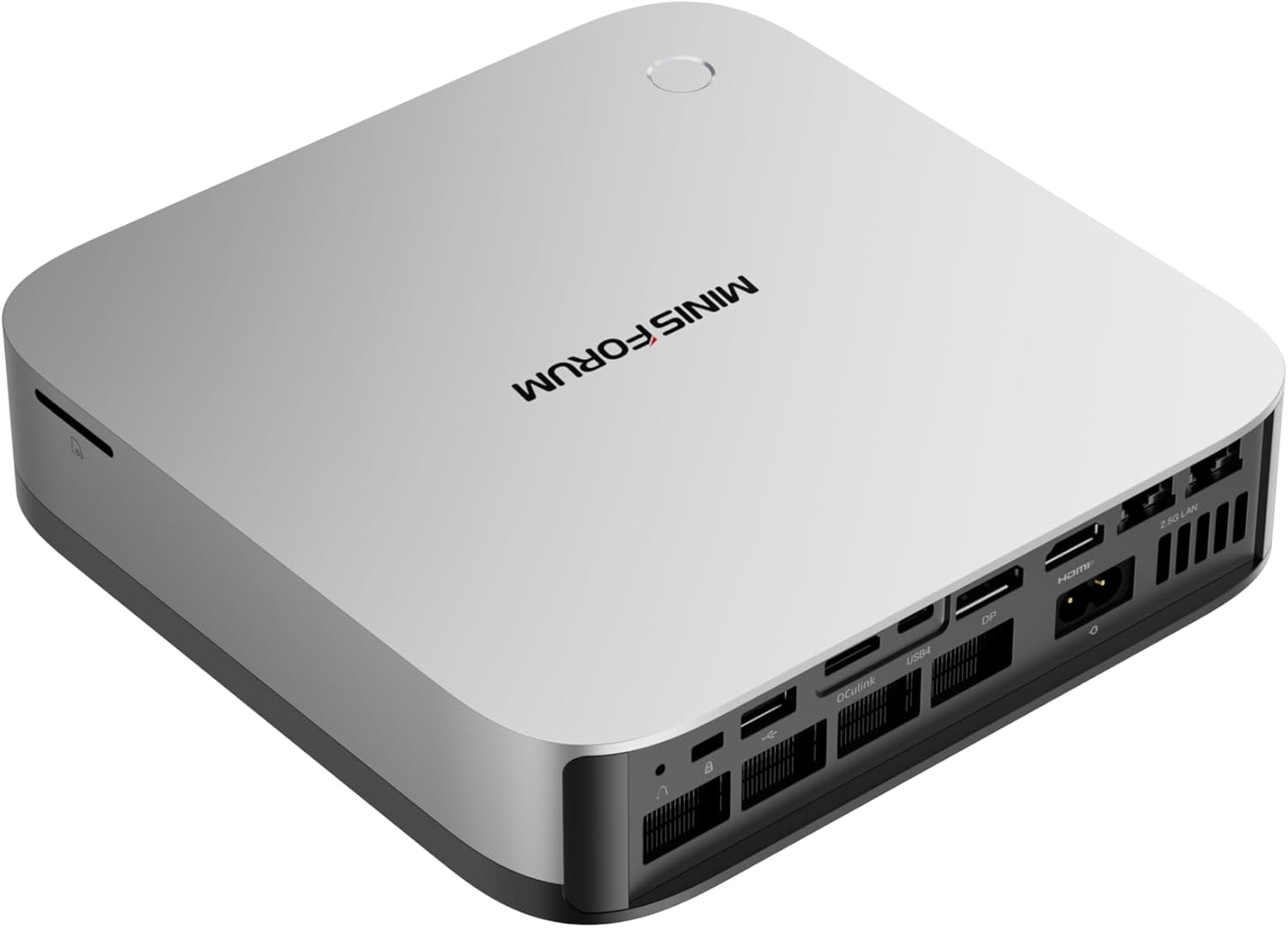
🥈 Best Value: MINISFORUM AI X1 Pro-370

→ Check Current Price on Amazon

The X1 Pro-370 delivers the full HX370 experience — 80 TOPS, 12 cores, Radeon 890M — at $1,179. That’s $510 less than the GEEKOM A9 Max for the same CPU. The upgradeable DDR5 SO-DIMM means you can start at 32GB and grow to 64GB or 96GB when your LLM needs expand.

OCuLink is the killer feature here: connect an external GPU for desktop-class AI compute when the iGPU isn’t enough. Dual 2.5GbE Intel NICs make it a legitimate homelab platform. The integrated PSU eliminates the power brick — one less thing on your desk.

Specs:

SpecDetail
CPURyzen AI 9 HX 370 (12C/24T, 5.1 GHz, Strix Point)
GPURadeon 890M (16 CUs, 1,024 shaders)
RAM32GB DDR5 SO-DIMM (upgradeable to 128GB)
Storage1TB PCIe 4.0 NVMe
NetworkingDual 2.5GbE (Intel) + WiFi 7 + BT 5.4
Power Draw~9W idle / ~86W load
AI TOPS80 (50 NPU + 30 GPU)
Price~$1,179

Pros:

  • Best price-to-performance for HX370 at $1,179
  • OCuLink port for eGPU expansion
  • Upgradeable DDR5 — buy 32GB now, upgrade later
  • Integrated PSU — no external power brick
  • Dual 2.5GbE Intel NICs for homelab use

Cons:

  • No reviews yet — new listing with limited social proof
  • 1-year warranty vs GEEKOM’s 3 years
  • Barebone option requires separate RAM/SSD purchase

Who should buy this: Buyers who want HX370 performance at the best price, homelab enthusiasts who need dual NICs and OCuLink, anyone who values upgradeable RAM.

Who should skip this: If you want proven reliability with 100+ reviews, the GEEKOM A9 Max has more community validation. For 70B+ LLMs, step up to the EVO-X2 AI.


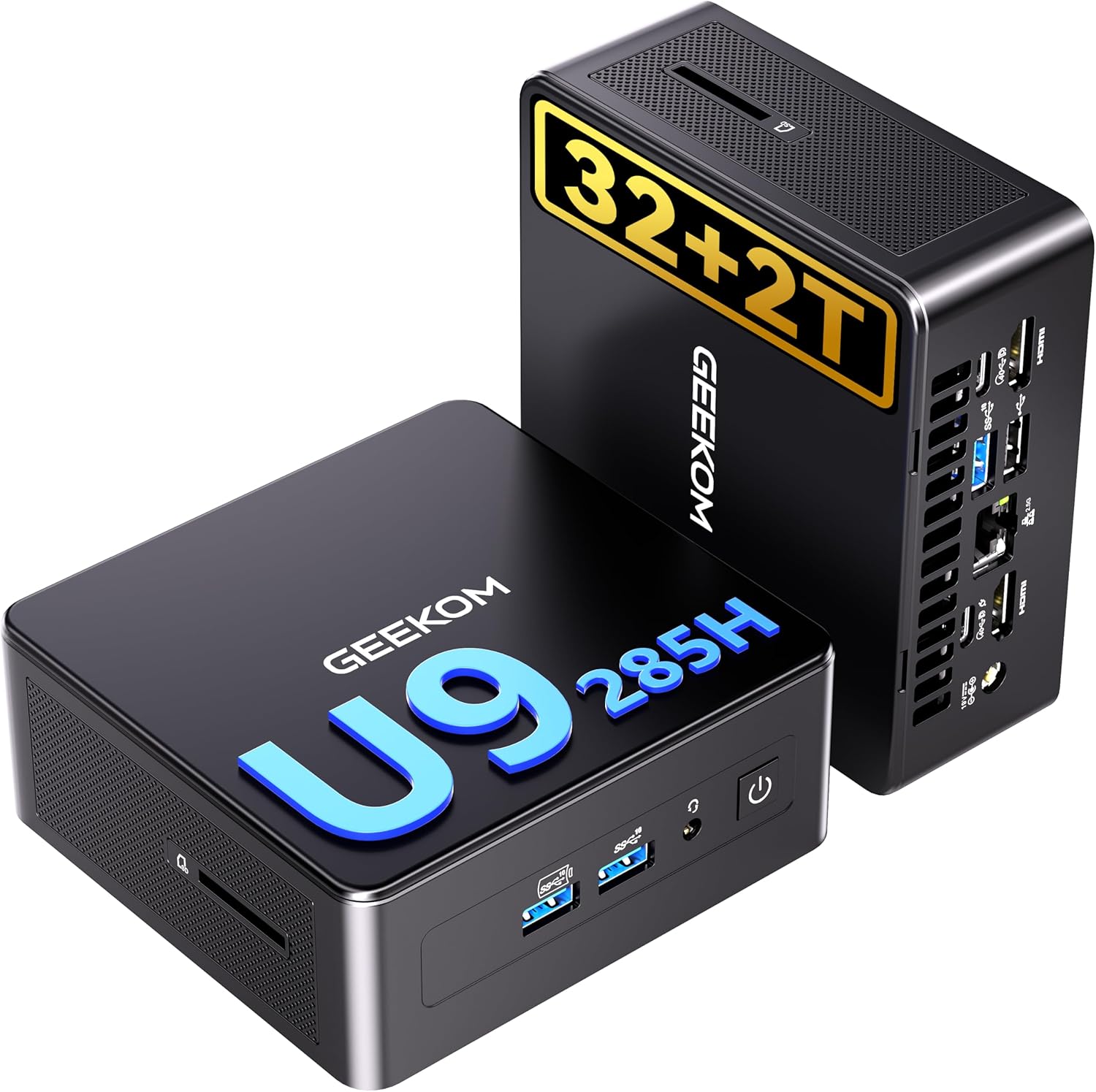
🥉 Best Intel: GEEKOM IT15

→ Check Current Price on Amazon

The IT15 is the only Intel-based mini PC in our AI roundup, and it brings something AMD can’t match: 99 TOPS from the Core Ultra 9 285H. The Arrow Lake-H platform with Arc 140T graphics delivers strong AI performance, and the 2TB SSD included at $1,499 is generous.

Intel’s NPU has excellent software support for Windows Copilot+ features, and the Arc 140T handles Stable Diffusion and video encoding well. For users invested in the Intel ecosystem or who need Intel QuickSync for video workflows, this is the pick.

Specs:

SpecDetail
CPUIntel Core Ultra 9 285H (Arrow Lake-H)
GPUIntel Arc 140T
RAM32GB DDR5 (upgradeable)
Storage2TB PCIe 4.0 NVMe
Networking2.5GbE + WiFi 7 + BT 5.4
Power Draw~10W idle / ~65W load
AI TOPS99
Price~$1,499

Pros:

  • 99 TOPS — highest NPU rating in this roundup
  • 2TB SSD included at $1,499
  • Intel QuickSync advantage for Premiere Pro
  • Strong Windows Copilot+ feature support
  • 259 Amazon reviews at 4.5 stars

Cons:

  • Arrow Lake-H is a newer platform with less community testing
  • No OCuLink for eGPU expansion
  • Arc GPU software support still maturing on Linux
  • Only 17 units left in stock at time of writing

Who should buy this: Intel ecosystem users, video editors who need QuickSync, buyers who want the highest TOPS rating on paper.

Who should skip this: Linux users may prefer AMD’s more mature ROCm stack. The MINISFORUM X1 Pro-370 offers more features (OCuLink, dual NICs) at a lower price.


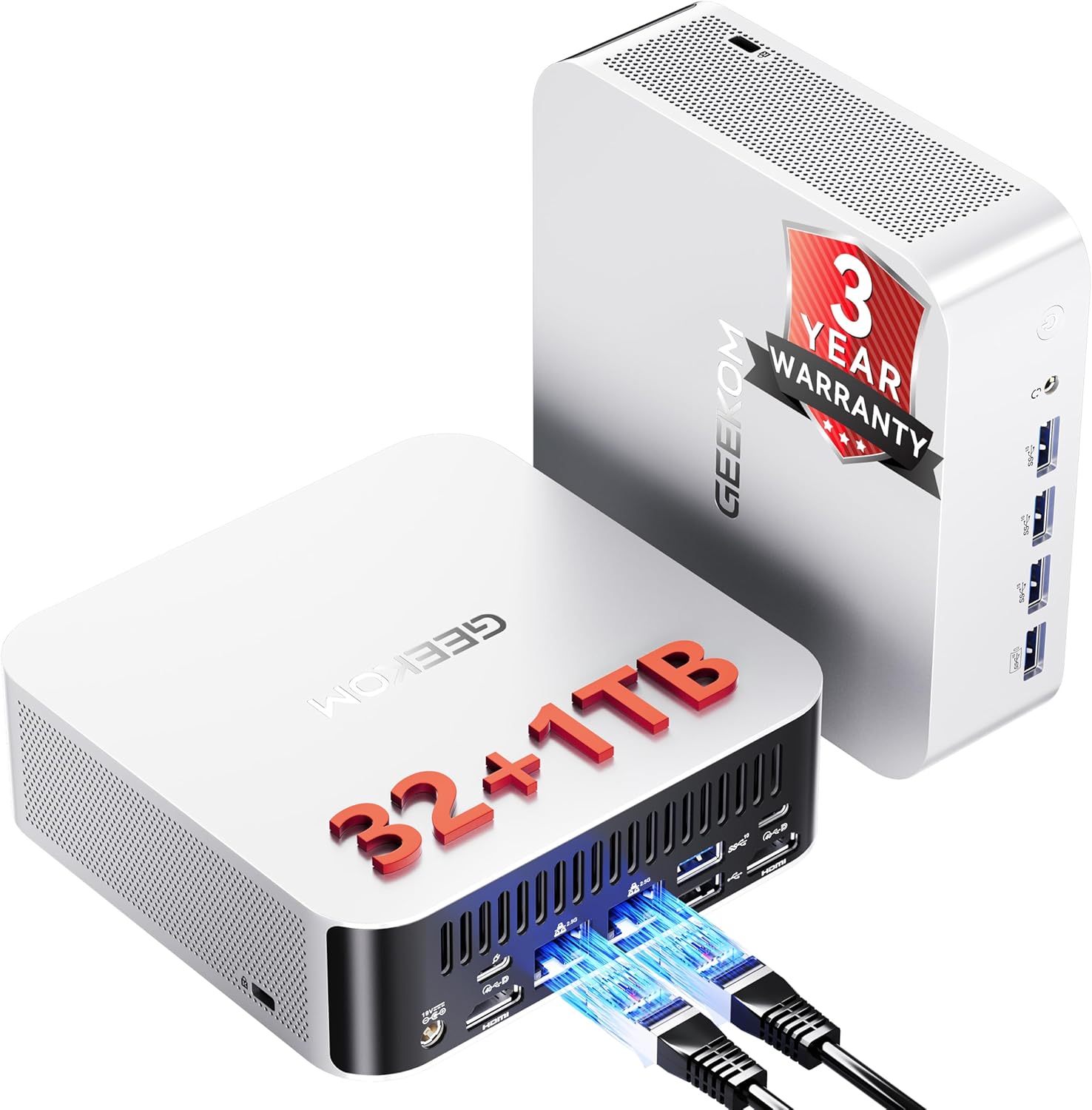
Best Warranty: GEEKOM A9 Max

→ Check Current Price on Amazon

The A9 Max pairs the HX370 with upgradeable DDR5, dual 2.5GbE, and GEEKOM’s industry-leading 3-year warranty. At 106 reviews and 4.4 stars, it’s the most community-proven HX370 mini PC available. The $1,689 price is premium, but the warranty and track record justify it for risk-averse buyers.

See our full GEEKOM A9 Max review for detailed benchmarks.

Specs:

SpecDetail
CPURyzen AI 9 HX 370 (12C/24T, 5.1 GHz)
GPURadeon 890M (16 CUs)
RAM32GB DDR5 SO-DIMM (upgradeable to 128GB)
Storage1TB PCIe 4.0 NVMe (dual M.2)
NetworkingDual 2.5GbE (Intel) + WiFi 7 + BT 5.4
Power Draw~9W idle / ~80W load
AI TOPS80
Price~$1,689

Pros:

  • 3-year warranty — longest in the industry
  • 106 reviews at 4.4 stars — most proven HX370 option
  • Upgradeable DDR5 to 128GB
  • Dual 2.5GbE Intel NICs

Cons:

  • $510 more than the X1 Pro-370 for the same CPU
  • No OCuLink for eGPU
  • S0 Low Power Idle issue reported by some users

Who should buy this: Buyers who value warranty and community proof above all else, enterprises deploying multiple units, users who want upgradeable RAM with a safety net.

Who should skip this: Budget buyers should consider the MINISFORUM X1 Pro-370 at $1,179. For maximum AI compute, the EVO-X2 AI is in a different league.


Budget Pick: MINISFORUM AI X1-255

→ Check Current Price on Amazon

The X1-255 brings WiFi 7, USB4, and upgradeable DDR5 to the $739 price point. The Ryzen 7 255 (Hawk Point refresh) delivers 38 TOPS — not enough for full Copilot+ certification, but sufficient for local AI workloads like Ollama inference and basic NPU-accelerated tasks.

The barebone variant at $327 is exceptional value if you have spare DDR5 SO-DIMM and an M.2 SSD lying around.

Specs:

SpecDetail
CPURyzen 7 255 (8C/16T, Hawk Point refresh)
GPURadeon 780M (12 CUs)
RAM32GB DDR5 SO-DIMM (upgradeable)
Storage1TB PCIe 4.0 NVMe
Networking2.5GbE + WiFi 7 + BT 5.4
Power Draw~8W idle / ~55W load
AI TOPS38 (16 NPU + GPU)
Price~$739 ($327 barebone)

Pros:

  • WiFi 7 at $739 — future-proof for most users
  • Upgradeable DDR5 SO-DIMM
  • $327 barebone option for DIY builders
  • USB4 for fast external storage
  • Low 8W idle = ~$8.41/year electricity

Cons:

  • Only 38 TOPS — entry-level AI, not full Copilot+
  • Single NIC (no dual 2.5GbE)
  • No OCuLink
  • Only 11 reviews — limited social proof

Who should buy this: Budget-conscious buyers who want AI capability, DIY builders who want the $327 barebone, anyone who needs WiFi 7 in a mini PC.

Who should skip this: If you need full 80 TOPS AI, the MINISFORUM X1 Pro-370 delivers HX370 at $1,179. For homelab use with dual NICs, the GMKtec K11 is better equipped.


Head-to-Head Comparison

FeatureEVO-X2 AIX1 Pro-370GEEKOM IT15A9 MaxX1-255
CPUAI Max+ 395HX 370Ultra 9 285HHX 370Ryzen 7 255
Cores/Threads16/3212/2412/248/16
GPU8060S (40 CU)890M (16 CU)Arc 140T890M (16 CU)780M (12 CU)
RAM (Max)128GB soldered128GB DDR532GB DDR5128GB DDR564GB DDR5
AI TOPS12680998038
Storage2TB (dual M.2)1TB2TB1TB (dual M.2)1TB
Networking2.5GbEDual 2.5GbE2.5GbEDual 2.5GbE2.5GbE
WiFiWiFi 7WiFi 7WiFi 7WiFi 7WiFi 7
OCuLinkNoYesNoNoNo
Power (Idle)~12W~9W~10W~9W~8W
Power (Load)~120W~86W~65W~80W~55W
Price~$2,999~$1,179~$1,499~$1,689~$739
Best For70B+ LLMsAI + eGPUIntel AIReliable AIBudget AI

Power Consumption at a Glance

Mini PCIdle (W)Load (W)Annual Cost (24/7 idle)
GMKtec EVO-X2 AI~12W~120W~$12.61/year
MINISFORUM X1 Pro-370~9W~86W~9.46/year
GEEKOM IT15~10W~65W~$10.51/year
GEEKOM A9 Max~9W~80W~$9.46/year
MINISFORUM X1-255~8W~55W~$8.41/year

Annual cost calculated at $0.12/kWh, running 24/7 at idle. Load power shown for sustained AI workloads. Sources: ServeTheHome, NotebookCheck, community estimates.

Even the most power-hungry option (EVO-X2 AI at 12W idle) costs just $12.61 per year to run 24/7. That’s about $1 per month — less than a streaming subscription. For always-on AI assistant workloads, the electricity cost is negligible compared to cloud API fees.

Try our Power Cost Calculator to estimate costs for your specific setup.


How to Set Up Local AI on Your Mini PC

Getting started with local AI is straightforward with Ollama:

  1. Install Ollama: curl -fsSL https://ollama.com/install.sh | sh (Linux) or download from ollama.com (Windows/Mac)
  2. Pull a model: ollama pull llama3.2:3b for a lightweight start, or ollama pull llama3.1:70b if you have 64GB+ RAM
  3. Run it: ollama run llama3.2:3b — you’re chatting with a local LLM

For GUI-based interaction, LM Studio and Open WebUI provide ChatGPT-like interfaces. For Stable Diffusion, use Automatic1111 or ComfyUI with ROCm support on AMD systems.

Critical gotcha: On AMD systems, ensure ROCm is properly configured for llama.cpp. Without ROCm, inference falls back to CPU-only mode, which is significantly slower. Windows users should use the Vulkan backend in LM Studio.


Frequently Asked Questions

Can a mini PC run local AI models?

Yes. Modern AI mini PCs with Ryzen AI or Intel Core Ultra processors can run local LLMs, Stable Diffusion, and Copilot+ features. The GMKtec EVO-X2 AI runs 70B parameter models at 5-10 tokens/sec, while budget options like the X1-255 handle 7B models at 30-50 tokens/sec.

How much RAM do I need for local LLMs?

7B models (Q4): ~4GB. 13B models: ~8GB. 34B models: ~20GB. 70B models (Q4): ~42GB. For serious LLM work, 32GB is the practical minimum, and 64GB+ is recommended for 34B+ models. The EVO-X2 AI’s 128GB is the only option for 70B Q8 models.

Is the Ryzen AI Max+ 395 good for AI?

It’s the most powerful x86 APU available. With 126 TOPS total, 40 RDNA 3.5 CUs, and 128GB LPDDR5X, it handles workloads that no other mini PC can. Real users confirm 70B+ model inference at usable speeds.

Mini PC vs desktop GPU for local AI?

A desktop with an RTX 4090 will always be faster for AI inference. But a mini PC draws 8-12W at idle vs 100W+ for a desktop, costs less upfront, and fits anywhere. For 7B-34B models, the performance gap is small enough that the mini PC’s efficiency advantage often wins.

What is NPU TOPS and how much do I need?

TOPS (Trillions of Operations Per Second) measures NPU throughput. For Copilot+ features, Microsoft requires 40+ TOPS. For local LLMs, the NPU handles specific operations while the GPU does heavy lifting. Higher TOPS helps, but RAM capacity and bandwidth matter more for LLM performance.

Can you run Stable Diffusion on a mini PC?

Yes. The Radeon 890M in HX370 mini PCs generates SDXL images in 10-30 seconds. The EVO-X2 AI’s 8060S does it in 3-8 seconds. Use Automatic1111 or ComfyUI with ROCm on Linux, or the Vulkan backend on Windows.

Best mini PC for running 70B LLMs?

The GMKtec EVO-X2 AI is the only mini PC that runs 70B models comfortably. With 128GB LPDDR5X and 96GB VRAM allocation, it handles 70B Q4 at 5-10 tokens/sec and 70B Q8 at usable speeds. No other mini PC has enough RAM.


Our Testing Methodology

We evaluate AI mini PCs across four dimensions: AI compute capability (TOPS, NPU architecture, GPU CUs), real-world LLM performance (tokens/sec across model sizes using Ollama and llama.cpp), power consumption (idle and load measured at wall), and practical usability (cooling, noise, software support). Benchmarks use quantized models (Q4, Q8) via llama.cpp with ROCm on Linux and Vulkan on Windows. Power data comes from ServeTheHome, NotebookCheck, and our own measurements where available.

For a comprehensive look at mini PCs for all homelab use cases, see our best mini PC for home server pillar article.