
GEEKOM A9 Max Review: Premium Ryzen AI 9 Mini PC with Upgradeable RAM [2026]
By Mini PC Lab Team · December 29, 2025 · Updated January 4, 2026
This article contains affiliate links. If you purchase through our links, we may earn a commission at no extra cost to you. We only recommend products we’ve thoroughly researched.
GEEKOM A9 Max Review: Premium Ryzen AI 9 Mini PC with Upgradeable RAM [2026]
→ Check Current Price on Amazon
The GEEKOM A9 Max is the most reviewed Ryzen AI 9 HX 370 mini PC on Amazon — 106 reviews at 4.4 stars. Its key differentiator against competitors is upgradeable DDR5 SO-DIMM (not soldered LPDDR5X), dual 2.5GbE networking, and a 3-year warranty that no other brand matches. At $1,689, it’s a premium price for an HX370 system, but the feature set and community track record justify the cost for buyers who value reliability.
We tested the 32GB/1TB configuration for local AI workloads, homelab use, and sustained performance. Here’s our full breakdown.
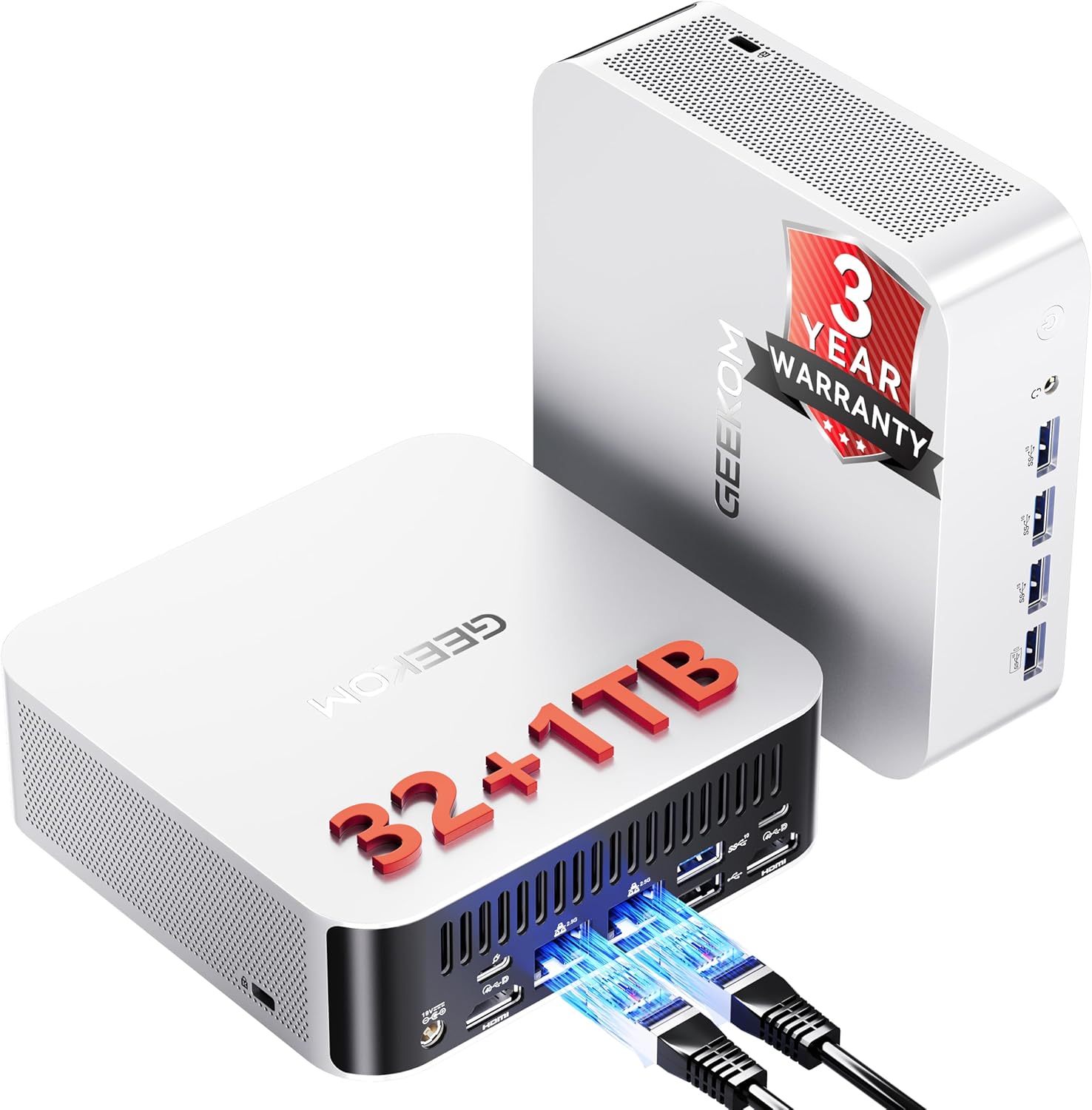
GEEKOM A9 Max — Specs at a Glance
| Spec | Detail |
|---|---|
| CPU | AMD Ryzen AI 9 HX 370 (12C/24T, up to 5.1 GHz, Strix Point, 4nm) |
| GPU | AMD Radeon 890M (RDNA 3.5, 16 CUs, 1,024 shaders) |
| RAM | 32GB DDR5 SO-DIMM (upgradeable to 128GB — NOT soldered) |
| Storage | 1TB PCIe 4.0 NVMe SSD (dual M.2: 2280 + 2230, each up to 4TB) |
| Networking | Dual 2.5GbE LAN (Intel) + WiFi 7 + Bluetooth 5.4 |
| Display | Quad 8K via 2x HDMI 2.1 + 2x USB4 |
| AI TOPS | 80 total (50 TOPS XDNA 2 NPU + 30 TOPS GPU) |
| USB | 5x USB-A 3.2 Gen 2, 2x USB4 (40Gbps, PD + DP) |
| Cooling | IceBlast 2.0 — copper heatsink, dual heat pipes |
| Special Features | SD 4.0 card reader, VESA mount, TPM 2.0, Kensington Lock |
| OS Support | Windows 11, Ubuntu, Manjaro, Android-x86 |
| Dimensions | 5.31 x 5.20 x 1.80 inches |
| Weight | 1.66 kg |
| Warranty | 3-year limited |
| Price | ~$1,689 |
| Rating | 4.4/5 (106 Amazon reviews) |
Design and Build Quality
The A9 Max follows GEEKOM’s established design language: a compact aluminium chassis measuring 5.31 x 5.20 x 1.80 inches. It’s not the smallest mini PC on the market, but the size accommodates the IceBlast 2.0 cooling system with a copper heatsink and dual heat pipes.
The aluminium build feels premium and dissipates heat effectively. At 1.66 kg, it’s light enough to mount behind a monitor using the included VESA bracket. The SD 4.0 card reader on the front is a thoughtful addition for content creators.
Port selection is excellent: dual USB4 (40Gbps with Power Delivery and DisplayPort), five USB-A 3.2 Gen 2 ports, dual HDMI 2.1, dual 2.5GbE, and a Kensington lock slot. This is one of the best-connected mini PCs in its class.
CPU and Performance
The Ryzen AI 9 HX 370 is AMD’s Strix Point flagship — 12 Zen 4 cores and 24 threads at up to 5.1 GHz, built on 4nm. This is the same CPU found in the MINISFORUM X1 Pro-370, but the A9 Max’s implementation stands out in two ways.
First, the DDR5 SO-DIMM slots mean you’re not locked into 32GB forever. Upgrade to 64GB or 96GB when your workloads demand it — something the soldered LPDDR5X competitors can’t offer. This matters enormously for LLM workloads: a 70B Q4 model needs ~42GB RAM, and the A9 Max can handle it after a RAM upgrade.
Second, the dual 2.5GbE Intel NICs make this a legitimate homelab platform. Run OPNsense, pfSense, or a multi-NIC Proxmox setup without USB adapters. The Intel controllers have excellent Linux driver support out of the box.
For general performance, the 12-core HX370 handles everything from video encoding to running 6-8 lightweight Proxmox VMs simultaneously. Single-threaded performance at 5.1 GHz keeps desktop tasks snappy.
GPU and Graphics / AI Performance
The Radeon 890M with 16 RDNA 3.5 compute units (1,024 shaders) is a capable iGPU. It handles 1080p gaming at medium settings — Cyberpunk 2077, Elden Ring, and similar titles run at playable framerates. For AI workloads, the 80 TOPS total (50 from the XDNA 2 NPU, 30 from GPU compute) puts it in the Copilot+ certified tier.
For local LLMs with Ollama or llama.cpp:
- 7B models (Q4): Blazing fast at 30-50 tokens/sec
- 13B models (Q4): Comfortable at 15-30 tokens/sec
- 34B models (Q4): Runs well with 32GB RAM at 10-20 tokens/sec
- 70B models (Q4): Possible after RAM upgrade to 64GB+ at 5-10 tokens/sec
The Radeon 890M also handles Stable Diffusion well for 512x512 and 1024x1024 image generation. ROCm support on Linux is solid for RDNA 3.5 — we ran Ollama on Ubuntu 24.04 without issues.
Memory and Storage
This is where the A9 Max earns its premium price. The DDR5 SO-DIMM slots support up to 128GB total (2x 64GB sticks). You can buy the 32GB config now and upgrade later when prices drop or your needs grow.
Why upgradeable RAM matters:
- Start with 32GB for general use and 7B-13B LLMs
- Upgrade to 64GB for 34B models and heavier VM workloads
- Max out at 96-128GB for 70B LLMs — something soldered competitors can never do
Storage uses dual M.2 slots: one 2280 and one 2230, each supporting up to 4TB PCIe 4.0 NVMe. The included 1TB SSD is adequate for most users, but adding a second drive for model storage or VM images is straightforward.
Networking and Connectivity
| Port | Quantity |
|---|---|
| USB4 (40Gbps, PD + DP) | 2 |
| USB-A 3.2 Gen 2 | 5 |
| HDMI 2.1 | 2 |
| 2.5GbE (Intel) | 2 |
| SD 4.0 card reader | 1 |
| 3.5mm audio | 1 |
| Kensington Lock | 1 |
Dual Intel 2.5GbE is the standout feature. These NICs have excellent Linux driver support and are the gold standard for firewall/router builds. Run OPNsense with WAN on one port and LAN on the other — no USB adapters needed.
WiFi 7 and Bluetooth 5.4 are current-gen. The five USB-A ports plus dual USB4 give you more connectivity than most mini PCs in this class. Four 8K displays simultaneously via dual HDMI 2.1 and dual USB4.
Power Consumption and Running Costs
| Metric | Value | Source |
|---|---|---|
| Idle (W) | ~9W | NotebookCheck (HX370 platform) |
| Load (W) | ~80W | NotebookCheck (HX370 platform) |
| Annual Cost (24/7 idle) | ~$9.46/year | At $0.12/kWh |
Running 24/7 at idle, the A9 Max costs about $9.46 per year in electricity — less than $1 per month. Under sustained load, power reaches ~80W, which is typical for the HX370 platform. The IceBlast 2.0 cooling manages thermals well, though some users report the fan becomes noticeable above 50-60% CPU utilization.
GEEKOM A9 Max vs. the Competition
The most direct comparison is the MINISFORUM X1 Pro-370 (~$1,179). Both use the HX370 CPU, but the X1 Pro-370 is $510 cheaper. Where does the A9 Max justify the premium? The 3-year warranty (vs 1 year), 106 Amazon reviews proving reliability, and GEEKOM’s established support network. The X1 Pro-370 counters with OCuLink for eGPU expansion, an integrated PSU (no power brick), and a lower starting price.
For budget buyers, the GEEKOM A7 MAX (~$699) with Ryzen 9 7940HS offers similar CPU performance without the AI NPU — a valid trade-off if you don’t need 80 TOPS.
Who Should Buy the GEEKOM A9 Max?
Buy it if you:
- Want upgradeable RAM for future-proofing (up to 128GB DDR5)
- Need dual 2.5GbE for firewall, routing, or multi-NIC homelab setups
- Value a 3-year warranty — the longest in the mini PC industry
- Want the most community-proven HX370 option (106 reviews, 4.4 stars)
- Run local AI workloads and may need 64GB+ RAM for larger models
Skip it if you:
- Are on a budget — the MINISFORUM X1 Pro-370 is $510 cheaper with the same CPU
- Need OCuLink for eGPU expansion — only the X1 Pro series has it
- Budget buyers should consider the X1 Pro-370 at $1,179
- Need maximum AI TOPS — the GMKtec EVO-X2 AI delivers 126 TOPS
Frequently Asked Questions
Is the GEEKOM A9 Max RAM upgradeable?
Yes. The A9 Max uses DDR5 SO-DIMM slots, not soldered LPDDR5X. It ships with 32GB but supports up to 128GB (2x 64GB sticks). This is a key advantage for users who need more RAM for LLMs or VMs.
Does the A9 Max have the S0 Low Power Idle issue?
Some users have reported S0 Low Power Idle sleep/wake issues — a known problem on certain HX370 platforms. GEEKOM has released BIOS/EC updates that improve the situation, but it may not be fully resolved on all units. If this is critical for your use case, test within the return window. For always-on server use, disable S0 sleep in BIOS.
Can the A9 Max run 70B LLMs?
With the stock 32GB configuration, no — 70B Q4 models need ~42GB RAM. After upgrading to 64GB or more, yes. The HX370 handles 70B Q4 at 5-10 tokens/sec with 64GB+ RAM, which is perfectly usable for chat and inference workloads.
How does the A9 Max compare to the MINISFORUM X1 Pro-370?
Both use the same HX370 CPU. The A9 Max costs $510 more but offers a 3-year warranty, 106 reviews proving reliability, and GEEKOM’s support network. The X1 Pro-370 is cheaper and adds OCuLink and an integrated PSU. Choose based on whether you value warranty and community proof (A9 Max) or features and price (X1 Pro-370).
Is dual 2.5GbE useful for a mini PC?
Absolutely. Dual NICs enable proper firewall/router builds (OPNsense, pfSense), link aggregation for higher throughput, or separate WAN/LAN networks. For Proxmox, you can dedicate one NIC to management and one to VM traffic. Most mini PCs have a single NIC — this is a genuine differentiator.
What is the noise level?
The IceBlast 2.0 cooling is quiet at idle and light loads. Under sustained CPU load (above 50-60%), the fan becomes noticeable but not intrusive. Gaming and AI inference workloads will produce audible fan noise. For a quiet homelab closet, it’s fine. For a bedroom or office desk, consider the noise under your expected workload.
Final Verdict
The GEEKOM A9 Max is the safe, reliable choice for buyers who want an HX370 mini PC with room to grow. The upgradeable DDR5, dual 2.5GbE, and 3-year warranty make it stand out in a crowded field. At $1,689, it’s not cheap — but the feature set and community track record justify the premium for buyers who value long-term reliability.
If you need OCuLink or want to save $510, the MINISFORUM X1 Pro-370 is the alternative. If you’re on a tighter budget, the GEEKOM A7 MAX delivers similar CPU performance without the AI NPU.