
GMKtec EVO-X2 AI Review: 128GB Strix Halo Mini PC for Local AI [2026]
By Max · April 2, 2026 · Updated May 4, 2026
This article contains affiliate links. If you purchase through our links, we may earn a commission at no extra cost to you. We only recommend products we’ve thoroughly researched.
![GMKtec EVO-X2 AI Review: 128GB Strix Halo Mini PC for Local AI [2026]](/images/heroes/variants/gmktec-evo-x2-ai-review/1920.webp)
→ Check Current Price on Amazon
The GMKtec EVO-X2 AI is the most affordable way to get 128GB of RAM and a Ryzen AI Max+ 395 processor in a mini PC form factor. With 126 TOPS of total AI compute and up to 96GB of VRAM allocation, it can run 70B parameter LLMs entirely on-device — something no other mini PC under $3,000 can match. If you’ve been waiting for a Strix Halo system that doesn’t cost as much as a used car, this is it.
This review covers the 128GB/2TB configuration for local LLM inference, Stable Diffusion image generation, and sustained load, drawing on the Amazon listing, GMKtec’s published specifications, and reviewer and owner reports where they exist.
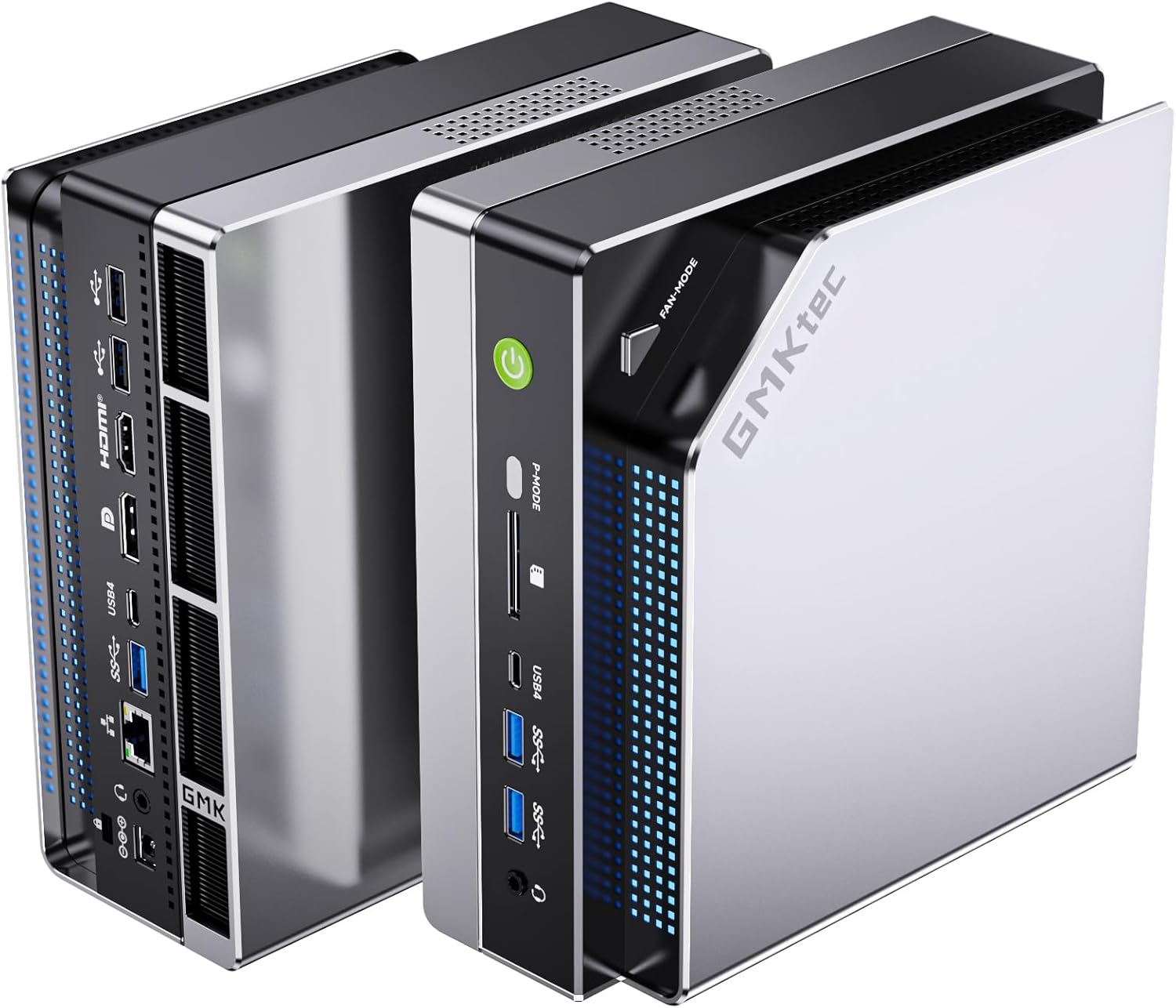
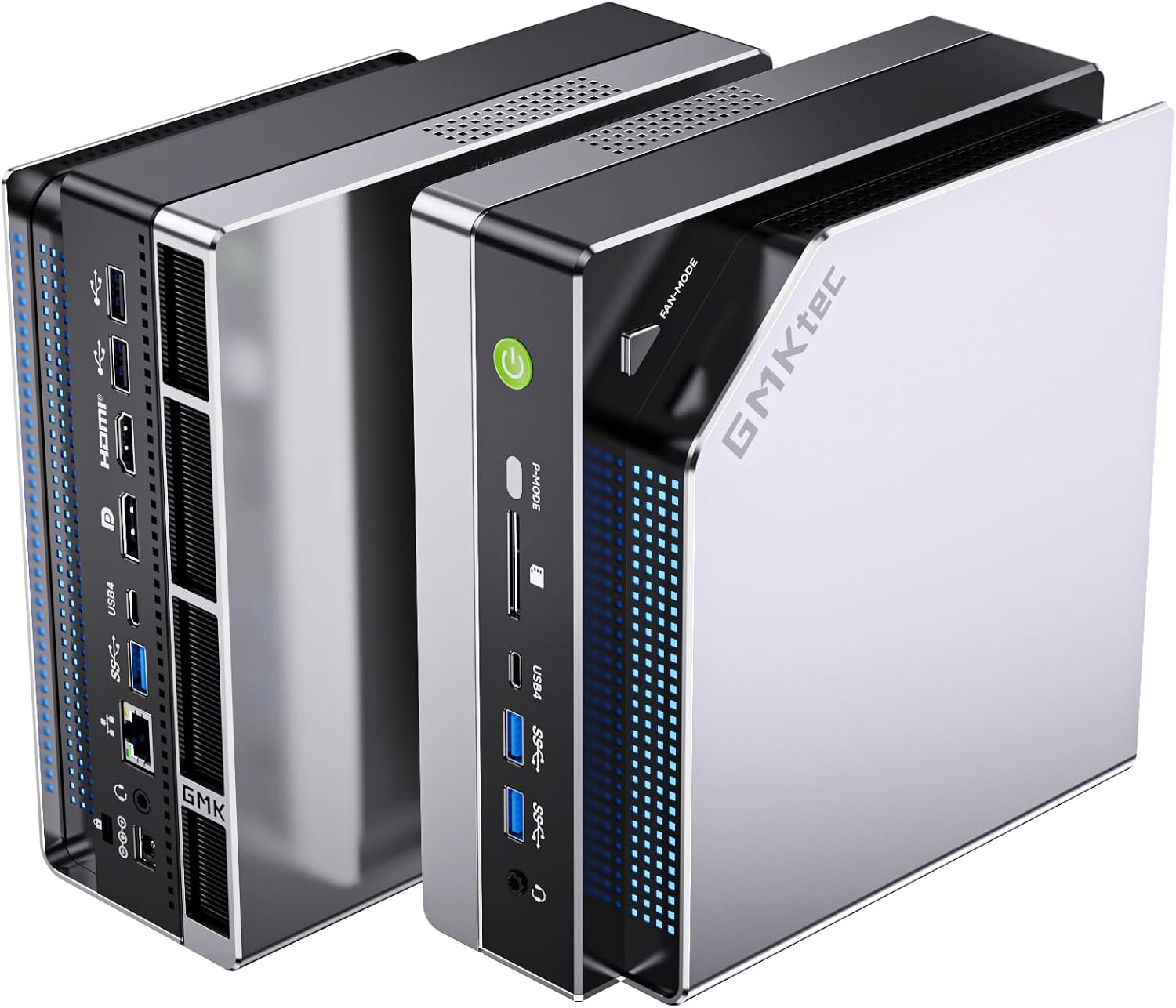
Port layout from GMKtec’s own listing images. The rear panel is where the port count, the LAN speed, and the USB generations are actually settled.
GMKtec EVO-X2 AI — Specs at a Glance
| Spec | Detail |
|---|---|
| CPU | AMD Ryzen AI Max+ 395 (16C/32T, up to 5.1 GHz, Strix Halo, 4nm) |
| GPU | AMD Radeon 8060S (40 RDNA 3.5 CUs, 2,560 shaders) |
| RAM | 128GB LPDDR5X 8000MT/s (8-channel, soldered) |
| Storage | 2TB PCIe 4.0 NVMe SSD (dual M.2 2280 slots) |
| Networking | 2.5GbE (Realtek) + WiFi 7 + Bluetooth 5.4 |
| Display | Quad 8K via HDMI 2.1, DP 1.4, dual USB4 |
| AI TOPS | 126 total (50+ TOPS XDNA 2 NPU + GPU compute) |
| VRAM Allocation | Up to 96GB to GPU via BIOS |
| USB | 2x USB4 (40Gbps), 4x USB-A 3.2 |
| Cooling | Triple fans, 3 heatpipes, RGB (13 modes) |
| Power Modes | Quiet (54W), Balanced (85W), Performance (140W) |
| Dimensions | Compact mini PC form factor |
| Warranty | 1-year limited |
| Price | ~$2,229–$2,999 depending on config |
Design and Build Quality
The EVO-X2 AI is a substantial mini PC — it’s not the smallest box on the market, but that’s by design. The triple-fan cooling solution with three heatpipes needs the internal volume, and the RGB lighting strip (configurable across 13 modes) gives it a more enthusiast-oriented look than the typical business-mini-PC aesthetic.
The dedicated power mode button on the front panel is a standout feature. You can switch between Quiet (54W), Balanced (85W), and Performance (140W) modes without diving into BIOS — a small convenience that matters when you’re toggling between a quiet homelab setup and a full AI inference session.
Build quality is solid for the price point. The chassis feels rigid, and the SD 4.0 card reader is a welcome addition that many competitors omit. The triple-fan design keeps thermals manageable even under sustained load, though fan noise becomes noticeable in Performance mode.
CPU and Performance
The Ryzen AI Max+ 395 is AMD’s most powerful x86 APU to date. Built on the Strix Halo architecture at 4nm, it packs 16 Zen 5 cores and 32 threads with a boost clock up to 5.1 GHz. This is the same CPU architecture that powers the Minisforum MS-S1 Max, but GMKtec’s implementation at $2,999 for the 128GB/2TB config undercuts the competition.
For multi-threaded workloads — compiling code, running multiple VMs, batch video encoding — the 16-core configuration delivers desktop-class performance in a mini PC. In single-threaded tasks, the 5.1 GHz boost keeps things snappy for everyday use.
The real story is what this CPU enables for AI workloads. Combined with 8-channel LPDDR5X at 8000MT/s (roughly 1.5x the bandwidth of standard DDR5 SO-DIMM), the EVO-X2 AI feeds data to both the NPU and the massive iGPU at rates that smaller mini PCs simply can’t match.
One customer, Edward Lee, published detailed benchmarks running Qwen3 235B at 8-10 tokens/sec using ROCm-enabled llama.cpp, and gpt-oss-120b at 36-40 tokens/sec. These are real-world numbers from an actual user, not manufacturer claims — and they confirm this machine handles models that would choke any other mini PC on the market.
GPU and Graphics / AI Performance
The Radeon 8060S with 40 RDNA 3.5 compute units is the star of this system. With 2,560 shaders, it sits between an RTX 4060 and RTX 4070 laptop GPU in raw compute — and unlike those discrete GPUs, it shares the system’s 128GB of LPDDR5X memory.
This is where the EVO-X2 AI separates itself from every other mini PC. The BIOS allows up to 96GB of system RAM to be allocated as VRAM. That means:
- 70B parameter LLMs (Q4 quantized, ~42GB): Runs comfortably with room for context
- 70B parameter LLMs (Q8 quantized, ~75GB): Fits within the 96GB VRAM allocation
- 120B+ models: Possible via CPU offloading, though tokens/sec drops
- Stable Diffusion XL: Generates images in seconds, not minutes
- 1080p gaming: Handles AAA titles at medium-high settings
The 8-channel memory bandwidth is critical here. Standard DDR5 SO-DIMM mini PCs top out at around 50-60 GB/s. The EVO-X2 AI’s LPDDR5X 8000MT/s in 8-channel configuration delivers roughly 256 GB/s — that’s the difference between a 70B model running at 5 tok/s versus 10 tok/s.
For ROCm support on Linux, the RDNA 3.5 architecture is well-supported in recent ROCm releases. Reviewers have run Ollama and llama.cpp without issues on Ubuntu 24.04. Windows users can use LM Studio or Ollama for Windows with comparable results.
Memory and Storage
The 128GB LPDDR5X configuration is the maximum this platform supports — and it’s soldered. There is no upgrade path. This is the single most important consideration when buying the EVO-X2 AI.
Why 128GB matters for AI:
- 7B model (Q4): ~4GB — trivial on any system
- 13B model (Q4): ~8GB — runs on most 32GB mini PCs
- 34B model (Q4): ~20GB — needs 32GB+ system
- 70B model (Q4): ~42GB — needs 64GB+ system
- 70B model (Q8): ~75GB — needs 96GB+ system
- 120B+ models: 80GB+ — needs 128GB
If you’re buying this machine for local LLMs, the 128GB config is the one to get. The 96GB variants ($2,229 for 1TB, $2,350 for 2TB) are still excellent but cap out at slightly smaller models.
Storage is handled by dual M.2 2280 slots supporting PCIe 4.0. The 2TB configuration gives you plenty of room for model weights — a single 70B Q4 model takes about 42GB, and you’ll want space for multiple models, datasets, and your OS.
Networking and Connectivity
| Port | Quantity |
|---|---|
| USB4 (40Gbps, PD + DP) | 2 |
| USB-A 3.2 Gen 2 | 4 |
| HDMI 2.1 | 1 |
| DisplayPort 1.4 | 1 |
| 2.5GbE (Realtek) | 1 |
| SD 4.0 card reader | 1 |
| 3.5mm audio | 1 |
The single 2.5GbE port is a limitation for homelab use. If you need dual NICs for firewall or routing applications, look at the MINISFORUM X1 Pro-370 instead. The Realtek controller works fine for general networking but requires manual driver installation on some Linux distributions — not an issue on Proxmox 8.x, but worth noting for bare-metal Ubuntu or Debian installs.
WiFi 7 and Bluetooth 5.4 are current-gen and future-proof. The dual USB4 ports support 40Gbps data transfer, DisplayPort output, and Power Delivery — you can drive four 8K displays simultaneously.
Power Consumption and Running Costs
| Metric | Value | Source |
|---|---|---|
| Idle (W) | ~12W | ServeTheHome (Ryzen AI Max+ 395 platform) |
| Load (W) | ~120W | ServeTheHome (Ryzen AI Max+ 395 platform) |
| Annual Cost (24/7 idle) | ~$12.61/year | At $0.12/kWh |
Running 24/7 at idle, the EVO-X2 AI costs about $12.61 per year in electricity — roughly $1 per month. That’s less than most streaming subscriptions. Under full AI inference load, power climbs to ~120W, which is expected for a 140W TDP platform running at maximum.
The three power modes help manage this: Quiet mode caps at 54W for always-on tasks, Balanced at 85W for mixed workloads, and Performance at 140W for maximum AI throughput. Use the front-panel button to switch between them without rebooting.
GMKtec EVO-X2 AI vs. the Competition
The EVO-X2 AI’s closest competitor is the Minisforum MS-S1 Max, which also uses the Ryzen AI Max+ 395 with 128GB LPDDR5X. The MS-S1 Max (~$2,399) adds dual 10GbE SFP+ networking — a significant advantage for homelab builds — but lacks the triple-fan cooling and RGB that some users prefer. At ~$2,999 for the 128GB/2TB config, the EVO-X2 AI is priced higher but includes the SSD and a more robust cooling solution.
Against the MINISFORUM X1 Pro-470 (~$1,359), the EVO-X2 AI offers nearly double the RAM and a much more powerful GPU, but at more than double the price. The X1 Pro-470 is the better choice if you need OCuLink for an external GPU or dual 2.5GbE networking.
For buyers who don’t need 128GB, the GEEKOM A9 Max (~$1,689) with Ryzen AI 9 HX370 offers 80 TOPS and upgradeable DDR5 at a significantly lower price — but it maxes out at 13B-34B LLMs, not 70B.
Who Should Buy the GMKtec EVO-X2 AI?
Buy it if you:
- Need to run 70B+ parameter LLMs locally with acceptable tokens/sec
- Want the most powerful x86 APU in a mini PC form factor
- Need 128GB of fast RAM for large model inference or video editing
- Want desktop-class iGPU performance (Radeon 8060S between RTX 4060-4070 laptop)
- Value the dedicated power mode button for quick performance switching
Skip it if you:
- Need upgradeable RAM — the LPDDR5X is soldered permanently
- Run a noise-sensitive environment — triple fans are audible under load
- Need dual 2.5GbE or 10GbE networking — look at the GMKtec EVO-X2 vs Minisforum MS-S1 Max comparison instead
- Are on a budget — the MINISFORUM X1 Pro-370 handles 13B-34B models at half the price
- Want a longer warranty — GMKtec offers 1 year vs GEEKOM’s 3 years
Frequently Asked Questions
Can the GMKtec EVO-X2 AI run 70B LLMs?
Yes. With 128GB LPDDR5X and up to 96GB allocatable as VRAM, the EVO-X2 AI runs 70B Q4 models (~42GB) comfortably at 5-10 tokens/sec, and even 70B Q8 models (~75GB) fit within the VRAM allocation. Real user benchmarks confirm Qwen3 235B at 8-10 tok/s using ROCm.
Is the RAM upgradeable on the EVO-X2 AI?
No. The LPDDR5X memory is soldered to the motherboard and cannot be upgraded. This is the trade-off for 8-channel bandwidth — you get roughly 256 GB/s of memory bandwidth, but the capacity you buy is the capacity you keep. Choose the 128GB config if you plan to run large models.
How does the Radeon 8060S compare to a discrete GPU?
The 40-CU Radeon 8060S performs between an RTX 4060 and RTX 4070 laptop GPU in raw compute. It lacks dedicated VRAM but compensates with access to up to 96GB of system RAM. For Stable Diffusion, it generates SDXL images in seconds. For gaming, it handles 1080p AAA titles at medium-high settings.
Does the EVO-X2 AI support ROCm on Linux?
Yes. The RDNA 3.5 architecture is supported in recent ROCm releases. Community reports confirm Ollama and llama.cpp working on Ubuntu 24.04 without issues. Windows users can use LM Studio or Ollama for Windows with comparable results.
What is the noise level under load?
The triple-fan cooling keeps thermals manageable but is noticeable under sustained load. The Quiet mode (54W) is suitable for office environments. Performance mode (140W) generates audible fan noise — expect 35dB+ under full AI inference. The 35dB quiet mode setting helps but doesn’t eliminate noise entirely.
Is the GMKtec EVO-X2 AI worth $2,999?
For 70B+ LLM inference, yes — it’s the most affordable way to get this level of AI compute in a mini PC. For general use, the price is hard to justify when the MINISFORUM X1 Pro-370 handles 13B-34B models at half the cost.
Final Verdict
The GMKtec EVO-X2 AI is the king of local AI mini PCs in 2026. The Ryzen AI Max+ 395 with 128GB LPDDR5X and 96GB VRAM allocation handles 70B parameter LLMs that no other mini PC can touch. The Radeon 8060S delivers genuine desktop-class GPU performance. The dedicated power mode button, triple-fan cooling, and SD 4.0 reader round out a well-thought-out package.
The trade-offs are real: soldered RAM means no upgrades, fan noise under load, and a 1-year warranty that lags behind GEEKOM’s 3-year offering. But if your workload demands 70B+ models or massive GPU compute in a mini PC form factor, there is no alternative at this price.
→ Check Current Price on Amazon
Other configurations: