
This article contains affiliate links. If you purchase through our links, we may earn a commission at no extra cost to you. We only recommend products we’ve thoroughly researched and verified.

If you want the actual box-level context before the silicon debate, read our Beelink EQ14 review, Beelink SER5 review, and best mini PC for home server guide.
The Intel N150 and Ryzen 5 5500U represent two different philosophies at the budget end of the mini PC market. The N150 is Intel’s efficiency-focused Twin Lake chip — 4 cores at 6W TDP, optimized for always-on 24/7 server duty. The Ryzen 5 5500U is AMD’s 2021-era Zen 3 laptop CPU — 6 cores at 15W TDP, significantly faster for multi-threaded work at a small power cost premium.
Both appear in mini PCs at similar price points. Here’s how to choose.
Specifications Comparison
| Spec | Intel N150 | Ryzen 5 5500U |
|---|---|---|
| Cores/Threads | 4C/4T | 6C/12T |
| Architecture | Twin Lake Intel 4 | Zen 3 TSMC 7nm |
| Boost Clock | Up to 3.6GHz | Up to 4.0GHz |
| Base Clock | 0.9GHz efficiency | 2.1GHz |
| iGPU | Intel HD 24 EU | Radeon Vega 7 |
| TDP | 6W efficiency | 15W cTDP 10-25W |
| Memory type | DDR4 SO-DIMM in current EQ14 systems | DDR4 SO-DIMM |
| Memory max | 32GB typical in EQ14 with 2 SO-DIMM slots | 64GB SO-DIMM upgradeable |
| PCIe version | 3.0 | 3.0 |
| Release | 2024 | 2021 |
Performance Comparison
Multi-Threaded Compute Cinebench R23
| CPU | Multi-Thread | Single-Thread |
|---|---|---|
| Intel N150 | ~4,500 | ~1,600 |
| Ryzen 5 5500U | ~8,500 | ~1,400 |
The 5500U is approximately 90% faster in multi-threaded tasks. Single-thread performance is similar — important for tasks like Home Assistant automations, Pi-hole DNS lookups, and Docker container startup.
Real-World Server Workloads
| Task | N150 | Ryzen 5 5500U | Winner |
|---|---|---|---|
| Pi-hole DNS filtering | Equivalent | Equivalent | Tie |
| Home Assistant 20 devices | Excellent | Excellent | Tie |
| Docker container startup | ~same | Slightly faster | 5500U |
| Plex 4K HW transcode streams | 1-2 | 1-2 | Tie |
| Video encoding ffmpeg | Slow | ~2× faster | 5500U |
| Docker image builds | Slow | Faster | 5500U |
| Proxmox VM density lightweight | 2-3 VMs | 4-5 VMs | 5500U |
| SMB file sharing | Equivalent | Equivalent | Tie |
For pure server workloads serving files, running lightweight containers, both perform identically from the user’s perspective. The 5500U advantage appears under load — simultaneous heavy tasks, compilation, and transcoding.
Power Consumption
| State | N150 EQ14 | Ryzen 5 5500U SER5 | Difference |
|---|---|---|---|
| Idle | ~7W | ~12-15W | 5-8W |
| Light load | ~10W | ~18-22W | 8-12W |
| Full load | ~18W | ~35-45W | 17-27W |
| Annual idle cost | ~$7.35/yr | ~$12.61-15.77/yr | ~$5-8/yr |
At $0.12/kWh, 24/7 idle.
Over 5 years at idle: ~$37 for N150 vs ~$63-79 for 5500U. A $25-40 difference — meaningful but not dramatic.
Memory Upgradeability: A Key Difference
The N150 in the Beelink EQ14 is no longer the dead end some older budget mini PCs were. The current EQ14 ships with DDR4 SO-DIMM memory and gives you an upgrade path to 32GB, which is enough for a modest Proxmox host or a fuller Docker stack.
The Ryzen 5 5500U in the Beelink SER5 still wins the expansion story. It uses DDR4 SO-DIMM and can reach 64GB, which matters if you expect your lab to grow from a few containers into heavier VMs and more memory-hungry services.
If 16GB is sufficient for your planned workload, this doesn’t matter. If you anticipate needing 32GB+ within 2-3 years, the SER5’s SO-DIMM slots provide that option.
iGPU Comparison for Hardware Transcoding
Both iGPUs support VA-API hardware decode on Linux for Plex and Jellyfin.
| Feature | N150 Intel HD | Ryzen 5 5500U Radeon Vega 7 |
|---|---|---|
| VA-API support | Yes | Yes |
| 4K HEVC decode | Yes | Yes |
| AV1 decode | Limited | No |
| ROCm support | No | Limited older architecture |
| Plex 4K streams | 1-2 | 1-2 |
Neither iGPU is a standout for GPU-accelerated workloads. For AI inference ROCm, llama.cpp or heavy GPU compute, both are insufficient — step up to the Beelink SER9 with Radeon 780M or higher.
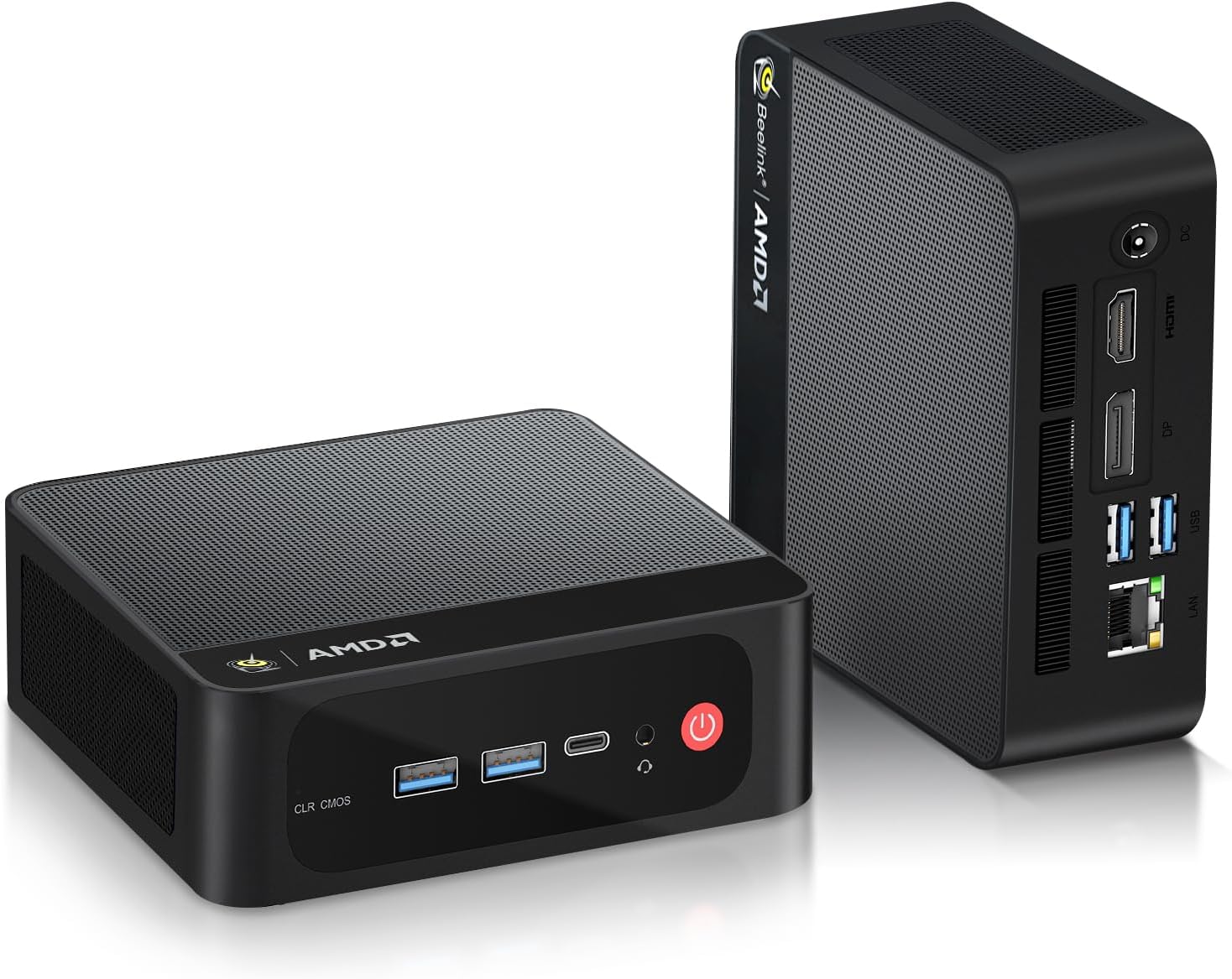
Mini PC Comparison: EQ14 vs SER5

| Feature | Beelink EQ14 N150 | Beelink SER5 Ryzen 5 5500U |
|---|---|---|
| Price | ~$180-200 | ~$150-180 |
| NICs | 2× Intel 2.5GbE | 1× 2.5GbE |
| RAM | 16GB DDR4 soldered | 32GB DDR4 SO-DIMM, upgradeable |
| Storage | 500GB NVMe | 500GB NVMe |
| CPU cores | 4C/4T | 6C/12T |
| Idle power | ~7W | ~12-15W |
| Best for | pfSense, Docker, dual-NIC homelab | Multi-core compute, Proxmox, more RAM |
The EQ14 costs slightly more but includes dual Intel 2.5GbE NICs, lower idle power, and enough RAM upgradeability for a practical always-on lab box. The SER5 includes 32GB SO-DIMM RAM standard and 6 cores at a lower price, which makes it the stronger compute-first bargain.
Which to Choose
Choose Intel N150 Beelink EQ14 if:
- You want dual NICs for pfSense or Docker network segmentation
- Your workload is mostly Docker containers and file serving
- Power consumption and electricity cost matter for 24/7 operation
- 16GB RAM is sufficient for your planned stack
Choose Ryzen 5 5500U Beelink SER5 if:
- You need 6+ cores for multi-threaded workloads
- You plan to upgrade RAM beyond 16GB
- You want faster Proxmox VM density
- Single NIC is acceptable for your network setup
Consider stepping up if:
Neither platform handles AI inference, heavy gaming emulation, or 3+ Plex 4K transcode streams well. For those workloads, look at the Ryzen 7 H255 platform — the Beelink SER9 offers Radeon 780M for ROCm, 8 cores, and 32GB LPDDR5X at $320-380.
Who Should Skip This Comparison
Skip this comparison if your workload clearly exceeds both platforms. For local LLM inference, heavy gaming emulation, or 5+ Proxmox VMs running simultaneously, both the N150 and 5500U will frustrate you. The Beelink SER9 with Radeon 780M and 8 Zen 4 cores is the entry point for those workloads.
Skip it also if the dual-NIC question isn’t relevant. The EQ14’s key hardware advantage is its dual Intel 2.5GbE NICs — if single-NIC networking is sufficient for your setup, the SER5’s extra cores and upgradeable RAM at a lower price make the decision straightforward without comparing networking.
Frequently Asked Questions
Is the Intel N150 better than the N100?
Yes — the N150 uses Intel 4 process node similar to 7nm EUV, providing better power efficiency and performance than the N100’s Intel 7 10nm ESF process. The N150 clocks higher at peak performance with lower sustained power draw. If choosing between an N100 and N150 mini PC at similar prices, N150 is the better pick.
Can the Ryzen 5 5500U run 4K Blu-ray remux files?
4K HDR Blu-ray remuxes H.265 HEVC at 80-100 Mbps require hardware decode. Both the N150 and 5500U support HEVC hardware decode via VA-API. With Plex Pass hardware transcoding or Jellyfin VA-API, both handle 4K HEVC to 1080p H.264 downscaling. For direct play no transcode on a client that supports HEVC: the server barely uses any CPU.
Does the N150 support AES-NI for VPN?
Yes. AES-NI is standard on all Intel CPUs including N-series. The N150 handles WireGuard VPN at 600-800 Mbps throughput — more than sufficient for most home internet connections.
Is 16GB enough for Docker + Plex + Home Assistant?
Yes. A complete homelab Docker stack HA + Plex + Pi-hole + Nginx + Portainer + Vaultwarden + Grafana uses 10-12GB active RAM on a 16GB system. The EQ14’s 16GB handles this with 4-6GB of headroom for additional containers. Adding Ollama LLM inference changes this calculus — a loaded 7B model uses 5-8GB alone.
What mini PCs use the Intel N150?
The Beelink EQ14 is the primary N150 mini PC in 2026. It pairs the N150 with 16GB DDR4, dual Intel 2.5GbE NICs, and 500GB NVMe at $180-200. The dual-NIC configuration makes it especially compelling for pfSense and Docker network segmentation.
What mini PCs use the Ryzen 5 5500U?
Mini PCs with Ryzen 5 5500U include the Beelink SER5 — 6C/12T Zen 3 CPU with DDR4 SO-DIMM upgradeable RAM at $150-180. The SER5 platform is a budget Ryzen option for users who need more cores than the N150 at a similar price point.
Is the Ryzen 5 5500U good for Plex transcoding?
The 5500U includes Radeon Vega 7 iGPU which supports VA-API hardware transcoding on Linux. 1-2 simultaneous 4K to 1080p transcode streams work without hardware strain. The N150 also supports VA-API hardware decode, handling 1-2 4K streams. Both are adequate for single-family Plex use. For 3+ simultaneous 4K streams, both need hardware decode enabled and ideally an 8-core CPU.