
Best Gaming Mini PC 2026 — Top Picks By Budget And Upgrade Path
By Max · May 2, 2026 · Updated July 23, 2026
This article contains affiliate links. If you purchase through our links, we may earn a commission at no extra cost to you. We only recommend products we’ve thoroughly researched and verified.

The best gaming mini PC in 2026 is not automatically the one with the most expensive CPU. For most buyers, the better question is simpler: which box gives you the best mix of integrated graphics, cooling, memory, and expansion for the money you actually want to spend.
This list sticks to machines whose configuration we have checked against their live Amazon listings and the manufacturer’s own documentation. Where a listing detail is not verified in those sources, it does not appear here as a claim.
If your search is really about a specific lane, see the 4K gaming tier below, or jump to Best Mini PC for Emulation. Those guides are the better fit if your priority is a living-room gaming box rather than a general-purpose mini PC.
Quick Picks: Best Gaming Mini PC 2026 At A Glance
| Pick | Mini PC | Best For | Current Research Price | Link |
|---|---|---|---|---|
| 🥇 Best Overall | GMKtec K12 | The best balance of Radeon 780M graphics, memory, and ports | ~$499 | Check Price |
| 🎮 Best Value | BOSGAME P3 | Buyers who want strong Ryzen 7 gaming value under $400 | ~$399 | Check Price |
| 💰 Best Lower-Cost Pick | KAMRUI H1 | Buyers trying to stay near the low $300 range | ~$329 | Check Price |
| 🧠 Best Upgrade-Aware Pick | GMKtec EVO-X1 | Buyers who care about newer AI silicon and OCuLink | ~$699 | Check Price |
| ⚙️ Best Ryzen 9 Alternative | BOSGAME P6 | Buyers who want a higher-tier CPU without crossing flagship pricing | ~$520–640 | Check Price |
How We Research These Picks
Every recommendation here is built from verifiable sources rather than bench claims we can’t back up. We verify each product against its live Amazon listing for current price, stock status, and the exact spec configuration, and we cross-check CPU, RAM type, and networking details against manufacturer documentation. Power-draw and performance figures are cited from published measurements by trusted reviewers such as ServeTheHome and Notebookcheck, plus community reports on r/homelab and the Proxmox forums. We also read recent 1-star reviews for every pick to surface thermal, driver, and reliability patterns before you hit them. Picks are re-verified quarterly for availability, pricing, and newer models.
What Actually Matters In A Gaming Mini PC
The iGPU matters more than the badge on the box. In this class, Radeon 780M and the surrounding platform details often matter more than a small difference in CPU naming.
Cooling still decides whether performance holds up. A mini PC that looks strong on paper can feel much weaker if the chassis runs hot and drops clocks under longer sessions.
Memory matters twice. It matters because games need enough system RAM, and it matters because integrated graphics share that memory pool.
Expansion changes the value story. Extra M.2 slots, stronger port layouts, and options such as OCuLink matter if you plan to keep the system longer than one hardware cycle.
Who Should Not Buy A Gaming Mini PC
Do not buy a gaming mini PC if your real goal is modern AAA gaming at high settings on a large monitor with no compromises. A compact desktop with a discrete GPU is still the better tool for that job.
Gaming mini PCs make the most sense when you care about space, desk simplicity, lower power use, and respectable integrated graphics. They are strongest at 1080p-oriented use, lighter titles, older AAA games, and buyers who want one box to cover both work and play.
Which Mini PC for Your Kind of Gaming
Gaming mini PCs live or die on the integrated GPU, and the right one depends entirely on what and how you play. A box that crushes 1080p esports is wasted on someone who only streams from a desktop, and a budget Radeon 680M will not hold 4K.
| How you game | What it needs | Recommended pick |
|---|---|---|
| 1080p esports and older AAA | Radeon 680M/780M class, high refresh | KAMRUI H1 or BOSGAME P3 |
| Modern AAA at 1080p–1440p | Radeon 780M/890M, 32GB | GMKtec EVO-X1 |
| Steam library, broad compatibility | Balanced Ryzen iGPU + fast NVMe | GMKtec K12 |
| Native 4K AAA at higher settings | Radeon 8060S class — beyond these picks | See the flagship Beelink GTR9 Pro tier |
| Game streaming, Sunshine/Moonlight host | Modern hardware encoder, wired network | BOSGAME P6 |
On 4K: today’s mini-PC iGPUs target 1080p–1440p comfortably; native 4K AAA at high settings still wants the Radeon 8060S in the Ryzen AI Max+ class, or an external GPU over OCuLink. For 1080p and most 1440p, the picks below deliver. On game streaming: hosting Sunshine or running Moonlight leans on the hardware video encoder and a wired connection more than raw GPU — any modern pick here handles it.
Our Top Picks
🥇 Best Overall
GMKtec K12
→ Check Current Price on Amazon
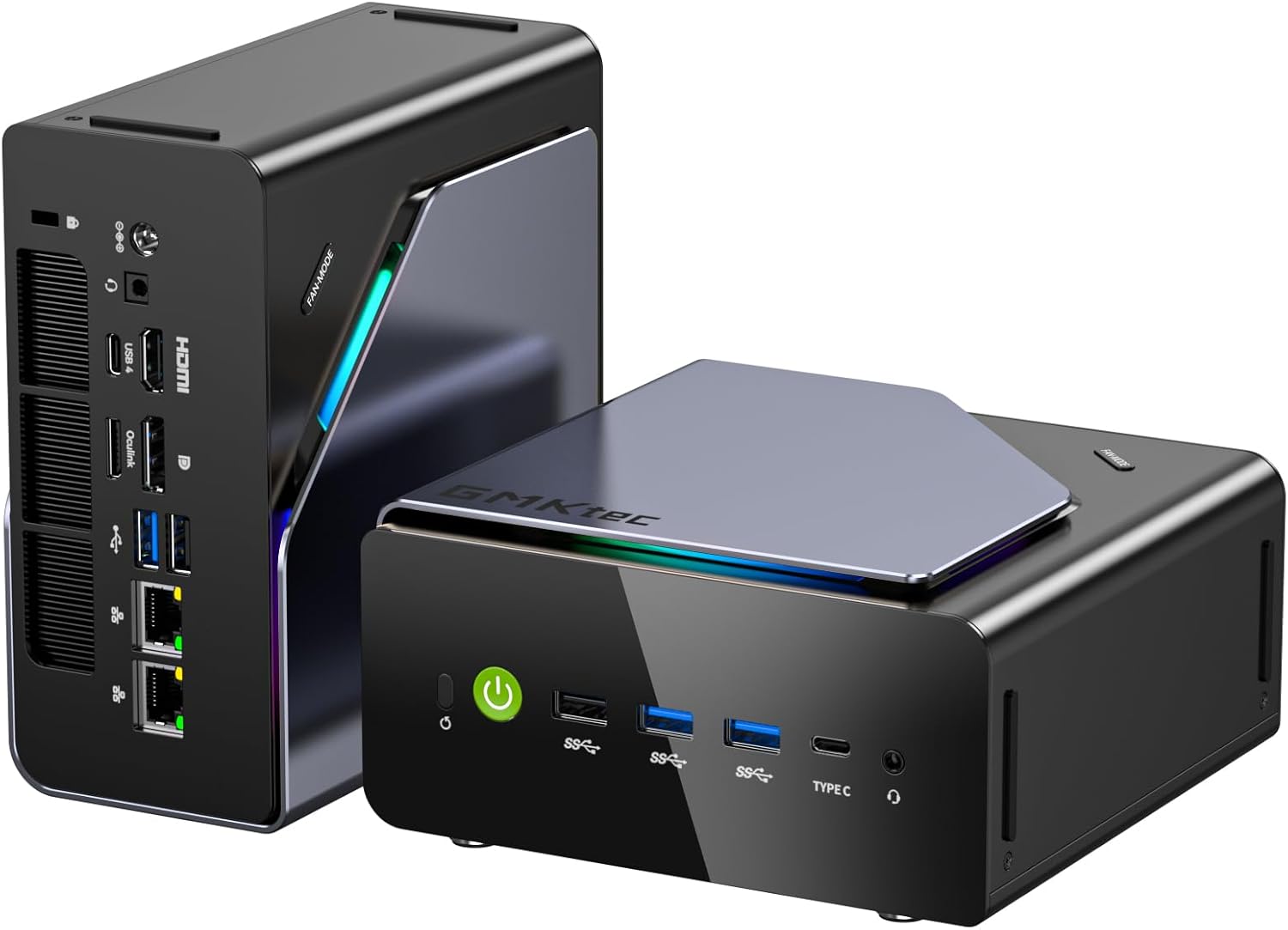
The GMKtec K12 is the best overall gaming pick in this research set because the whole package lines up well. The verified configuration gives you Ryzen 7 H255, 32GB DDR5, Radeon 780M, triple M.2 storage potential, and dual 2.5GbE. That is a rare combination near $500.
Why it wins:
- Radeon 780M is still a very solid integrated graphics tier for a compact gaming desktop.
- 32GB DDR5 keeps the system more comfortable for modern multitasking and shared-memory graphics.
- Dual 2.5GbE and triple M.2 make it more flexible than a gaming-only box.
This is the pick for buyers who want one compact PC that can game, serve as a daily desktop, and still moonlight as a light lab machine.
Who should buy this: Buy it for gaming combined with desktop and light lab use. Radeon 780M handles 1080p gaming well, 32GB DDR5 keeps shared VRAM allocation generous, and dual 2.5GbE gives it networking flexibility most gaming-only boxes lack near this price.
Who should skip this: Skip it for pure budget gaming where networking and storage expansion don’t matter. The BOSGAME P3 at ~$399 gets you Ryzen 7 7840HS and 32GB DDR5 for less. Choose the K12 when the dual-NIC and triple M.2 flexibility matter for dual desktop-plus-homelab use. 🎮 Best Value
BOSGAME P3

→ Check Current Price on Amazon
The BOSGAME P3 is one of the easiest mid-range value calls because the verified base is still strong where it matters most for gaming. Ryzen 7 7840HS and 32GB DDR5 is a good starting point ~$399.
The important caveat is networking. This box uses dual Gigabit Ethernet, not dual 2.5GbE. That does not matter much if you only want a gaming mini PC. It matters a lot if you also want a stronger homelab crossover.
Buy it if you want gaming value first and advanced networking second.
Who should buy this: Buy it for pure gaming value where 2.5GbE doesn’t matter. Ryzen 7 7840HS and 32GB DDR5 deliver solid 1080p performance at a lower price than the K12, and WiFi 6E covers wireless-first setups without needing an Ethernet run.
Who should skip this: Skip it if dual 2.5GbE or triple M.2 is important for a dual gaming-plus-homelab role. The K12 at ~$500 adds those features plus Radeon 780M. The P3 is gaming-first — keep it if that’s the whole job. 💰 Best Lower-Cost Pick
KAMRUI H1

→ Check Current Price on Amazon
The KAMRUI H1 exists for the buyer who wants to spend less than the K12 tier while still getting a meaningful Ryzen 7 class machine. The verified configuration is Ryzen 7 7735HS, 24GB LPDDR5, and 1TB NVMe.
That does not make it the strongest long-term value in the whole category. It does make it a realistic option if your budget is fixed around the low $300 range and you still want a better gaming-class mini PC than entry-level boxes can offer.
Who should buy this: Buy it when the budget is fixed near $300 and you still want Ryzen 7-class graphics over entry-level options. Ryzen 7 7735HS’s Radeon 680M handles casual 1080p gaming and emulation better than N-series or older Ryzen 5 chips at the same price.
Who should skip this: Skip it if you can stretch to the BOSGAME P3. Ryzen 7 7840HS and 32GB DDR5 at ~$399 is meaningfully better for about $100 more. The KAMRUI H1’s 24GB LPDDR5 limits shared VRAM headroom compared to the 32GB options above it. 🧠 Best Upgrade-Aware Pick
GMKtec EVO-X1
→ Check Current Price on Amazon
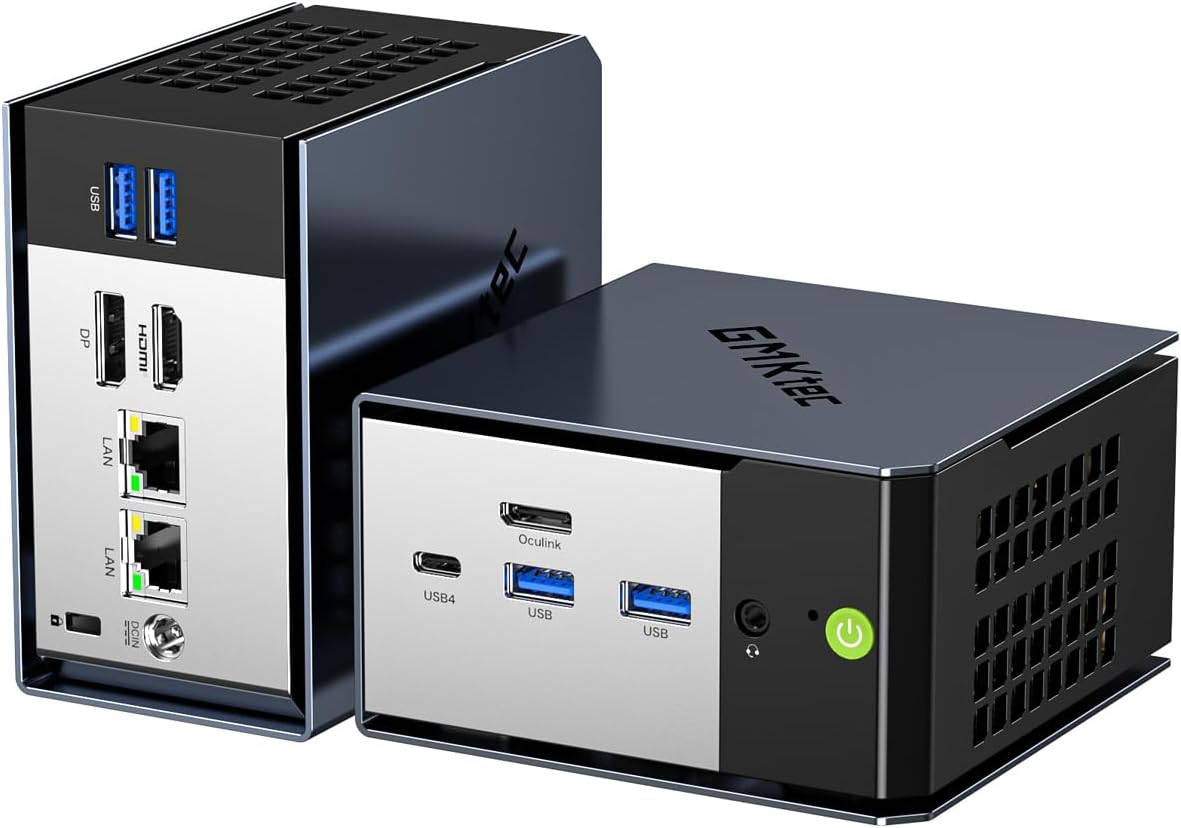
The GMKtec EVO-X1 is a more specialized recommendation. The verified config gives you Ryzen AI 9 HX 370, 32GB onboard LPDDR5X, and OCuLink. That combination makes it more interesting for buyers who care about platform freshness and external expansion options, not just raw price-to-performance. The memory is not upgradeable, so choose the capacity you need at purchase time.
This is the gaming mini PC you buy if you want more than a pure budget recommendation. It is not the cheapest answer, but it has a more forward-looking feature set than the older mid-range Ryzen systems in this group.
Who should buy this: Buy it for a more forward-looking gaming mini PC with OCuLink for external GPU expansion later. Ryzen AI 9 HX 370 is a newer platform than the Ryzen 7 7000-series options, and OCuLink gives you a clear upgrade path to a discrete GPU when native iGPU limits appear.
Who should skip this: Skip it if budget-to-performance ratio matters most right now. The BOSGAME P3 or GMKtec K12 deliver better immediate value for gaming per dollar. The EVO-X1 is worth the premium specifically for buyers who want platform freshness and the OCuLink expansion option. ⚙️ Best Ryzen 9 Alternative
BOSGAME P6

→ Check Current Price on Amazon
The BOSGAME P6 is the most obvious alternative if you want a stronger CPU tier than the low-$300 class offers without moving all the way to premium AI hardware. The setup we verified on July 22, 2026 is Ryzen 9 6900HX, 24GB soldered LPDDR5X, dual gigabit LAN, and WiFi 6E, listed at $639.99 and often discounted nearer $520. Our BOSGAME P6 review covers the spec conflicts on that listing in detail.
That makes it attractive for buyers who want a faster-feeling general system and stronger upper-mid-range spec sheet than the cheapest gaming mini PCs provide.
Who should buy this: Buy it for strong CPU performance at mid-range pricing. Ryzen 9 6900HX gives more headroom for background tasks, streaming, and multitasking than entry Ryzen 7 options, at a price point between the budget tier and OCuLink-focused picks.
Who should skip this: Skip it if gaming frame rates are the priority. Radeon 680M in the 6900HX is older than Radeon 780M in the K12 or P3’s 7840HS. For better gaming-per-dollar, the newer Radeon 780M-based options are the stronger choice — the P6’s advantage is CPU throughput, not GPU performance.
Which One We Would Buy At Different Budgets
If the budget is close to $300, the KAMRUI H1 is the better conversation starter.
If the budget is close to $400, the BOSGAME P3 is the cleanest gaming-value choice in this set.
If the budget is close to $500, the GMKtec K12 is the strongest overall answer.
If you are willing to spend more for newer platform features and OCuLink, the GMKtec EVO-X1 becomes more interesting.
If your goal is a living-room emulation box instead of a general Steam library machine, the emulation-focused guides above will save you from overbuying.
Related Reading
- The 4K gaming tier in this guide covers native iGPU 4K versus eGPU-first setups.
- Best Mini PC for Emulation if your priority is console-style play rather than a general PC game library.
- Best Mini PC for Retro Emulation if your gaming focus is older consoles rather than general PC titles.
Product Snapshot
GMKtec K12
Specs:
| Spec | Detail |
|---|---|
| Key Hardware | Ryzen 7 H255 gaming mini PC with 32GB DDR5, Radeon 780M, 3x M.2, and dual 2.5GbE. Strongest all-round gaming and lab crossover in this price band. |
| Listing Check | Verify the exact variant, RAM type, storage layout, and networking before you buy. |
| Price | ~$499 |
Pros:
- Ryzen 7 H255 gaming mini PC with 32GB DDR5, Radeon 780M, 3x M.2, and dual 2.5GbE. Strongest all-round gaming and lab crossover in this price band.
- The current feature mix still fits the workload this article targets.
- ~$499 keeps it in the right conversation when the live listing matches the verified notes.
Cons:
- Shared or shifting Amazon listings can hide configuration changes.
- Value falls off quickly if you do not need the hardware features called out above.
BOSGAME P3
Specs:
| Spec | Detail |
|---|---|
| Key Hardware | Ryzen 7 7840HS system with 32GB DDR5 and WiFi 6E. Attractive value for buyers who care more about gaming than advanced networking. |
| Listing Check | Verify the exact variant, RAM type, storage layout, and networking before you buy. |
| Price | ~$399 |
Pros:
- Ryzen 7 7840HS system with 32GB DDR5 and WiFi 6E. Attractive value for buyers who care more about gaming than advanced networking.
- The current feature mix still fits the workload this article targets.
- ~$399 keeps it in the right conversation when the live listing matches the verified notes.
Cons:
- Shared or shifting Amazon listings can hide configuration changes.
- Value falls off quickly if you do not need the hardware features called out above.
KAMRUI H1
Specs:
| Spec | Detail |
|---|---|
| Key Hardware | Ryzen 7 7735HS box with 24GB LPDDR5 and 1TB NVMe. Lower-cost option for buyers who want better-than-basic integrated graphics under the mid-range tier. |
| Listing Check | Verify the exact variant, RAM type, storage layout, and networking before you buy. |
| Price | ~$329 |
Pros:
- Ryzen 7 7735HS box with 24GB LPDDR5 and 1TB NVMe. Lower-cost option for buyers who want better-than-basic integrated graphics under the mid-range tier.
- The current feature mix still fits the workload this article targets.
- ~$329 keeps it in the right conversation when the live listing matches the verified notes.
Cons:
- Shared or shifting Amazon listings can hide configuration changes.
- Value falls off quickly if you do not need the hardware features called out above.
GMKtec EVO-X1
Specs:
| Spec | Detail |
|---|---|
| Key Hardware | Ryzen AI 9 HX 370 mini PC with 32GB DDR5 and OCuLink. Useful for buyers who care about newer AI silicon and stronger upgrade optionality. |
| Listing Check | Verify the exact variant, RAM type, storage layout, and networking before you buy. |
| Price | ~$699 |
Pros:
- Ryzen AI 9 HX 370 mini PC with 32GB DDR5 and OCuLink. Useful for buyers who care about newer AI silicon and stronger upgrade optionality.
- The current feature mix still fits the workload this article targets.
- ~$699 keeps it in the right conversation when the live listing matches the verified notes.
Cons:
- Shared or shifting Amazon listings can hide configuration changes.
- Value falls off quickly if you do not need the hardware features called out above.
BOSGAME P6
Specs:
| Spec | Detail |
|---|---|
| Key Hardware | Ryzen 9 6900HX system with 24GB soldered LPDDR5X and dual gigabit LAN. Good for buyers who want more CPU class than the cheapest gaming boxes provide. |
| Listing Check | Verify the exact variant, RAM type, storage layout, and networking before you buy. |
| Price | ~$449 |
Pros:
- Ryzen 9 6900HX system with 24GB soldered LPDDR5X and dual gigabit LAN. Good for buyers who want more CPU class than the cheapest gaming boxes provide.
- The current feature mix still fits the workload this article targets.
- ~$449 keeps it in the right conversation when the live listing matches the verified notes.
Cons:
- Shared or shifting Amazon listings can hide configuration changes.
- Value falls off quickly if you do not need the hardware features called out above.
Power Consumption at a Glance
Power context: unless a section says otherwise, treat the wattage guidance in this article as planning figures from current listing details or comparable review coverage rather than final measured at wall lab data.
At $0.12/kWh, every 10W of always-on idle draw costs about ~$10.51 per year. Use that rule of thumb when you compare the picks in this article, then confirm the final number with the active listing or your own watt meter.
| Idle Draw | Annual Electricity Cost |
|---|---|
| 10W | ~$10.51/year |
| 20W | ~$21.02/year |
| 30W | ~$31.54/year |
Power context: unless a product section says otherwise, treat wattage references in this article as planning numbers from current listing details or comparable review coverage rather than final measured at wall lab data.
Frequently Asked Questions
What is the best gaming mini PC in 2026 for most buyers?
For most buyers in this batch, the GMKtec K12 is the best overall answer because it balances graphics, memory, networking, and expansion better than the rest.
How much RAM should a gaming mini PC have?
32GB is the safer target in 2026 because integrated graphics share system memory and modern game plus desktop multitasking loads add up quickly.
Is OCuLink worth caring about on a gaming mini PC?
Yes if you know you may want better external expansion later. No if you just want a self-contained box and the current integrated graphics tier is enough for you.
What matters most besides the chip name?
Integrated graphics tier, cooling, memory type, port layout, and whether the box supports better external expansion all matter more than a small CPU naming difference.
Final Verdict
The gaming mini PC market in 2026 is strongest in the middle. The GMKtec K12 is the best all-round choice. The BOSGAME P3 is the best value. The KAMRUI H1 is the lower-cost entry point. The GMKtec EVO-X1 is the more upgrade-aware option. The BOSGAME P6 is the better fit if you want a stronger CPU tier without paying premium flagship money.
That is the honest shape of the category right now. Buy for the lane you actually care about, not the product page that shouts the loudest.