
GMKtec EVO-X1 review for buyers choosing fixed memory
By Max · October 20, 2026 · Updated November 18, 2026
This article contains affiliate links. If you purchase through our links, we may earn a commission at no extra cost to you. We only recommend products we’ve thoroughly researched and verified.
What will still fit in memory when a game, a development environment and a background VM are open together? That is the purchase question for the GMKtec EVO-X1. Both the Radeon 890M and the CPU use the onboard memory. You can add an SSD or attach a graphics card later. Neither upgrade increases the memory available to the host and its guests.
GMKtec EVO-X1
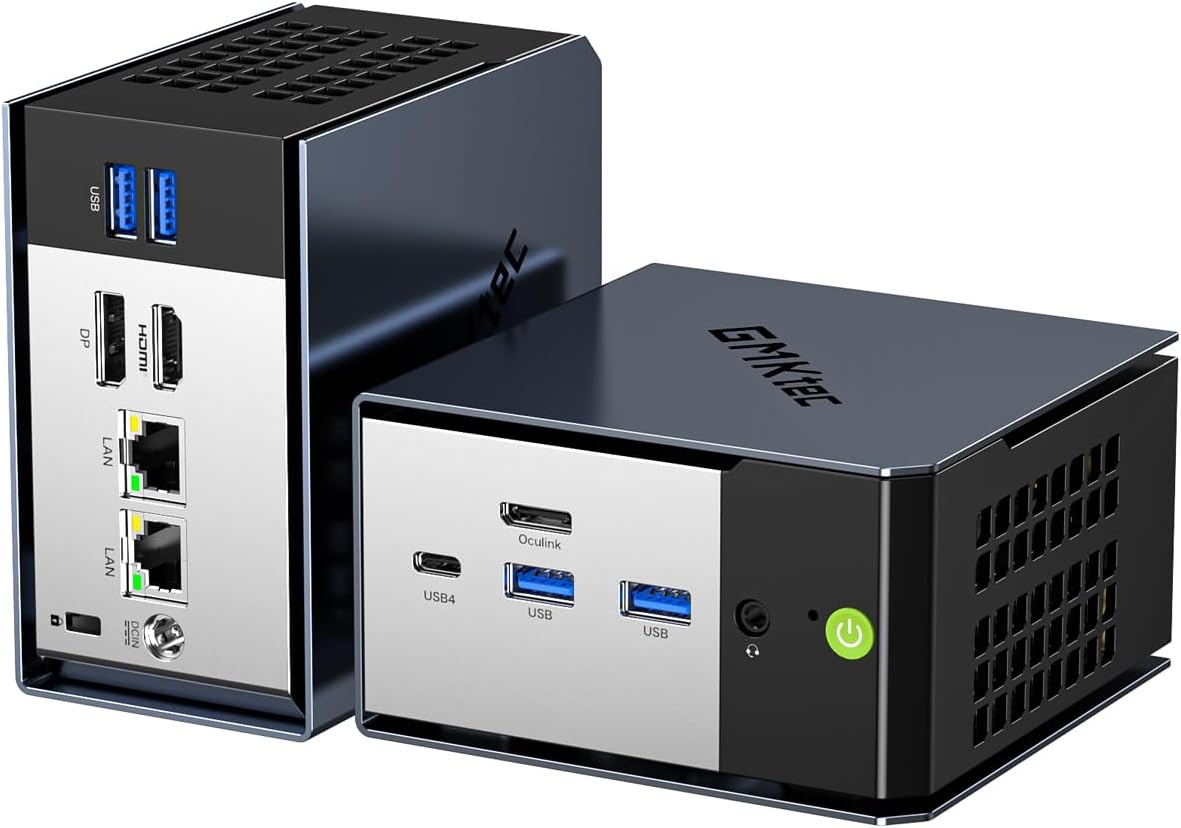
The linked US configuration identifies 32GB. GMKtec also documents a separate 64GB version. Check both the installed memory and the SSD size in the selected bundle before ordering. We used GMKtec’s specifications, Notebookcheck’s case inspection and Liliputing’s Windows and Ubuntu results to separate permanent choices from replaceable parts.
Check the EVO-X1 configuration on Amazon
GMKtec EVO-X1 specifications
| Spec | Detail |
|---|---|
| CPU | AMD Ryzen AI 9 HX 370, 12 cores and 24 threads, up to 5.1GHz |
| Integrated graphics | AMD Radeon 890M with 16 graphics cores, up to 2.9GHz |
| Memory | 32GB or 64GB onboard LPDDR5X, not upgradeable |
| Storage | Two M.2 2280 PCIe 4.0 NVMe sockets total, one free in a single-drive build |
| Networking | Dual Intel I226V 2.5GbE, Wi-Fi 6, and Bluetooth 5.2 |
| External graphics | OCuLink PCIe Gen4 x4 and full-function USB4 |
| Displays | HDMI 2.1, DisplayPort 2.1, and USB4, up to three displays |
| Power adapter | 120W external adapter listed by GMKtec |
| Chassis | 110.19 by 107.3 by 63.2 millimeters according to Notebookcheck |
GMKtec lists up to 50 TOPS from the XDNA 2 NPU and up to 80 TOPS for total processor AI performance. Those are manufacturer figures describing theoretical platform capability. They do not establish a particular speed for a local model, editor, or other application.
The fixed-memory decision comes first
The EVO-X1 is sold with 32GB or 64GB of onboard LPDDR5X. The 32GB version is listed at 7500MT/s and the 64GB version at 8500MT/s. The memory is fast and helps the Radeon 890M, but it cannot be replaced with larger modules later.
That changes how to choose the configuration. Thirty-two gigabytes is enough for office work, photo editing, most development environments, and a small group of containers. Sixty-four gigabytes makes more sense for several virtual machines, larger creative projects, or local AI workloads that need more system memory.
The Ryzen AI mini PC guide covers alternatives with different memory designs. The EVO-X1 makes sense when its size, OCuLink, and price matter more than a long upgrade path. If future memory expansion is a firm requirement, choose a system with SO-DIMM slots before looking at processor scores.
Ryzen AI 9 HX 370 and Radeon 890M performance
The HX 370 combines four Zen 5 cores with eight Zen 5c cores for 12 cores and 24 threads. Its default power profile is 28W, with GMKtec listing a configurable range from 15W to 54W and a peak of 65W. The Radeon 890M adds 16 RDNA 3.5 graphics cores.
This is a strong integrated platform for a mini PC. Notebookcheck recorded a PCMark 10 overall score of 7,341 points and a digital content creation score of 10,613 points in its test system. Those results describe its memory, SSD, firmware, drivers, and selected test setup. They are useful for context, not a promise that every EVO-X1 configuration will match them.
For gaming, Notebookcheck measured 41.3 frames per second at 1080p low in Cyberpunk 2077 and 59.4 frames per second at 720p low in Baldur’s Gate 3. It measured 83.3 frames per second at 1080p ultra in Dota 2. Liliputing reported 48 frames per second in Shadow of the Tomb Raider at 1080p high and 66 frames per second at 1080p low.
The pattern is more useful than any single number. Radeon 890M can handle many games at sensible settings, but the EVO-X1 is not a native high-end gaming system. Use the best mini PC for gaming guide to compare it with cheaper Radeon systems and larger platforms.
OCuLink is the upgrade path for graphics
OCuLink is the EVO-X1’s most distinctive expansion feature. It exposes a direct PCIe Gen4 x4 connection for an external graphics enclosure, which gives the small system a way to move into much stronger gaming or GPU-assisted creative work later.
Liliputing tested an external GPU through OCuLink and found the port useful for graphics workloads. Notebookcheck also identifies OCuLink as the feature that separates this system from many compact Ryzen AI alternatives. The enclosure, graphics card, power supply, and cable still cost extra, so count the complete setup rather than treating OCuLink as free performance.
OCuLink is not hot-pluggable. Shut the EVO-X1 down before connecting or disconnecting the cable. That matters for a desk system that moves between a standalone setup and an external GPU, and it matters even more if the mini PC is mounted vertically or behind a display.
One SSD can be added beside the system drive
Notebookcheck removed the cover and fan and found two M.2 PCIe 4.0 x4 sockets in total. GMKtec lists the system SSD separately from its expansion specification. The inspected board is the stronger basis for a parts list. If your configuration comes with one SSD, you have room for one more. To renew the boot drive while keeping a separate data drive, plan a clone or restore before taking the old disk out. Keep an independent backup somewhere other than the second socket.
| Example of simultaneous memory use | Budget |
|---|---|
| Host, browser and tools | 8GB |
| Two development guests at 8GB each | 16GB |
| Space left on a 32GB machine before graphics and overhead | 8GB |
These are planning allowances. Check peak usage on your present machine with the same guests and applications open. If graphics or a third guest routinely needs that last 8GB, choose the 64GB model or move to socketed memory. A bigger SSD gives a guest room to grow its files. It does little for a guest that spends its day paging to disk. See the server RAM sizing guide and compare memory options.
Port layout and networking
The EVO-X1 has two 2.5GbE ports driven by Intel I226V controllers. That is useful for a workstation that moves large project files, a backup target, or a lab node that needs separate physical links. It also gives the EVO-X1 more network flexibility than a single-NIC mini PC, though it is still not a 10GbE system.
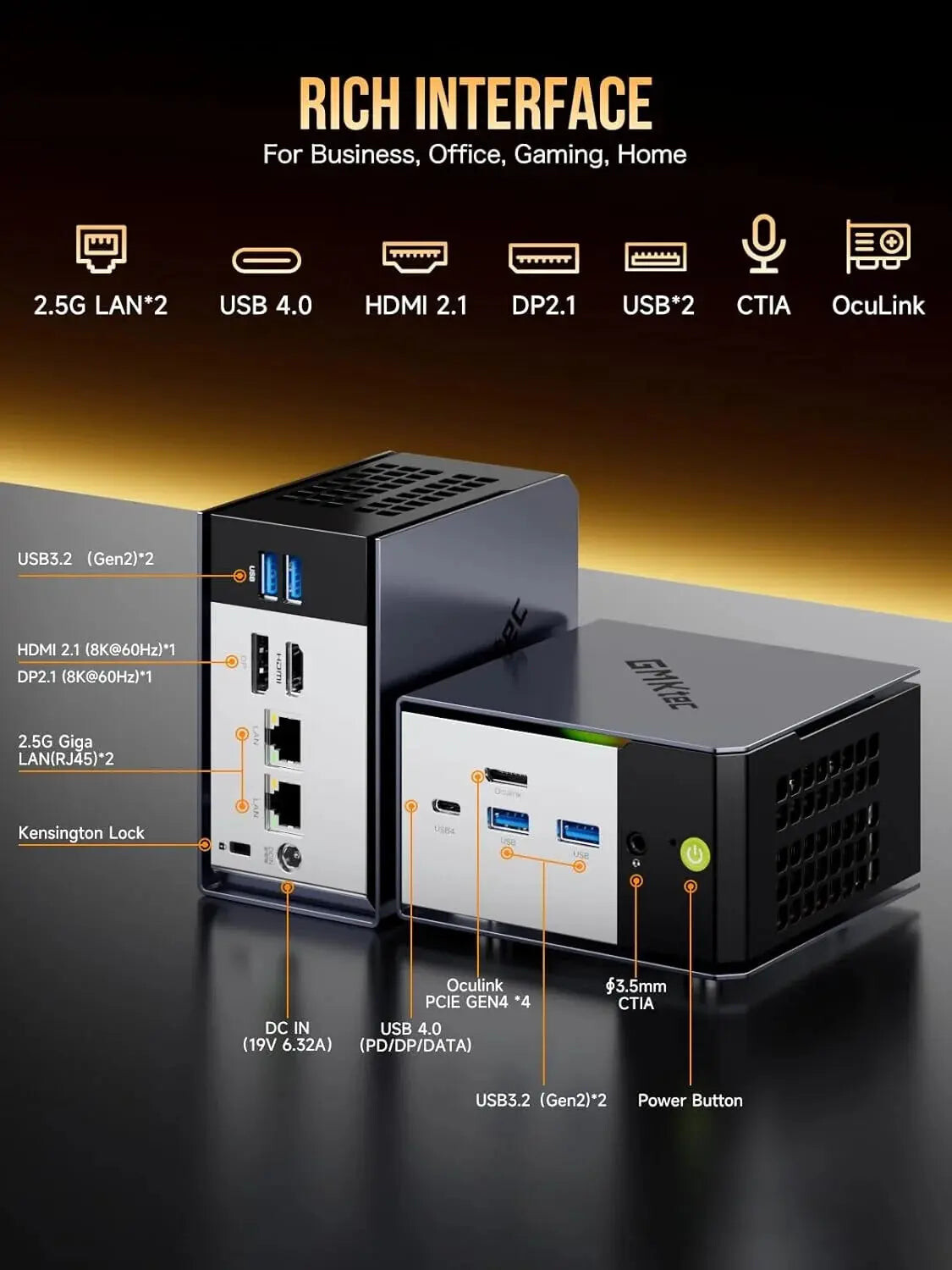
The official port-layout image shows the rear display and network connections alongside the front OCuLink, USB4, USB-A, audio, and power controls.
The rear panel carries a full-size DisplayPort and HDMI beside the two Ethernet ports. USB4 on the front also carries DisplayPort video. GMKtec’s current page presents the display path as HDMI 2.1, DisplayPort 2.1, and USB4, with support for up to three displays at 8K60.
Wi-Fi 6 and Bluetooth 5.2 cover ordinary wireless use. A wired connection is still the better choice for a server, backup target, or external storage workflow. Check current Linux kernel and firmware support before making wireless a hard requirement because the independent reviews used different operating systems and dates.
Cooling, power, and noise
The EVO-X1 gives buyers two different published operating pictures. Notebookcheck measured 5.8W average idle power, 72.1W average load power, and 76.1W maximum load power. It measured 27.8 to 30.4dBA at idle and 44.6 to 46.1dBA under load.
Liliputing measured 5.6W at idle in Windows, 5.1W at idle in Ubuntu, 75.5W during a Windows Cinebench R23 CPU stress run, and 71.9W during an Ubuntu stress run. Its noise readings were 30.4dBA at idle and 40.3dBA during its stress test. The two reviews used different software, power modes, meters, and test conditions, so the ranges should be treated as evidence of behavior rather than a single universal rating.
Both reviews support the same practical conclusion. The EVO-X1 can remain quiet during light work, but the fans become clearly audible during sustained CPU or gaming loads. Liliputing reports that Ubuntu kept the CPU and NVMe drive under control with minimal CPU throttling. Notebookcheck describes the fan behavior as one of the model’s weak points.
Notebookcheck also found elevated power draw in shutdown and sleep, with 3.7W switched off and 12.6W in standby on its review unit. If the EVO-X1 will stay on continuously, check its sleep settings and read the completed setup at a wall meter and enter those watts in the power-cost calculator rather than assuming the adapter rating represents normal consumption.
Linux and homelab use
Liliputing installed Ubuntu 25.04 alongside Windows 11 Pro and reports that the system ran its stress test without significant CPU throttling. That is encouraging for Linux desktop or development use, but it does not validate every kernel, driver, container runtime, or virtualization feature.
The dual 2.5GbE ports and two M.2 sockets total make the EVO-X1 plausible as a small lab host. The fixed memory ceiling is the constraint. A 32GB model can run a useful set of containers, but a host with several virtual machines or large databases benefits from 64GB at purchase time. OCuLink can add a GPU, but it does not add more network ports or memory.
For a direct networking and memory comparison, see GMKtec EVO-X1 versus Minisforum AI X1 Pro-370. Both offer two wired interfaces. The Minisforum has replaceable SO-DIMMs, which matter if your guests are likely to outgrow the memory you buy today.
Who should buy the EVO-X1?
Choose the EVO-X1 when you need:
- A compact Ryzen AI 9 HX 370 desktop with strong integrated graphics.
- 32GB or 64GB of fast onboard LPDDR5X selected at purchase time.
- Two M.2 sockets total for applications, project data, or virtual machines.
- OCuLink for a future external graphics enclosure.
- Dual 2.5GbE for a workstation or small homelab.
- Three-display support through HDMI, DisplayPort, and USB4.
- A small system that can stay quiet during light work and accept more fan noise under sustained load.
Who should not buy the EVO-X1
Skip the EVO-X1 when:
- You need to upgrade from 32GB to 64GB or more later.
- You want a quiet system during long renders or gaming sessions.
- You need 10GbE rather than dual 2.5GbE.
- You require an SD card reader for a camera workflow.
- You want hot-pluggable external graphics.
- You need a turnkey server with validated sleep, shutdown, and Linux driver behavior.
Frequently asked questions
Which memory capacity does the linked EVO-X1 have?
The linked US configuration identifies 32GB. GMKtec also lists a 64GB model. Both have soldered LPDDR5X, so check the capacity before ordering.
How many SSDs can I add?
A single-drive model has one free M.2 2280 socket. Notebookcheck found two sockets total under the cover and fan.
Does the EVO-X1 have two Ethernet ports?
Yes. Both ports are Intel I226-V 2.5GbE interfaces. One can serve the main network while the other connects to storage or a separate lab network.
Can I disconnect an OCuLink GPU while the PC is running?
Shut down before changing the OCuLink connection. Leave room at the front for the dock cable and check the dock and graphics card power requirements.
What should a light sleeper check?
Fan noise rises under sustained load, and Notebookcheck recorded elevated standby draw. Check both noise under your usual workload and overnight power behavior before choosing a bedroom location.
Verdict
The GMKtec EVO-X1 is a capable compact platform with a clear identity. Ryzen AI 9 HX 370 and Radeon 890M deliver strong integrated performance, dual 2.5GbE supports more serious networking, two M.2 slots provide useful storage growth, and OCuLink gives the system an external-GPU path.
The fixed memory design is the deciding tradeoff. Buy the capacity you need at the start, especially if local AI or virtual machines are part of the plan. Also expect audible fans during sustained loads and check sleep or shutdown power behavior if the machine will run continuously.
Our recommendation is conditional: choose the EVO-X1 for compact gaming, creative work, or a networked desktop that may gain an external GPU. Choose a socketed-memory mini PC when long-term capacity matters more than the EVO-X1’s size and onboard memory speed.
→ Check the current GMKtec EVO-X1 configuration on Amazon