
GMKtec EVO-T1 review for a three-drive workstation
By Max · October 19, 2026 · Updated November 18, 2026
This article contains affiliate links. If you purchase through our links, we may earn a commission at no extra cost to you. We only recommend products we’ve thoroughly researched and verified.
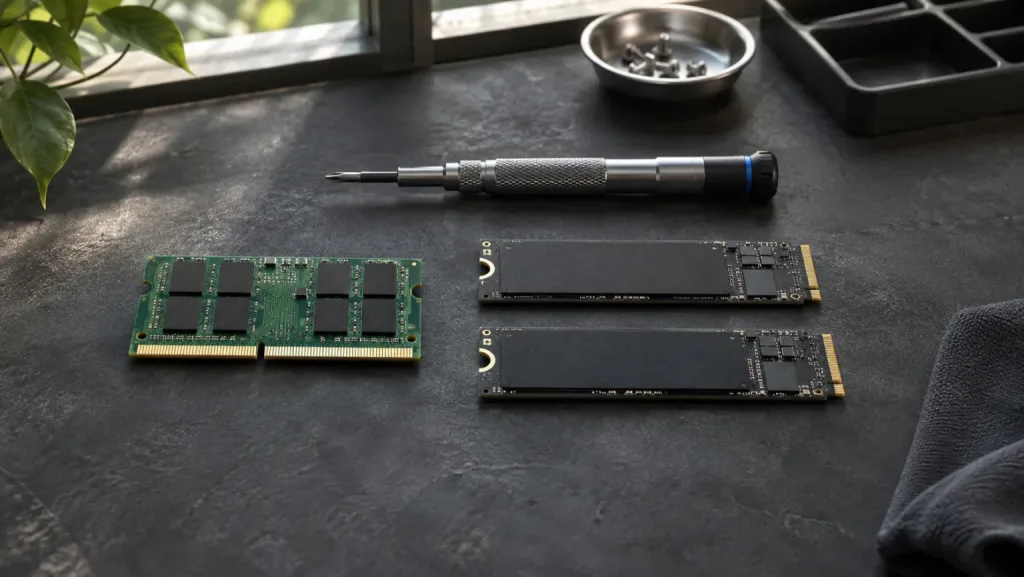
The reason to buy the GMKtec EVO-T1 is easy to see when you draw up a parts list. A boot SSD, a fast workspace for virtual machines and a third disk for project files can all stay inside the case. Connecting a graphics card through OCuLink still leaves those drives in place. If your list stops at one SSD and an office monitor, much of what makes this box worth buying will sit empty.
GMKtec EVO-T1
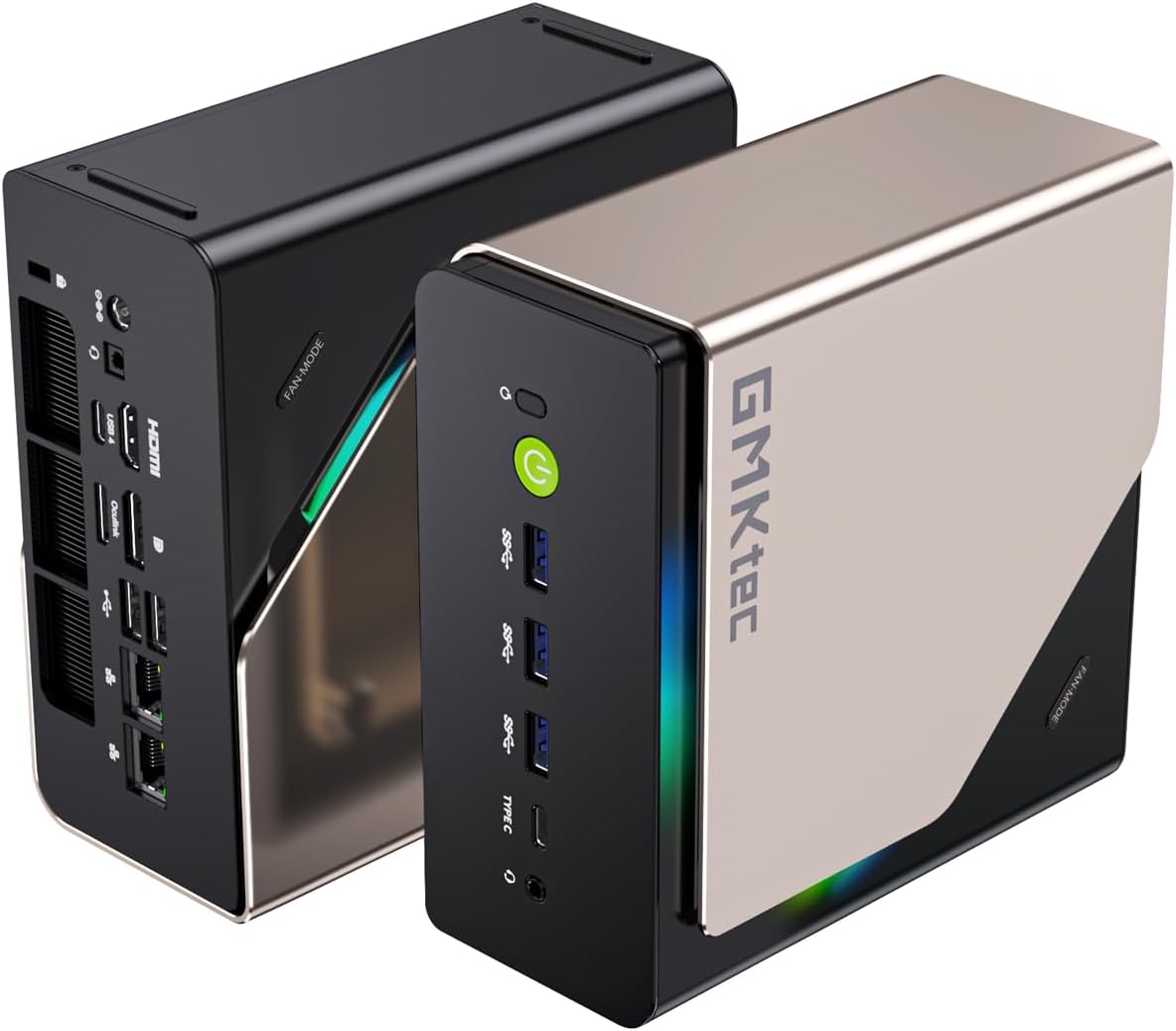
The configuration linked here has a Core Ultra 9 285H and two 32GB memory modules. Its Amazon title names a 1TB SSD, while a description for the same offer says 2TB. Check the selected capacity on the order summary before comparing the cost with a barebones kit. Notebookcheck reviewed a 64GB machine with a 1TB drive.
Check the EVO-T1 configuration on Amazon
We compared GMKtec’s specifications with Notebookcheck’s inspection of the board and Lon.TV’s desktop and Linux results. The power and sound figures below come from those reviewers’ machines.
GMKtec EVO-T1 specifications
| Spec | Detail |
|---|---|
| CPU | Intel Core Ultra 9 285H, 16 cores and 16 threads, up to 5.4GHz |
| Integrated graphics | Intel Arc 140T |
| Memory | Two DDR5 SO-DIMM slots, 64GB in the current listing, up to 128GB according to GMKtec |
| Storage | Three M.2 2280 PCIe 4.0 x4 slots according to GMKtec |
| Networking | Two Realtek RTL8125BG 2.5GbE ports, Intel AX201 Wi-Fi 6 and Bluetooth 5.2 |
| External graphics | OCuLink PCIe Gen4 x4 and USB4 |
| Displays | HDMI 2.1, DisplayPort 1.4, USB4, and USB-C, up to four displays |
| Power adapter | GMKtec lists 148.2W. Lon.TV received a 150W adapter |
| Chassis | 154 by 151 by 73.6 millimeters |
GMKtec advertises up to 99 TOPS across the EVO-T1’s CPU, GPU, and NPU. That is a manufacturer claim describing theoretical AI capability, not an independent application result. Treat it as a platform specification when comparing AI features rather than as a promise that every local model or workflow will run at a particular speed.
A compact chassis with unusually broad expansion
The EVO-T1’s main appeal is how much connectivity fits into a chassis that still belongs on a desk. The 154 by 151 by 73.6 millimeter footprint is larger than the smallest N100 systems, but it leaves room for two SO-DIMM sockets, three M.2 slots, a high-power mobile processor, and a substantial rear I/O group.
The access story is mixed in the published reviews. Notebookcheck describes the case as sturdy and easy to open. TechRadar finds access less convenient than the component list suggests. Those observations come from different reviewers and should be read as a reminder to plan the upgrade process before mounting the system behind a display or under a desk.
The 64GB listing configuration is already suitable for several virtual machines, containers, or development tools. Because the memory is socketed, a future upgrade does not require replacing the whole computer. GMKtec lists support up to 128GB, though the exact memory compatibility still depends on the modules and firmware you choose.
The Intel Core Ultra mini PC guide provides broader platform context. The EVO-T1 belongs near the upper end of that group because it combines the 285H with desktop-style memory and storage access.
CPU and AI capability
The Core Ultra 9 285H is a 16-core Arrow Lake-H processor with six performance cores, eight efficiency cores, and two low-power efficiency cores. GMKtec lists a maximum clock of 5.4GHz and a 45W to 80W operating range. Notebookcheck’s test unit sustained the intended 70W level under its selected load profile and reached about 90C.
Those figures make the EVO-T1 a good candidate for compiling code, running several services, processing photos, and handling desktop workloads that overwhelm low-power mini PCs. They do not mean it replaces a desktop with a large cooler. The power profile, acoustic mode, and workload determine how much of the processor’s headroom is useful in a small enclosure.
The system also includes Intel’s AI Boost NPU and Arc 140T graphics. GMKtec’s 99 TOPS figure combines the platform’s advertised AI resources. For local AI, the more useful questions are model size, quantization, memory capacity, software support, and whether the workload uses the CPU, GPU, or NPU. The EVO-T1’s 64GB starting point is helpful for larger local workloads, but the headline TOPS number does not establish an application-level result.
Arc 140T is useful, but it is not a gaming GPU
The Arc 140T gives the EVO-T1 more graphics capability than the basic integrated solutions in entry-level mini PCs. It can drive multiple displays, handle modern video playback, and support light creative work. Lon.TV reported smooth 4K60 video playback and found that a simple 4K60 DaVinci Resolve project was workable, while more complex effects slowed down.
Lon.TV also reported 45 to 60 frames per second at 1080p low settings in No Man’s Sky and Cyberpunk 2077. Those results belong to its test system and settings. They are a useful indication of the graphics tier, not a guarantee for every game or driver version.
TechRadar reaches the same practical boundary from a different angle: the integrated Arc platform is useful for everyday graphics and lighter games, but it is not a substitute for a high-end discrete GPU. Buyers who want modern games at high settings should plan for an external GPU or a desktop instead.
Three M.2 slots and a separate OCuLink path
The EVO-T1 has one of the strongest storage layouts in its class. GMKtec lists three M.2 2280 PCIe 4.0 x4 positions, and Notebookcheck confirms three M.2 slots in its review unit. That gives the system room for a boot drive, a separate application or virtual-machine drive, and a larger working-data device without relying on a USB enclosure.
Notebookcheck also reports that OCuLink does not consume one of those M.2 positions. That separation matters. You can keep internal storage available while connecting an external graphics enclosure or another PCIe device. OCuLink is a direct expansion link rather than a hot-plug interface, so shut the system down before connecting or disconnecting it.
With a single boot drive installed, two sockets remain free. Put a write-heavy scratch workload on one and keep VM disks on the other if independent replacement matters. Three drives inside the same chassis still share a power supply and an administrator. Keep a recoverable copy of your guests elsewhere. Use the comparison tool to check the EVO-T1 against other systems by memory, storage, and network layout instead of comparing processor names alone.
Rear-panel connectivity
The back of the EVO-T1 is where its workstation and homelab intent becomes clear. It has HDMI, DisplayPort, USB4, OCuLink, two USB 2.0 ports, two 2.5GbE ports, and a second audio jack. The dual network ports can separate management from a high-speed workstation link, or connect the mini PC to two networks when the operating system and security model support that arrangement.
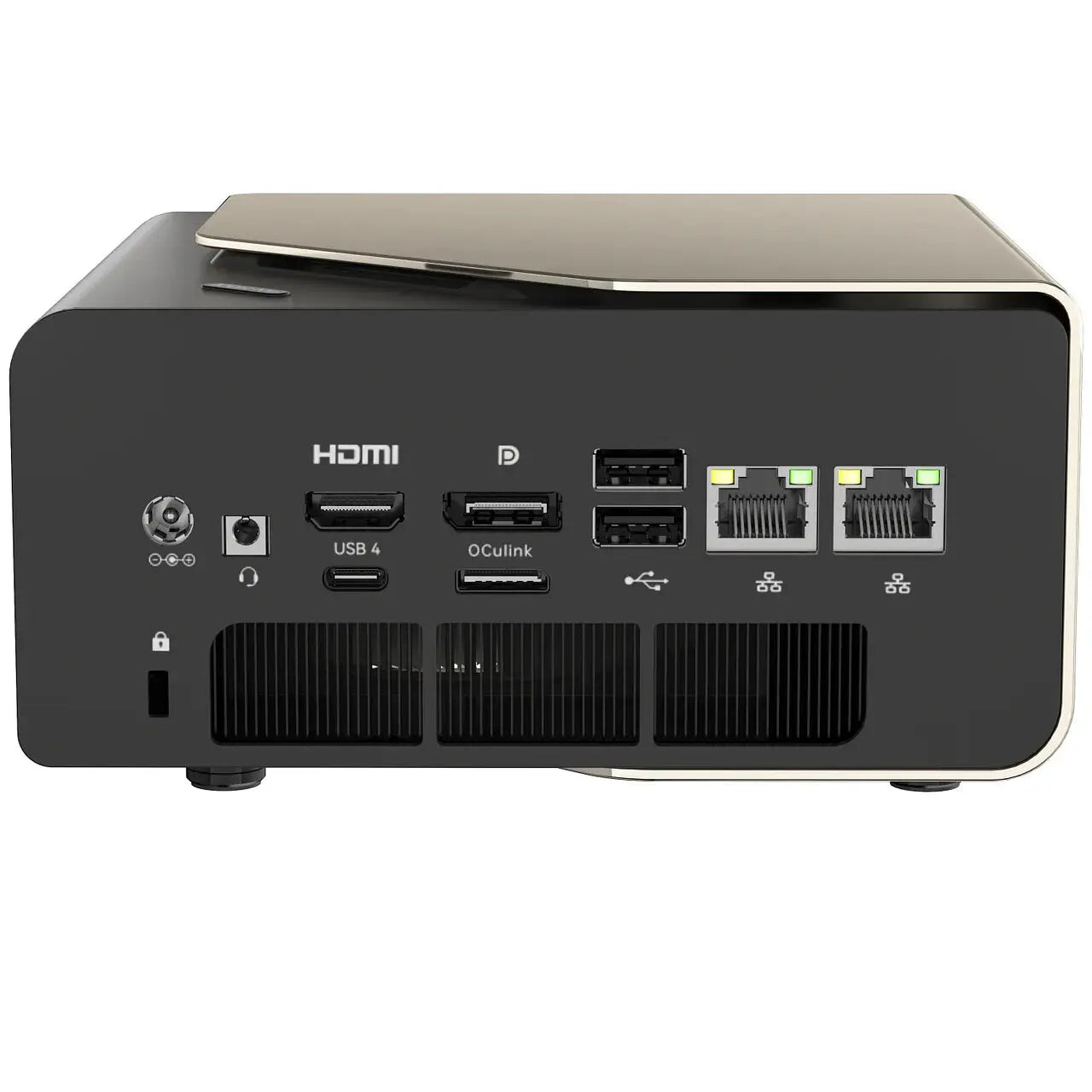
The official rear-panel image shows the HDMI, DisplayPort, USB4, OCuLink, USB, and dual 2.5GbE layout.
The front adds three USB-A 3.2 Gen2 ports, a full-function USB-C port, and a 3.5mm combo jack. That is a sensible split for a desktop: fast removable storage and daily peripherals remain easy to reach, while permanent display and network cables stay at the rear.
Notebookcheck measured 3,167.46MB per second in its external USB4 SSD test. The result reflects its SSD, enclosure, host configuration, and test method. It does show why the USB4 port is more than a basic display connector when paired with suitable storage.
Networking and Linux caveats
Dual 2.5GbE is a strong fit for a homelab node, backup target, or workstation that moves large files. Notebookcheck identified a Realtek RTL8125 on each wired interface and an Intel AX201 Wi-Fi 6 card in its unit. If your firewall installation requires an Intel Ethernet controller, that wireless chip does not meet the requirement. Wi-Fi 6 and Bluetooth 5.2 cover normal wireless use, though wired Ethernet is the better choice for a server.
Lon.TV reported that Ubuntu worked overall but did not detect Wi-Fi or Bluetooth during its review. That is a dated result from one software setup, not proof that wireless support always fails. It is enough reason to check the current kernel, firmware, and distribution support before making Linux wireless a requirement.
If your plan is Proxmox, containers, or a small virtualization host, the memory and network layout are more important than the AI branding. Start with the best mini PC for virtualization guide, then confirm that the exact network, wireless, and graphics behavior fits the operating system you intend to install.
Power and noise evidence
The review unit’s 150W external adapter gives the processor room to run at its higher power profiles, but the fastest setting has an acoustic cost. Notebookcheck measured 7.9W average idle power, 60.7W average load power, and 117.1W maximum load power in its test. In performance mode, it measured 38.8dBA at idle and 51.6dBA under load.
Lon.TV reported different power results, with about 12W to 15W at idle and about 90W under load. The difference is expected when test software, display state, firmware, operating system, and performance profile change. Neither set of figures is a universal rating for every EVO-T1 configuration.
The useful conclusion is simple: choose the operating mode based on the room and the workload. Performance mode makes sense for a sustained compile or rendering task when the system is not beside a microphone. A quieter mode is a better fit for a living-room display, bedroom office, or always-on server. The power-cost calculator can turn the published wall-draw ranges into an estimate for your electricity rate.
Where the expansion budget goes
| Planned use | First purchase | What can wait |
|---|---|---|
| VM host with separate guest storage | One additional NVMe drive and an off-host backup destination | A third internal drive until guest capacity or write contention warrants it |
| Desk workstation with a scratch volume | A second SSD sized for the largest active project | The eGPU until a specific application exceeds Arc 140T performance |
| External GPU workstation | Compatible dock, card, power supply and room for the rear cable | Extra storage if the supplied drive already fits the project |
An external GPU makes the desk footprint larger than the mini PC alone. Check where the dock will draw power and whether its cable can reach the rear port with the case in its final position. Our OCuLink setup guide walks through the connection sequence. For an unattended node, the home-server guide compares less elaborate hosts.
How it compares with other expansion-focused mini PCs
The EVO-T1 is a particularly good fit when three things matter together: high CPU performance, upgradeable memory, and OCuLink. A system with a faster integrated GPU may be better for graphics work, while a system with a larger chassis may provide quieter cooling or a discrete graphics card. The EVO-T1’s advantage is balance across CPU, storage, network, and external expansion.
For a direct product-to-product look at GMKtec’s other high-end platform, see the EVO-T1 versus EVO-X2 comparison. That comparison is the better place to decide whether you want the EVO-T1’s Intel platform and OCuLink layout or the EVO-X2’s much larger memory configuration. For a broader office decision, the home-office mini PC guide covers simpler and lower-power alternatives.
Who should buy the EVO-T1?
Choose the EVO-T1 when you need:
- A fast compact workstation with 64GB of memory in the current listing.
- Socketed DDR5 memory with room to expand.
- Three internal PCIe 4.0 M.2 positions.
- OCuLink for an external graphics enclosure or another PCIe device.
- Dual 2.5GbE for a workstation, server, or segmented lab network.
- USB4, four-display support, and a broad rear I/O layout.
- More CPU and graphics headroom than an entry-level low-power mini PC provides.
Who should not buy the EVO-T1
Skip the EVO-T1 when:
- You need quiet performance under sustained load and cannot tolerate a louder performance profile.
- You want high-end gaming without adding an external graphics solution.
- You need a turnkey NAS with drive bays rather than a compute mini PC.
- You require guaranteed Linux Wi-Fi and Bluetooth support without checking current drivers.
- You only need light office work and would not use the extra CPU, memory, storage, or expansion.
- You want hot-pluggable external graphics. OCuLink requires a shutdown before connection changes.
Frequently asked questions
How many SSDs fit alongside an OCuLink dock?
Three M.2 2280 drives fit inside. Notebookcheck found that the dedicated OCuLink port leaves all three sockets available.
Can the 64GB memory be expanded?
Yes. Both SO-DIMM slots are populated with 32GB modules in the linked bundle. Reaching the 128GB maximum listed by GMKtec requires replacing the pair.
Which Ethernet controllers does the EVO-T1 use?
Notebookcheck identified two Realtek RTL8125 controllers. Each provides a separate 2.5GbE interface.
Is the EVO-T1 quiet enough for a desk?
Placement and power mode matter. Notebookcheck measured 51.6 dBA under load in performance mode and reported quieter operation in balanced and quiet modes.
Does the EVO-T1 include a 1TB or 2TB drive?
The linked title specifies 1TB, but a detail on the same page says 2TB. Check the capacity in the seller’s order summary before paying.
Verdict
The GMKtec EVO-T1 is a strong choice for buyers who want a compact Core Ultra workstation with real expansion headroom. Its 285H processor, socketed memory, three M.2 positions, dual 2.5GbE, USB4, and OCuLink give it a useful combination of desktop and homelab traits.
The limits are just as important. Arc 140T is an integrated graphics solution, performance mode is loud in Notebookcheck’s measurements, wireless support deserves a Linux compatibility check, and the final value depends heavily on the configuration price. The EVO-T1 makes the most sense when you will use its storage and expansion features, not when you only need a browser and office apps.
Our recommendation is conditional: choose it for a high-performance mini workstation, development box, or expansion-ready lab node. Choose a quieter lower-power system for basic office work, and choose a desktop or discrete-GPU platform for demanding gaming.
→ Check the current GMKtec EVO-T1 configuration on Amazon