
GMKtec M5 Ultra review for a 16GB home server
By Max · October 22, 2026 · Updated November 18, 2026
This article contains affiliate links. If you purchase through our links, we may earn a commission at no extra cost to you. We only recommend products we’ve thoroughly researched and verified.
Quick Picks
| Model | Reviewed offer | Current price |
|---|---|---|
| GMKtec M5 Ultra | Ryzen 7 7730U, 16GB DDR4, 256GB SSD | Check price on Amazon |
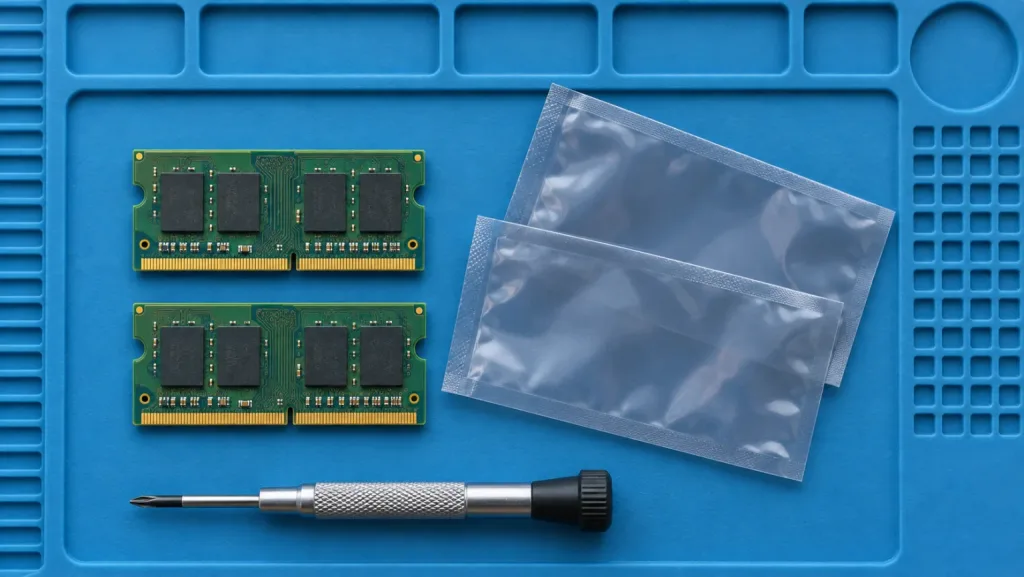
The GMKtec M5 Ultra makes sense for a small server that needs two wired networks today and may need more memory later. The linked bundle starts with one 16GB DDR4 module and a 256GB SSD. That leaves one memory socket and one drive socket free. If you already need 32GB and a terabyte of fast storage, compare the price of the finished machine with the M6 Ultra before choosing the cheaper box.
GMKtec M5 Ultra
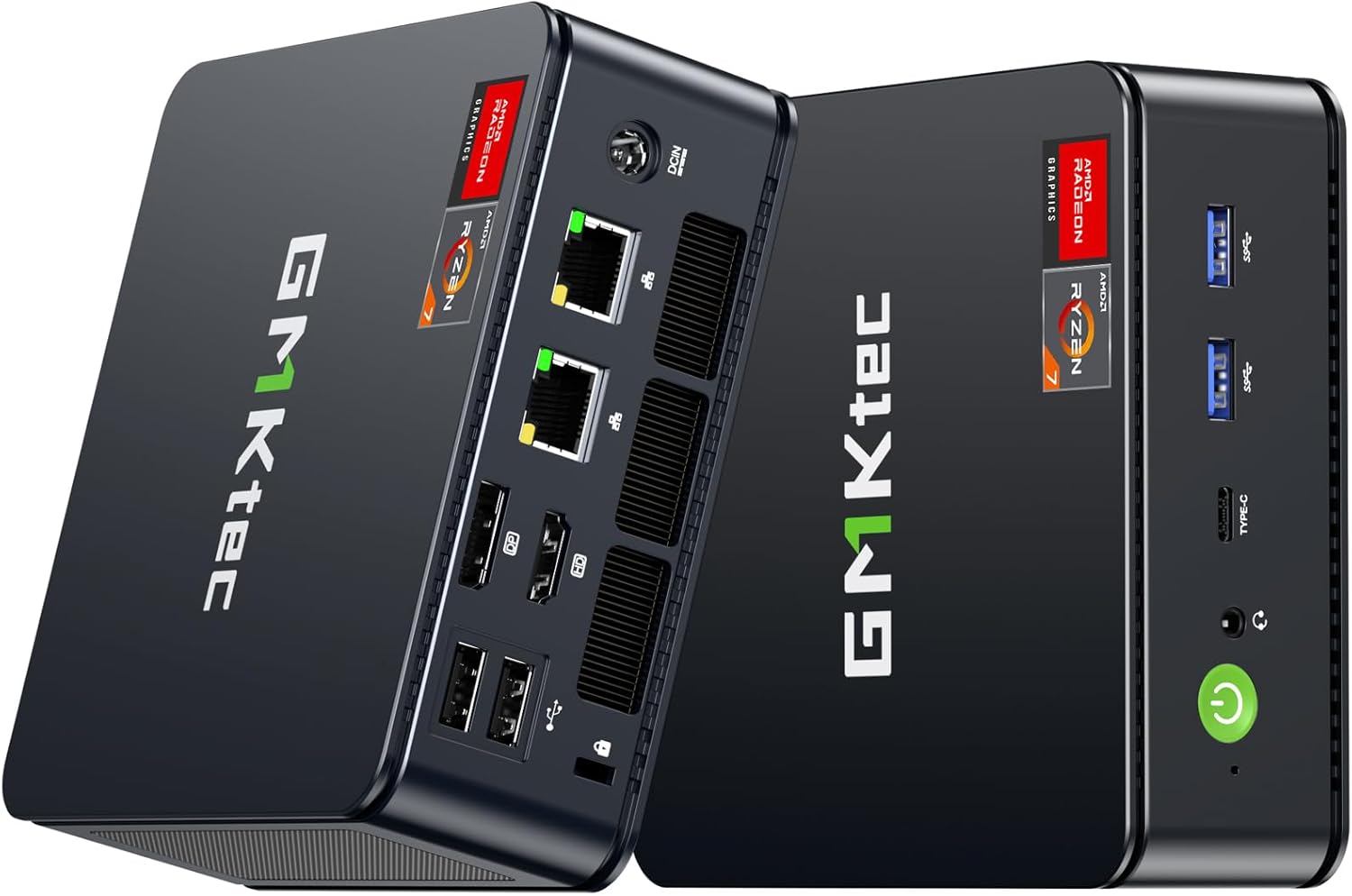
The processor is AMD’s eight-core Ryzen 7 7730U. GMKtec specifies 64GB as the memory ceiling, and the current retail description agrees. We would size a purchase around two 32GB SO-DIMMs at most. An older seller claim of 128GB has no corresponding support in GMKtec’s model specifications.
Check the 16GB and 256GB M5 Ultra configuration on Amazon
TechRadar tested a 32GB dual-channel build with a 1TB SSD. Its results below describe what that system did. The capacity, memory bandwidth available to the integrated graphics and SSD performance can all differ on the smaller bundle.
GMKtec M5 Ultra specifications
| Component | Specification |
|---|---|
| Processor | AMD Ryzen 7 7730U, 8 cores / 16 threads, 2.0 GHz base, up to 4.5 GHz boost |
| Architecture | Zen 3, TSMC 7nm process |
| Graphics | AMD Radeon graphics, Radeon Vega 8 in the tested configuration, up to 2,000 MHz listed by GMKtec |
| Memory | One 16GB DDR4 SO-DIMM, one socket free |
| Maximum memory | 64GB across two 32GB SO-DIMMs according to GMKtec |
| Storage | Two M.2 2280 positions, one occupied by the supplied 256GB PCIe 3.0 SSD |
| Networking | Dual 2.5GbE, Wi-Fi 6E, Bluetooth 5.2 |
| USB and display | One USB-C USB 3.2 Gen 2, two USB-A USB 3.2 Gen 2, two USB-A USB 2.0, HDMI 2.0, DisplayPort 1.4 |
| Display support | Triple-display output through USB-C, HDMI, and DisplayPort; up to 8K through DisplayPort according to GMKtec |
| Power | External DC adapter listed as 19V / 3.42A |
| Dimensions | 128.8 x 127 x 47.8 mm |
| Weight | About 528 g according to GMKtec’s listing |
| Operating system | Windows 11 Pro |
The full-size Ethernet sockets are useful even with the base configuration. A storage server can send backups to a NAS on one interface while clients reach services over the other. Check the switch and NAS port speeds before budgeting for a faster network.
Ryzen 7 7730U is an older eight-core design
The Ryzen 7 7730U is an eight-core, 16-thread Zen 3 processor with a boost clock of up to 4.5 GHz. It is efficient enough for an always-on service box and has more threads than the four-core chips used in many entry-level mini PCs. It is also very close in design to AMD’s older Ryzen 7 5825U, which means the Ryzen 7 name should not be mistaken for a current high-performance mobile platform.
That distinction affects the buying decision. The M5 Ultra can handle web applications, code editors, office work, file services, and several light containers. It can also host a few modest virtual machines when the storage and memory allocation are sensible. It is less attractive for sustained compilation, modern video production, or a large number of busy virtual machines.
TechRadar’s tested system scored 5,581 in PCMark 10. Its Cinebench 2024 results were 78 in single-core and 414 in multi-core testing. Geekbench 6 recorded 1,806 single-core and 5,939 multi-core. These are figures from TechRadar’s 32GB and 1TB sample, not measurements from Mini PC Lab.
The numbers also show why the M5 Ultra should be judged by its feature mix. A newer six-core Ryzen 5 can match or exceed it in some workloads because architecture and memory support matter as much as the Ryzen 7 label. The M5 Ultra’s advantage is the second network port and the second M.2 position.
Our Ryzen 7 mini PC comparison puts the 7730U beside the similarly named 7735U and shows what changes in graphics and memory.
Radeon Vega 8 is for light gaming and media
The integrated Radeon graphics use shared system memory and are listed at up to 2,000 MHz by GMKtec. TechRadar identified Radeon Vega 8 in its tested system. That graphics engine is enough for everyday desktop work, media playback, esports, and older games, but it is well behind current integrated graphics such as the Radeon 760M in the GMKtec M6 Ultra.
TechRadar recorded 6,711 in 3DMark Wild Life, 3,154 in Fire Strike, 1,264 in Time Spy, and 1,035 in Steel Nomad Light. It also recorded 12,823 in Geekbench 6 OpenCL and 11,472 in Vulkan. Those results provide a useful baseline for the tested configuration, but they should not be treated as a promise for every driver or game update.
The M5 Ultra makes sense for a living-room PC, an older game library, or a desktop that occasionally plays lighter titles. It is not the right starting point for high-refresh modern games. Our gaming mini PC guide covers models with stronger graphics hardware, while the GMKtec M6 Ultra review explains what the newer Radeon 760M platform adds.
DDR4 is the compromise behind the price
The first memory upgrade is straightforward because one socket is empty. A compatible second 16GB module brings the machine to 32GB and lets the memory controller use both channels. Reaching the documented 64GB maximum requires replacing the original module and fitting two 32GB sticks.
| Planned workload | What the starter bundle buys | Purchase to consider |
|---|---|---|
| DNS, monitoring and a few small containers | A free socket for later and enough storage to start collecting logs | Measure peak memory and log growth before buying parts |
| A desktop sharing memory with Vega graphics | One populated channel for the CPU and GPU to share | A matched second 16GB module if this configuration fits your software |
| VM host with large virtual disks | A small boot SSD and a free NVMe socket | A second SSD sized for guests, plus a backup destination off the host |
| More than 64GB for active guests | Both slots would be full at the supported ceiling | Compare a different platform before spending on DDR4 |
For example, reserving 4GB for the host and assigning two guests 6GB each consumes the entire base memory budget before allowing for overhead. If those guests are routinely busy together, allow headroom when pricing the build. Storage space cannot make up that memory shortfall.
TechRadar tested a 32GB dual-channel configuration and noted that the M5 Ultra uses older DDR4 technology. Buyers who already have compatible DDR4 modules may find that useful. Buyers starting from scratch should compare the total system cost with a newer DDR5 mini PC rather than assuming the Ryzen 7 badge makes this the better value.
Two M.2 positions give it a server role
The M5 Ultra has two M.2 2280 positions. One contains the retail bundle’s 256GB boot drive. The seller and manufacturer describe different maximum drive capacities, so confirm compatibility with the specific SSD before ordering a large upgrade. That gives the machine a straightforward split between an operating-system drive and a second drive for application data, virtual-machine images, or a local media library.
The two sockets are more valuable for a server than a small increase in sequential SSD speed. You can keep the boot volume separate from data, replace the original drive without losing the expansion position, or use one drive for a test operating system. The system has no SATA bays, so it is not a replacement for a multi-drive NAS.
TechRadar measured 3,624 MB/s read and 2,642 MB/s write on the 1TB NVMe drive in its review sample. That result belongs to the tested drive and configuration. GMKtec notes that storage components can vary, so do not assume every retail unit includes the same SSD controller.
Our mini PC comparison tool can help compare the M5 Ultra with models that offer different storage layouts. If your plan is a home server, the best mini PC for home server guide puts dual-network systems into a broader hardware context.
Dual 2.5GbE is the strongest feature
The two 2.5GbE ports are the M5 Ultra’s clearest reason to exist. One port can connect to the primary LAN while the other handles a management network, a storage segment, a firewall interface, or a separate virtual-machine bridge. That makes the M5 Ultra more useful for a homelab than a similar office mini PC with one Ethernet port.
The ports use Realtek controllers according to TechRadar’s specifications. Windows support is straightforward in the reviewed setup, but anyone installing Proxmox, Linux, or a firewall operating system should confirm driver support and power-management behavior for the exact kernel and release. A system that works well with its factory image still needs validation in a different operating system.
The network arrangement does not make the M5 Ultra a 10GbE appliance. Two 2.5GbE connections are enough for many home networks, backups, service traffic, and segmented lab designs. They are not a substitute for a dedicated switch or a faster interface when a storage array can actually saturate 10GbE.
USB-C instead of USB4
The M5 Ultra has one USB-C port, but it is not USB4. GMKtec lists it as USB 3.2 Gen 2 with DisplayPort 1.4 and Power Delivery input. That is enough for a modern dock, a display, and fast USB storage, but it does not provide the same expansion headroom as USB4.
That difference matters if you are considering an external GPU. The M5 Ultra can use ordinary USB-C accessories, but buyers wanting a high-bandwidth eGPU path should move to the best mini PCs with OCuLink guide or choose a system with USB4. The M6 Ultra adds one USB4 port and a newer Zen 4 platform, making it the more flexible GMKtec choice when the price gap is acceptable.
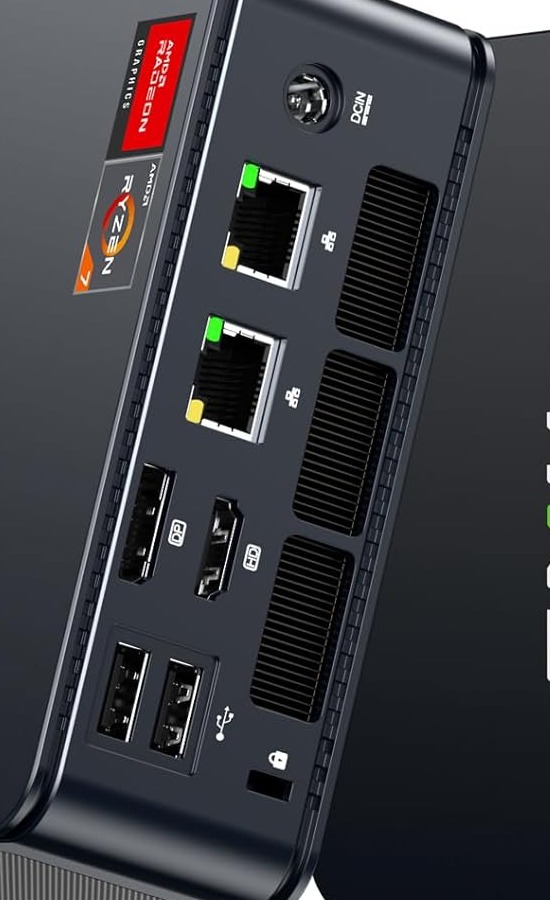
Both network cables plug into the rear alongside the display and power connections.
The rear panel keeps the network, display, and power cables out of the way. The front panel holds the USB-C port, two USB-A ports, audio, status lights, and the power button. GMKtec includes a VESA bracket, so the M5 Ultra can sit behind a monitor or attach to the underside of a desk.
Wi-Fi 6E and the current listing
GMKtec’s current product page lists Wi-Fi 6E through an RZ616 module, with Bluetooth 5.2. The linked configuration also specifies Wi-Fi 6E. A compatible access point is required to use the 6 GHz band.
Wi-Fi 6E is useful for a desktop or a temporary server deployment, but the dual Ethernet ports are the better choice for services that need predictable latency. Wired connections also simplify firewall rules and make it easier to determine which traffic uses the management or data network.
Cooling and power planning
GMKtec lists an external adapter at 19V / 3.42A and uses a dual-fan cooling design. We are not assigning a total system wattage because no independent power measurement is available in the sources used for this review. The adapter rating should not be presented as the machine’s actual wall draw.
TechRadar describes the M5 Ultra as quiet and flexible in normal use, while noting that the external adapter adds to the total travel weight. That is a review observation, not a measurement from Mini PC Lab. Fan behavior can change with ambient temperature, power mode, memory population, SSD choice, and firmware.
For an always-on deployment, use our mini PC power cost calculator with a conservative idle assumption and then verify the real draw after installation. The M5 Ultra’s low-power U-series processor helps, but attached storage, displays, and network equipment are part of the real system cost.
M5 Ultra versus M6 Ultra
The M6 Ultra is the more modern choice. It moves to the Zen 4 Ryzen 5 7640HS, DDR5 memory, Radeon 760M graphics, and USB4. It also keeps dual 2.5GbE and two M.2 positions, so it preserves the M5 Ultra’s useful layout while improving the platform around it.
The M5 Ultra still has a reason to be cheaper. Its Ryzen 7 7730U supplies eight cores and 16 threads, two DDR4 slots are easy to replace, and the system is adequate for office work, network services, and light containers. Choose the M5 Ultra when its lower platform requirements and feature mix fit the budget. Choose the M6 Ultra when graphics, memory bandwidth, USB4, and longer platform life matter more.
For other configurations with different port and memory layouts, see the GMKtec model guide.
Who should buy the GMKtec M5 Ultra?
- Buyers who want a compact Ryzen system with eight cores and 16 threads
- Homelab users who can use dual 2.5GbE for separate networks or a firewall
- Owners who need two M.2 positions for boot and data separation
- Office users who want three displays and a VESA mounting option
- Buyers with compatible DDR4 modules who want an upgrade-friendly system
- Users who play older games or esports titles at sensible settings
Who should skip the GMKtec M5 Ultra?
- Buyers who want the latest AMD architecture or DDR5 memory
- Gamers expecting high settings or modern 4K performance
- Anyone who needs USB4, OCuLink, or 10GbE expansion
- Users who require a confirmed 128GB memory ceiling
- Buyers who need SATA bays for a standalone NAS
- People who only need basic office work and will not use the second Ethernet port or second SSD position
Frequently Asked Questions
Is the GMKtec M5 Ultra good for a home server?
It is a useful compact server for Docker, network services, and light virtualization. The Ryzen 7 7730U provides eight cores and 16 threads, while dual 2.5GbE ports allow separate network connections. Two M.2 positions also make it easier to separate the system drive from application or virtual-machine storage.
How much RAM can the GMKtec M5 Ultra use?
GMKtec and the linked offer specify 64GB across two 32GB SO-DIMMs. The 16GB bundle uses one module, leaving a free socket for an upgrade to 32GB.
Does the GMKtec M5 Ultra have USB4?
No. The M5 Ultra has one USB-C port with USB 3.2 Gen 2, DisplayPort 1.4, and Power Delivery input. Buyers who need USB4 for an external graphics enclosure or faster peripherals should look at the GMKtec M6 Ultra or another newer platform.
Is the GMKtec M5 Ultra good for gaming?
The integrated Radeon Vega 8 graphics are suitable for esports, older games, and lighter modern titles at reduced settings. The M5 Ultra is not a high-end gaming system, and newer integrated graphics such as the Radeon 760M and Radeon 890M offer more headroom.
Does the GMKtec M5 Ultra support Wi-Fi 6E?
GMKtec’s current product page lists Wi-Fi 6E with the RZ616 wireless module and Bluetooth 5.2. Some regional material uses Wi-Fi 6 wording, so confirm the exact wireless module if 6 GHz connectivity is important.
How many SSDs can the GMKtec M5 Ultra hold?
There are two M.2 2280 sockets. The linked bundle has a 256GB PCIe 3.0 drive in one socket. You can add a second drive without replacing the boot disk.
Verdict
The GMKtec M5 Ultra is a flexible budget mini PC whose best features are easy to miss in a CPU-first comparison. Dual 2.5GbE, two M.2 positions, two SO-DIMM slots, Wi-Fi 6E, and triple-display support give it several useful roles in a small office or homelab.
The Ryzen 7 7730U is an older Zen 3 processor, and DDR4 limits the system compared with newer platforms. There is no USB4, no 10GbE, no SATA storage, and the supported memory ceiling is 64GB. Those limits make the recommendation specific rather than universal.
We recommend the M5 Ultra for buyers who will use its second network port or second SSD position and who are comfortable with a mature Zen 3 platform. It is not the best choice for high-end gaming, modern workstation workloads, or buyers who want the newest connectivity.
Sources
Product links
- GMKtec M5 Ultra on Amazon — Ryzen 7 7730U, 16GB DDR4, 256GB SSD.