
Beelink SER5 MAX review for the 24GB Ryzen 7 7735U listing
By Max · October 23, 2026 · Updated November 18, 2026
This article contains affiliate links. If you purchase through our links, we may earn a commission at no extra cost to you. We only recommend products we’ve thoroughly researched and verified.
Quick Picks
| Model | Reviewed offer | Current price |
|---|---|---|
| Beelink SER5 MAX | Advertised Ryzen 7 7735U, 24GB LPDDR5, 500GB SSD | Check price on Amazon |
The Beelink SER5 MAX linked here is advertised with a Ryzen 7 7735U, 24GB of onboard LPDDR5 and a 500GB SSD. If a review led you here for the Ryzen 7 7735HS, pause before ordering. The two chips have the same core count, peak boost clock and Radeon graphics name. None of those details tells you which processor a seller will ship.
Beelink SER5 MAX
We would consider the U-labelled configuration for a fixed set of desktop apps or home services that fits in 24GB. If your buying decision depends on the sustained performance of an HS review unit, get written confirmation of the full processor name for the unit you are ordering. The retail description establishes what is offered. The processor name reported by the delivered machine settles what you received.
Check the 24GB SER5 MAX configuration on Amazon
AMD documents two different power ranges for these processors. Beelink sells multiple configurations under the SER5 MAX name, and TechRadar identifies a 7735HS alternative with the same memory and SSD capacities. Those are useful comparisons only after identifying the processor. AMD 7735U specifications · AMD 7735HS specifications · TechRadar’s comparison
Beelink SER5 MAX specifications
| Component | Current listing detail |
|---|---|
| Processor label | AMD Ryzen 7 7735U on the current Amazon title and graphics |
| Alternate published label | Ryzen 7 7735HS on Beelink-family material and independent coverage |
| Architecture | Zen 3 plus on both processor variants |
| CPU cores and threads | 8 cores and 16 threads |
| Graphics | Radeon 680M, 12 graphics cores at up to 2,200MHz |
| Memory | 24GB LPDDR5, onboard, described as two 12GB packages |
| Storage | 500GB M.2 2280 SSD |
| Storage expansion | Two M.2 2280 PCIe SSD positions, with up to 4TB per position claimed by the listing |
| Wired networking | One 2.5GbE RJ45 port |
| Wireless | Wi-Fi 6 and Bluetooth 5.4 according to the current listing |
| Video output | HDMI 2.0, DisplayPort 1.4, and USB-C video output |
| USB | Two USB 3.2 Gen 2 ports and two USB 2.0 ports |
| Audio | 3.5mm headphone jack |
| Power input | External adapter listed as 19V / 3.42A |
| Dimensions | 126 x 113 x 42mm |
| Operating system | Windows 11 Pro |
The 7735U versus 7735HS problem
The most important finding in this review is not a port or benchmark. It is the disagreement over which Ryzen 7 chip belongs to the exact configuration sold through the current listing.
The Amazon title says Ryzen 7 7735U. The feature graphics repeat that name and show a 2.7GHz base clock with a 4.75GHz maximum boost. AMD’s specifications identify the 7735U as a Zen 3 plus processor with eight cores, 16 threads, Radeon 680M graphics, and a 15W to 30W configurable power range.
Several SER5 MAX pages use Ryzen 7 7735HS instead. TechRadar describes the SER5 MAX as a 7735HS system with 24GB of memory and a 500GB SSD. Beelink-family material also lists a 7735HS version with a 3.2GHz base clock. AMD identifies the HS chip as an eight-core, 16-thread Zen 3 plus processor with the same Radeon 680M graphics, but its configurable power range is 35W to 54W.
That is not a cosmetic naming difference. The U model is designed for a lower power envelope, while the HS model has more thermal headroom for sustained CPU work. Both can be good fits in a mini PC, but they should not be reviewed as if they were interchangeable.
How to identify the processor after delivery
- Save the seller’s chosen configuration with your order confirmation. Look for the complete suffix on that line, alongside the memory and SSD capacity.
- In Windows, open Task Manager, select Performance and choose CPU. Read the full model name above the utilization graph. On Linux, run
lscpuand read the Model name line. - Compare that name with the order before transferring your data. A momentary clock reading, an eight-core count or a Radeon 680M entry cannot distinguish the two.
- If the suffix differs, keep the order and system details together and contact the seller during the return period. Changing a firmware power setting cannot turn one processor model into the other.
| Detail reported by AMD | Ryzen 7 7735U | Ryzen 7 7735HS |
|---|---|---|
| Base frequency | 2.7 GHz | 3.2 GHz |
| Maximum boost | 4.75 GHz | 4.75 GHz |
| Configurable processor power range | 15–30W | 35–54W |
| Integrated graphics | Radeon 680M | Radeon 680M |
The power figures describe the processor. To estimate electricity for an always-on server, measure the whole system at the outlet with the expected SSDs and peripherals connected.
Performance expectations from the platform
Whether the box contains the U or HS variant, the underlying design is an older Zen 3 plus platform from AMD’s 2023 mobile family. It is still capable for general work, but the Ryzen 7 badge does not place it beside current Ryzen AI or Zen 5 mini PCs.
Eight cores and 16 threads are plenty for office applications, browser-heavy work, software development, light photo editing, and several background services. The platform also supports AMD-V virtualization, so it can serve as a modest Proxmox host when the workload is light and the memory limit is acceptable.
The important boundary is sustained load. A lower-power 7735U listing should not be expected to hold the same clocks as a 7735HS machine under long compiles, repeated media conversions, or many busy virtual machines. The seller’s cooling graphic claims a 19% improvement, but that is a marketing claim rather than an independent thermal result.
There are no Mini PC Lab benchmark or power measurements for this machine. We will not turn the adapter’s 19V / 3.42A rating into a system consumption number. The adapter tells you what the power supply can provide, not what the computer draws at idle or under load. For an always-on setup, use our power cost calculator after you have a wall-meter reading from your own configuration.
Radeon 680M is suited to light gaming
The SER5 MAX listing graphics identify Radeon graphics with 12 cores at 2,200MHz. AMD’s documentation names that engine Radeon 680M. It is a meaningful step above the basic graphics found in entry-level mini PCs and works well for desktop acceleration, video playback, esports, older games, and emulation that does not demand a discrete GPU.
The shared memory design is the constraint. The graphics processor uses system memory, and the 24GB LPDDR5 pool is fixed. That gives the GPU more bandwidth than older DDR4 systems, but there is no way to add memory later when a game or creative application needs more room.
The SER5 MAX is a good fit for games such as esports and older releases at 1080p with sensible settings. It is not the right purchase for demanding new games at high refresh rates. Our best gaming mini PC guide covers machines with newer integrated graphics and discrete GPUs when gaming is the main reason you are buying.
24GB LPDDR5 is generous but fixed
The current graphics show 24GB of LPDDR5 as two 12GB packages. The wording can be confusing because two memory packages do not mean two user-replaceable SO-DIMM slots. LPDDR5 is soldered to the board in this design. You cannot replace the soldered memory packages with larger sticks after purchase.
Twenty-four gigabytes is a useful middle ground. It gives Windows, a development environment, containers, and several browser sessions more room than an 8GB or 16GB budget system. It can also support a small virtualization lab if the virtual machines are not all busy at once.
The fixed capacity changes the long-term calculation. A buyer who needs 64GB for databases, build workers, or many virtual machines should choose a system with removable DDR5 or DDR4 memory. The SER5 MAX is better for a defined workload that fits within 24GB than for a lab you expect to grow without limits.
Two M.2 positions are the best expansion feature
The SER5 MAX listing graphics show two M.2 2280 PCIe SSD positions. The supplied drive is 500GB, and the listing claims up to 4TB per position. Those capacity limits are seller claims, so verify the drive length, interface, and firmware support before buying a very large SSD.
Two sockets are valuable in a compact system. You can keep the operating system on one drive and place containers, virtual-machine images, downloads, or media on the other. You can also replace the original drive while keeping the second position available for a test installation.
This is still not a NAS chassis. The current port graphics show no SATA bay, and there is only one 2.5GbE connection. If your plan involves several hard drives, redundant storage, or a large media library, start with our home-server mini PC guide and compare the SER5 MAX with purpose-built NAS hardware.
2.5GbE works for a small homelab
One 2.5GbE port gives the SER5 MAX a useful network advantage over basic office mini PCs. It can connect to a 2.5GbE switch or router for faster file transfers, backups, and media storage. It is also a better fit for a small homelab where a single faster link matters more than network segmentation.
The limitation is that there is only one wired port. You cannot dedicate one interface to management and another to storage without adding a USB Ethernet adapter or a separate network card. That also makes this a weaker choice for a firewall appliance than a mini PC with dual NICs.
For Docker, a single 2.5GbE link is usually enough. For Proxmox, the question is less about raw link speed than about how many services you plan to run and whether you need separate bridges. Our Docker on a mini PC guide and Proxmox installation guide cover the software side, but you should verify network drivers with the exact operating system you choose.
Triple-display output and useful rear ports
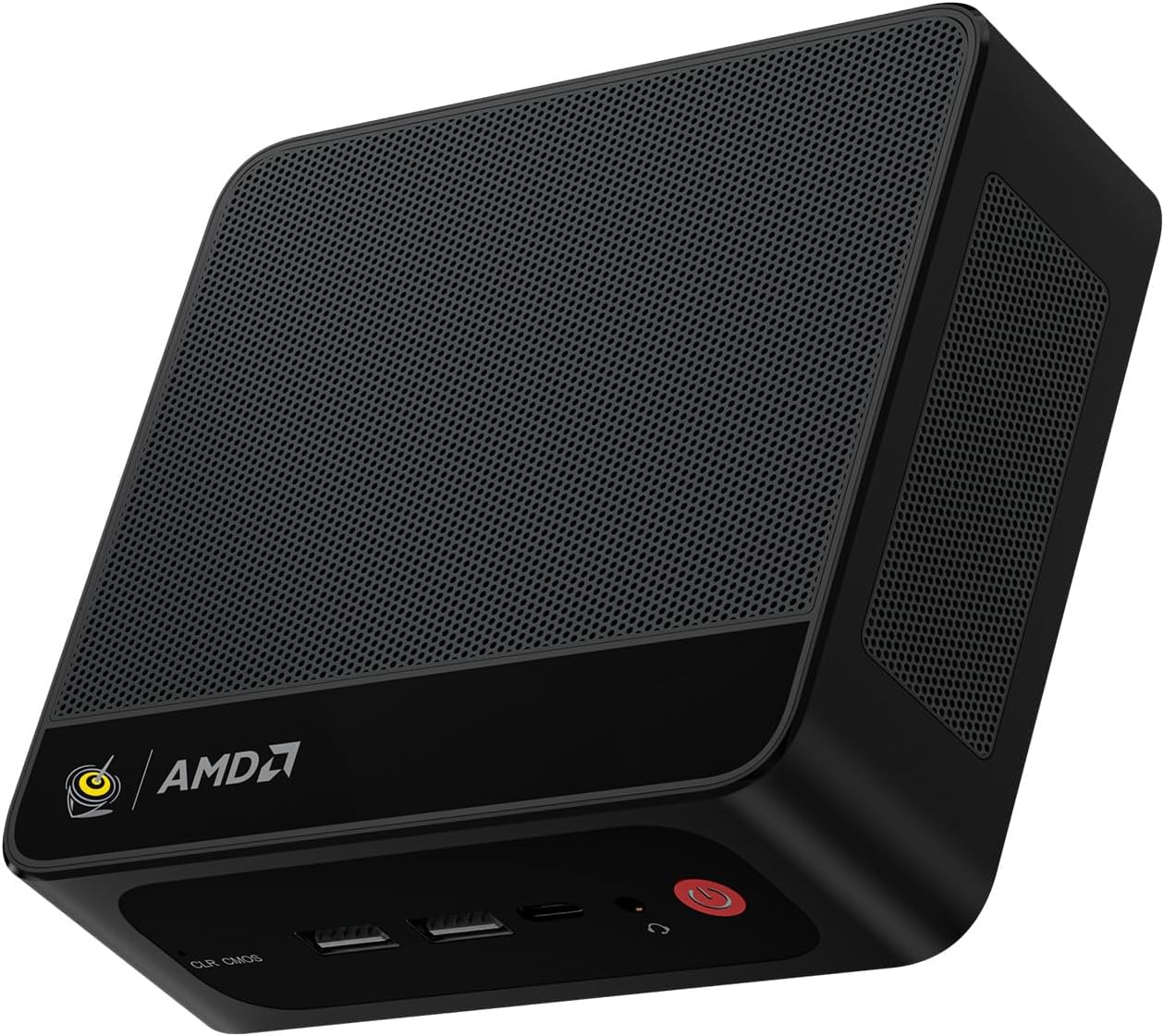
The front panel has two USB-A ports, USB-C with data and video output, a 3.5mm headphone jack, a clear CMOS key, and the power button. The USB-C port is listed as 10Gbps and carries video, but this is not USB4.
The rear panel has one 2.5GbE port, one additional USB 3.2 Gen 2 port, one USB 2.0 port, DisplayPort 1.4, HDMI 2.0, and the DC input. The listing graphics rate DisplayPort at up to 4K 144Hz and HDMI at 4K 60Hz. Beelink advertises three displays through HDMI, DisplayPort, and USB-C.
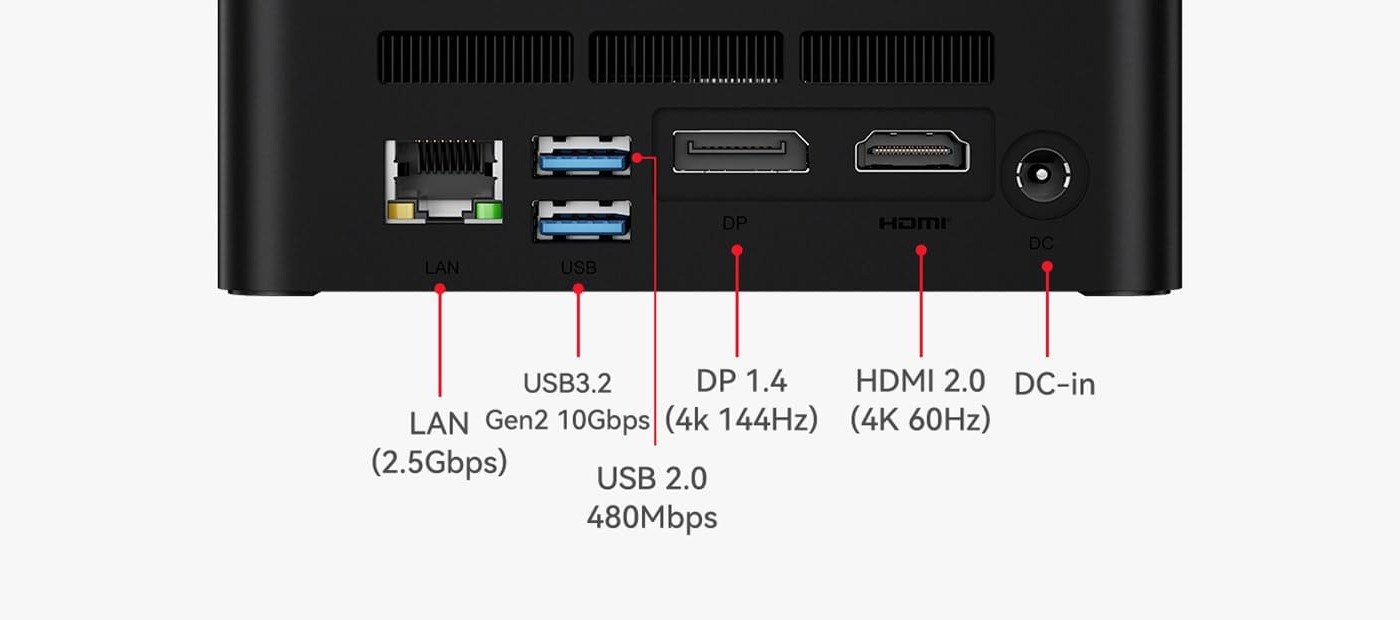
The rear-panel layout comes from the verified product listing graphic. It shows one 2.5GbE port, two rear USB ports, DisplayPort, HDMI, and the DC input.
The port mix is sensible for a desk. USB-C video lets you connect a third display or a compatible dock, while the rear Ethernet and display cables can stay out of the way. Buyers who need high-speed external storage or an external graphics enclosure should look for USB4 or OCuLink instead.
Cooling and power caveats
The listing describes a heat pipe, heatsink, and fan arrangement. It also promotes a 19% cooling improvement, but the seller does not specify the comparison workload behind that percentage. We therefore cannot promise a particular temperature, noise level, or sustained clock speed.
The CPU discrepancy makes this even more important. AMD rates the 7735U at 15W to 30W configurable power, while the 7735HS is rated at 35W to 54W. Those are processor-level ranges, not wall measurements from the SER5 MAX. A U-labeled unit and an HS-labeled unit may respond differently to long workloads even if their chassis and graphics look identical.
Leave clearance around the vents, avoid placing the unit on a soft surface, and check the return terms before committing to a workload that depends on sustained performance. If you need a quiet server, measure the exact unit after setup rather than relying on a generic product description.
Who should buy the Beelink SER5 MAX?
Buy it when you want a compact Windows desktop with more than entry-level memory, a 2.5GbE connection, triple-display support, and two SSD positions. The 24GB configuration is well suited to office work, development, media playback, light gaming, and a small Docker host.
It is also a sensible choice when the current price is meaningfully below newer DDR5 systems. The older platform is easier to justify when you value the two M.2 positions and 2.5GbE more than the latest CPU architecture.
Who should not buy it?
Skip it if you need removable memory. The soldered 24GB capacity cannot grow with a larger virtualization lab or memory-heavy application.
Skip it if you need dual NICs, 10GbE, USB4, or OCuLink. One 2.5GbE port handles many home networks, but it does not replace a multi-interface homelab appliance.
Skip it if the listing still leaves the CPU identity unresolved and your workload depends on the HS power class. A buyer who needs predictable sustained CPU performance should choose a machine with an unambiguous processor listing.
Finally, skip it for serious new-game performance. Radeon 680M is useful integrated graphics, but compare results from the games you play on newer integrated or discrete GPUs before choosing this chassis. The Beelink mini PC guide gives you a broader view of the company’s current lineup.
Beelink SER5 MAX versus a newer mini PC
The SER5 MAX’s value depends on what you need from the box. A newer machine may have a faster CPU, DDR5 memory, USB4, or a newer integrated GPU, but it may also cost more or provide fewer storage positions.
The GMKtec M6 Ultra review is the most direct newer alternative in this site’s coverage. It moves to a newer Ryzen platform, DDR5 memory, USB4, and dual 2.5GbE. Choose the M6 Ultra when those features matter more than the SER5 MAX’s 24GB memory configuration and low purchase price.
The SER5 MAX remains easier to justify for a three-display office desk or a small service host that needs two SSD positions and one faster Ethernet link. Use the comparison tool to line up the exact memory, storage, network, and port requirements before choosing.
Frequently asked questions
Is the Beelink SER5 MAX good for a home server?
It can work as a small Docker or light virtualization server when one 2.5GbE port and 24GB of soldered LPDDR5 are enough. The two M.2 positions are useful for separating the operating system from application data. It is not a multi-drive NAS, and the processor label should be confirmed before purchase.
Does the Beelink SER5 MAX have upgradeable RAM?
No. The current listing describes 24GB of LPDDR5 as two 12GB packages, and the product graphics show onboard LPDDR5 rather than removable SO-DIMM slots. Choose the capacity you need at purchase.
Which processor does the Beelink SER5 MAX use?
The current Amazon title and graphics identify this 24GB and 500GB listing as Ryzen 7 7735U. Beelink-family material and independent coverage identify similar SER5 MAX configurations as Ryzen 7 7735HS. Confirm the exact processor label on the purchase page because the U and HS parts have different power ranges.
Is the Beelink SER5 MAX good for gaming?
Its Radeon 680M graphics can handle esports, older games, and lighter modern games at sensible settings. It is not a replacement for a mini PC with a discrete GPU or a newer high-end integrated graphics platform.
How many monitors can the Beelink SER5 MAX support?
The listing provides HDMI 2.0, DisplayPort 1.4, and USB-C video output. Beelink’s graphics advertise three displays, with HDMI at 4K 60Hz, DisplayPort at up to 4K 144Hz, and USB-C carrying data and video.
Does the Beelink SER5 MAX support two SSDs?
Yes. The current listing graphics show two M.2 2280 PCIe SSD positions and claim support for up to 4TB per position. The supplied storage is a 500GB M.2 drive, so confirm the drive interface and capacity before buying replacements.
For a first server with room to grow, compare the home-server buying guide and mini PC comparison tool before committing to soldered memory.
Verdict
The Beelink SER5 MAX has a strong budget feature mix: 24GB of LPDDR5, two M.2 positions, 2.5GbE, triple-display output, and a compact chassis. Those features make it more interesting than a basic office mini PC and give it a legitimate role as a small desktop or homelab service box.
Use the 7735U specifications to evaluate the linked offer. Choose a different configuration if replaceable memory or documented HS performance is essential. If the U model fits your workload, confirm the processor suffix on arrival before putting time into your installation.
Product links
- Beelink SER5 MAX on Amazon — Advertised Ryzen 7 7735U, 24GB LPDDR5, 500GB SSD.