
Apple Mac Mini M4 Review 2026 — Base Model, 16GB, 256GB
By Max · May 2, 2026 · Updated May 5, 2026
This article contains affiliate links. If you purchase through our links, we may earn a commission at no extra cost to you. We only recommend products we’ve thoroughly researched and verified.

→ Check Current Price on Amazon
The Mac mini M4 is one of the easiest desktops to recommend in 2026 if your workload fits inside the Apple box Apple ships on day one. We verified the hardware against Apple’s official technical specifications and cross-checked benchmark and efficiency data from Tom’s Guide, Macworld, and Notebookcheck before writing this review.
What makes the base Mac mini M4 interesting is not just the price. It is the combination of a 10-core M4 chip, 16GB of unified memory as the new entry point, three-display support, and unusually strong single-core speed in a chassis that barely takes up desk space. What holds it back is also obvious: no USB-A, no internal user upgrades, no Linux-first homelab story, and only 16GB on the base machine.

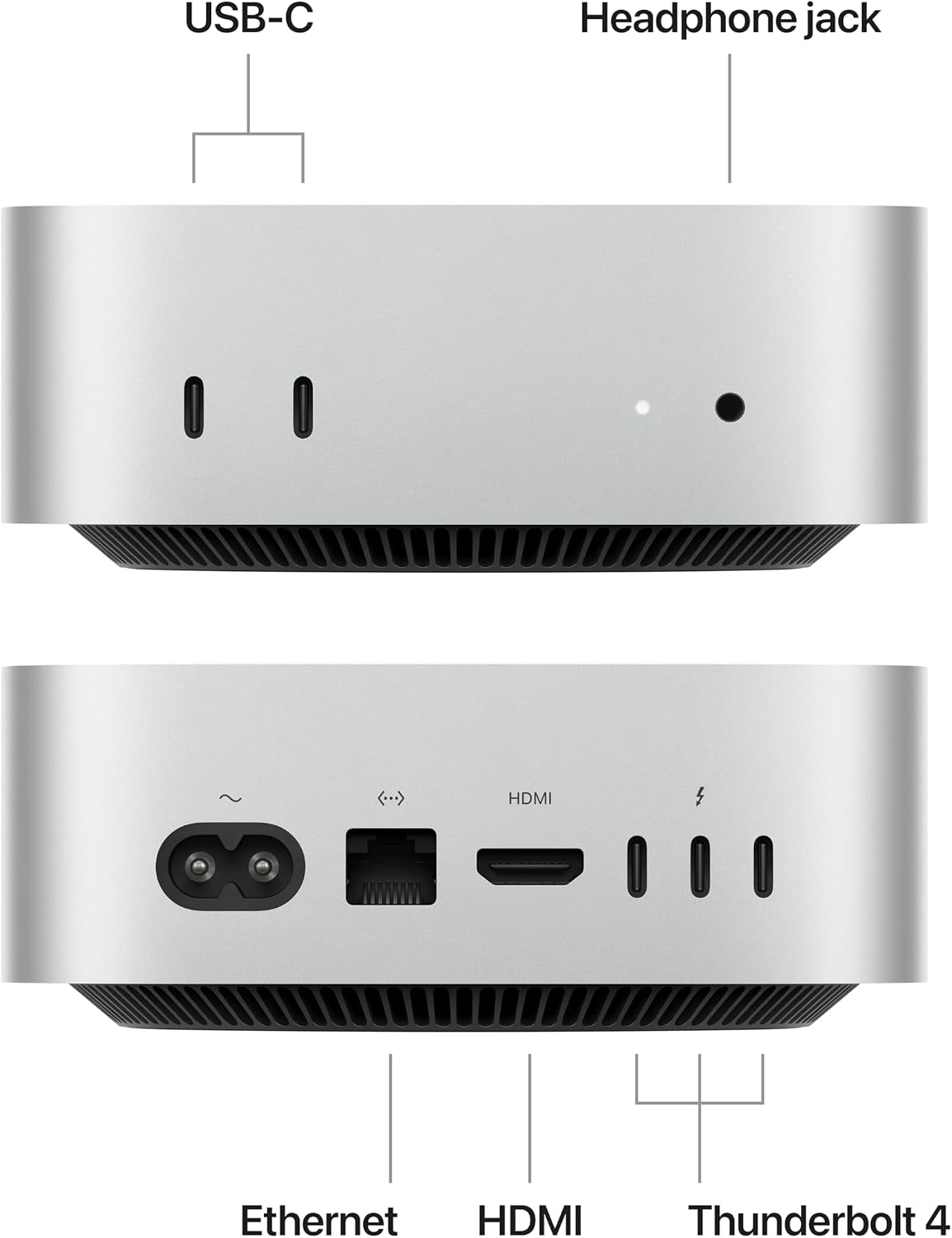
Port layout from Apple’s own listing images. The rear panel is where the port count, the LAN speed, and the USB generations are actually settled.
Mac Mini M4 Specs at a Glance
| Spec | Detail |
|---|---|
| Chip | Apple M4 |
| CPU | 10-core CPU with 4 performance cores and 6 efficiency cores |
| GPU | 10-core GPU |
| Neural Engine | 16-core Neural Engine |
| Memory | 16GB unified memory on the base model |
| Memory Ceiling | Up to 32GB |
| Storage | 256GB SSD on the base model |
| Storage Ceiling | Up to 2TB |
| Memory Bandwidth | 120GB per second |
| Rear Ports | 3 Thunderbolt 4 ports, HDMI, Gigabit Ethernet |
| Front Ports | 2 USB-C ports, 3.5 mm headphone jack |
| Networking | Gigabit Ethernet, Wi-Fi 6E, Bluetooth 5.3 |
| Optional Networking | 10Gb Ethernet at order time |
| Display Support | Up to 3 displays |
| Size | 5 by 5 by 2 inches |
| Weight | 1.5 pounds |
| Starting Price | $599 |
Quick Verdict
The base Mac mini M4 is production ready as a desk computer the moment you unbox it. It is fast, quiet, tiny, and unusually easy to recommend for coding, office work, and general Apple-heavy workflows.
It becomes a weaker buy the second your real needs move beyond the base profile. If you already know you want heavier local AI, more than 16GB of memory, or a compact machine that can double as a lab box, you should not buy this model just because the entry price looks attractive.
Design and Day to Day Experience
Apple finally made the Mac mini feel genuinely mini again. The current chassis is much smaller than the older aluminum square, and that matters in real use. It disappears on a desk, fits easily in a media console, and makes sense for people who want a fixed workstation without a laptop dock taking over the room.

The port layout is a mixed result. Front USB-C ports are a real improvement for flash drives, headphones, and quick accessory swaps. The downside is the lack of USB-A. If your keyboard dongle, audio gear, or external storage still uses USB-A, you will either buy adapters or live with a hub from day one.
The power button on the underside is still awkward. It is not a dealbreaker because most Mac users put the machine to sleep instead of fully powering it down, but it is still worse than a normal rear or side button.
Performance That Feels Bigger Than the Box
The biggest reason people search for a Mac mini M4 review is simple: they want to know whether the cheapest Mac desktop feels cheap. It does not.
The M4 remains one of the strongest desktop CPUs in its class for single-core work. Tom’s Guide found the machine fast enough to feel instant in everyday use, while Notebookcheck noted that the M4’s single-core results sit at the top of the small desktop field. That matches what the spec sheet suggests. Apple gives the base model a full 10-core CPU and 10-core GPU rather than a cut-down entry configuration.
Multi-core performance is strong too, though this is where context matters. Notebookcheck reported the M4 staying efficient under sustained load while pulling far less chip power than many 65 watt Windows mini PCs. That is excellent for coding, office workloads, Xcode, light video work, and moderate content creation. It does not mean the base M4 turns into a substitute for a 12-core HX370 box or a 128GB Strix Halo machine.
In plain terms:
- The Mac mini M4 is excellent for coding, browser-heavy work, and office tasks
- It is strong for photo editing and light to moderate video editing
- It is a very efficient desktop for developers already inside macOS
- It is not the right desktop for buyers who really need local 34B to 70B class AI work or easy hardware expansion
Local AI and Developer Workloads
This is where the Mac mini M4 gets more nuanced than the broad hype suggests.
The 16-core Neural Engine and fast unified memory help Apple silicon feel smooth in AI-assisted desktop tasks, light inference, and agent-style workflows. If your work means code assistants, transcription, summarization, local automation tools, and smaller 7B class models, the Mac mini M4 is completely usable.
The base 16GB memory pool is still the hard wall. That is the part many high-level Mac mini reviews gloss over. Unified memory is efficient, but 16GB is still 16GB. If you want to run larger models, keep multiple heavy creative apps open, or use the machine as both a developer box and a local AI workstation, the base model stops making sense quickly.
If local AI is your main reason for buying a small desktop, read Best Mini PC for Local LLM and Best Ryzen AI Mini PC before you commit. Those guides cover the machines that offer far more memory headroom and better Linux flexibility.
Ports, Networking, and Expandability
The Mac mini M4 is better connected than older entry Macs, but it is still not a homelab-first machine.
You get three Thunderbolt 4 ports on the rear, two front USB-C ports, HDMI, and Ethernet. That is enough for external NVMe storage, multiple displays, audio gear, and a clean workstation setup. Optional 10Gb Ethernet is useful if you know you need it at purchase time.

What you do not get is just as important:
- No user-upgradeable memory
- No second internal SSD slot
- No OCuLink
- No dual NIC setup
- No easy Proxmox or Linux-first hardware story
That means the Mac mini M4 is a good small desktop, not a versatile lab node. If you need a machine that can move between desktop use, Docker labs, local AI, and storage-heavy tinkering, a Windows or Linux mini PC is often the better long-term buy. Our Best Mini PC for Home Server guide and Mini PC vs Mac Mini M4 comparison explain that gap in more detail.
Power, Noise, and Efficiency
Efficiency is where the Mac mini M4 earns its reputation.
Apple’s official specs list very low idle acoustics, and third-party testing backs up the broader point: the M4 stays fast without behaving like a small space heater. Notebookcheck reported low single-core and multi-core chip power draw in testing, which helps explain why the Mac mini M4 often feels quicker than bulkier Windows mini PCs in everyday work while staying quieter.
That matters more than synthetic bragging rights. For a desk computer that may stay on all day, the Mac mini M4 gives you strong CPU speed without the fan noise and wall-power penalty that usually come with trying to buy the smallest possible desktop.
If your buying decision is partly about long-term electricity cost, compare it with our Mini PC Home Server Power Cost Calculator and Mini PC Power Consumption Guide.
Who Should Buy the Mac Mini M4
Buy it if:
- You want the cheapest current Mac desktop
- Your main work is coding, office productivity, browser-heavy tasks, or light creative work
- You care more about low noise and strong single-core speed than internal expandability
- You already live inside macOS, iPhone, AirDrop, and Apple app workflows
- You want a small desktop for a clean workstation and not a lab project
Who Should Not Buy the Mac Mini M4
Skip it if:
- Your real target is local AI with larger models
- You want upgradeable RAM or extra internal storage
- You need dual NICs, Proxmox flexibility, or Linux-first hardware support
- You want a compact gaming machine with broad Windows compatibility
- You know you will outgrow 16GB quickly
Better Alternatives for Different Buyers
If you want the Apple experience but more headroom, the Mac mini M4 Pro review is the next step.
If you want a Windows alternative that is closer in price and more flexible on storage and RAM, a machine like the MINISFORUM AI X1-255 is the more useful comparison. If you want a premium mini PC that makes the stronger local AI and homelab case, look at Beelink GTR9 Pro vs Mac Mini M4 Pro and Ryzen AI Max+ 395 vs Apple M4 Pro.
Product Snapshot
Apple Mac Mini M4
Pros:
- Base Mac mini M4 with 10-core CPU, 10-core GPU, 16GB unified memory, and 256GB SSD. Best compact Apple desktop for general work and coding.
- The current feature mix still fits the workload this article targets.
- ~$599-999 keeps it in the right conversation when the live listing matches the verified notes.
Cons:
- Shared or shifting Amazon listings can hide configuration changes.
- Value falls off quickly if you do not need the hardware features called out above.
Power Consumption at a Glance
Power context: unless a section says otherwise, treat the wattage guidance in this article as planning figures from current listing details or comparable review coverage rather than final measured at wall lab data.
At $0.12/kWh, every 10W of always-on idle draw costs about ~$10.51 per year. Use that rule of thumb when you compare the picks in this article, then confirm the final number with the active listing or your own watt meter.
| Idle Draw | Annual Electricity Cost |
|---|---|
| 10W | ~$10.51/year |
| 20W | ~$21.02/year |
| 30W | ~$31.54/year |
Power context: unless a product section says otherwise, treat wattage references in this article as planning numbers from current listing details or comparable review coverage rather than final measured at wall lab data.
Frequently Asked Questions
Is the Mac mini M4 worth buying in 2026?
Yes if you want the best small desktop for coding, office work, light creative apps, and a quiet Apple setup at the lowest Mac desktop price. No if you need upgradeable RAM, serious gaming support, or dual-NIC homelab features.
Is 16GB enough on the base Mac mini M4?
It is enough for general work, coding, photo editing, and small local AI models, but it is the main limit of the base machine. If you expect to run heavier local LLM workloads or multiple big creative apps at once, the 24GB or 32GB configs make more sense.
Can the Mac mini M4 run local LLMs?
Yes, but the base 16GB model is a modest local AI machine. It is comfortable with smaller 7B class models and lighter agent workflows, but it is not the right pick if your real target is larger local models or heavy multi-model work.
What is the biggest downside of the Mac mini M4?
The biggest downside is that memory and storage are fixed at purchase. The machine is extremely efficient and very fast for its size, but you cannot add RAM later and Apple upgrade pricing changes the value story quickly.
How We Research These Picks
Every recommendation here is built from verifiable sources rather than bench claims we can’t back up. We verify each product against its live Amazon listing for current price, stock status, and the exact spec configuration, and we cross-check CPU, RAM type, and networking details against manufacturer documentation. Power-draw and performance figures are cited from published measurements by trusted reviewers such as ServeTheHome and Notebookcheck, plus community reports on r/homelab and the Proxmox forums. We also read recent 1-star reviews for every pick to surface thermal, driver, and reliability patterns before you hit them. Picks are re-verified quarterly for availability, pricing, and newer models.
Final Verdict
The Mac mini M4 is one of the best compact desktops on the market if you judge it as a desktop and not as a tiny server, gaming box, or local AI monster. At the $599 base price, it is fast, quiet, compact, and unusually polished.
The caveat is simple. The base model only stays a value play if 16GB is enough for your work. Once you start pricing extra memory and storage, or once you realize you really wanted a more flexible mini PC, the math changes fast.
For general users, developers in macOS, and buyers who want a tiny desk setup with very little friction, the Mac mini M4 is easy to like. For homelab builders, Linux tinkerers, and local AI buyers, a Windows mini PC is still the better tool.
Amazon Product Links
- Apple Mac mini M4: Check Current Price