
This article contains affiliate links. If you purchase through our links, we may earn a commission at no extra cost to you. We only recommend products we’ve thoroughly researched and verified.
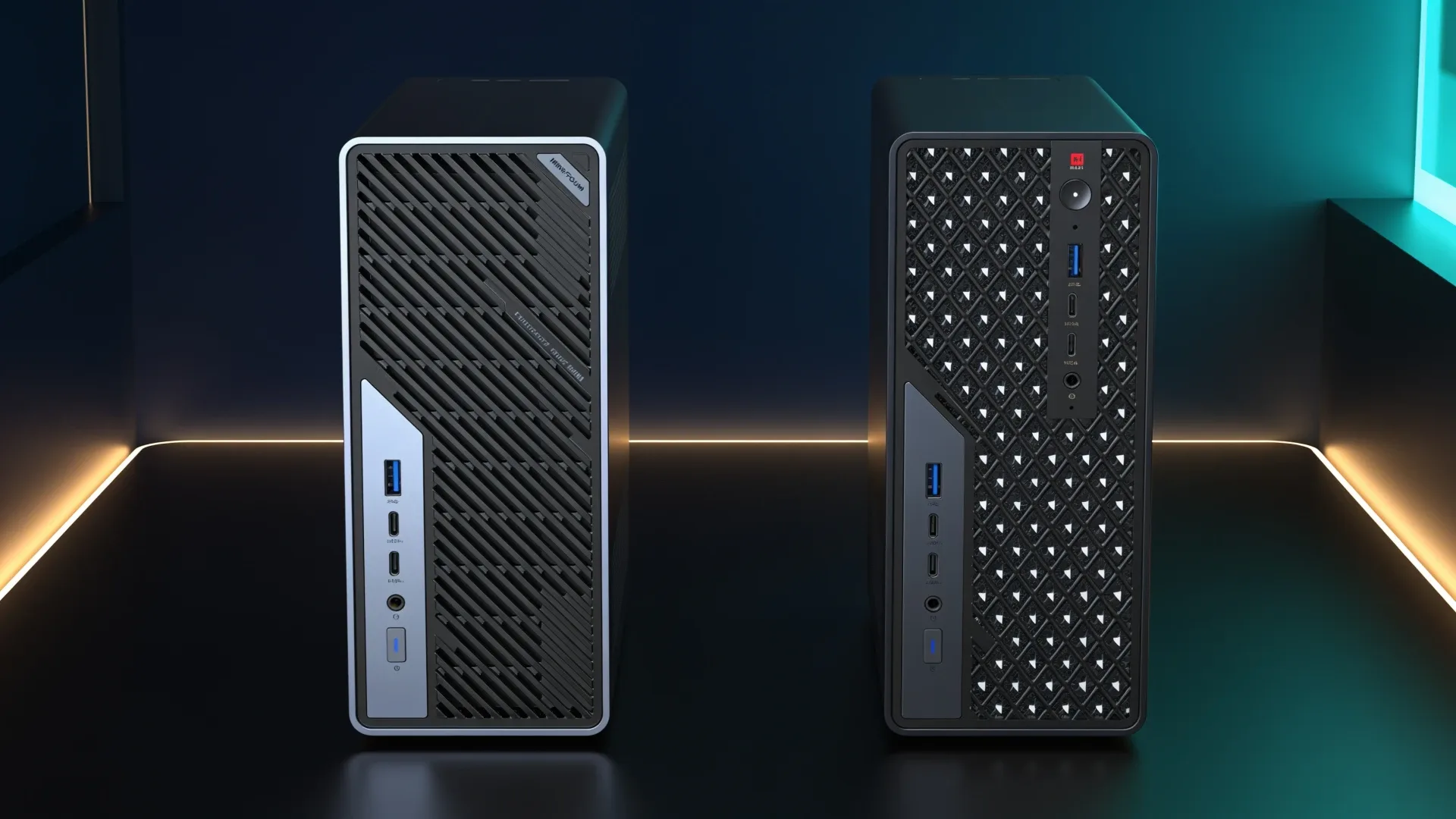
Quick price check: MS-02 Ultra 285HX · MS-S1 Max 128GB
The MS-02 Ultra 285HX is the better infrastructure host. It supports four DDR5 sockets, a 256GB ceiling, dual 25GbE, and far more add-in expansion. The MS-S1 Max is the better local-AI machine when a model needs a single 128GB unified memory pool and a Radeon 8060S.
Do not buy either because it wins a general benchmark. Buy the one whose memory architecture fits the workload.
The Short Answer
| Workload | Better fit | Why |
|---|---|---|
| Dense Proxmox host | MS-02 Ultra | Upgradeable memory and PCIe expansion |
| HBA plus accelerator | MS-02 Ultra | Multiple add-in positions |
| 25GbE storage or migration network | MS-02 Ultra | Dual 25GbE on the 285HX package |
| Large local model in one memory pool | MS-S1 Max | 128GB unified LPDDR5X |
| Radeon 8060S graphics workload | MS-S1 Max | Strix Halo integrated GPU |
| Future RAM replacement | MS-02 Ultra | Socketed DDR5 |
Platform Differences
| Feature | MS-02 Ultra 285HX | MS-S1 Max |
|---|---|---|
| Processor | Core Ultra 9 285HX | Ryzen AI Max+ 395 |
| Memory | Four DDR5 sockets, up to 256GB | Fixed 128GB LPDDR5X unified memory |
| Graphics | Intel integrated graphics unless a GPU is added | Radeon 8060S integrated graphics |
| Networking | Dual 25GbE, 10GbE, and 2.5GbE | Dual 10GbE |
| Expansion | Multiple PCIe positions and four M.2 positions | Compact fixed-platform layout |
| Best role | Virtualization and expandable workstation | Local AI and large shared-memory workloads |
The MS-02 features in this comparison apply to the exact 285HX configuration. Lower MS-02 Ultra variants do not inherit every memory, ECC, vPro, storage, and network feature.
Memory Is the Real Decision
The MS-02 Ultra 285HX specification lists four SO-DIMM sockets and a 256GB ceiling. That is ideal for virtual machines because each guest receives an explicit allocation. It also avoids replacing the entire computer when the original memory kit becomes too small.
The MS-S1 Max uses less total memory but shares it between CPU and GPU. That makes a large portion of the 128GB pool available to the Radeon 8060S for local inference. A conventional workstation with plenty of system RAM still cannot present all of it to a discrete or integrated GPU in the same way.
The trade is permanent capacity. The MS-S1 memory is soldered. Choose 128GB because the workload needs it now, not because an NPU figure looks impressive.
Expansion and Networking Favor the MS-02
The MS-02 is designed around add-in devices. It can support combinations such as an HBA, accelerator, GPU, or additional storage card, subject to the exact slot layout and power budget. Its internal 350-watt supply also makes it more workstation-like than most mini PCs.
Dual 25GbE only matters when the rest of the network can use it. You need compatible switch ports, optics or DACs, and storage that can sustain the traffic. A single SATA pool or 2.5GbE client will not become faster because the server has a larger link number.
The MS-S1 Max still has strong dual 10GbE networking. For model files, shared datasets, and backups, that can be plenty without buying a 25GbE network.
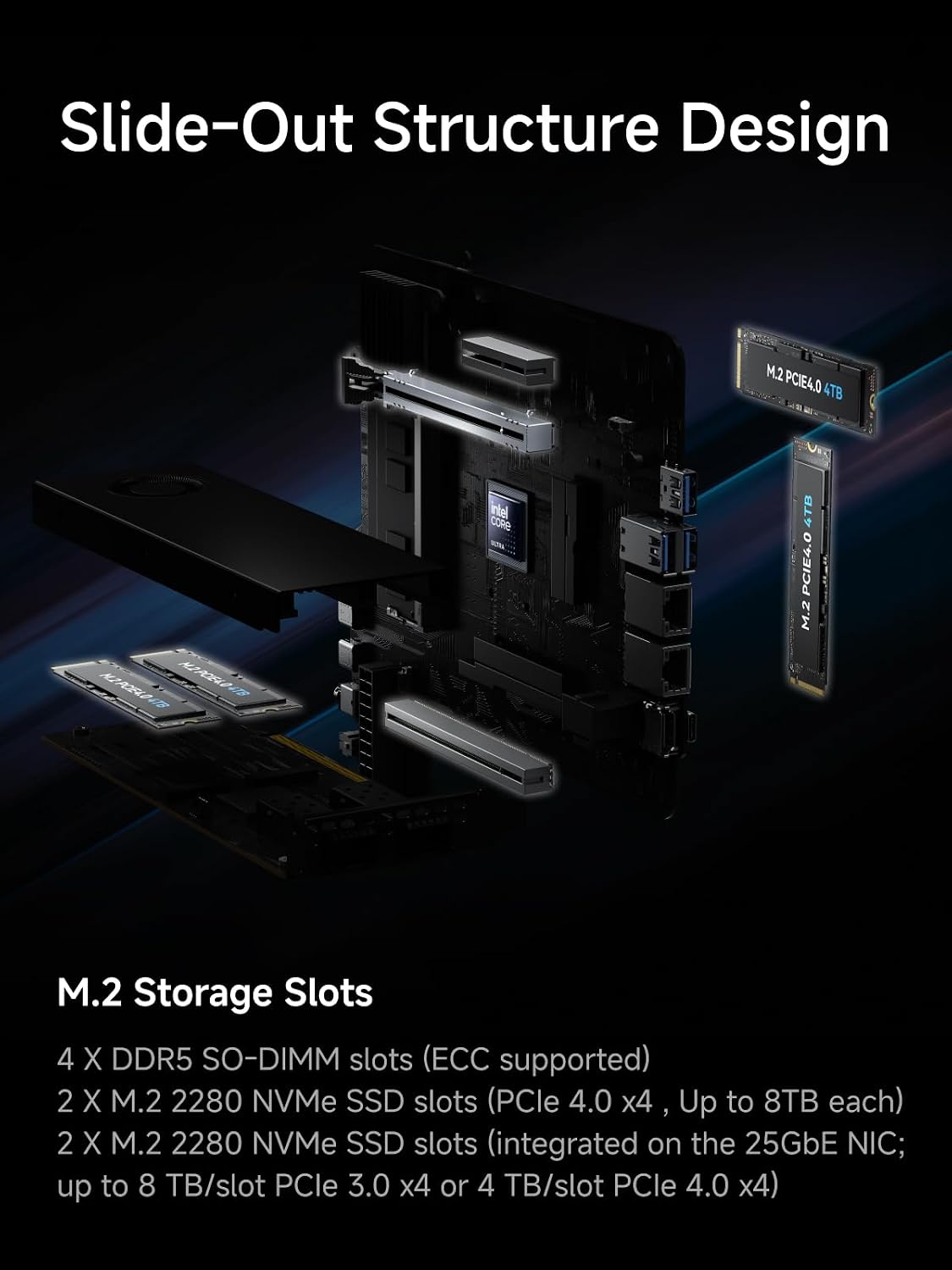
MINISFORUM product material showing the MS-02 Ultra expansion layout.
→ Check the exact MS-02 Ultra 285HX configuration
Local AI Favors the MS-S1 Max
The MS-S1 Max specification combines sixteen Zen 5 cores, Radeon 8060S graphics, and a 128GB unified pool in the configuration compared here. Its advantage is model capacity, not an automatic speed win over every GPU.
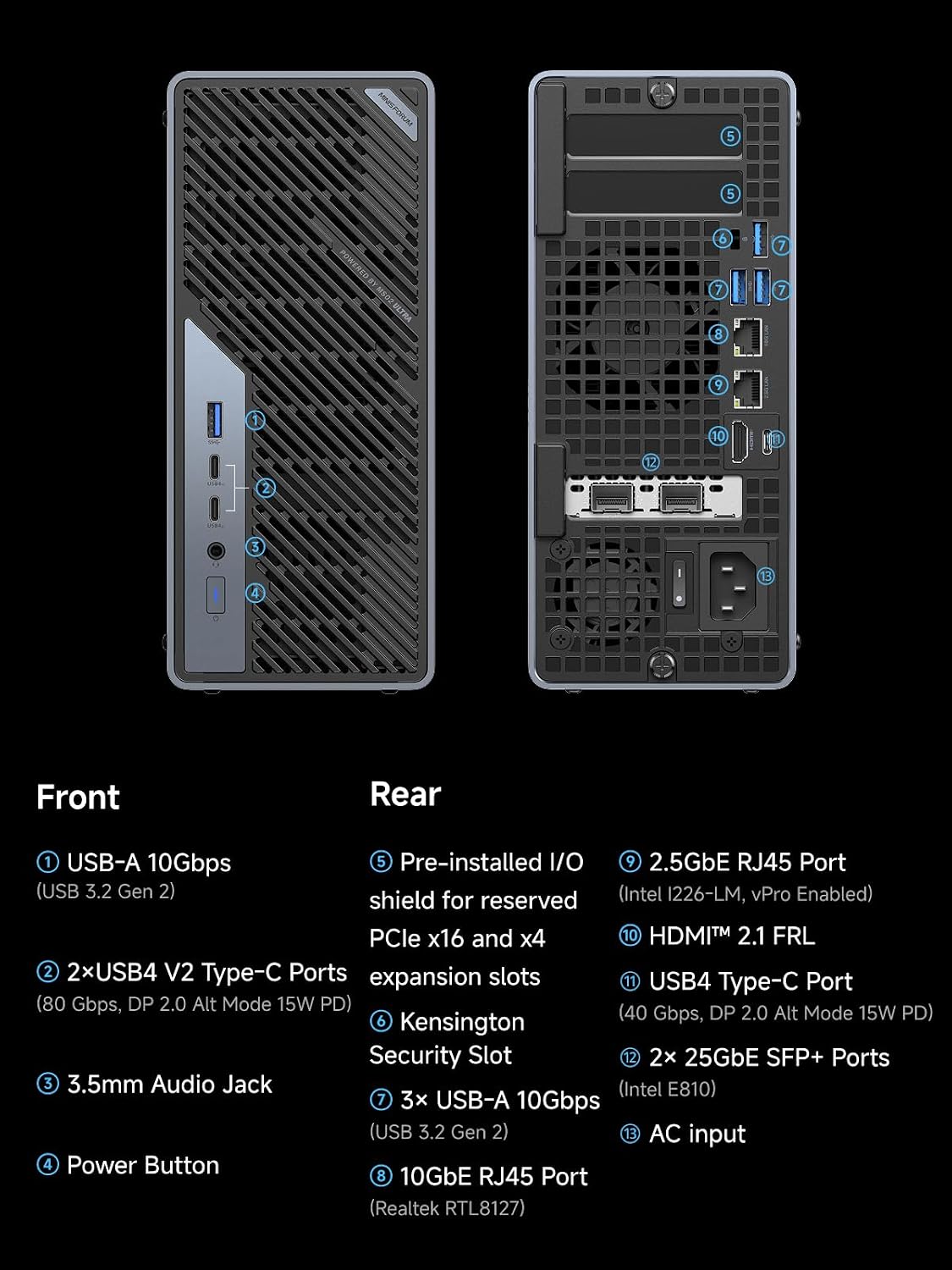
MINISFORUM product material showing the MS-02 Ultra network and peripheral ports.
Strix Halo memory bandwidth is far below a high-end discrete graphics card. Long-context prompt processing can therefore expose the bandwidth ceiling even when the model fits. Plain Ollama also does not automatically turn the NPU rating into application speed.
The MS-02 can add a discrete GPU, which may be much faster, but the GPU then has its own VRAM ceiling. A 24GB or 32GB card and 256GB of system RAM do not behave like one 128GB GPU-visible pool.
Noise and Power Need Configuration Labels
Notebookcheck found the MS-02 sample audible at idle and louder under load. Tom’s Hardware measured a configured MS-02 with a discrete RTX 5060 at 33 watts idle. That is not a barebone figure and should not be applied to a CPU-only build.
The MS-S1 Max also needs configuration-specific measurement evidence. Processor ratings and power-supply capacity are not wall measurements. Use the power-cost calculator once you have a defensible idle and load range for the exact build.
What Local AI Claims Are Safe to Make
The MS-S1’s 128GB pool changes what can fit. It does not prove how fast a specific model will run. Quantization, context length, runtime, ROCm support, memory allocation, and cooling all affect the result. Manufacturer TOPS totals combine different engines and are not a tokens-per-second measurement for Ollama or LM Studio.
Use three gates before selecting it:
- Confirm the model file plus context cache fits while leaving memory for the operating system.
- Confirm the intended runtime supports the Radeon 8060S path you plan to use.
- Find an independent result for the same model, quantization, runtime, and memory configuration if speed determines the purchase.
The MS-02 follows a different path. Its system memory is not equivalent to GPU VRAM. Adding a discrete GPU can improve supported workloads, but the card’s own VRAM remains the main capacity boundary unless the application supports slower system-memory offload. Do not add 256GB and a 24GB card on paper and call it a 280GB accelerator.
Infrastructure Topology for the MS-02
The 285HX configuration is compelling when its ports and slots receive named jobs:
| Resource | Example assignment | Cost or conflict to check |
|---|---|---|
| Four SO-DIMM sockets | host plus guest memory | validated kit and replacement plan |
| Dual 25GbE | storage fabric and replication | SFP28 switch, DACs or optics |
| 10GbE | client or management network | copper switch port and heat |
| 2.5GbE | recovery management | separate network optional |
| PCIe positions | HBA, accelerator, or GPU | lane map, card height, cooling, and power |
| Four M.2 positions | boot and VM datasets | two positions share the 25GbE assembly layout |
ServeTheHome’s chassis review is useful because it shows the physical relationships hidden by a feature list. The 25GbE assembly and storage placement affect what remains available. Plan the complete card and cable layout before buying the box.
AI Workstation Topology for the MS-S1 Max
The MS-S1 Max has fewer storage positions, but it is not sealed to one use. MINISFORUM lists one PCIe 4.0 x4 M.2 slot, a second x1 M.2 slot, dual 10GbE, and a full-length physical PCIe slot wired at x4. The platform also uses a built-in 320W supply and documented 60W, 95W, and 130W CPU modes.
Assign the x4 M.2 device to models or active datasets and the x1 device to the operating system or low-throughput storage. Use one 10GbE link for model and dataset access from a NAS, and reserve the other for management, replication, or a second node. The PCIe slot may accept a useful accelerator or network card, but it does not turn the platform into the MS-02’s multi-card workstation.
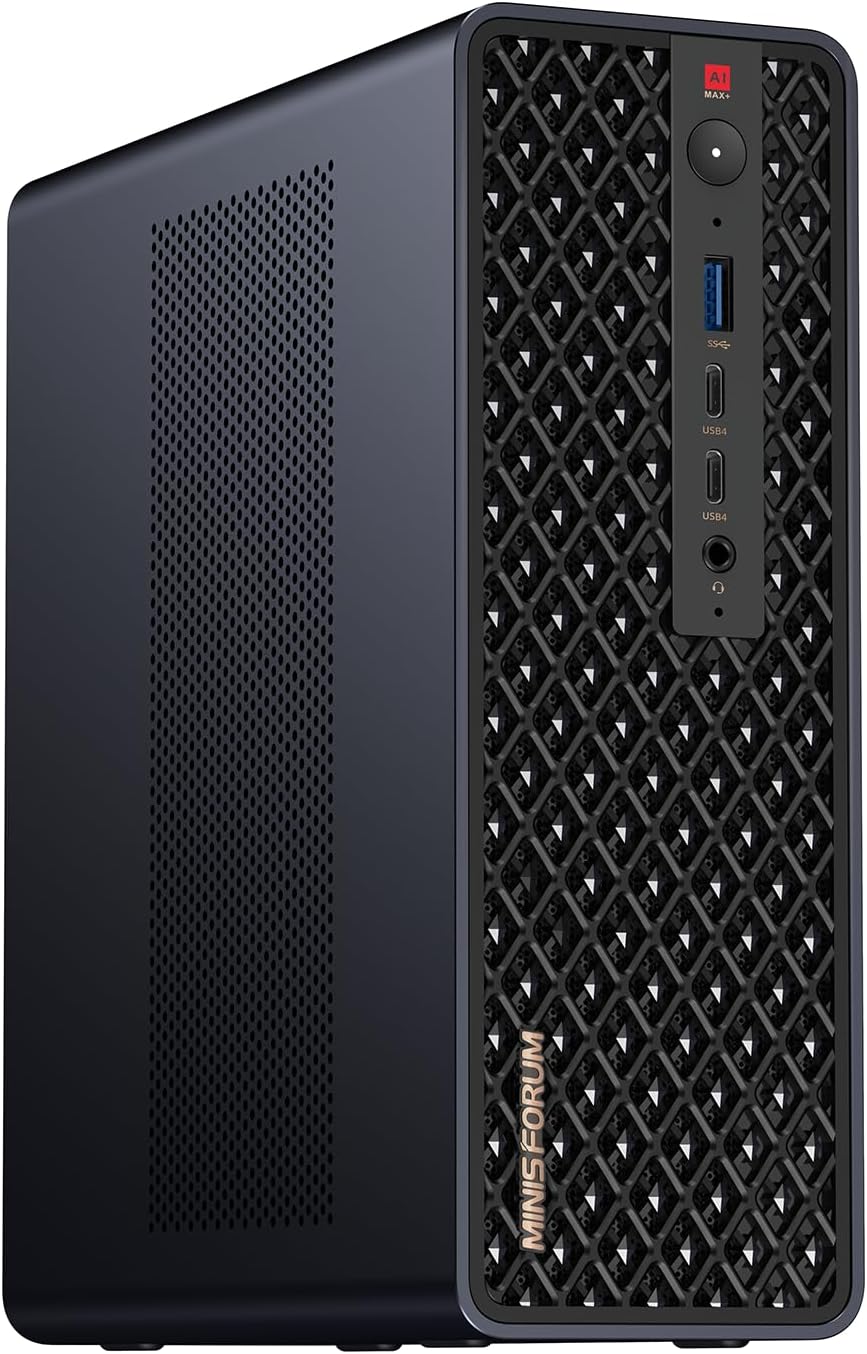
MINISFORUM product image showing the compact MS-S1 Max AI workstation.
→ Check the MS-S1 Max 128GB configuration
Configured-Cost Worksheet
| Cost line | MS-02 285HX | MS-S1 Max 128GB |
|---|---|---|
| Base system | current exact listing | current exact listing |
| Memory | add selected DDR5 or ECC kit | included and fixed |
| Model storage | add x4 SSD | confirm included 2TB and add if needed |
| Accelerator | add if required | Radeon 8060S included |
| High-speed network | SFP28 switch and cables | 10GbE copper switch and cables |
| Shared storage | add enclosure or NAS | add separate NAS if needed |
| Future memory change | replace modules | replace the machine |
The MS-02 becomes expensive quickly when a discrete GPU and 25GbE network are required. It can still be the better investment if those pieces support virtual machines, storage, and non-AI services as well. The MS-S1 Max carries a higher all-in AI configuration cost but includes the large shared pool. Compare finished systems, not a bare MS-02 against a configured MS-S1.
Failure and Maintenance Boundaries
An MS-02 consolidation host can take many guests offline during a BIOS update, memory replacement, or PCIe change. An MS-S1 Max dedicated to AI has a narrower blast radius, especially when datasets live on a separate NAS. If the AI service is experimental, isolating it from storage and routing often produces a more reliable homelab.
For a one-node lab, keep recovery access, tested backups, and a documented restore order. For two nodes, decide whether 10GbE is used for shared storage or simple file copies. Shared storage improves mobility but also adds a dependency that must survive maintenance.
Who Should Spend Less
If the VM plan fits in 96GB and needs one expansion card, compare the MS-A2. If the local model fits in 32GB or 64GB and sustained speed matters more than maximum capacity, compare a less expensive mini PC or a discrete GPU workstation. The fact that a 128GB model exists is not a reason to reserve 128GB.
Purchase-Day Checklist
For the MS-02, confirm that the selected processor is the 285HX, then record the included 25GbE assembly, memory support, power supply, and every planned card. For the MS-S1, confirm the selector says 128GB rather than 64GB and that the expected shipping date works for the project. Save the firmware and warranty pages for either machine.
After delivery, validate memory capacity, network controllers, SSD lane widths, and stability before migrating important workloads. That validation is not a benchmark. It is a check that the shipped configuration matches the purchase decision. Keep the original packaging until the return period ends, and document the final wiring and recovery order.
Final Verdict
Buy the MS-02 Ultra 285HX for virtual machines, replaceable memory, add-in cards, and 25GbE infrastructure. Buy the MS-S1 Max when fitting a large local model into one shared memory pool is the central job.
Buy neither if an MS-A2-class host already covers your virtualization plan or a smaller local model fits on cheaper hardware. Our Proxmox picks and local LLM guide show those lower tiers.
MS-02 specifications are scoped to the 285HX configuration and linked to MINISFORUM, ServeTheHome, and Notebookcheck. MS-S1 Max facts come from its current official specification. We have not physically tested either system and do not infer performance from shared branding.
Current Buying Links
- MINISFORUM MS-02 Ultra 285HX: Check current price
- MINISFORUM MS-S1 Max 128GB: Check current price