
This article contains affiliate links. If you purchase through our links, we may earn a commission at no extra cost to you. We only recommend products we’ve thoroughly researched and verified.
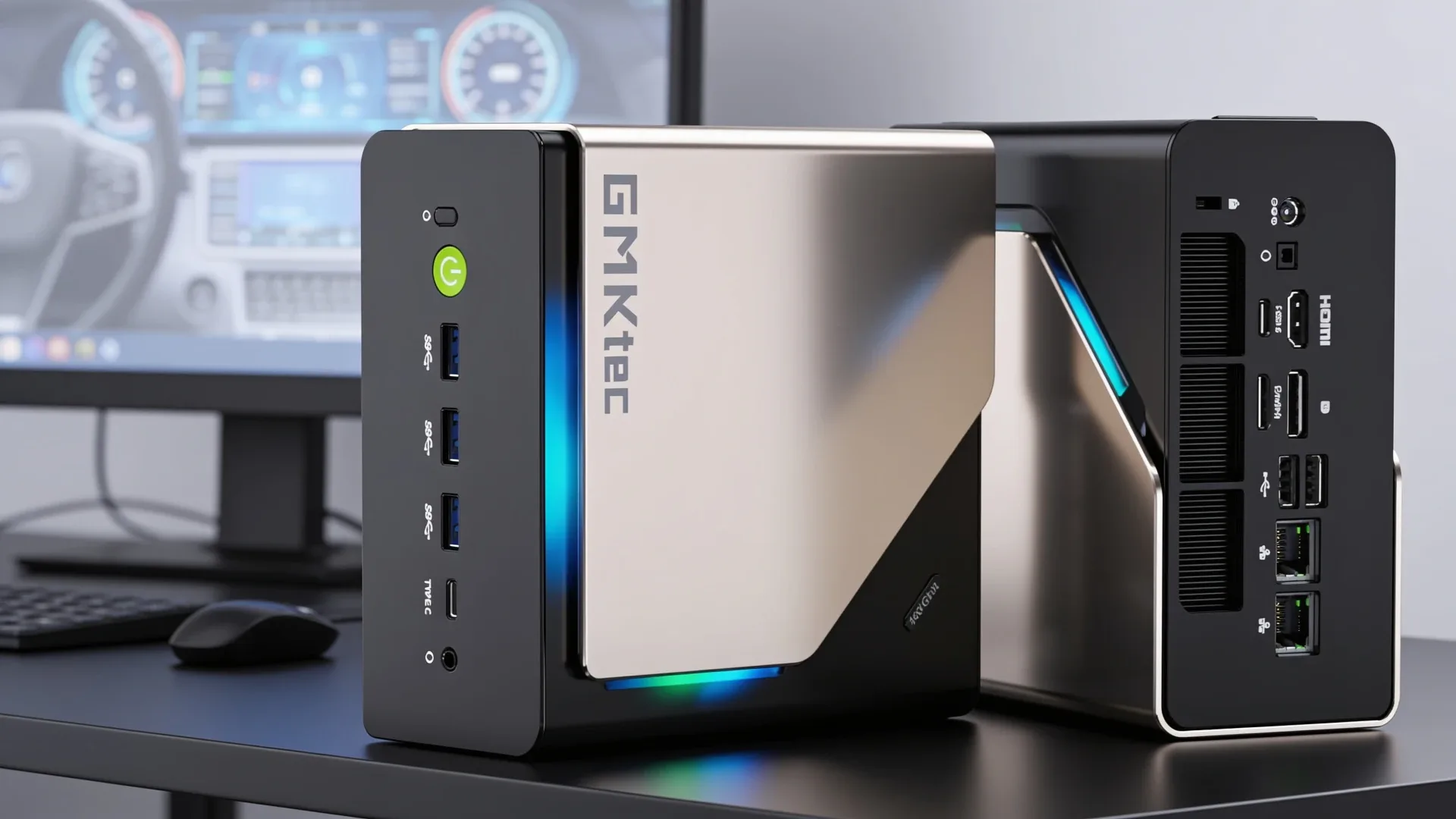
The GMKtec EVO-T2 is not another budget mini PC with a faster badge. It is an early Panther Lake desktop AI box with Intel Core Ultra X7 358H silicon, Arc B390 graphics, 64GB of LPDDR5X memory, 10GbE, 2.5GbE, OCuLink, and a Phison AI SSD. That combination makes this GMKtec EVO-T2 review a narrow buyer decision: pay flagship money for Intel’s newest compact AI platform, or buy a cheaper AMD or workstation mini PC that solves the same homelab job with less risk.
Our short answer: the EVO-T2 is interesting, powerful, and unusually well connected, but it is an early-adopter machine. Buy it for the exact blend of Panther Lake, 10GbE, OCuLink, and local AI storage acceleration. Skip it if you mostly need cheap virtualization, quiet 24/7 hosting, or maximum RAM for 70B and larger LLMs.
→ Check Current Price on Amazon
Quick Verdict: GMKtec EVO-T2 Review Summary
| Question | Answer |
|---|---|
| Best for | Intel early adopters, local AI developers, 10GbE desktops, compact workstations |
| Not for | Budget homelabs, RAM upgraders, firewall-first builds, quiet always-on servers |
| Amazon listing name | GMKtec EVO-T2S |
| Manufacturer name | GMKtec EVO-T2 |
| Current price band | Around $2,400 on Amazon, around $1,960 direct from GMKtec at validation |
| Biggest strength | 10GbE, OCuLink, dual USB4, and Arc B390 in one compact chassis |
| Biggest caution | No independent EVO-T2 wall-power data yet, plus early review flags around fan noise, BIOS depth, and setup quality |
The name needs a note right away. Amazon lists this as the GMKtec EVO-T2S, while GMKtec’s own product page calls it the EVO-T2. The photos, CPU, memory, AI SSD, and networking all line up, so we treat EVO-T2 and EVO-T2S as the same product family in this review.
Verified Sources and Spec Corrections
We verified the Amazon listing, the GMKtec product page, Intel’s processor page, Realtek’s driver page, and the saved local product image before writing this review. The most important correction is CPU boost speed. Amazon’s title says the X7 358H reaches 5.1 GHz, but Intel’s official Core Ultra X7 358H page lists up to 4.8 GHz. We use Intel’s 4.8 GHz figure throughout the article.
GMKtec also advertises 35W silent, 45W balanced, and 54W performance modes with a 60W chassis peak, while Intel lists 25W processor base power and 80W maximum turbo power for the chip. Those numbers describe different layers of the system. We treat GMKtec’s figures as chassis tuning and Intel’s figures as processor capability.
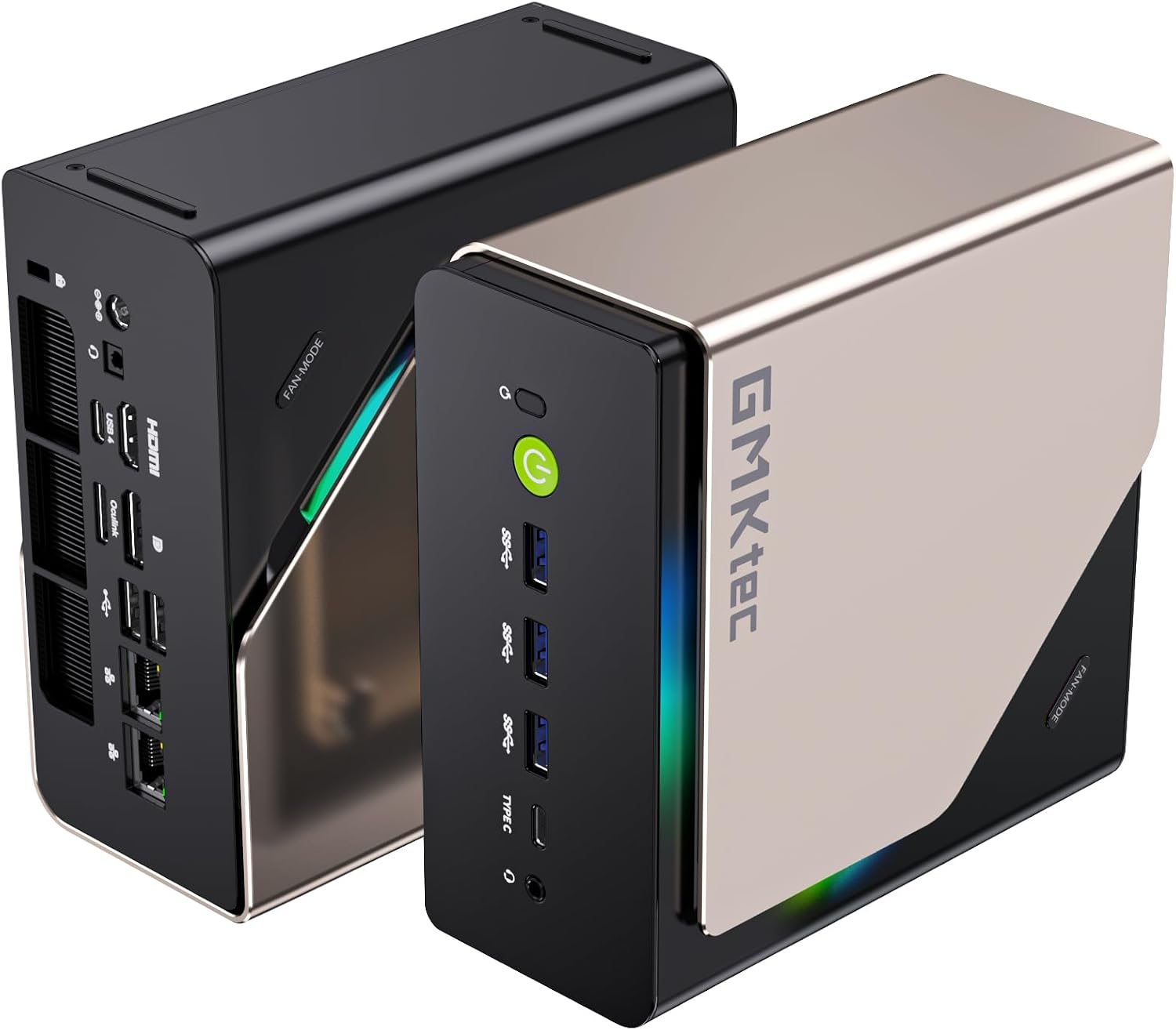
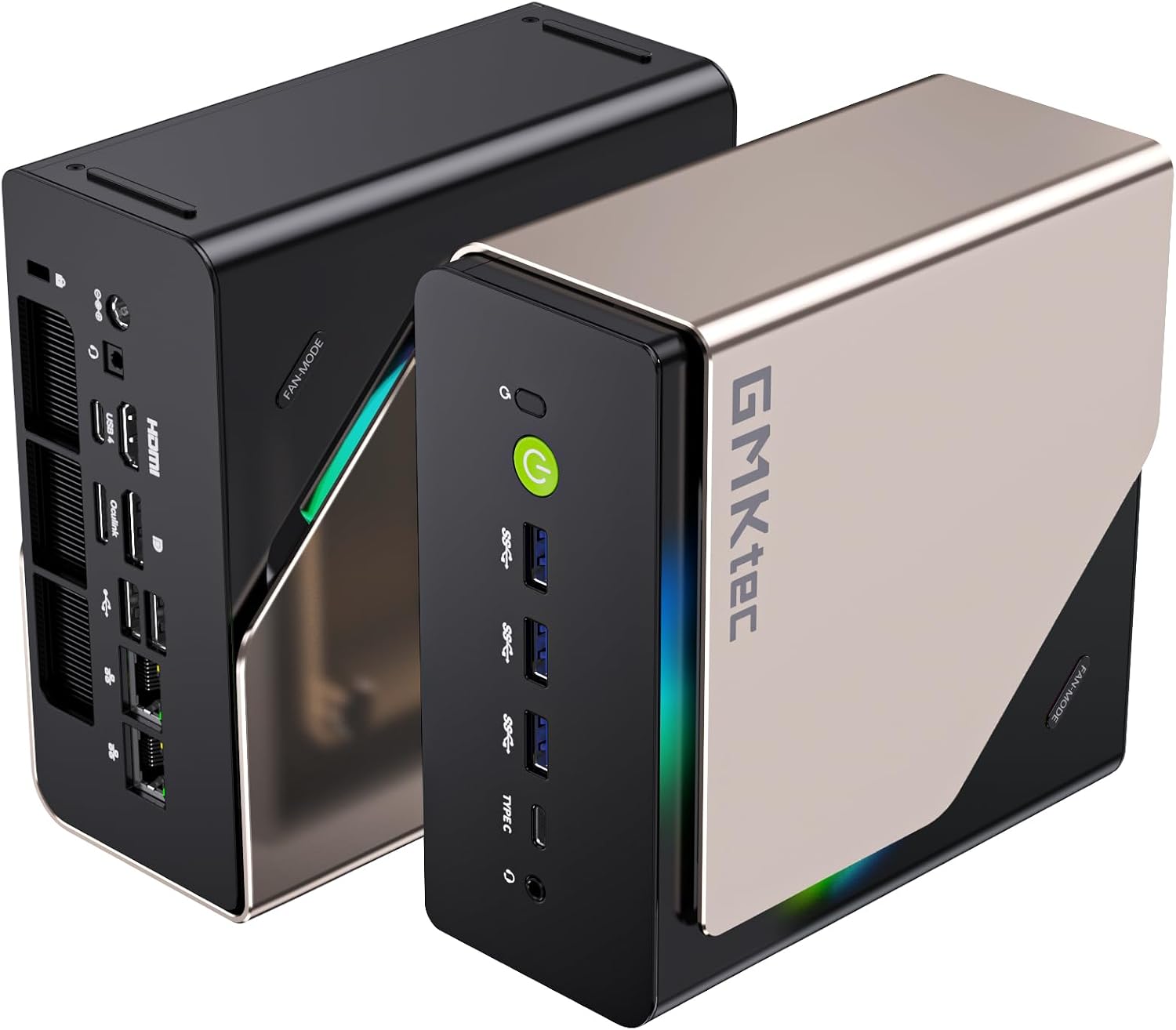
Port layout from GMKtec’s own listing images. The rear panel is where the port count, the LAN speed, and the USB generations are actually settled.
Customer Review Signals
Our critical-review extraction on July 15, 2026 returned two verified-purchase rows for this listing. That is a small sample, so we treat it as buyer-risk context rather than a defect-rate claim.
The useful caveats are practical ones. One 1-star buyer reported damaged packaging and a locked Windows account on arrival. One 3-star buyer liked the core specs, storage, memory, and port selection, but called out audible fan noise, limited BIOS options, occasional thermal throttling, and memory behavior below the advertised top speed.
The broader extracted summary was more positive on build quality, speed, compact size, value, and ports, but mixed on performance, noise, and configuration. That lines up with our verdict: the EVO-T2 is a capable early platform for buyers who like tuning, not the cleanest low-risk server for everyone.
Review Pick
GMKtec EVO-T2
| Spec | Verified Detail |
|---|---|
| CPU | Intel Core Ultra X7 358H, Panther Lake, 16 cores, 16 threads, up to 4.8 GHz |
| CPU layout | 4 performance cores, 8 efficient cores, 4 low-power efficient cores |
| GPU | Intel Arc B390, 12 Xe cores, 122 TOPS INT8 GPU peak |
| NPU | Intel AI Boost, 50 TOPS INT8 peak |
| Memory | 64GB LPDDR5X 8533MT/s onboard |
| Storage | 853GB Phison AI SSD with 768GB storage and 85GB AI cache |
| Expansion | Dual M.2 slots, one PCIe 5.0 x4 and one PCIe 4.0 x1 |
| Networking | Realtek RTL8127AT 10GbE plus Realtek RTL8125BG 2.5GbE |
| Wireless | RZ717 Wi-Fi 7 and Bluetooth 5.4 |
| External expansion | OCuLink over PCIe 4.0 x4 |
| USB | Dual USB4 at 40Gbps plus USB-A ports |
| Display | HDMI 2.1, DisplayPort 1.4, dual USB4 display output |
| Dimensions | 154 x 151 x 73.6 mm |
| Weight | Around 2.3 kg |
| OS | Windows 11 Pro, GMKtec lists Ubuntu and Linux support |
| Warranty | GMKtec lists 1 year limited warranty |
→ Check Current Price on Amazon
What Makes the EVO-T2 Different
Most premium mini PCs ask you to choose a lane. The GMKtec EVO-X2 AI gives you 128GB of unified AMD memory for large local AI models, but only one 2.5GbE port. The Minisforum MS-A2 gives you serious networking and storage expandability, but no AI NPU and weak integrated graphics. The best Intel Core Ultra mini PC options on this site are much cheaper, but they sit in a lower performance and connectivity tier.
The EVO-T2 is different because it combines four high-end pieces in one box:
- Panther Lake with Intel 18A CPU cores and Arc B390 graphics
- 10GbE plus 2.5GbE wired networking
- OCuLink for an external GPU
- A Phison aiDAPTIV+ SSD configuration aimed at local AI workloads
That does not automatically make it the best mini PC. It makes it a specialized premium desktop for users who would otherwise bolt together a small workstation, an external GPU dock, and a 10GbE adapter.
CPU and Platform
The Intel Core Ultra X7 358H is a Series 3 Panther Lake chip. Intel lists 16 total cores, 16 threads, 18MB of Smart Cache, VT-x, VT-d, Intel Thread Director, and Intel 18A CPU lithography. The core layout matters for homelab use because this is not a simple 8-core or 16-core desktop CPU. You get 4 performance cores for foreground work, 8 efficient cores for parallel background tasks, and 4 low-power efficient cores for light always-on work.
For a compact workstation, that layout is useful. You can keep Windows 11 Pro responsive, run a few development containers, transcode media through Quick Sync, and leave lighter AI or automation jobs running without turning the whole box into a loud desktop tower.
For Proxmox, TrueNAS, or router use, the picture is more complicated. Intel confirms VT-d, so the CPU has the virtualization foundation we want. The issue is platform maturity. Panther Lake is new, and the EVO-T2 uses Realtek networking. We would not buy this as a production firewall or storage router until the exact kernel, BIOS, and NIC behavior are proven in your target stack.
Graphics, AI, and the Arc B390
The Arc B390 is the most interesting part of the EVO-T2. Intel lists 12 Xe cores, ray tracing, AV1 encode and decode, H.265 encode and decode, H.266 decode, DirectX 12 Ultimate, and 122 TOPS INT8 GPU peak. The NPU adds 50 TOPS, so GMKtec’s total AI compute story is built around CPU, GPU, and NPU working together.
For creators and developers, the real benefit is not only peak TOPS. It is media support, local inference support through Intel’s software stack, and a much stronger integrated GPU than older Core Ultra mini PCs. AV1 encode matters for streamers and video workflows. Quick Sync matters for Plex and Jellyfin. The larger iGPU matters for Stable Diffusion, small LLM work, and light gaming.
The caution is software. Intel’s local AI story is strongest through OpenVINO, WindowsML, DirectML, ONNX Runtime, WebNN, and WebGPU. If your workflow is Ollama and llama.cpp first, AMD Ryzen AI Max systems with huge unified memory or a discrete NVIDIA GPU over OCuLink may still be easier. The EVO-T2 is a good local AI development box, not a magic replacement for a CUDA workstation.
Memory and the Phison AI SSD
The EVO-T2 ships with 64GB of LPDDR5X 8533MT/s memory. That is fast, but it is onboard. You cannot upgrade it later. For normal desktop work, software development, 4K media, Docker stacks, and many local AI models, 64GB is comfortable. For 70B and larger LLMs, it becomes the limiting factor.
The Phison AI SSD is the unusual storage piece. The Amazon listing and GMKtec page describe an 853GB configuration with 768GB for normal storage and 85GB set aside as an AI cache. GMKtec frames this as aiDAPTIV+ support for reducing memory pressure during local AI workloads.
That idea is plausible, but we are careful with the claim. SSD-assisted caching is not the same as more RAM, and it is not the same as dedicated VRAM. Until independent EVO-T2 benchmarks show model load times, token output, and latency with and without the cache, we treat the Phison AI SSD as a promising feature rather than a proven reason to pay the premium.
If your main goal is running 70B models all day, a 128GB Ryzen AI Max mini PC still deserves a hard look. If your goal is mixed AI development, code work, media acceleration, and high-speed networking in one compact Intel box, the EVO-T2 makes more sense.
Networking and Linux Caveats
Networking is the EVO-T2’s biggest homelab advantage. You get one 10GbE RJ45 port and one 2.5GbE RJ45 port. That gives the box a useful role as a compact workstation connected directly to a NAS, a fast ingest node for video work, or a small lab server with separate storage and LAN paths.
The controllers matter. The Amazon listing names the 10GbE controller as Realtek RTL8127AT-CG and the 2.5GbE controller as Realtek RTL8125BG. Realtek’s driver page lists current Linux drivers for r8127 and r8125, including kernel support up to 7.1 at the time we checked. The OpenWrt rtl8127 repository also tracks Realtek’s RTL8127 10GbE Linux driver source for OpenWrt development.
That is good news, but not the same as Intel i226-level comfort. For Windows 11, the EVO-T2 should be straightforward. For Ubuntu desktop, it should be manageable with the right kernel and drivers. For Proxmox, TrueNAS SCALE, pfSense, OPNsense, or any appliance-style install, expect to verify driver support before you rely on the 10GbE port.
This is why we would not make the EVO-T2 our first pick for a firewall. For firewall-first builds, see our best mini PC with 10GbE and best mini PC for firewall guides before buying.
OCuLink and USB4 Expansion
OCuLink is a major reason to care about this machine. It exposes PCIe 4.0 x4 bandwidth for external GPUs and high-speed PCIe devices. Compared with USB4 eGPU setups, OCuLink usually has less protocol overhead and better GPU performance. GMKtec also includes dual USB4 ports at 40Gbps with DisplayPort and 100W power input support.
That gives the EVO-T2 a flexible desk setup:
- Use the onboard Arc B390 for everyday work, AV1 media, and light AI jobs
- Add an external NVIDIA GPU over OCuLink for CUDA-heavy workloads
- Attach fast USB4 storage for video or model libraries
- Run a 10GbE link to a NAS without burning a USB4 port on an adapter
The practical warning is cable management and power. An OCuLink GPU dock turns a mini PC into a modular workstation, but it also adds a second box, a GPU power supply, and more desk clutter. If you know you need a discrete GPU every day, a small tower may still be the cleaner engineering answer.
Power and Noise Expectations
We do not have independent EVO-T2 wall-power measurements yet, so we are not going to invent idle and load watts. GMKtec lists 35W silent, 45W balanced, and 54W performance modes with a 60W peak. Intel lists 25W processor base power and 80W maximum turbo power for the X7 358H.
Here is the useful planning math at $0.12 per kWh:
| Scenario | Power Figure | Annual Cost at 24/7 Runtime |
|---|---|---|
| GMKtec silent mode ceiling | 35W | About $37 per year |
| GMKtec balanced mode ceiling | 45W | About $47 per year |
| GMKtec performance mode ceiling | 54W | About $57 per year |
| Intel maximum turbo power | 80W | About $84 per year |
These are ceiling-style planning numbers, not measured idle figures. A real idle draw should be lower than the mode ceiling, but platform tuning, RGB lighting, SSD behavior, 10GbE link state, and external devices all matter. Once independent wall data exists, this is the first section we would update.
Customer review extraction also gave us a noise caution. One verified 3-star buyer described the fan as noticeable in a quiet room and mentioned occasional thermal throttling. We would not treat that as a universal result from two review rows, but it is enough reason to avoid the EVO-T2 for a silent bedroom server until more field data exists.
For your own electricity rate, use our mini PC power cost calculator.
EVO-T2 vs EVO-X2 AI vs MS-A2
| Feature | GMKtec EVO-T2 | GMKtec EVO-X2 AI | Minisforum MS-A2 |
|---|---|---|---|
| CPU | Core Ultra X7 358H | Ryzen AI Max+ 395 | Ryzen 9 8945HX |
| Memory | 64GB LPDDR5X onboard | Up to 128GB LPDDR5X unified | DDR5 SO-DIMM, buyer installed |
| GPU | Intel Arc B390 | Radeon 8060S | Radeon 610M |
| Wired networking | 10GbE plus 2.5GbE | 2.5GbE | Dual 10GbE SFP+ plus dual 2.5GbE |
| OCuLink | Yes | No on the common EVO-X2 AI config | No |
| Best role | Intel AI workstation with 10GbE | Large local LLM mini PC | Homelab and NAS networking box |
| Main caution | Early platform and Realtek Linux validation | Soldered memory and single wired NIC | Barebone build and weak iGPU |
The EVO-T2 wins when you want one compact Intel desktop that can do a bit of everything: 10GbE, local AI, media work, USB4, and OCuLink. The EVO-X2 AI wins when memory capacity matters more than networking. The MS-A2 wins when the job is storage, routing, virtualization, or high-speed lab networking at a much lower platform cost.
Who Should Buy the GMKtec EVO-T2
Buy the GMKtec EVO-T2 if you want a compact Intel-first workstation with high-speed networking and external GPU headroom. It fits developers who want Panther Lake, creators who move large files over 10GbE, and AI experimenters who value Intel’s NPU and Arc GPU software path.
It also makes sense if you were about to add a 10GbE adapter, USB4 dock, and external GPU path to a smaller mini PC. The EVO-T2 puts those pieces into one cleaner platform.
Who Should Skip It
Skip the EVO-T2 if you need the best value per VM. A Ryzen 7 or Ryzen 9 mini PC from our best mini PC for home server guide will cost far less and run typical homelab services just fine.
Skip it if you need RAM upgrades. The 64GB LPDDR5X is fixed. For bigger local LLM work, compare the EVO-X2 AI, MS-S1 Max, and Framework Desktop-class options.
Skip it if the machine will be a firewall, router, or production NAS on day one. Realtek 10GbE is workable, but Intel and Mellanox networking still give us more confidence for appliance-style networking.
Skip it if you want a quiet, low-touch box with mature BIOS controls. The early review data includes fan-noise, BIOS-depth, and setup-quality complaints, and this platform is too new for us to ignore those signals.
Final Verdict
The GMKtec EVO-T2 is a strong but narrow flagship. The hardware mix is genuinely different from the usual mini PC formula: Intel Core Ultra X7 358H, Arc B390, 64GB LPDDR5X, 10GbE, 2.5GbE, OCuLink, dual USB4, and a Phison AI SSD. That earns it a real review page, not a quick mention inside a cheaper Intel roundup.
Our recommendation is conditional. If you want an early Panther Lake AI workstation with 10GbE and OCuLink, the EVO-T2 is one of the most complete compact options available right now. If you want a reliable value homelab node, a quiet 24/7 server, or a proven large-model AI box, spend less or buy a platform with more field data.
For most readers, the right move is to watch the price gap. At around $2,400 on Amazon, the EVO-T2 is hard to call a value pick. Around GMKtec’s direct price near $1,960, it becomes easier to justify, provided you accept the warranty and support tradeoff of buying direct.
→ Check Current Price on Amazon
Frequently Asked Questions
Is the GMKtec EVO-T2 worth buying?
The GMKtec EVO-T2 is worth buying if you specifically need Panther Lake, 10GbE, OCuLink, dual USB4, and local AI acceleration in one compact box. Most buyers should compare it against the EVO-X2 AI, MS-S1 Max, and MS-A2 before paying flagship money.
Does the GMKtec EVO-T2 have upgradeable RAM?
No. The EVO-T2 uses 64GB LPDDR5X onboard memory. That memory is fast, but the capacity is fixed for the life of the machine.
Does the GMKtec EVO-T2 support Linux?
GMKtec lists Ubuntu and Linux support, and Intel confirms VT-x and VT-d on the X7 358H. The caution is networking, because the 10GbE and 2.5GbE ports use Realtek controllers that may need newer vendor drivers on some Linux and firewall builds.
Can the GMKtec EVO-T2 run large local AI models?
The 64GB memory pool can run many 7B, 13B, 34B, and some 70B quantized models, but it is not a 128GB unified-memory box. Buyers who mainly want 70B and larger local LLM work should also compare Ryzen AI Max systems.
How We Researched This Review
We verified the live Amazon listing on July 15, 2026 with the site’s product validation workflow. It was live, sold by GMKtec-US, shipped from Amazon, and showed 4.2 stars from 94 reviews.
We cross-checked the CPU against Intel’s official Core Ultra X7 358H page, the system specs against GMKtec’s EVO-T2 product page, and the Ethernet controller driver situation against Realtek’s current Linux driver page. We also re-read the critical customer reviews on the listing, which yielded two verified-purchase rows on the critical side plus Amazon’s own aspect summary. We will update the article once independent EVO-T2 wall-power data is available.
Amazon Product Links
- GMKtec EVO-T2: Check Current Price on Amazon